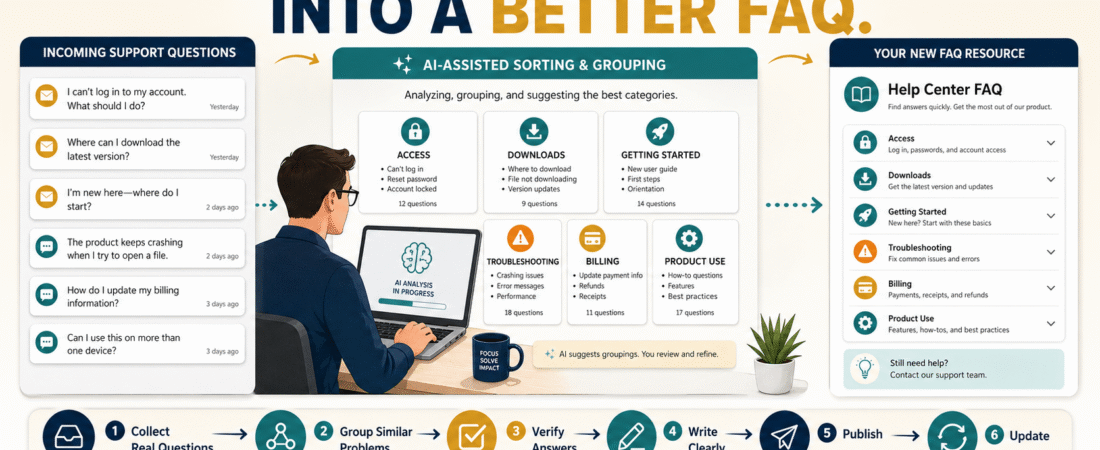
A good digital-product FAQ should not begin with a list of questions you imagine customers might ask.
It should begin with the questions customers actually ask.
When several buyers have trouble finding a download, understanding the first step, accessing a bonus, opening a file, or knowing what a feature means, those questions are useful business information. They show where your product or delivery process may not be as clear as you intended.
AI can help turn that growing collection of questions into an organized FAQ, but its best role is to sort, group, summarize, and help explain verified information.
It should not invent customer problems or make up answers.
A practical workflow is:
Collect Real Questions → Remove Private Information → Group Similar Problems → Verify the Correct Answer → Draft the FAQ → Human Review → Publish → Update
That gives you a FAQ based on evidence instead of guesswork.
Why Real Customer Questions Are More Valuable Than Invented Questions
Before a product launches, you may try to predict what customers will need.
That can be useful.
But after real customers begin using the product, you have better information.
Suppose five buyers ask:
“Where is the workbook?”
Three ask:
“Do I need to complete Module 1 before using the templates?”
Two ask:
“Why does my download link no longer work?”
Those are not random interruptions.
They are signals.
They may reveal:
- Missing instructions.
- Poor file organization.
- An unclear Start Here process.
- A repeated technical issue.
- A confusing product name.
- A delivery-email problem.
- An important limitation that needs explanation.
If you already use a simple digital product customer support system, the FAQ becomes one of the most useful assets inside that system.
Instead of answering the same basic question manually every week, you can create a clear answer once and improve it when needed.
Step 1: Collect Questions Before Asking AI to Organize Them
Start with evidence.
Potential sources include:
- Support email.
- Contact forms.
- Customer replies.
- Help-desk tickets.
- Refund explanations.
- Course comments.
- Product feedback.
- Questions sent after purchase.
- Questions asked before purchase.
- Problems recorded in your support notes.
Do not feed private customer information into an AI system unnecessarily.
Remove:
- Names.
- Email addresses.
- Order numbers.
- Passwords.
- Login credentials.
- Payment information.
- Personal notes.
- Any other information that is not needed to understand the question.
What you want to preserve is the problem, not the customer’s identity.
For example:
Original support message:
“Hi Michael, I’m Jane Smith and I purchased order #18457 yesterday. I cannot find the workbook that was supposed to come with Module 2.”
Clean version:
“Customer cannot locate the workbook associated with Module 2.”
The second version contains everything necessary for FAQ analysis.
Step 2: Give AI a Narrow Job
Do not begin with:
“Create an FAQ for my product.”
That encourages the AI to fill gaps.
Instead, provide the cleaned customer questions and ask for organization.
For example:
“Group these customer support questions by underlying problem. Do not invent new questions, answers, product features, policies, or technical explanations. Preserve unusual questions separately if they do not fit a repeated pattern.”
Now AI is doing a job it handles well:
Pattern recognition and organization.
It may identify groups such as:
- Product Access.
- Downloads.
- Getting Started.
- Account Problems.
- Billing.
- Product Use.
- Technical Troubleshooting.
- Updates.
- Support.
You remain responsible for deciding whether those categories accurately reflect your product.
Step 3: Separate Repeated Questions From One-Time Problems
Not every support request belongs in a public FAQ.
Suppose one customer has a problem caused by an unusual browser extension.
That may not deserve a permanent FAQ entry.
But if fourteen customers cannot find the same file, you probably have a repeated issue.
Create three groups:
Repeated Questions
Strong candidates for the FAQ.
Important but Infrequent Questions
May still deserve inclusion if the consequence of confusion is significant.
One-Time Individual Problems
Usually better handled through support documentation rather than the public FAQ.
This keeps the FAQ useful.
A FAQ with eighty obscure questions can be harder to use than one with fifteen strong answers.
Step 4: Identify the Real Problem Behind Each Question
Customers may describe the same problem differently.
One says:
“I cannot get my ebook.”
Another says:
“The download button doesn’t work.”
A third says:
“Where do I access my files?”
Those may represent one issue:
How do I access my purchased files?
AI can help identify that shared intent.
But check the grouping yourself.
Sometimes similar wording hides different problems.
For example:
“I can’t access the product.”
could mean:
- The email never arrived.
- The password is wrong.
- The account does not exist.
- The download expired.
- The payment failed.
- The customer is using the wrong email address.
Do not combine those into one vague answer if the solutions are different.
Step 5: Verify the Answer Before AI Writes It
This is the most important step.
Do not ask AI to decide your:
- Refund policy.
- Access period.
- License terms.
- Update policy.
- Support hours.
- Download limits.
- Account-recovery process.
- Product requirements.
Retrieve the actual policy or procedure.
For example, if the FAQ question is:
“How long will I receive product updates?”
use your real documented update policy.
If you have already created a digital product update policy, use that approved information as the source.
Then AI can help convert the policy into a shorter customer-friendly explanation.
The sequence should be:
Question → Approved Information → Draft Answer
not:
Question → AI Guesses Answer
Step 6: Write for the Customer Who Is Already Confused
FAQ answers should reduce friction.
Avoid answers that sound like legal documents unless legal precision is required.
Weak:
“Users experiencing unsuccessful authentication should initiate the relevant account credential restoration protocol.”
Better:
“If you cannot log in, start by using the password-reset option for the email address you used when purchasing. If that does not restore access, contact support and include the email address associated with the purchase.”
Clear language is especially important when a customer is already frustrated.
Use:
- Short paragraphs.
- Numbered steps.
- Descriptive headings.
- Exact product names.
- Direct links when appropriate.
- Clear limitations.
- One action at a time.
Step 7: Make the FAQ Prevent Support, Not Block Support
A FAQ should help customers solve routine problems independently.
It should not become a wall between the customer and you.
Avoid:
“Read the FAQ before contacting us.”
A friendlier structure is:
“Start with these common solutions. If your problem is not resolved, contact support using the information below.”
That gives customers self-service help without making them feel that asking a question is unwelcome.
Step 8: Fix the Product When the FAQ Reveals a Bigger Problem
Repeated questions do not always mean:
“Add another FAQ.”
Sometimes they mean:
“Fix the product.”
Suppose customers repeatedly ask:
“Where do I start?”
You could add:
FAQ: Where should I start?
But the stronger solution may be creating a clear Start Here guide inside the product.
Likewise, repeated questions about missing downloads may indicate that your delivery email or members area needs improvement.
The FAQ should not become a permanent patch over a preventable design problem.
Use this decision:
Can better product design eliminate the question?
If yes, improve the product first.
Then keep the FAQ entry if customers may still need it.
Step 9: Use AI to Detect FAQ Gaps Carefully
Once you have a verified FAQ, you can ask AI to review it for structural gaps.
A useful request might be:
“Review these verified FAQ entries and identify categories that may be missing based only on the questions supplied. Do not invent product policies, features, customer problems, or answers.”
That restriction matters.
You want AI to say:
“There are several access questions but no organized access section.”
You do not want it to invent:
“Customers may want to know whether you offer a lifetime money-back guarantee.”
unless that question actually exists and the policy is verified.
Step 10: Connect the FAQ to Your Existing AI System
If your business handles repeated questions across several products, consider maintaining a reusable knowledge source.
My guide to building an AI FAQ system for a small online business explains how to organize approved information so AI can help retrieve and format answers without inventing business policies.
The important principle remains the same:
Your verified business information is the source.
AI is the assistant.
Create a Simple FAQ Record
For each FAQ item, record:
Question: What is the customer asking?
Category: Access, Download, Setup, Billing, etc.
Approved Answer: The verified answer.
Source: Where did the answer come from?
Last Reviewed: Date checked.
Related Product: Which product does it apply to?
Needs Product Fix?: Yes or No.
Notes: Anything the support process should remember.
This creates a small maintenance system.
If your refund policy changes later, you can identify FAQ answers that need revision.
What AI Can Safely Help With
AI can be useful for:
- Grouping similar questions.
- Identifying repeated themes.
- Shortening overly technical explanations.
- Rewriting answers for beginners.
- Turning instructions into steps.
- Checking consistency.
- Finding duplicate FAQ entries.
- Suggesting a logical FAQ order.
- Creating internal support categories.
AI should not independently decide:
- What your product includes.
- What customers purchased.
- What your refund policy says.
- Whether a customer qualifies for a refund.
- How long access lasts.
- What software features currently exist.
- What legal rights a customer has.
Those require verified information and human responsibility.
Update the FAQ From Patterns, Not Every Message
Do not change your FAQ every time one customer asks an unusual question.
Look for patterns.
A practical review cycle might be:
- Collect support questions continuously.
- Review repeated issues monthly.
- Add or improve FAQ entries when a pattern becomes clear.
- Remove obsolete entries.
- Update answers when the product changes.
Customer feedback can also reveal improvement opportunities beyond the FAQ. A structured customer feedback loop can help you separate useful repeated patterns from isolated opinions.
Conclusion
A useful digital-product FAQ is not a collection of questions invented before customers arrive.
It is a living support resource built from real customer confusion.
Collect genuine questions, protect customer privacy, let AI organize repeated patterns, verify the correct answer from your approved business information, write clearly, and then decide whether the question belongs in the FAQ or reveals something in the product that should be improved.
The most important rule is:
Use AI to organize the questions—not to invent the truth.
Start by collecting the last ten to twenty real customer questions you have received. Remove personal information, group them by problem, and identify the three questions you have answered most often.
Those three are strong candidates for your first FAQ improvements.