Selling a digital product creates a responsibility that does not end when the payment clears.
Customers may forget where to log in, lose a download link, misunderstand what they purchased, have trouble opening a file, ask how to begin, or wonder whether something is included.
If every one of those questions requires you to stop what you are doing and invent a new answer, customer support can quietly become one of the most time-consuming parts of a small digital-product business.
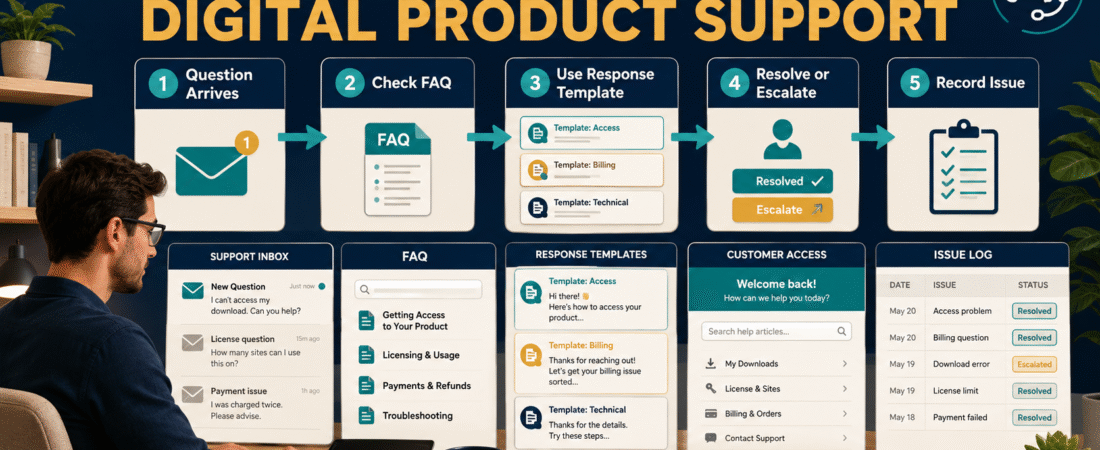
A better solution is a digital product customer support system built around a small number of repeatable components:
- One clear place for support requests.
- A useful FAQ.
- Reusable response templates.
- A simple troubleshooting sequence.
- Rules for unusual problems.
- A record of recurring questions.
- Periodic improvements to the product and delivery process.
The goal is not to automate customers away. It is to handle predictable questions consistently so you can spend personal attention where it actually helps.
Why Digital Product Support Becomes Complicated So Quickly
A digital product can appear simple from the seller’s side.
You may see:
Product → checkout → payment → delivery.
A customer experiences many more steps:
Sales page → purchase decision → checkout → payment confirmation → email → login or download → file access → instructions → first use → questions → results.
Confusion can occur at any point.
That is why it is useful to test the entire experience rather than assuming the product file itself is the only thing that matters. The process described in testing a digital product purchase and delivery process before launch can help catch many support problems before customers encounter them.
Even with good testing, questions will still occur. The objective is to make them manageable.
Step 1: Give Customers One Clear Support Path
A small business usually does not need several support channels.
Offering support through email, social media messages, website comments, multiple forms, and personal accounts may sound helpful, but it can make requests difficult to track.
A simpler approach is to choose one primary channel.
For example:
Customer Support: support email or contact form.
Then state clearly:
- Where questions should be sent.
- What information customers should include.
- Typical business days for replies.
- What support covers.
- Where customers should look first for common questions.
You do not need to promise instant responses.
A clear expectation such as “Support requests are reviewed during normal business days” is more sustainable than creating an expectation that every message will receive an immediate personal reply.
Step 2: Build the FAQ From Real Questions
An FAQ should not be a collection of questions you hope people might ask.
Begin with predictable operational questions.
For a downloadable ebook, checklist, course, template pack, or other digital product, these may include:
- Where is my download?
- I did not receive the email. What should I do?
- How do I access my account?
- Can I download the files again?
- What software opens the file?
- Can I use this commercially?
- Where should I begin?
- Is an update included?
- How do refunds work?
- How do I contact support?
As real questions arrive, add the recurring ones.
That creates a useful cycle:
Customer question → answer → repeated question → FAQ improvement
Your FAQ becomes stronger because actual customers are helping reveal where your instructions are unclear.
Step 3: Create Response Templates for Predictable Problems
A response template is not the same as an impersonal answer.
It is a prepared starting point.
Suppose a customer writes:
I bought the product but cannot find my download.
Instead of typing a completely new answer every time, maintain a template containing:
- A friendly acknowledgment.
- Where the delivery email normally appears.
- What email subject to search for.
- Whether to check spam or promotions.
- How to regain access.
- What information to send if the issue remains unresolved.
Personalize the first sentence and any customer-specific details.
This gives the customer a useful answer while preventing you from repeatedly reconstructing the same instructions.
Useful templates may include:
- Missing delivery email.
- Forgotten login.
- Download trouble.
- File-format question.
- Incorrect email address.
- Product-access question.
- Duplicate purchase.
- Refund request acknowledgment.
- Licensing question.
- Update question.
The delivery email itself should prevent as many questions as possible. A clear digital product delivery email that explains access and first steps can reduce confusion before a support request is necessary.
Step 4: Use a Troubleshooting Order
When a customer reports a problem, avoid jumping immediately to the most complicated explanation.
Use a consistent order.
Confirm the Purchase
Verify:
- Customer name.
- Purchase email.
- Product.
- Transaction when necessary.
Identify the Exact Problem
“Product does not work” is too broad.
Ask which step failed:
- Payment?
- Confirmation?
- Email delivery?
- Login?
- Download?
- File opening?
- Course access?
- Instructions?
Check the Simplest Explanation First
Many support problems involve something basic:
- Wrong email address.
- Message filtered into spam.
- Expired session.
- Customer using a different email.
- Download stored in an unexpected folder.
- Unsupported software.
- Incorrect login page.
- Browser caching.
Reproduce the Problem When Necessary
If the customer’s explanation suggests a genuine system problem, test the process yourself.
Do not assume the customer made a mistake.
Escalate Only When Needed
Some issues may require a payment processor, hosting provider, product-delivery service, plugin developer, or another platform.
Your support system should identify when that handoff is appropriate.
Step 5: Separate Support Questions From Refund Decisions
A customer asking for help is not automatically asking for a refund.
Likewise, someone asking for a refund should not have to enter a prolonged troubleshooting argument first.
Document the difference.
For support:
Identify problem → troubleshoot → resolve → confirm.
For refunds:
Verify purchase → check policy → make decision → process outcome → update access and records.
A documented digital product refund process keeps refund decisions from becoming improvised negotiations.
Step 6: Maintain a Small Support Issue Log
You do not need complicated customer-service software to learn from support requests.
A simple record can include:
| Date | Product | Issue Type | Cause | Resolution | Repeat Issue? |
|---|---|---|---|---|---|
| Aug. 25 | Ebook | Missing email | Spam folder | Customer found email | Yes |
| Aug. 27 | Course | Login | Wrong email | Account identified | No |
| Aug. 29 | Workbook | File opening | No PDF reader | Instructions sent | Yes |
After several weeks, patterns become visible.
If fifteen customers ask where to begin, the problem may not be your support system.
The product may need a clearer “Start Here” page.
If customers repeatedly miss the access link, your delivery email may need redesigning.
If licensing questions repeat, the license should probably be easier to find.
Support data is valuable because it shows where the customer experience needs improvement.
Step 7: Fix the Cause, Not Just the Question
Suppose five customers ask:
“Which file should I open first?”
You could keep answering the question.
Or you could add:
START HERE — READ THIS FIRST.pdf
to the delivery package.
That single improvement may prevent dozens of later messages.
This is one reason good file organization matters. A consistent approach to organizing digital product files and clearly identifying the final delivery version makes both customer support and future updates easier.
Think of repeated support questions as signals.
They may reveal problems in:
- Product instructions.
- Checkout wording.
- Delivery emails.
- File names.
- Login instructions.
- FAQ content.
- License explanations.
- Refund policies.
- Onboarding.
The best support improvement may therefore be a product or workflow improvement.
Build a Small Customer Support Knowledge Base
Create one internal document containing:
Product Information
Product name, current version, delivery location, customer login address, included files, and relevant licenses.
Common Problems
List the issues that appear repeatedly.
Approved Responses
Store reusable answers.
Troubleshooting
Document what to check first.
Escalation
Record which outside service handles payment, hosting, delivery, or other technical problems.
Policies
Keep the current refund, update, access, and licensing policies available.
Links
Store the correct customer-facing pages.
This prevents you from relying on memory.
It also makes the business easier to hand to someone else later because the procedure exists outside your head.
What Should Remain Human?
Automation and templates are most useful for predictable questions.
Human judgment remains important when:
- A customer has an unusual problem.
- The instructions genuinely failed.
- A disability or accessibility issue requires accommodation.
- A transaction is complicated.
- A policy does not cleanly fit the situation.
- The customer is understandably frustrated.
- An error on your side caused the problem.
Templates should create consistency, not rigidity.
A simple system should make it easier to treat customers fairly because you are not trying to solve everything under time pressure.
A Simple Weekly Support Routine
A low-maintenance business does not require watching an inbox all day.
A practical routine might be:
During normal business days
- Review support messages.
- Answer routine requests.
- Flag unusual cases.
Once per week
- Review repeated questions.
- Add useful FAQ entries.
- Improve one unclear instruction.
- Update templates when necessary.
Once per month
- Review the support log.
- Identify the most common issue.
- Decide whether the product, checkout, delivery, or onboarding process needs improvement.
Small corrections compound.
Customer Support System Checklist
Before considering the system complete, verify that you have:
- One primary support channel.
- A clear customer response expectation.
- A basic FAQ.
- Delivery instructions.
- Login or download instructions.
- Response templates.
- A troubleshooting order.
- A documented refund process.
- A place to record recurring issues.
- A process for improving confusing instructions.
- Current product and access information.
- A method for escalating genuine technical problems.
You do not need a large help desk to support a small digital-product business professionally.
You need a repeatable process.
Conclusion
A useful digital product customer support system should reduce unnecessary work without making customers feel ignored.
Start with one support channel, answer predictable questions in an FAQ, create reusable response templates, follow a consistent troubleshooting order, and keep a simple record of recurring problems.
Then use those recurring questions to improve the product itself.
The most efficient support request is often the one a clearer delivery email, better file name, stronger FAQ, or improved instruction prevents from happening in the first place.