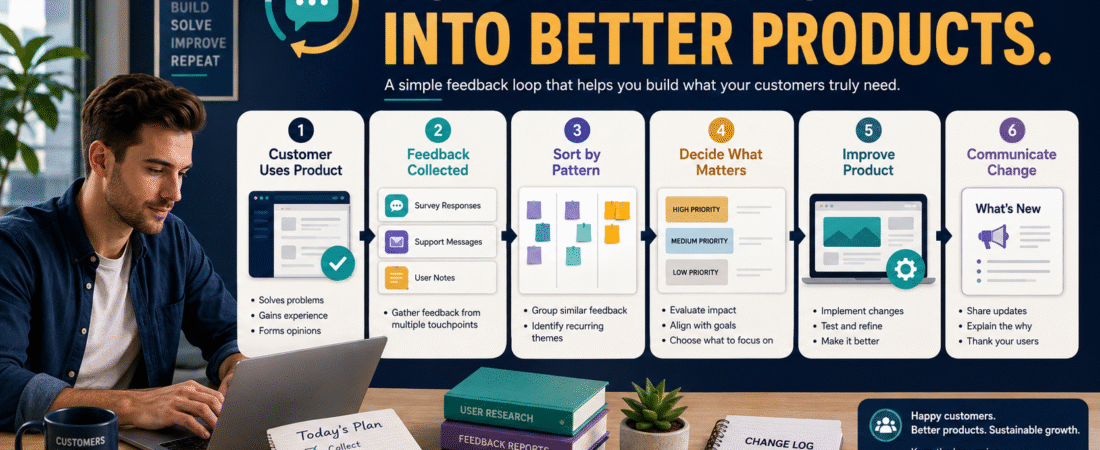
Customer feedback can help you improve an ebook, course, checklist, membership, template pack, or other digital product.
It can also send you in ten different directions if every comment immediately becomes a new feature.
One buyer may want shorter lessons. Another may want longer lessons. One wants more examples. Another wants fewer pages. Someone asks for video. Someone else bought the product specifically because it did not require video.
That is why a useful customer feedback loop for digital products needs more than a survey.
The process should be:
Collect feedback → organize it → identify patterns → evaluate importance → make deliberate improvements → communicate meaningful changes → continue learning.
The purpose is not to obey every suggestion. It is to learn where customers repeatedly struggle, what they value, and what improvements support the product’s original promise.
Feedback Is Evidence, Not an Instruction
A customer comment is useful evidence.
It is not automatically a command.
Consider:
“You should add a 12-week coaching program to this $27 workbook.”
That tells you something about what one customer wants.
It does not prove that turning a simple workbook into a coaching program is a good business decision.
Instead ask:
- Is this request repeated?
- Is it connected to the product’s purpose?
- Would it improve the experience for most intended buyers?
- Would it make the product unnecessarily complicated?
- Does it create new ongoing support obligations?
- Is the customer actually describing a different product?
That distinction protects a simple business from feature creep.
Step 1: Decide What You Need to Learn
Do not begin with a 25-question survey.
Decide what information would actually help.
You might need to learn:
- Why customers bought.
- Whether they could access the product.
- Whether instructions were clear.
- Where they became confused.
- Which section was most useful.
- Which section felt unnecessary.
- Whether they achieved the intended result.
- What prevented them from using the product.
- What question remained unanswered.
The questions should connect to decisions you may reasonably make.
Step 2: Collect Feedback at Useful Moments
Timing matters.
Immediately After Purchase
This is useful for learning:
- Why they bought.
- What they hope to accomplish.
- What problem feels most important.
It is usually too early to ask whether the product worked.
After Initial Use
This is useful for:
- Access problems.
- Confusing instructions.
- Navigation.
- Missing first steps.
A strong customer onboarding system for a digital product can make that early experience easier while also revealing where customers need additional guidance.
After Enough Time to Use the Product
Now you can ask:
- What was most useful?
- What was unclear?
- What did you complete?
- What result did you experience?
- What prevented progress?
When Support Is Requested
Support questions provide unsolicited feedback.
If the same question keeps appearing, customers are identifying a weak point without completing a survey.
When a Refund Is Requested
A refund is not pleasant, but it can reveal important information.
The reason might involve:
- Wrong product fit.
- Unclear sales-page expectations.
- Technical access.
- Missing feature.
- Product difficulty.
- Accidental purchase.
Record the reason without turning the refund conversation into an interrogation.
Step 3: Keep Questions Short and Specific
Useful feedback questions include:
What were you hoping this product would help you accomplish?
What part was easiest to use?
Where, if anywhere, did you become confused?
Was anything important missing?
What nearly stopped you from completing the product?
If you could change one thing, what would it be?
These generate more actionable information than:
Did you like it?
A “yes” may feel encouraging but provides little guidance.
Step 4: Separate Feedback From Testimonials
Feedback and testimonials serve different purposes.
Feedback helps you learn.
A testimonial is a customer’s statement that you have permission to publish as social proof.
Do not automatically turn a private survey response into a public endorsement.
If someone provides a comment that could make a useful testimonial, ask for clear permission.
The process in collecting genuine digital-product testimonials without manufacturing praise explains why customer language should remain authentic rather than being rewritten into exaggerated marketing claims.
Step 5: Categorize Feedback
A basic spreadsheet can use these categories:
- Access.
- Instructions.
- Content.
- Design.
- Missing information.
- Technical issue.
- Support.
- Pricing expectation.
- Product fit.
- Requested feature.
- Positive feedback.
- Result achieved.
Then add:
- Date.
- Product.
- Customer wording.
- Frequency.
- Severity.
- Possible action.
- Decision.
Now you can distinguish patterns from noise.
Step 6: Look for Repetition
One comment can be useful.
Five similar comments deserve closer attention.
Suppose feedback says:
Customer A: “I was unsure which worksheet came first.”
Customer B: “I couldn’t tell where to start.”
Customer C: “A quick-start page would help.”
Customer D: “The material is good, but the order confused me.”
Those are not four unrelated opinions.
They point toward one underlying problem:
The starting sequence is unclear.
The best solution might be one “Start Here” page, not four separate changes.
Step 7: Consider Severity as Well as Frequency
Some problems should be fixed even if only one customer reports them.
Examples:
- Broken download.
- Incorrect factual information.
- Security problem.
- Wrong file delivered.
- Checkout charging incorrectly.
- Accessibility barrier you can reasonably correct.
- License wording that contradicts the sales page.
Other changes can wait for a pattern.
A useful priority model is:
Priority 1 — Critical
Something is broken, inaccurate, unsafe, or misleading.
Priority 2 — Repeated Friction
Several customers struggle with the same step.
Priority 3 — Useful Improvement
The suggestion strengthens the existing promise.
Priority 4 — Preference
It reflects one person’s preferred style.
Priority 5 — New Product Idea
It would substantially expand the product’s scope.
This prevents every idea from entering the same queue.
Step 8: Protect the Product’s Original Purpose
A product becomes harder to use when improvements turn into accumulation.
Suppose you created:
The Beginner’s 30-Minute Affiliate Offer Checklist
Customers then request:
- 10 video lessons.
- A community.
- Weekly calls.
- A 200-page manual.
- An affiliate network.
- AI software.
- Done-for-you campaigns.
Those may be interesting ideas, but adding all of them would destroy the simplicity of the original offer.
Sometimes the correct response to feedback is:
Good idea, but it belongs in a different product.
A simple product ladder can provide a place for larger needs without forcing every solution into one offer. Creating a simple digital product ladder without building ten products explains how related offers can remain focused instead of becoming oversized bundles.
Step 9: Use a Decision Filter Before Making a Change
For each suggested improvement, ask:
- What problem does this solve?
- How many customers experienced it?
- How serious is the problem?
- Does it support the product’s promise?
- Will it simplify or complicate the experience?
- Does it increase ongoing support?
- How much work will it require?
- Can a smaller change solve the same problem?
- Is this correction, improvement, or expansion?
- What happens if we do nothing?
You may discover that adding one instruction is better than adding an entire feature.
Step 10: Keep Version Changes Controlled
When feedback does lead to a product change, document it.
For example:
Version 1.1
- Added clearer Start Here instructions.
- Corrected two outdated links.
- Renamed worksheets for easier navigation.
Version 1.2
- Added an example to Section 4.
- Clarified commercial-use language.
This matters because the customer-facing product should not become confused with working drafts.
The system for organizing digital product files so the final version is always clear is especially useful once customer feedback begins producing revisions.
Do Not Change a Product Every Week
Constant updating can become another form of busywork.
Unless a correction is urgent, batch minor improvements.
For example:
Immediately
- Broken links.
- Incorrect facts.
- Delivery failures.
Monthly review
- Repeated clarification requests.
- Small usability improvements.
Quarterly or scheduled review
- Larger content revisions.
- New examples.
- Structural updates.
This provides enough stability for customers while preventing a backlog from growing indefinitely.
A Simple Feedback Dashboard
Keep six numbers or notes:
- Responses received.
- Support issues.
- Repeated confusion points.
- Improvement requests.
- Critical corrections.
- Changes approved.
The goal is not sophisticated analytics.
It is to preserve enough evidence to make better decisions.
What If Very Few Customers Respond?
Do not assume silence means everything is perfect.
Look at:
- Support messages.
- Refund reasons.
- Completion patterns if available.
- Questions before purchase.
- Replies to delivery emails.
- Customer language.
- Common misunderstandings.
Also make feedback easy.
A three-question form often produces more useful responses than a long survey customers postpone.
A Sustainable Feedback Loop
For a small digital-product business, this can be simple:
During the month
Collect comments and support issues.
End of month
Group similar feedback.
Review
Identify the three most important patterns.
Decide
Fix, postpone, reject, or turn into a future-product idea.
Update
Make only approved changes.
Communicate
Tell affected customers when the improvement materially changes their product.
Repeat
Continue collecting evidence.
That is enough to create continuous improvement without continuous chaos.
Conclusion
A customer feedback loop should help you make a digital product better, not turn customers into an unofficial product-development committee.
Collect feedback at useful points, ask specific questions, record the customer’s actual wording, look for repeated patterns, prioritize serious problems, and protect the original purpose of the product.
Most importantly, separate evidence from instructions.
A customer suggestion deserves consideration. It does not automatically deserve implementation.
When you consistently collect, organize, and evaluate feedback before acting, improvements become deliberate—and your digital product can become more useful without becoming more complicated.