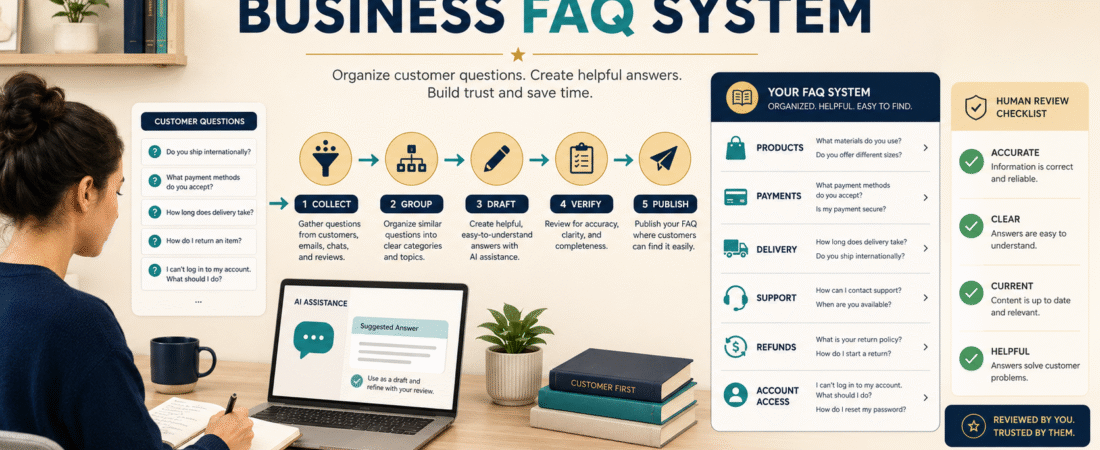
An AI FAQ system can help you turn repeated customer questions into organized, reusable answers without writing every response from the beginning.
The safest approach is not to let AI answer customers automatically without supervision. Use AI to organize questions, create working drafts, simplify explanations, and identify missing information. You should verify every answer before it becomes part of your website, course, product-delivery area, or support process.
A useful FAQ system follows five stages:
- Collect real questions.
- Group related questions.
- Draft answers.
- Verify the information.
- Publish and update the answers.
This creates a support resource that can save time while still protecting accuracy and customer trust.
Key Takeaways
- Build FAQs from questions people actually ask.
- Organize questions by the customer’s stage or problem.
- Give AI specific source information before requesting answers.
- Review every response for accuracy, clarity, and current policies.
- Update the FAQ when your product, pricing, delivery, or support process changes.
What Is an AI-Assisted FAQ System?
An FAQ system is an organized collection of answers to frequently asked questions.
AI assistance may be used to:
- Sort similar questions
- Remove duplicate wording
- Create answer outlines
- Simplify technical explanations
- Suggest additional questions
- Convert long policies into shorter explanations
- Create different versions for a website, email, or course area
- Review whether an answer appears incomplete
The system should not depend on AI inventing company policies or product information.
Your source material should control the answer.
Useful source materials include:
- Product descriptions
- Checkout information
- Delivery instructions
- Refund policies
- License terms
- Support procedures
- Course access instructions
- Privacy notices
- Customer emails
- Approved business policies
AI helps organize and explain these materials. It should not replace them.
Why Small Businesses Need Organized FAQs
A small online-business owner may receive the same questions repeatedly:
- Where is my download?
- How do I log in?
- Can I use the product commercially?
- What format is included?
- How do I reset my password?
- When will I receive access?
- Can I get a refund?
- Does the product work on a mobile device?
- Is this suitable for beginners?
- How do I contact support?
Answering each message separately consumes time.
An organized FAQ system can provide customers with immediate guidance and give you a consistent starting point when personal support is still required.
It can also reveal unclear parts of your business.
When several people ask where to find a download, the problem may not be the customer. Your delivery email or access page may need improvement.
Step 1: Collect Real Customer Questions
Begin with questions that already exist.
Review:
- Support emails
- Contact-form messages
- Social-media comments
- Product questions
- Course feedback
- Refund requests
- Subscriber replies
- Comments under videos
- Questions from friends or test users
- Your own setup notes
Create one document and record each question exactly as it was asked.
Do not correct the language during the collection stage.
The customer’s wording helps you understand how beginners describe the problem.
For example, your official system may use the term “customer-access portal,” while customers ask:
Where do I find the page with everything I bought?
Both phrases describe the same need, but the customer’s wording may be clearer for an FAQ heading.
Step 2: Group Similar Questions
After collecting the questions, sort them into categories.
A digital-product business might use:
Before Purchase
- What does the product include?
- Who is it designed for?
- Is it suitable for beginners?
- Which software is required?
Payment
- Which payment methods are accepted?
- Is this a one-time purchase?
- Will the payment renew?
- Where is my receipt?
Delivery
- When will the product arrive?
- Where is the download link?
- How do I access the course?
- What should I do if the email does not arrive?
Licensing
- Can I sell the product?
- Can I edit the files?
- Can I use the material with clients?
- Are commercial rights included?
Support
- How do I contact support?
- How quickly should I expect a response?
- What information should I include in my message?
Refunds
- Is a refund available?
- How do I request one?
- Are downloaded digital files refundable?
Grouping questions prevents you from creating several answers that say nearly the same thing.
Step 3: Choose the Questions to Answer First
Do not attempt to build a large support library in one sitting.
Start with questions that:
- Are asked most often
- Prevent customers from accessing a purchase
- Affect buying decisions
- Create confusion about rights
- Involve payments or renewals
- Reduce unnecessary support messages
- Protect customer trust
A first FAQ page may contain only ten to fifteen questions.
Add more when the need becomes clear.
Step 4: Prepare the Source Information
Before asking AI to draft an answer, gather the approved information.
For a course-access question, provide:
- Course-platform name
- Login-page location
- When the access email is sent
- Sender name
- Password-reset process
- Support address
- Steps to follow when the email is missing
A useful prompt might say:
Using only the approved information below, draft a beginner-friendly answer to the question, “Where do I find my course after purchasing?” Do not invent any policies, links, delivery times, or support promises. Use numbered steps and identify any missing information I need to supply.
OpenAI’s current prompting guidance recommends giving clear, specific instructions, enough context, and refining the request after reviewing the response.
Step 5: Draft One Clear Answer
A useful FAQ answer should usually include:
- A direct answer
- The steps to follow
- An important caution
- The next action when the steps do not work
For example:
Where Do I Find My Course After Purchasing?
Your course-access email should arrive at the email address used during checkout.
- Search your inbox for the product or business name.
- Check the spam, promotions, and junk folders.
- Open the message containing your access instructions.
- Follow the login link and create or enter your password.
- Save the login page for future use.
When you still cannot find the message, contact support and include the name and email address used for the purchase. Do not send credit-card information by email.
This answer is more useful than:
Check your email for access.
Step 6: Verify Every Detail
Before publishing, check:
- Links
- Email addresses
- Product names
- Delivery times
- Prices
- Plan limits
- License language
- Refund terms
- Login instructions
- Support promises
AI may produce a reasonable-sounding answer that does not match your actual system.
Mark each answer as:
- Verified
- Needs clarification
- Waiting for policy decision
- Not ready to publish
Do not publish an answer while the underlying policy is still unclear.
Step 7: Rewrite for Beginners
A technically correct answer may still be confusing.
Replace internal terms with plain language.
For example:
Technical wording:
Authenticate your credentials within the customer portal.
Clearer wording:
Enter the email address and password connected to your customer account.
Define necessary terms.
If customers need to understand the difference between personal-use rights and commercial-use rights, explain it in one or two plain sentences before directing them to the full license.
Step 8: Add Questions AI Suggests Carefully
After organizing real questions, ask AI to identify possible gaps.
Example prompt:
Review these approved FAQ categories for a beginner digital-product business. Suggest questions a first-time customer may reasonably ask that are not currently covered. Do not create answers and do not assume policies that have not been provided.
Possible suggestions might include:
- How long will access remain available?
- Can files be downloaded more than once?
- Are updates included?
- Can the product be used on more than one device?
- Is technical support included?
- Are future versions included?
Treat these as possible questions, not confirmed business policies.
Step 9: Decide Where the FAQs Should Appear
The complete FAQ library might be placed on a dedicated website page.
Selected answers may also appear:
- On product pages
- Near checkout
- In delivery emails
- Inside a course
- On thank-you pages
- In a customer dashboard
- In support replies
- Under tutorial videos
Place the answer near the point where the question occurs.
A licensing question belongs on the product page or license page. A password-reset question belongs near the login area or support section.
Step 10: Create Reusable Support Replies
Turn approved FAQ answers into email-response templates.
A template should still allow personalization.
Example:
Hello [CUSTOMER NAME],
Your access email is normally sent to the address used during checkout. Please check your inbox, spam folder, and promotions folder for a message containing [PRODUCT NAME].
When you still cannot locate it, reply with the email address used during purchase so the account can be checked. Please do not send payment-card information.
Thank you,
[SUPPORT NAME]
Review the message before sending it.
Do not let automation send an irrelevant answer simply because one keyword appeared in the customer’s email.
A Practical Beginner Example
Imagine an ebook creator receives repeated questions about whether buyers can edit and resell the ebook.
The creator realizes the sales page says “includes editable files” but does not explain the license.
The FAQ process reveals that the business needs three separate answers:
- What file formats are included?
- May the buyer edit the material for personal use?
- Are resale or commercial rights included?
Instead of asking AI to invent a response, the creator first writes the actual license policy.
AI then helps convert that approved policy into:
- A short product-page answer
- A complete FAQ response
- A delivery-email reminder
- A customer-support template
The system improves because the business decision comes before the AI wording.
Step 11: Keep a Review Date
FAQ information becomes outdated when you change:
- Checkout systems
- Email services
- Product platforms
- Prices
- Licenses
- Refund policies
- Support addresses
- Product versions
- Delivery procedures
Add a private review field to your FAQ working document.
Record:
- Question
- Approved answer
- Source
- Date verified
- Person responsible
- Next review date
Review high-risk answers, such as pricing and licensing, more often than general educational answers.
Common AI FAQ Mistakes
Asking AI to Invent the Policies
AI should explain approved decisions, not make them.
Publishing Answers Without Testing the Steps
Follow the instructions yourself.
Creating Too Many Categories
Begin with categories customers can understand.
Writing Answers That Are Too Long
Provide the direct answer first and link to detailed policies when necessary.
Hiding Important Limitations
Be clear about restrictions, renewals, and customer responsibilities.
Treating an FAQ as a Replacement for Support
Some problems require personal review.
A Simple FAQ Quality-Control Checklist
Before publishing an answer, confirm:
- The question reflects real customer language.
- The answer is direct.
- The steps are complete.
- The information matches current policy.
- Links work.
- Unfamiliar terms are explained.
- No personal or payment information is requested unnecessarily.
- The customer knows what to do when the answer does not solve the problem.
- The answer has a review date.
Google’s current guidance says generative AI may be useful for research and adding structure, but automatically producing many pages without adding user value can violate scaled-content policies. The priority should remain useful, reliable, people-first information.
Conclusion
An AI FAQ system can reduce repeated work when it is built from real questions and controlled by verified business information.
Collect customer questions, group them, provide approved source material, use AI for drafting and simplification, and complete a human review before publication.
Start with the ten questions that create the most confusion and build one verified answer at a time.