Creating a digital product is not always the end of the work.
An ebook, course, checklist, template pack, resource guide, or training manual may remain useful for years, but some parts can become outdated much sooner.
A software screenshot changes.
A link stops working.
A platform changes a menu.
A recommended tool changes its pricing.
A process you taught in 2026 no longer works the same way in 2027.
Without a maintenance system, an otherwise valuable product can slowly become less reliable.
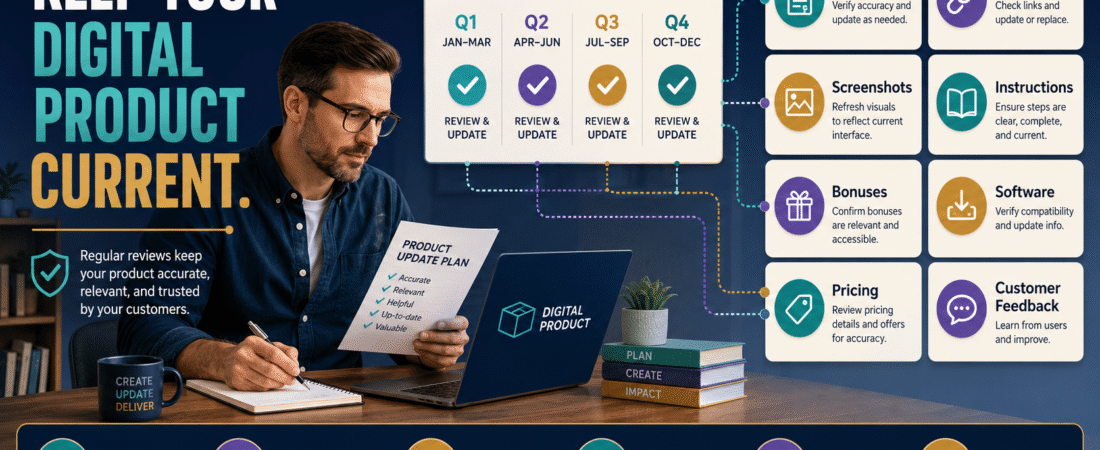
A simple solution is to create a digital product revision schedule.
You do not need to rewrite every product every month. Instead, classify how quickly the information can change, schedule reasonable review dates, check the highest-risk sections first, record necessary updates, revise the approved master file, and test the new customer version before replacing the old one.
Not Every Product Needs the Same Update Schedule
Some digital products are mostly evergreen.
Examples include:
- Journaling worksheets.
- Brainstorming frameworks.
- General productivity checklists.
- Writing exercises.
- Goal-setting planners.
- Timeless educational concepts.
Others contain time-sensitive information:
- Software screenshots.
- Pricing.
- Platform instructions.
- Legal or policy references.
- Tool recommendations.
- Website-navigation directions.
- Current statistics.
- Affiliate links.
- Product comparisons.
A product full of software tutorials may need more frequent review than a workbook about identifying personal goals.
That is why a universal rule such as:
“Update every product every 30 days”
usually creates unnecessary work.
Step 1: Classify the Product by Update Risk
Create three categories.
Low-Change Product
Most information is evergreen.
Possible review schedule:
Once or twice per year.
Moderate-Change Product
Contains some links, tools, examples, or processes that may change.
Possible review schedule:
Every three to six months.
High-Change Product
Depends heavily on current software, prices, interfaces, policies, regulations, or rapidly evolving technology.
Possible review schedule:
Monthly or quarterly, depending on the subject.
These are planning examples, not rigid rules.
The correct schedule depends on the consequences of outdated information.
Step 2: Create an Update Map
Do not reread a 200-page manual from the beginning every week.
Identify the parts most likely to change.
Your update map might contain:
Section 2 — Current Software Recommendations
Review every quarter.
Section 5 — Platform Screenshots
Review every six months or after known interface changes.
Resource Appendix — External Links
Check quarterly.
Core Framework
Annual review.
Legal Disclaimer
Review when business circumstances or applicable requirements change.
This concentrates your attention where it matters.
Step 3: Separate Corrections From Improvements
Not every revision has the same urgency.
A useful classification is:
Correction
Something is inaccurate.
Examples:
- Broken link.
- Wrong instruction.
- Outdated price.
- Incorrect feature statement.
Corrections usually deserve prompt attention.
Minor Improvement
The existing content is correct but could be clearer.
Examples:
- Better example.
- Improved wording.
- Added checklist.
- Clearer screenshot.
These can often wait for the scheduled revision.
Major Revision
The product needs substantial restructuring.
Examples:
- Platform changed completely.
- Course workflow is obsolete.
- Entire module must be replaced.
- Product positioning has changed.
Major revisions may need their own project rather than being mixed with ordinary maintenance.
If you already have a digital product update policy, this classification can help you determine what type of update existing customers should reasonably receive.
Step 4: Track What Customers Are Telling You
Customers often identify problems before your scheduled review.
A support message saying:
“The link on page 17 is broken”
should not sit untouched until the next annual review.
Likewise, several customers asking the same question may show that instructions need clarification.
Create a simple update queue with:
- Product.
- Location.
- Problem.
- Source.
- Priority.
- Date discovered.
- Proposed fix.
- Status.
Then your revision session begins with known issues instead of a blank page.
Step 5: Review the Master File, Not a Random Copy
Version confusion creates serious maintenance problems.
Imagine discovering an outdated screenshot and editing:
Course-Guide-Final.pdf
Then later learning the actual source was:
Course-Guide-Final-New-Updated.docx
Now you have two competing versions.
Your revision schedule should always point to the approved master source.
If file versions have become difficult to manage, use a system like organizing digital product files so you always know which version is final.
A clean structure might include:
Source
Editable working files.
Current Approved
Master version currently delivered.
Archive
Retired versions.
Delivery
Exported customer files.
Step 6: Check High-Risk Information First
During a revision session, start with information that could mislead customers.
Check:
- Broken links.
- Product access instructions.
- Software instructions.
- Pricing references.
- Platform features.
- Policies.
- Current screenshots.
- Technical requirements.
- Recommended resources.
- Customer support details.
Then review less urgent improvements.
This prevents cosmetic rewriting from consuming the time needed for accuracy.
Step 7: Review External Links
External links can quietly deteriorate.
A page may:
- Move.
- Redirect.
- Disappear.
- Change purpose.
- Become a sales page.
- Become irrelevant.
Open important links.
Do not assume a link works because it is still blue and clickable inside your source document.
Also check affiliate links.
If a product you recommend is no longer appropriate, replacing the link is not enough. Review the recommendation itself.
Step 8: Check Screenshots and Interface Instructions
Software-based products age quickly when the reader is told:
“Click the blue Settings button in the upper-right corner.”
If that interface changes, the reader may think they are doing something wrong.
During review, determine:
- Does the menu still exist?
- Is the feature name unchanged?
- Is the button in the same place?
- Is the screenshot still recognizable?
- Does the process still work?
- Is the feature available on the same plan?
When exact interface terminology matters, verify it.
Do not update an old screenshot merely because the colors changed slightly. Change it when the difference affects the learner’s ability to complete the task.
Step 9: Add a Version Record
Every meaningful revision should produce a version record.
For example:
Product: Beginner Digital Product Guide
Version: 2.1
Approved: September 3, 2026
Changes: Updated three external links, replaced two outdated screenshots, clarified product-access instructions.
Previous Version: 2.0
Customer Notification Required?: No
Delivery File Updated?: Yes
This becomes extremely useful when a customer asks:
“Which version do I have?”
Step 10: Test the Updated Product
Do not assume the exported replacement works.
After revision:
- Open the PDF.
- Test links.
- Check page order.
- Confirm images display.
- Confirm downloads work.
- Check mobile readability when relevant.
- Test the members area.
- Verify the correct file is delivered.
- Check the delivery email if the filename changed.
The same discipline used to test a digital product purchase and delivery process before launch should also be applied after an important product revision.
Step 11: Decide Whether Customers Need to Know
A spelling correction probably does not require an announcement.
A major replacement may.
Consider notifying customers when:
- Instructions materially changed.
- A major module was replaced.
- New files were added.
- Important errors were corrected.
- Access requirements changed.
- The update creates meaningful new value.
Avoid sending an email every time you change a sentence.
Communication should match the significance of the revision.
Create a Product Maintenance Calendar
Your calendar can be simple.
January
Annual review of evergreen guides.
March
Quarterly software-based product review.
June
Link and resource audit.
September
Software and course update review.
December
Year-end product portfolio check.
Or assign each product its own review month.
The goal is not a perfect calendar.
The goal is preventing:
“I haven’t looked at this product since I launched it three years ago.”
Retire Products That No Longer Deserve Updating
Sometimes the best revision decision is not to revise.
A product may be:
- Too outdated.
- No longer aligned with your business.
- Duplicated by a newer product.
- Too expensive to maintain.
- Based on retired software.
- Producing more support than value.
In that case, retiring the product responsibly may be better than rebuilding it indefinitely.
Use the Post-Launch Review as Your Starting Point
A maintenance schedule is easier to build when you already know where the product struggled.
A digital product post-launch review can reveal:
- Customer confusion.
- Support workload.
- Technical problems.
- Delivery issues.
- Content gaps.
- Unexpected use cases.
Those findings should feed directly into the next revision cycle.
A Simple Revision Checklist
Before closing a scheduled review, confirm:
- Facts checked.
- Links checked.
- Instructions checked.
- Screenshots reviewed.
- Policies reviewed.
- Product recommendations reviewed.
- Customer feedback reviewed.
- Corrections completed.
- Version number updated.
- Delivery copy tested.
- Archive copy preserved.
- Customer notification decision made.
Then record the next review date.
Conclusion
A digital product does not need constant rewriting to remain valuable.
It needs appropriate maintenance.
Classify the product by how quickly its information changes, create an update map, track customer-reported problems, check high-risk information first, revise the approved master file, test the new delivery copy, and schedule the next review.
The key is to replace random updating with a predictable process.
Choose one product you expect to keep selling for at least another year. Identify the five sections most likely to become outdated and put a realistic review date beside each one.
That small maintenance plan can protect the usefulness of the product long after the original launch.