AI automation sounds attractive because it promises to remove repetitive work.
But automating the wrong task can make a small business more complicated rather than less.
A confusing manual process does not automatically become a good process because AI performs it faster.
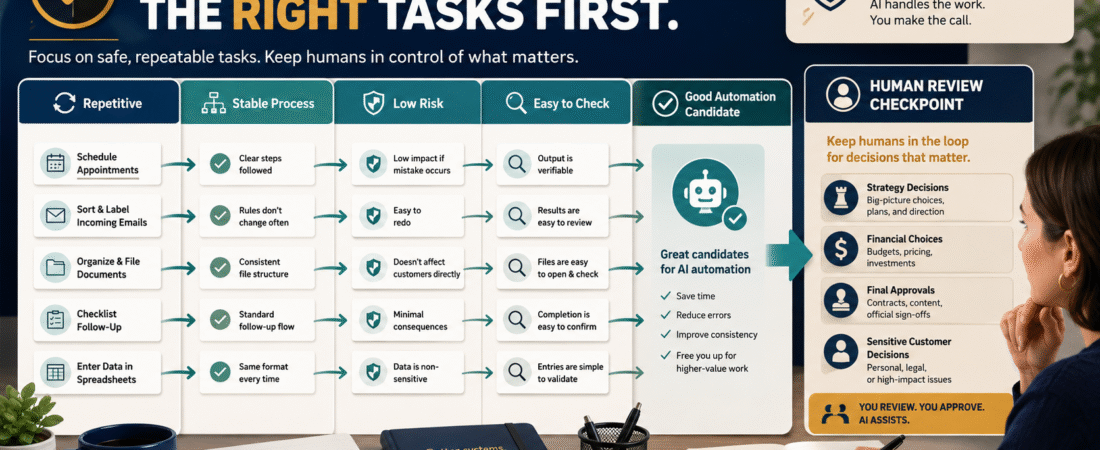
For a beginner, the best tasks to automate first are usually tasks that are:
- Repeated frequently.
- Based on a stable process.
- Easy to describe.
- Low risk when something goes wrong.
- Easy for a human to check.
- Time-consuming enough that automation creates real value.
- Reversible if the automation fails.
That leads to a useful rule:
Standardize first. Automate second.
The U.S. Small Business Administration’s current AI guidance encourages small businesses to start small, test whether AI tools genuinely add value, and consider AI for internal efficiencies rather than adopting technology merely because it is available.
Do Not Begin With “What Can AI Automate?”
That question is too broad.
AI can participate in a large number of business activities.
A better question is:
Which task is consuming recurring time, follows an understandable pattern, creates limited risk, and would still benefit from human oversight?
That narrows the field.
Suppose every Monday you manually take customer questions from several sources and organize them by subject.
That may be a good automation candidate.
Suppose you are deciding whether to refund a major customer, make a legal claim, approve a financial transaction, or publish an accusation about another company.
Those decisions deserve much more human judgment.
Automation priority should be based on the nature of the task, not the novelty of the technology.
Step 1: List Tasks You Repeat
For one week, keep a simple log.
Record tasks such as:
- Format blog-post notes.
- Organize customer questions.
- Categorize support messages.
- Turn meeting notes into action items.
- Prepare first drafts of recurring reports.
- Rename files.
- Create recurring content briefs.
- Check a list for missing information.
- Generate variations of approved descriptions.
- Prepare a weekly analytics summary.
- Convert an approved SOP into a checklist.
Do not judge yet.
Just identify repetition.
This pairs well with the process in How to Use AI to Separate Important Work From Online-Business Busywork, because automation should remove unnecessary friction rather than simply accelerate low-value activity.
Step 2: Remove Work That Should Not Exist
Before automating a task, ask:
Should I be doing this at all?
Suppose you manually copy the same information into three spreadsheets because you created those spreadsheets years ago.
The correct solution may be to eliminate two spreadsheets.
Suppose you spend 30 minutes creating a report nobody reads.
Do not build an AI agent to create it in three minutes.
Stop creating it.
Automation is not a substitute for simplification.
Step 3: Make Sure the Process Is Stable
A task is easier to automate when you can describe what “correct” looks like.
For example:
Every Friday, collect this week’s customer questions, remove duplicates, group them by topic, and produce a list containing the question, source, frequency, and suggested follow-up.
That is reasonably clear.
Compare:
Help me run the business better.
That is not a process.
Before automating a recurring task, document how it should work. My guide to creating an SOP with AI for business tasks you repeat can help turn an informal routine into defined instructions.
Use Five Automation Tests
Score each task against five questions.
1. Frequency
How often does it happen?
- Daily.
- Weekly.
- Monthly.
- Rarely.
Frequent tasks normally provide more opportunities for useful savings.
2. Stability
Does the process stay approximately the same each time?
Stable:
Take these six fields and place them into this format.
Unstable:
Decide the best strategy based on whatever happens this month.
The first is generally easier to automate.
3. Risk
What happens if AI gets it wrong?
Low risk:
- Drafting internal notes.
- Categorizing ideas.
- Summarizing information for review.
Higher risk:
- Sending an irreversible customer communication.
- Publishing unverified factual claims.
- Changing financial information.
- Making legal decisions.
- Deleting files.
- Modifying a live website automatically.
Risk should determine how much human review you require.
4. Reviewability
Can you quickly determine whether the output is correct?
If reviewing an AI-generated result takes longer than doing the task manually, the automation may not help.
5. Value
Does automating the task meaningfully reduce work, error, delay, or inconsistency?
Saving 30 seconds once per month probably does not deserve a complex automation.
Good First AI Automation Candidates
Organizing Information
Examples:
- Categorize customer questions.
- Group content ideas.
- Organize research notes.
- Extract action items from approved notes.
- Turn raw information into a structured template.
These tasks are often easy to review.
Draft Preparation
AI can prepare first drafts of:
- Content briefs.
- FAQ answers.
- Internal summaries.
- Standardized descriptions.
- Recurring reports.
A person can then review and approve the output.
Reformatting
Examples:
- Turn approved prose into a checklist.
- Convert notes into headings.
- Format an existing process into an SOP structure.
- Adapt approved material to another predefined format.
Quality-Control Assistance
AI can check for:
- Missing sections.
- Duplicate entries.
- Formatting inconsistencies.
- Required fields.
- Unanswered checklist items.
The final decision still belongs to a person.
Tasks That Need More Caution
NIST’s AI Risk Management Framework is a voluntary framework for managing risks and encouraging trustworthy use of AI systems. Its broader lesson is relevant to a small business: AI use should be matched with risk awareness rather than treated as automatically safe because a tool can perform a task. NIST’s AI Risk Management Framework provides the official framework.
Be particularly careful with automation involving:
- Financial transactions.
- Legal decisions.
- Medical or health guidance.
- Customer disputes.
- Sensitive personal data.
- Account credentials.
- Website deletion or bulk editing.
- Automatic public publishing.
- Unverified product claims.
- Refund decisions.
- Reputation-sensitive communications.
AI may assist with preparation.
That does not mean it should execute the final decision without review.
Build an Automation Ladder
Do not jump from fully manual to fully autonomous.
Use stages.
Level 1: AI Assists
You manually start the task and AI produces a draft.
Level 2: AI Structures
AI follows a reusable prompt or SOP and returns standardized output.
Level 3: AI Prepares, Human Approves
Information moves through the workflow automatically until a human approval point.
Level 4: Controlled Automation
The system completes low-risk steps automatically and logs what happened.
This progression lets you learn where the failures occur before giving a system more authority.
Example: Customer Question Workflow
Manual Version
Every Friday:
- Open email.
- Review comments.
- Copy customer questions.
- Group them.
- Count repeats.
- Create content ideas.
AI-Assisted Version
- Gather approved questions.
- Give them to AI.
- AI removes obvious duplicates.
- AI groups questions by topic.
- AI records frequency.
- AI suggests possible FAQ or content subjects.
- You verify the grouping.
- You decide what to publish.
AI handles organization.
You keep editorial judgment.
Example: Weekly Content Review
Instead of asking AI to automatically publish new articles, use it to prepare a review:
- What was published?
- Which topics overlap?
- Which questions remain unanswered?
- Which claims need current verification?
- Which existing articles might deserve updating?
- Which internal resources are relevant?
Then a person chooses the next article.
That is automation supporting judgment rather than replacing it.
Measure Whether Automation Actually Works
After introducing an automation, record:
Before
- Time required.
- Error rate.
- Rework.
- Number of steps.
- Frustration points.
After
- Time required.
- Review time.
- Errors.
- Exceptions.
- Maintenance required.
Do not count only the time AI takes to generate the output.
Count:
- Setup.
- Prompt maintenance.
- Checking.
- Correcting.
- Troubleshooting.
A five-second AI result that takes 25 minutes to repair is not efficient.
Avoid Building an Automation Stack Too Early
Automation can create another software collection.
You begin with one AI tool.
Then you add:
- Automation platform.
- Database.
- Project manager.
- Prompt manager.
- Agent platform.
- Dashboard.
- Connector.
- Monitoring tool.
Soon the “simple” automation requires its own operations department.
Start with the tools already in your business when possible.
If you are still simplifying the core toolset, review How to Build a Simple Online-Business Starter Stack before adding another automation platform.
Create an Automation Decision Card
Before automating a task, fill this out:
Task:
[Name]
Frequency:
[Daily/Weekly/Monthly]
Current Time Required:
[Time]
Process Stable?
Yes / No
Output Easy to Check?
Yes / No
Risk if Wrong:
Low / Medium / High
Human Approval Needed?
Yes / No
Could the Task Be Eliminated Instead?
Yes / No
Automation Benefit:
[Expected benefit]
Test Period:
[Period]
This forces the automation to justify itself.
A Simple Priority Order
If you have ten possible automation projects, start with tasks that are:
High frequency + stable + low risk + easy to review + meaningful time cost.
Delay tasks that are:
Rare + unclear + high risk + difficult to verify.
That one rule prevents a great deal of unnecessary complexity.
Conclusion
The best first AI automation is rarely the most impressive one.
It is usually a boring, repetitive, clearly defined task that consumes time and produces an output you can check quickly.
Begin by simplifying the work. Document the correct process. Test AI on one controlled step. Keep a human checkpoint where mistakes matter. Measure the real result before expanding.
Your next action is to list the ten tasks you repeated most often during the last week and mark each one Eliminate, Keep Manual, AI Assist, or Automation Candidate.