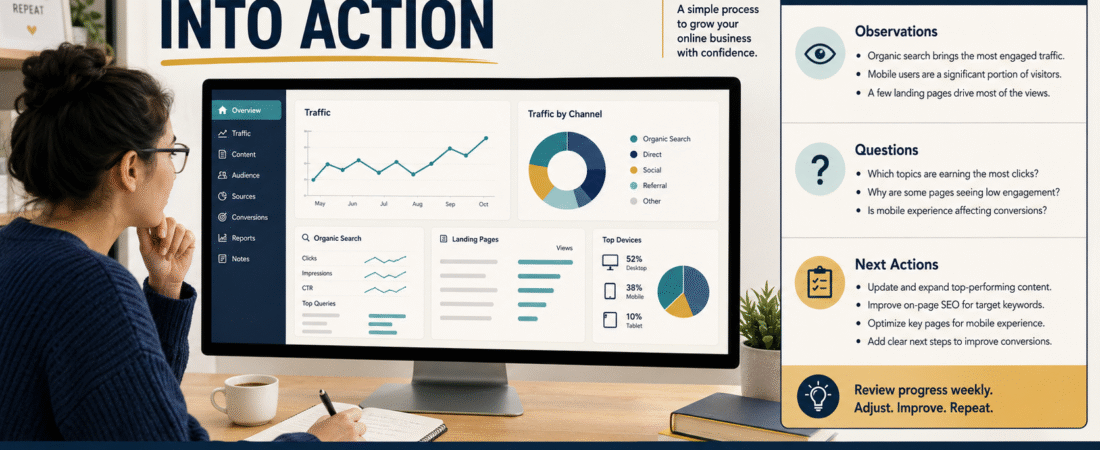
Website analytics can tell you what happened, but beginners often get stuck at the next question: What should I actually do with the numbers?
A practical way to use AI is not to hand it your analytics and ask for “SEO advice.” Instead, give it a small, clearly defined set of traffic data and ask it to help you organize observations, identify questions worth investigating, and turn those questions into a short monthly action list. You remain responsible for deciding whether the conclusions make sense.
This approach can make analytics more useful without pretending that AI can see causes that are not present in the data.
Start With a Small Set of Website Metrics
You do not need to export every report in Google Analytics before AI can help.
For a simple monthly review, start with a few measurements that answer different questions:
- Sessions or users: Is the site being visited more or less often?
- Traffic source: Where are visits coming from?
- Organic Search: Is search traffic beginning to contribute?
- Top landing pages: Which pages introduce visitors to the site?
- Engagement: Are visitors doing anything after arriving?
- Search Console impressions and clicks: Is Google showing the content in search, and are people clicking it?
Google Analytics’ Traffic acquisition report is useful for understanding where sessions came from, including organic and direct sources. Google’s Traffic acquisition documentation explains how that report is organized.
For a beginner, the goal is not to become an analytics expert. The goal is to collect enough evidence to make one or two better content decisions.
Do Not Ask AI to Diagnose the Website From One Number
Suppose your site received 300 sessions this month and 220 last month.
It is tempting to tell AI:
Traffic increased. Tell me why.
The problem is that the number alone does not contain the answer.
Traffic could have increased because one article started appearing in Google, you visited your own site more frequently while publishing, a social post sent visitors, Direct traffic increased, a referral link produced a temporary spike, or several pages each gained a small amount of visibility.
AI can help you generate possibilities, but possibilities are not findings.
A better prompt is:
Here are my monthly traffic totals and channel breakdown. Separate what the data directly shows from what would require more investigation. Do not guess at causes.
That one instruction can prevent a lot of false certainty.
Build a Monthly Data Snapshot
Create a small table or note containing the same fields each month.
For example:
Period: August 1–31
Total sessions: 300
Organic Search sessions: 18
Direct sessions: 240
Referral sessions: 22
Other sessions: 20
Top three landing pages: Article A, Article B, Home page
Search Console impressions: 1,400
Search Console clicks: 12
Pages gaining impressions: Article A, Article C
Pages losing impressions: Article D
The exact numbers do not matter in this example. What matters is consistency.
When you use the same structure every month, AI has something comparable to work with.
This is one reason a reusable AI prompt library for your online business can be useful. Instead of reinventing your analytics instructions every month, you can save one approved review prompt and reuse it with fresh data.
Ask AI for Observations Before Recommendations
The order of your questions matters.
Do not begin with:
What should I change?
Begin with:
What changed?
A useful first-pass prompt might be:
Compare these two monthly snapshots. Identify the five most important changes. For each one, state whether it is directly supported by the data or whether it is only a question that needs investigation. Do not recommend changes yet.
That forces a separation between evidence and action.
For example, AI might reasonably identify that Organic Search sessions increased, one article became a leading landing page, Search Console impressions increased, another article lost impressions, or Direct traffic still represents most sessions.
Those are observations.
It should not jump immediately to conclusions such as:
Google prefers Article A because it is better written.
The analytics do not prove that.
Turn Each Observation Into a Question
Once the observations are clear, create an investigation question for each one.
If Organic Search increased, ask which pages and queries produced the increase.
If one article gained impressions, ask which searches are triggering that page and whether the article answers those searches well.
If a page lost visibility, ask whether the decline is temporary, seasonal, query-specific, or part of a broader pattern.
If Direct traffic dominates, investigate whether it represents your own publishing activity, returning visitors, untagged links, or genuine direct navigation.
If a landing page receives traffic but little engagement, ask whether it satisfies the visitor’s likely intent and gives the visitor a useful next step.
AI becomes more useful when it helps you create better questions instead of manufacturing answers.
Use a Three-Bucket Action System
After reviewing the evidence, place potential actions into three buckets.
Keep
These are things that appear to be working and do not require immediate changes.
Examples include a page gaining impressions for relevant searches, an article beginning to attract Organic Search traffic, or a content topic generating several related queries.
Do not “optimize” a page merely because you found it in a report.
Sometimes the correct action is to leave a page alone and collect more data.
Investigate
These items deserve additional evidence.
Examples include a sudden drop in impressions, an unusual traffic source, a page appearing for irrelevant queries, high traffic with very weak engagement, or a large gap between impressions and clicks.
Investigation may mean opening Search Console, checking the landing page, comparing date ranges, or examining the actual search results.
Change
Only move something into this bucket when you have a reasonable basis for action.
Examples include a broken internal link, outdated product information, a title that clearly no longer represents the article, missing coverage of an important search question already appearing in Search Console, or a page with a confusing next step.
This prevents analytics from becoming a monthly excuse to rewrite everything.
Limit Yourself to Three Monthly Content Actions
A monthly report can produce twenty ideas.
That does not mean you should execute twenty changes.
Choose no more than three high-value actions.
For example:
- Expand one article receiving impressions for a closely related question it does not yet answer.
- Add internal links from relevant older pages to a newer page beginning to gain visibility.
- Leave a promising article unchanged for another month so you can collect additional data.
A short list is more useful than a giant optimization backlog that never gets finished.
The same principle applies when you create a 30-day AI content plan without losing your voice: planning should make the work easier to execute, not create another complicated system to maintain.
Keep a Record of Why You Made Each Change
One of the biggest problems with website improvement is forgetting why a change was made.
You update a title in September.
In November, impressions change.
Was the title responsible? Did rankings change? Did search demand change? Did another page begin ranking?
Without a record, you may not remember.
Create a simple log containing the date, page, evidence, action, reason, and review date.
For example:
Date: September 1
Page: Article A
Evidence: Increasing impressions for three closely related queries; low CTR
Action: Rewrote the title to reflect the dominant query more accurately
Reason: Better alignment with search language already appearing in Search Console
Review date: October 1
If you already keep an AI decision journal for better business choices, the same idea works here. The value is not in documenting everything. It is in recording decisions you may need to evaluate later.
Protect Sensitive Information Before Giving Data to AI
Website analytics can contain information you should handle carefully.
For a basic content review, AI usually does not need customer names, email addresses, order information, account identifiers, private URLs, login information, or raw personal data.
Use aggregate numbers whenever possible.
Instead of supplying an enormous export, prepare a small summary containing only the information necessary for the decision.
This also makes the AI’s job easier because it is not trying to locate an important signal inside thousands of irrelevant rows.
A Reusable Monthly AI Prompt
You can save a prompt like this:
Act as an analytics review assistant. I will give you two monthly website-performance snapshots. First, identify meaningful changes that are directly supported by the numbers. Second, separate facts from possible explanations. Third, create no more than five investigation questions. Fourth, suggest no more than three content actions, but only when the available evidence reasonably supports them. Do not claim causation from correlation. Do not recommend rewriting pages merely because a metric changed. If more data is needed, tell me exactly what report or comparison would help.
Then add your monthly data beneath it.
The prompt does not need to be complicated.
Its job is to keep the review disciplined.
What a Good Monthly Review Should Produce
At the end of the process, you should have something short enough to use.
A useful summary could tell you what improved, what weakened, what remains unclear, and the two or three actions worth investigating next.
A thirty-page AI-generated analytics report usually is not necessary.
Do Not Let AI Replace the Monthly Judgment Call
AI can help summarize, compare, organize, and question your data.
It cannot know your business priorities unless you provide them.
A page with only ten visits may still matter if it attracts exactly the right reader.
A page with 500 visits may be less valuable if visitors arrive for an unrelated topic.
A temporary decline may not justify any action.
The final question should always be:
What is the smallest useful action this data actually supports?
That keeps analytics connected to decisions instead of turning it into another source of busywork.
Conclusion
You can use AI to turn website traffic data into a practical monthly content action plan, but the process works best when AI is used as an organizer and questioning assistant rather than an automatic strategist.
Start with a small set of consistent metrics. Ask AI to identify observations before recommendations. Turn observations into investigation questions. Separate what you should keep, investigate, and change. Then choose no more than three actions that the evidence reasonably supports.
Over time, the value comes from repeating the same review process and comparing what changed.
For your next monthly review, collect one traffic snapshot, one Search Console snapshot, and your top landing pages, then ask AI to separate facts from questions before it suggests a single change.