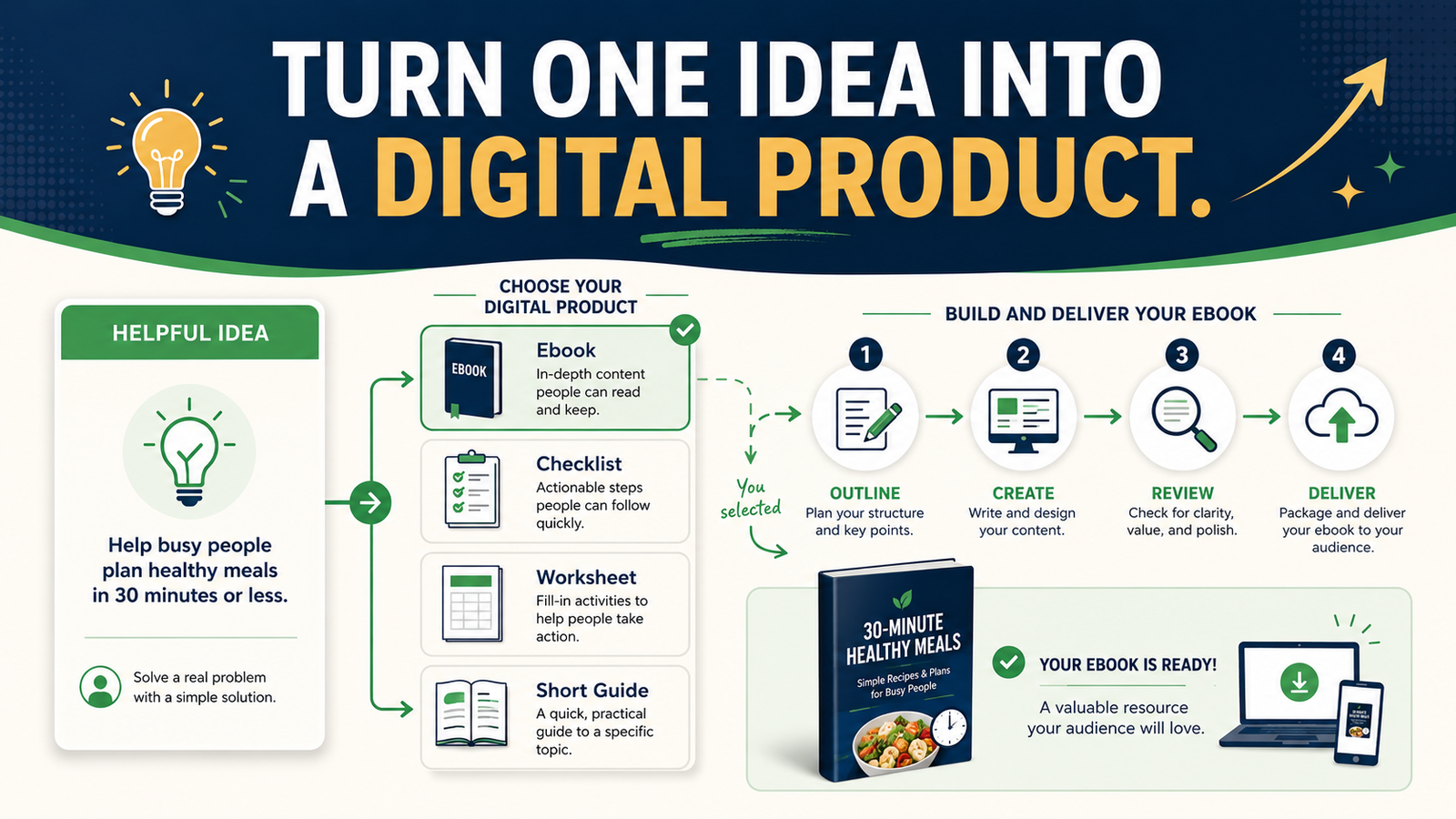
You do not need a large course, complicated membership, or extensive product catalog to begin selling digital information.
A simple digital product can start with one useful idea that helps one clearly defined audience solve one manageable problem.
The basic process is:
- Identify a problem you understand.
- Define the result the customer wants.
- Choose the smallest useful format.
- Create and review the content.
- Set up a simple delivery process.
This focused approach is more manageable than trying to build a complete online-business empire before making your first offer.
Key Takeaways
- Begin with a specific customer problem rather than a general topic.
- Choose the smallest format that can deliver a useful result.
- Create a clear product promise before writing the content.
- Review the product as if you were a first-time customer.
- Build a simple delivery system before promoting the offer.
Affiliate Disclosure: This article contains affiliate links. If you purchase through one of these links, I may earn a commission at no additional cost to you. Affiliate compensation does not determine the conclusions or recommendations presented in this article.
Begin With a Problem, Not a Product Format
Many beginners begin with a statement such as:
I want to write an ebook.
That gives you a format, but it does not tell you what the ebook should accomplish.
A stronger starting point would be:
New retirees need a simple way to compare online-business ideas without choosing an expensive or time-consuming model.
Now you have:
- An audience: new retirees
- A problem: difficulty comparing business ideas
- A desired result: selecting a manageable option
- A possible product: a comparison workbook or short guide
The format should follow the problem.
Do not force every idea into an ebook when a checklist, template, worksheet, or short tutorial would provide a faster and clearer solution.
Step 1: List Problems You Understand
Begin with knowledge you already have.
Consider:
- Questions people ask you
- Mistakes you have learned to avoid
- Processes you can explain
- Checklists you already use
- Subjects you taught or studied
- Tasks you have completed repeatedly
- Confusing topics you can simplify
- Decisions you can help someone make
Do not assume that your knowledge is too ordinary.
A beginner may value information that an experienced person considers basic. What matters is whether you can organize the information into a useful result.
Use the One-Sentence Problem Test
Complete this statement:
My audience struggles with __________ because __________.
Example:
First-time ebook creators struggle with organizing their chapters because they begin writing before defining the reader’s main problem.
This statement gives the product a practical purpose.
Step 2: Define One Product Result
A product should help the customer move from a starting point to a clearer result.
Use this statement:
This product helps [AUDIENCE] go from [CURRENT PROBLEM] to [PRACTICAL RESULT].
For example:
This workbook helps first-time ebook creators go from a collection of disconnected ideas to a clear chapter-by-chapter outline.
Notice that the promise is useful but realistic.
It does not claim that the customer will:
- Become a bestselling author
- Build a six-figure business
- Generate guaranteed sales
- Complete an entire book without effort
- Achieve results within an invented deadline
A trustworthy promise explains what the product helps the customer do.
Step 3: Choose the Smallest Useful Format
Different problems require different formats.
Checklist
Choose a checklist when the customer needs to confirm that nothing important has been missed.
Examples:
- Blog-post publishing checklist
- Ebook quality-control checklist
- Email-list setup checklist
- Product-launch preparation checklist
Worksheet
Choose a worksheet when the customer must think, compare, or record decisions.
Examples:
- Audience-definition worksheet
- Product-idea evaluation worksheet
- Weekly content-planning worksheet
- Affiliate-product comparison worksheet
Template
Choose a template when the customer needs a reusable structure.
Examples:
- Welcome-email template
- Article-outline template
- Product-description template
- Customer FAQ template
Short Guide
Choose a guide when the customer needs an explanation and a sequence of steps.
Examples:
- Beginner’s guide to choosing an email service
- Simple guide to outlining an ebook
- Guide to creating a first lead magnet
- Retiree’s guide to selecting an online-business model
Mini Course
Choose a short course when demonstration, practice, or several lessons are necessary.
Do not select a course simply because it may appear more valuable. A course requires more creation time, delivery planning, and customer commitment.
Step 4: Create the Product Promise Before the Outline
The product promise keeps the content focused.
Write:
- Who the product is for
- What problem it addresses
- What result it supports
- What it includes
- What it does not promise
Example:
The Simple Ebook Outline Workbook is for first-time nonfiction writers who have a topic but do not know how to organize it. The workbook helps the user identify one reader problem, define the book’s purpose, and create a logical chapter sequence. It does not write or publish the book for the customer.
This statement becomes your quality standard.
If a section does not support that promise, it may not belong in the product.
Step 5: Create a Result-Based Outline
Do not create chapters merely because other products include them.
Organize the material around what the customer must understand or complete.
A workbook about planning an ebook might include:
- Define the intended reader.
- Identify the main problem.
- State the book’s practical promise.
- List the questions the book must answer.
- Group related questions.
- Arrange the groups in a logical order.
- Turn each group into a chapter.
- Review the complete outline.
Each section moves the customer closer to the intended result.
Step 6: Develop the First Version
Create the simplest complete version of the product.
Include:
- A clear title
- A brief explanation of the product
- Instructions for using it
- The main educational content
- Examples
- Action steps
- A final review or next-step section
People who want assistance developing ebooks, guides, checklists, and other online-business assets can review the current AI Product Engine offer.
A product-creation tool may help organize ideas and develop drafts. It does not decide whether the product solves an important problem, and it does not remove the need for fact-checking, editing, and original examples.
Step 7: Add an Original Example
Examples help beginners understand how to apply instructions.
Suppose the product teaches customers how to select a lead-magnet idea.
A weak instruction would be:
Choose a valuable lead magnet.
A more useful section would show the process:
Audience: Retirees exploring online business
Broad problem: Online business feels confusing
Smaller problem: The person does not know which tools are necessary
Lead-magnet idea: The Three-Tool Online-Business Starter Checklist
Practical result: The reader identifies one website tool, one email tool, and one content-creation tool to investigate
The example turns an abstract instruction into a decision the customer can understand.
Step 8: Review the Product for Completeness
Read the product from the customer’s perspective.
Ask:
- Is the intended audience clear?
- Does the product solve the promised problem?
- Are the instructions presented in the correct order?
- Are unfamiliar terms explained?
- Does each section include enough guidance?
- Are the examples realistic?
- Are any important steps missing?
- Are facts and links accurate?
- Is the next action clear?
- Does the product avoid exaggerated claims?
Do not evaluate only spelling and grammar.
A polished product may still be incomplete if customers must guess what to do.
A Practical Example for a Retired Educator
Imagine a retired teacher with decades of experience creating lesson plans and classroom materials.
The teacher wants a simple digital product but does not want to record a large course.
A useful starting idea might be:
Help first-time online educators turn their knowledge into a five-lesson mini course.
The smallest product could be a planning workbook containing:
- An audience worksheet
- A course-purpose statement
- A five-lesson outline
- A lesson-objective template
- A resource checklist
- A final review page
The product uses existing teaching knowledge while solving a specific problem.
The first version does not need videos, a membership community, weekly coaching calls, or an advanced learning platform.
Those additions should only be considered when customers need them and the creator wants to manage them.
Step 9: Decide How Customers Will Receive the Product
Digital delivery should be simple for both the customer and the seller.
The process may include:
- A sales or checkout page
- A payment confirmation
- A customer-access page
- A secure download or membership area
- A support contact method
A tool such as ProductDyno may be relevant for digital-product delivery, downloads, customer access, memberships, or software licenses.
Before selecting a delivery system, identify what the product actually requires. A downloadable PDF may need a simpler setup than a course containing several videos and customer accounts.
Avoid paying for a complex platform when a basic delivery process would be sufficient.
Step 10: Prepare a Simple Product Page
A beginner product page should answer practical questions.
Include:
What the Product Is
Explain the format and purpose.
Who It Is For
Describe the person most likely to benefit.
What Problem It Helps Solve
Use the customer’s language rather than broad marketing phrases.
What Is Included
List the guide, worksheets, templates, lessons, or other materials.
What the Customer Will Be Able to Do
Describe the realistic result.
What the Product Does Not Include
Clarify important limitations when necessary.
How It Is Delivered
Explain whether the product is a download, course, membership, or another format.
Common Digital-Product Mistakes
Creating Too Much Before Confirming the Idea
A 200-page book is not automatically more useful than a focused 30-page guide.
Create enough content to solve the problem completely without adding filler.
Choosing a Topic That Is Too Broad
“Online Business Success” is too broad for a first product.
“Choose Your First Beginner-Friendly Online-Business Model” provides a clearer purpose.
Adding Features That Increase Management
Weekly calls, private groups, live coaching, and custom reviews may make an offer harder to manage.
Add those elements only when they are necessary and sustainable.
Copying Competitors’ Products
Use competing products to understand the market, not to copy their content, structure, promises, or branding.
Create your own explanation, examples, process, and customer experience.
Skipping the Customer Review
Complete the product as if you were a new customer.
Open every file, follow every instruction, and test every link.
A Seven-Day Beginner Product Plan
Day 1: Define the Audience and Problem
Write one sentence describing whom you help and what problem the product addresses.
Day 2: Define the Result
Create a realistic product promise.
Day 3: Choose the Format
Select a checklist, worksheet, template, guide, or mini course.
Day 4: Create the Outline
Organize the product around the customer’s steps.
Day 5: Develop the First Version
Write the content and add examples.
Day 6: Review and Test
Check completeness, clarity, accuracy, and usability.
Day 7: Prepare Delivery
Upload the product, test access, and create a basic description page.
This schedule is a planning example, not a guarantee that every product can or should be completed within seven days. A detailed or research-intensive product may require additional time.
Conclusion
A simple digital product begins with one audience, one problem, one practical result, and one suitable format.
You do not need to create the largest possible offer. You need to create a complete and useful solution that customers can understand and apply.
Write down one problem you can explain clearly and identify the smallest digital product that could help someone solve it.