Not every digital product should stay on sale forever.
An ebook may become outdated.
A software tool may no longer be maintained.
A course may depend on an interface that changed completely.
A small product may be replaced by a better bundle.
A membership may no longer make business sense.
The simplest reaction is:
Delete the sales page.
But that is not a complete product retirement plan.
Existing customers may still:
- Need downloads.
- Need course access.
- Have bookmarks.
- Receive automated emails.
- Click affiliate or promotional links.
- Ask for support.
- Expect promised updates.
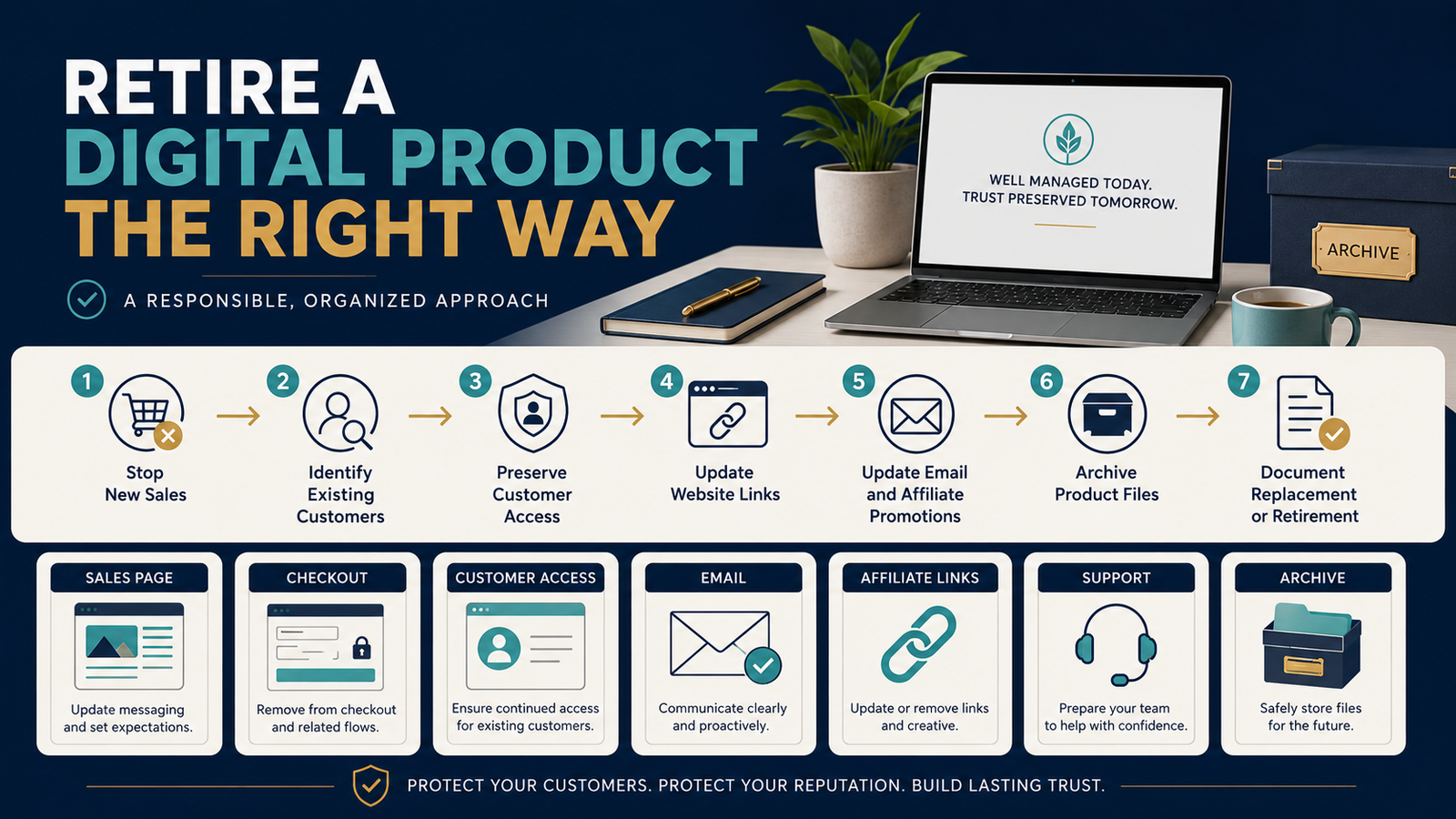
A better product-retirement workflow is:
Stop New Sales → Protect Existing Customers → Remove Old Promotions → Preserve Records → Archive Product Assets → Document the Replacement
Product Retirement Is Different From Product Updating
Ask first:
Does the product need an update, or should it stop being sold?
An update makes sense when:
- The underlying solution remains useful.
- A few examples are outdated.
- Screenshots need replacement.
- Links need correction.
- A lesson requires revision.
Retirement makes more sense when:
- The product solves a problem that no longer exists.
- The software it teaches disappeared.
- Maintaining it costs more than the product is worth.
- A newer product completely replaces it.
- The offer no longer fits the business.
Your low-maintenance digital product update plan can help distinguish reasonable maintenance from endless rebuilding.
Step 1: Document Why the Product Is Being Retired
Write one sentence.
Examples:
Retired because the software interface changed so substantially that the training is no longer reliable.
Retired because the product was replaced by the updated Starter Business System.
Retired because annual maintenance exceeds customer demand.
This prevents future confusion.
Step 2: Record the Retirement Date
Use a defined date.
Last day for new sales: September 30, 2026
Existing customer access continues according to original purchase terms.
The exact arrangement depends on what you promised customers.
Do not casually rewrite historical purchase terms after the fact.
Step 3: Identify Every Place the Product Is Sold
Make a checklist.
- Main sales page.
- Checkout.
- Upsell.
- Order bump.
- Bundle.
- Marketplace listing.
- Affiliate offer.
- Resource page.
- Email sequence.
- Blog article.
- YouTube description.
- Social profile.
- Course catalog.
Most retirement mistakes happen because the product exists in more places than the creator remembers.
Step 4: Turn Off New Sales Before Deleting the Infrastructure
Do not start by deleting everything.
First prevent new purchases.
That may mean:
- Disable checkout.
- Remove purchase buttons.
- Unpublish marketplace offer.
- Remove it from active bundles.
- Pause affiliate promotion.
Then verify that new purchases cannot accidentally continue.
Step 5: Protect Existing Customer Access
This is one of the most important steps.
Ask:
What did existing customers reasonably expect when they purchased?
Depending on the product, you may need to preserve:
- Download access.
- Course login.
- Membership content.
- License access.
- Customer files.
If access must eventually end, communicate clearly and provide reasonable options consistent with what was originally promised and any applicable obligations.
Step 6: Create a Customer Notice When Necessary
A simple notice may say:
We are retiring new sales of [Product] on September 30. Existing customers will continue to access their purchased materials through the current customer area. No action is required.
Or, when migration is required:
[Product] is being retired and replaced. Existing customers will receive instructions by email explaining how access will work.
Do not create unnecessary alarm.
Explain:
- What is changing.
- When.
- Whether customer access changes.
- Whether action is required.
- Where support questions should go.
Step 7: Decide What Happens to the Sales Page
You have several options.
Remove It Entirely
Appropriate when the page no longer has useful search or customer value.
Keep an Informational Retirement Page
Example:
This product is no longer available. See [Replacement Product].
Redirect to a Genuine Replacement
Use this only when the replacement really serves the same intent.
Do not redirect an old product page to your homepage merely because you want to preserve traffic.
Step 8: Update Internal Links
Search your website for links to the retired product.
Decide whether each should:
- Be removed.
- Point to an informational retirement page.
- Point to the legitimate replacement.
Do not let readers reach:
Buy now
only to discover the checkout no longer exists.
Step 9: Update Automated Email Sequences
This is easy to forget.
A welcome sequence created two years ago may contain:
Check out my Product A here.
If Product A has been retired, the automation may continue promoting it indefinitely.
Search:
- Welcome series.
- Follow-up sequences.
- Broadcast templates.
- Customer onboarding emails.
- Affiliate emails.
Remove or replace obsolete references.
Step 10: Update Affiliate Promotions
If affiliates were allowed to promote the product:
- Inform them.
- Disable the offer when appropriate.
- Update promotional materials.
- Clarify the retirement date.
- Explain any approved replacement.
Do not leave affiliates sending traffic to a dead checkout.
Step 11: Preserve Customer Support Information
Support does not automatically end the moment new sales stop.
Keep documentation for:
- Login recovery.
- Download access.
- Common questions.
- Known limitations.
- Replacement information.
A customer who bought six months earlier may still need help.
Step 12: Archive the Product Files
Do not delete the master files immediately.
Archive:
- Approved final product.
- Editable source.
- Cover graphics.
- Worksheets.
- Customer-delivery files.
- Sales page copy.
- Support documentation.
- Version history.
- Licensing information.
Label the folder clearly:
PRODUCT-NAME — RETIRED — 2026-09-30
This preserves the business record without confusing it with current products.
Step 13: Keep the Product Out of Your Active Working Folder
Retired files should not sit beside current files with ambiguous names.
Move them into:
Archive → Retired Products
Now anyone managing the business later can tell that the product is historical.
Step 14: Decide Whether the Product Becomes Part of Something Else
Retirement does not always mean every useful component must disappear.
Perhaps:
- One checklist moves into a new course.
- A worksheet becomes a bonus.
- A useful framework gets updated.
- The strongest lesson becomes a blog article.
But do not simply dump an obsolete product into a bundle so you can keep claiming it has value.
Your guide to creating a digital product bundle that adds real value emphasizes that bundle components should support one coherent outcome.
Step 15: Document the Replacement Relationship
If Product B replaces Product A, record:
Retired Product: Product A
Retirement Date: September 30, 2026
Replacement: Product B
Customer Migration: None required / instructions provided
Old Sales Page: Redirected / archived
Old Checkout: Disabled
Customer Access: Retained
Promotional Links: Updated
Now the decision is understandable later.
Do Not Confuse “No Longer Promoted” With “Retired”
Sometimes a product still works but you stop actively marketing it.
That is different.
Useful statuses:
ACTIVE
Currently sold and promoted.
MAINTENANCE
Still sold but receives limited promotion.
HIDDEN
Available only through specific funnels or customers.
RETIRED
No longer sold.
ARCHIVED
Historical files retained.
Clear status labels prevent mistakes.
Use Your Product Ladder to Decide What Stays
If several products solve nearly identical problems, the business may become unnecessarily confusing.
A simpler product ladder may reveal:
- Which entry offer should remain.
- Which core product is primary.
- Which products are redundant.
Your verified guide to creating a simple digital product ladder without building ten products provides a useful framework for reducing offer complexity.
Create a Product Retirement Checklist
Sales
- New checkout disabled.
- Purchase buttons removed.
- Marketplace listings updated.
Customers
- Existing access reviewed.
- Necessary customer notice prepared.
- Support instructions preserved.
Website
- Internal links updated.
- Sales page handled properly.
- Resource pages updated.
Marketing
- Email sequences updated.
- Affiliate promotions updated.
- Video descriptions reviewed.
- Social links reviewed.
Files
- Master files archived.
- Source documents preserved.
- Product status marked RETIRED.
Records
- Retirement reason documented.
- Date recorded.
- Replacement documented.
Review the Retirement After 30 Days
Thirty days later:
- Search website for product name.
- Test old major links.
- Check for support issues.
- Confirm checkout remains disabled.
- Verify customer access still works where promised.
- Check automated emails again.
One follow-up review can catch forgotten references.
Do Not Delete Historical Evidence
Keep reasonable records of:
- What was sold.
- What customers received.
- What terms applied.
- What version was delivered.
This is useful for customer support and business continuity.
Product Retirement Can Simplify the Business
A product that earns little but creates:
- Support work.
- Update obligations.
- Broken links.
- Confusing offers.
may cost more attention than it contributes.
Retirement can be a legitimate business decision.
The goal is not to maintain every product forever.
The goal is to retire products responsibly.
Conclusion
Retiring a digital product requires more than removing a Buy button.
A responsible product-sunset process protects:
Existing customers
Product access
Promotional links
Automated emails
Affiliate relationships
Support documentation
Historical files
Start by stopping new sales.
Then work outward through every system connected to the product.
When the retirement is complete, someone should be able to look at your records and understand exactly what happened, when it happened, and how existing customers were handled.