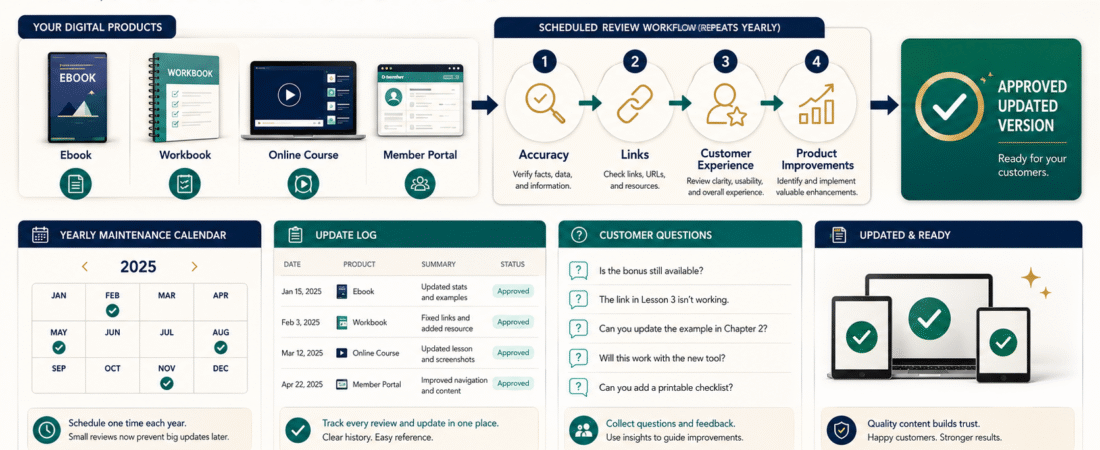
A digital product is not finished forever on the day it is published.
Links may stop working. Software instructions may change. Examples may become outdated. Customers may identify confusing steps. Delivery systems may be replaced.
This does not mean you need to rebuild every product constantly.
A low-maintenance update plan gives each product a scheduled review based on how quickly its information can change.
The basic process is:
- List the products.
- Identify what can become outdated.
- Assign a review schedule.
- Record customer questions.
- Update only what improves accuracy or usefulness.
- test the revised customer experience.
- Keep an update record.
This helps you maintain useful products without allowing maintenance to consume your retirement or business schedule.
Key Takeaways
- Give each product a review frequency based on its subject and risk.
- Separate urgent corrections from optional improvements.
- Use customer questions to identify confusing instructions.
- Test links, downloads, logins, and delivery after every meaningful update.
- Keep one update log so you know what changed and why.
Affiliate Disclosure: This article contains affiliate links. If you purchase through one of these links, I may earn a commission at no additional cost to you. Affiliate compensation does not determine the conclusions or recommendations presented in this article.
Why Digital Products Need Maintenance
A digital product may contain several types of information.
Stable Information
Examples include:
- Personal framework
- General planning process
- Original worksheet
- Timeless teaching principles
- Historical explanation
These sections may remain useful for years.
Changing Information
Examples include:
- Software screenshots
- Prices
- Platform features
- Website instructions
- Product names
- Affiliate links
- Legal requirements
- Support addresses
- Checkout procedures
These sections may require regular review.
Customer-Experience Information
Examples include:
- Login instructions
- Download directions
- Password recovery
- Course navigation
- File names
- Support process
- Mobile access
These may change whenever your delivery system changes.
A maintenance plan should focus attention where change is most likely.
Step 1: Create a Product Inventory
Record every active product.
Include:
- Product name
- Format
- Publication date
- Current version
- Checkout
- Delivery platform
- Main topic
- Customer type
- Affiliate links
- Last review
- Next review
- Status
Formats may include:
- Ebook
- Workbook
- Checklist
- Template pack
- Video course
- Audio training
- Membership
- Resource library
Do not include unfinished ideas in the active maintenance list.
Keep those in a separate development file.
Step 2: Identify the Update Risk
Assign each product a risk level.
Lower-Change Product
Examples:
- Original planning workbook
- Personal framework
- General productivity checklist
- Evergreen teaching guide
Suggested review:
- Once each year
- After significant customer feedback
- Before a new promotional campaign
Medium-Change Product
Examples:
- Online-business guide
- Email-marketing workbook
- Digital-product setup instructions
- Affiliate-marketing course
Suggested review:
- Every six months
- After a major platform change
- Before relaunching
High-Change Product
Examples:
- Software tutorial
- Pricing comparison
- Legal or policy guide
- Platform-specific training
- Technical setup course
Suggested review:
- Every three months
- When the provider announces a change
- When customers report a problem
These schedules are starting points rather than permanent rules.
Step 3: Separate Corrections From Improvements
Every possible change does not have the same priority.
Required Correction
Examples:
- Broken link
- Incorrect price
- Wrong login page
- Outdated license statement
- Missing file
- Dangerous or misleading instruction
Complete these changes quickly.
Useful Improvement
Examples:
- Better example
- Clearer heading
- Additional worksheet
- Shorter introduction
- Improved visual
Schedule these during the next planned review.
Optional Expansion
Examples:
- Additional module
- Bonus video
- Private group
- New templates
- Advanced version
Do not allow optional expansion to delay required corrections.
Step 4: Create a Product Update Log
Use this format:
Product:
[Product]
Version:
[Version]
Review Date:
[Date]
Reason for Review:
[Scheduled, customer report, platform change, or relaunch]
Problems Found:
[Problems]
Changes Completed:
[Changes]
Files Replaced:
[Files]
Links Tested:
[Yes or no]
Customer Access Tested:
[Yes or no]
Customers Notified:
[When necessary]
Next Review:
[Date]
An update log prevents confusion when several product versions exist.
Step 5: Use Version Numbers
Use a simple system.
Version 1.0
Original released product
Version 1.1
Minor corrections
Version 1.2
Additional examples or formatting improvements
Version 2.0
Major revision or new structure
Do not label every corrected spelling error as a major edition.
The version should help you distinguish meaningful releases.
Include the version inside the product file and in your private product record.
Step 6: Review Accuracy
Check:
- Facts
- Dates
- Product names
- Prices
- Statistics
- Platform instructions
- Policies
- Licenses
- External recommendations
Mark changing information when creating the product.
For example:
Review this pricing section every six months.
This makes future maintenance faster.
Step 7: Test Every Link
Open:
- Affiliate links
- Resource links
- Download links
- Support links
- Login pages
- Referenced articles
- Recommended tools
- Contact pages
Confirm that the destination still fits the surrounding text.
A link may work while leading to a different product or updated offer.
Replace or remove links that no longer serve the customer.
Step 8: Review the Customer Experience
Do not review only the product file.
Test:
- Product page
- Checkout
- Receipt
- Access email
- Login or download
- Product files
- First instructions
- Support contact
- Password recovery
- Refund or cancellation information when applicable
ProductDyno may be relevant when delivering courses, memberships, downloads, and protected customer resources.
You can review the current ProductDyno offer.
When you change a delivery platform, complete a full customer test before directing existing or new buyers to the revised system.
Step 9: Review Customer Questions
Create a list of:
- Support requests
- Refund reasons
- Missing-access messages
- Confusing instructions
- Repeated content questions
- Suggested improvements
- Technical problems
A repeated question may indicate that the product or onboarding needs clarification.
For example:
Where should I begin?
The course may need a quick-start lesson.
Can I use this commercially?
The license may need clearer placement.
Which file should I download?
The file names may be confusing.
Use the question to improve the system rather than only creating a canned reply.
Step 10: Review the Visual Presentation
Check:
- Cover
- Product mockup
- Screenshots
- Worksheets
- Charts
- Featured images
- Sales-page graphics
- Mobile readability
A design update may be appropriate when:
- The title changed.
- The product contains old screenshots.
- The cover no longer represents the content.
- Text is difficult to read.
- The product bundle changed.
ClickDesigns may be useful for producing or updating ebook covers, product mockups, worksheets, and marketing graphics.
You can review the current ClickDesigns options.
Do not redesign a useful product merely because a newer template exists.
Prioritize customer clarity.
A Practical Low-Maintenance Example
Imagine a retired educator sells three products:
- An evergreen teaching workbook
- A guide to building an email list
- A video course about a specific software platform
The maintenance schedule might be:
Teaching Workbook
- Annual content review
- Review customer feedback after every 25 sales
- No regular screenshot updates
Email-List Guide
- Review every six months
- Check email-service features and affiliate links
- Update platform examples when necessary
Software Course
- Review every three months
- Check the interface after provider updates
- Replace outdated videos
- Test the student login and downloads
The educator does not maintain every product every month.
The schedule reflects the amount of change.
Step 11: Decide Whether Customers Receive Updates
Create an update policy.
Possible approaches include:
Updates Included
Customers receive future revisions.
Limited Updates
Customers receive corrections but not major new editions.
Separate New Edition
A major revised product is sold separately.
Active-Customer Updates
Updates are included only during an active subscription or membership.
Explain the policy before purchase.
Do not promise lifetime updates unless you are prepared to maintain and deliver them.
Step 12: Notify Customers When Necessary
Notify customers when an update affects:
- Access
- Safety
- Important accuracy
- Licensing
- Instructions
- Included files
- Product functionality
A minor formatting correction may not require an announcement.
A useful update message should explain:
- What changed
- Why it changed
- Whether action is required
- Where the new version is located
- How to get help
Keep the message focused.
When to Retire a Product
Consider retiring a product when:
- The subject is no longer relevant.
- The main platform no longer exists.
- Updating would require complete redevelopment.
- The product conflicts with your current business.
- Support requirements exceed its value.
- Another product replaces it.
- Customers could be misled by the old version.
Retirement may involve:
- Removing the sales page
- Stopping new sales
- Preserving customer access
- Providing a replacement
- Redirecting the page
- Updating affiliate promotions
Do not delete existing customer access without reviewing your obligations.
Digital Product Maintenance Checklist
Accuracy
- Facts reviewed
- Prices verified
- Product names checked
- Policies reviewed
- Licenses confirmed
Technical
- Checkout tested
- Receipt received
- Access email received
- Login tested
- Downloads opened
- Password recovery tested
Content
- Instructions complete
- Examples current
- Repetition removed
- Customer questions addressed
- Final action clear
Visual
- Cover accurate
- Screenshots current
- Worksheets readable
- Mobile view tested
- Product mockup updated when necessary
Business
- Affiliate links working
- Support address correct
- Update policy clear
- Version recorded
- Next review scheduled
Common Maintenance Mistakes
Updating Everything Too Often
Use a risk-based schedule.
Ignoring Products After Publication
Even evergreen products need occasional testing.
Adding Content Without Improving the Result
More lessons can create more confusion.
Losing the Previous Version
Archive the original and revised files.
Replacing Files Without Testing
Complete the customer journey.
Forgetting Existing Customers
Decide whether and how they receive the update.
Conclusion
A low-maintenance digital product update plan keeps products accurate and useful without creating constant work.
Create a product inventory, assign a review schedule, separate corrections from optional improvements, maintain version records, and test the complete customer experience after meaningful changes.
Schedule the next review date for every active product instead of waiting for a customer to discover the problem.