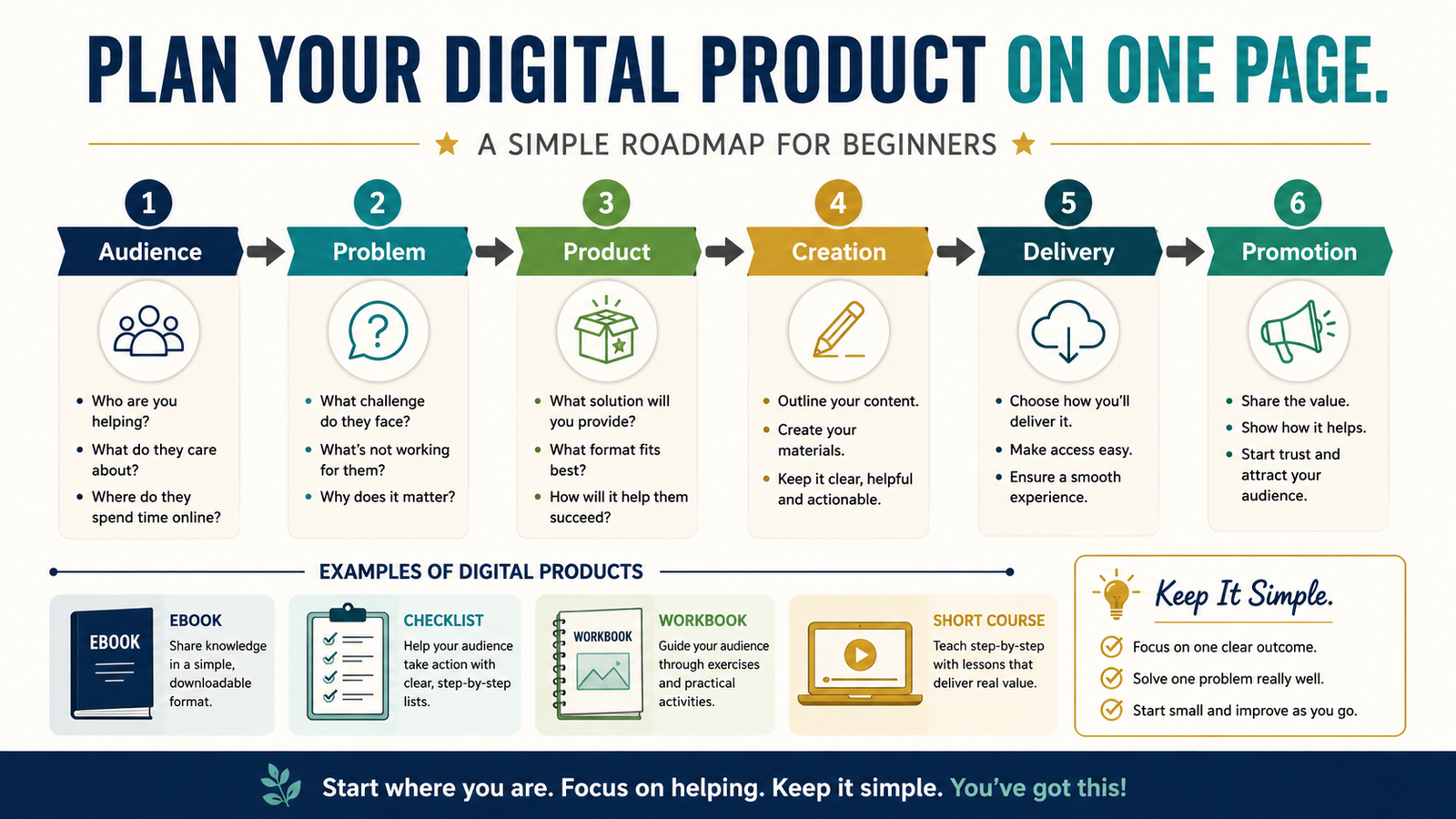
A digital product can become unnecessarily complicated when creation begins before the complete process is understood.
You may start writing an ebook and later realize that the audience is unclear. You may record course videos before deciding how customers will receive them. You may purchase several software tools before knowing which product format you need.
A one-page digital product roadmap helps you define the basic business system before investing substantial time or money.
The roadmap covers six decisions:
- Audience
- Problem
- Product result
- Product format
- Delivery
- Promotion
When these six parts fit together, you have a practical starting plan.
Key Takeaways
- Choose one audience and one manageable problem.
- Define the result before selecting the product format.
- Create the smallest format that solves the problem completely.
- Select delivery based on what the customer receives.
- Plan one realistic way to attract the first customers.
Affiliate Disclosure: This article contains affiliate links. If you purchase through one of these links, I may earn a commission at no additional cost to you. Affiliate compensation does not determine the conclusions or recommendations presented in this article.
Section 1: Define the Audience
Begin with a specific group.
Avoid:
People who want to improve their lives.
A clearer audience might be:
- Retirees exploring online-business ideas
- First-time ebook creators
- Bloggers starting an email list
- Course creators organizing existing content
- Small-business owners learning AI
- Affiliate marketers writing product reviews
The audience should be specific enough to guide the product but not so narrow that only a few people can relate to the problem.
Write:
This product is for __________.
Section 2: Define the Problem
Choose one problem the audience recognizes.
For example:
Audience: First-time ebook creators
Problem: They have several ideas but cannot organize them into chapters.
Audience: Retirees exploring online business
Problem: They do not know which business model is simple enough to manage.
Audience: New bloggers
Problem: They publish articles without a promotion process.
Do not begin with the product format.
Begin with the problem.
Section 3: Define the Product Result
Write:
This product helps [AUDIENCE] move from [PROBLEM] to [RESULT].
Example:
This workbook helps first-time ebook creators move from disconnected notes to a complete chapter-by-chapter outline.
The result should be specific and realistic.
It should not promise:
- Guaranteed income
- Guaranteed sales
- Automatic success
- Instant expertise
- Results without effort
- A business completed entirely by software
The product provides guidance or tools. The customer still applies them.
Section 4: Choose the Product Format
The format should fit the result.
Checklist
Use a checklist when the customer must verify that a process is complete.
Examples:
- Blog publishing checklist
- Product-launch checklist
- AI content-review checklist
Workbook
Use a workbook when the customer needs to think, write, compare, or make decisions.
Examples:
- Product-idea workbook
- Ebook-outline workbook
- Audience-planning workbook
Template
Use a template when the customer needs a repeatable structure.
Examples:
- Welcome-email template
- Article brief
- Product-description template
Ebook or Guide
Use a guide when the customer needs explanation and steps.
Examples:
- Beginner guide to list building
- Guide to creating a first digital product
- Guide to choosing an AI workflow
Short Course
Use a course when the customer benefits from instruction, demonstration, practice, and several lessons.
Do not select the largest format because it appears more valuable.
Select the smallest complete format.
Section 5: Plan the Product Contents
Write down what the customer must receive.
A short workbook might include:
- Introduction
- Instructions
- Five worksheets
- One completed example
- Review checklist
- Final action plan
A course might include:
- Welcome lesson
- Five teaching modules
- Workbook
- Examples
- Quizzes
- Implementation checklist
- Support instructions
Every included item should support the promised result.
Remove bonuses that make the offer look larger without helping the customer.
Section 6: Plan the Creation Method
Decide how the product will be created.
Possible tools include:
- Microsoft Word
- Canva
- Presentation software
- Video software
- AI writing assistance
- Course-creation software
- Audio narration tools
People who want assistance developing ebooks, guides, checklists, and related product assets can review the current AI Product Engine offer.
A product-creation tool may help organize ideas and prepare drafts. It does not determine whether the product solves a useful problem or replace editing and fact-checking.
Section 7: Plan Delivery
Delivery depends on the product.
Downloadable Product
The customer may receive:
- Word document
- Spreadsheet
- ZIP file
- Audio file
Course
The customer may receive:
- Login information
- Video lessons
- Worksheets
- Progress area
- Support
Membership
The customer may receive:
- Recurring access
- New content
- Community
- Ongoing support
A platform such as ProductDyno may be relevant for digital-product delivery, protected downloads, courses, memberships, or customer access.
Do not select a large delivery platform until you know what the product requires.
Section 8: Plan Payment
Record:
- Product price
- One-time or recurring payment
- Payment processor
- Checkout page
- Refund terms
- Taxes when applicable
- Customer receipt
- Delivery trigger
The checkout and delivery systems must work together.
A customer should not complete payment and then wait for you to send the product manually unless that process is clearly explained.
Section 9: Plan the First Promotion Method
Do not plan to use every platform.
Choose one or two starting methods.
Possible options include:
- Blog articles
- Email list
- YouTube videos
- Affiliate partners
- Existing customers
- Online marketplace
The strongest first method is often the one where you already have content, contacts, or experience.
Write:
The first customers will discover the product through __________.
A Completed One-Page Example
Audience:
Retirees exploring a small online business
Problem:
Too many business models and tools create confusion.
Result:
Help the reader select one simple business model and identify the first three tools needed.
Product:
A short guide and decision workbook
Contents:
Business-model comparison, tool checklist, budget worksheet, 30-day plan
Creation:
Microsoft Word, human editing, simple cover design
Delivery:
Protected PDF download
Payment:
One-time checkout
Promotion:
Educational blog articles and email list
This plan is focused enough to create without becoming a large course or membership.
Use the “Necessary Now” Test
For every planned feature, ask:
- Does the customer need this to receive the result?
- Can it be added later?
- Does it create ongoing management?
- Does it require another software subscription?
- Will it delay publication?
- Does it improve the customer experience?
Examples of items that may not be necessary at first include:
- Private community
- Weekly coaching
- Twenty bonus products
- Mobile application
- Advanced certification
- Several membership levels
- Complex affiliate program
Add them only when the product and customers require them.
Create a Minimum Complete Version
A minimum complete product is small but useful.
It includes everything required to fulfill the promise.
For example, a digital-product idea workbook may need:
- Audience worksheet
- Problem worksheet
- Product-format comparison
- Product-result statement
- Delivery checklist
- Final decision page
It may not need:
- Fifteen videos
- A private group
- Live coaching
- Monthly content
Complete the minimum version, test it, and improve it based on actual feedback.
One-Page Digital Product Roadmap Template
Product Name:
[Working title]
Audience:
[Specific audience]
Problem:
[One problem]
Desired Result:
[Practical result]
Format:
[Checklist, workbook, guide, templates, or course]
Main Contents:
[Contents]
Creation Tools:
[Tools]
Estimated Creation Time:
[Realistic estimate]
Checkout:
[Payment system]
Delivery:
[How access is provided]
Support:
[Support method]
Price:
[Starting price]
Promotion Method:
[Primary method]
Affiliate or Product Relationship:
[When relevant]
What Can Be Added Later:
[Optional features]
First Test:
[How the complete system will be tested]
Common Roadmap Mistakes
Choosing the Format First
The problem should determine the format.
Planning Too Many Products
Complete one product before creating a catalog.
Buying Software Before Defining Delivery
A PDF and a video course require different systems.
Creating Too Many Bonuses
More files do not automatically create more value.
Ignoring Customer Support
Decide how questions and access problems will be handled.
Planning Promotion Last
Know how the intended customer may discover the offer.
Conclusion
A one-page digital product roadmap helps you understand the complete system before creation begins.
Define the audience, problem, result, format, contents, delivery, payment, and first promotion method. Then remove anything that does not help the customer receive the promised result.
Complete the roadmap for one product idea before purchasing additional software or creating the first chapter.