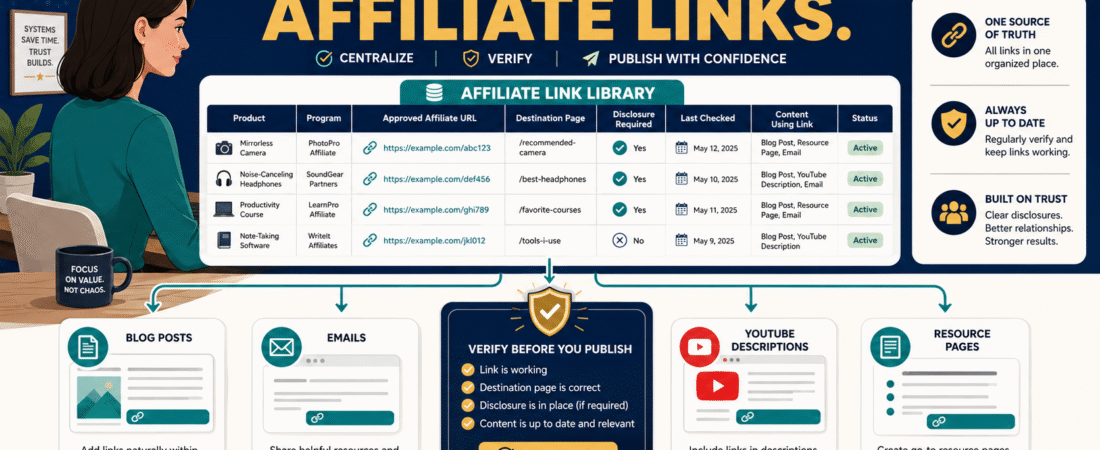
Affiliate marketing becomes harder to manage as the number of products you recommend increases.
At first, you might have three affiliate links.
You remember where they came from.
Later you may have:
- 20 products.
- Different affiliate networks.
- Direct vendor programs.
- Old tracking URLs.
- Special campaign links.
- Different destination pages.
- Products that changed names.
- Programs that closed.
- Links placed across dozens of articles.
Then every new article begins with the same frustrating routine:
Where is my correct affiliate link?
A simple affiliate link management system solves that problem by creating one authoritative location for your approved affiliate URLs.
The system can be very simple:
Affiliate Program → Approved Link Library → Verification → Content Placement → Periodic Check
The goal is not to make affiliate marketing more complicated.
It is to stop rebuilding information you already have.
Start With a Central Affiliate Link Library
A spreadsheet is enough for many small businesses.
Create columns such as:
Product Name
Company
Affiliate Program
Affiliate Network
Approved Affiliate URL
Normal Product URL
Destination
Commission Information
Disclosure Required
Date Added
Last Verified
Status
Notes
Do not automatically fill every column just because it exists.
Use the fields that help you manage the business.
Why Store the Normal Product URL Too?
Your affiliate URL may look like:
That tells you very little.
Store the normal product page too.
Example:
Product: Example Email Platform
Official Site: product.example
Affiliate URL: tracking.example/your-id
Now you can verify that the affiliate link still lands on the intended product.
This also helps if the affiliate program changes networks.
Never Reconstruct Tracking Links From Memory
Suppose your affiliate ID is mike123.
Do not assume:
I can probably add ?affiliate=mike123 to the product URL.
Affiliate tracking formats vary.
Use the URL issued or approved by the program.
An incorrect link can:
- Fail to track.
- Lead to the wrong offer.
- Point to an expired promotion.
- Break entirely.
Store the exact approved destination.
Keep Affiliate Selection Separate From Link Management
There are two different decisions.
Decision 1
Should I recommend this product?
Decision 2
What is the correct affiliate URL?
Do not let the existence of a commission determine the first decision.
My guide to choosing affiliate products without losing your audience’s trust explains the product-selection side of the system.
The link library comes afterward.
Create a Simple Status Field
Use:
Active
The program and destination are currently usable.
Verify
You are uncertain whether the link or offer remains current.
Paused
You are temporarily not recommending it.
Retired
The program, product, or relationship has ended.
Replaced
A new tracking URL supersedes the old one.
Now an old URL does not accidentally reappear six months later.
Track Where Important Links Are Used
Suppose a company closes its affiliate program.
You need to know where the old URL appears.
Add a column:
Used In
or maintain a separate link-placement sheet.
Examples:
- Tools page.
- GetResponse review.
- GetResponse vs AWeber.
- Welcome email #4.
- YouTube description template.
You do not necessarily need to record every one-off link manually if another system can scan the site.
But your highest-value recurring placements should be documented.
Create a Last-Verified Date
Affiliate relationships change.
A link that worked when you created a post two years ago may now:
- Redirect somewhere else.
- Lead to a discontinued product.
- Point to old pricing.
- Lose tracking.
- Return an error.
Record:
Last Verified: August 18, 2026
That does not guarantee the link will work tomorrow.
It tells you when somebody actually checked.
What Does “Verified” Mean?
For a simple manual verification:
- Open the link.
- Confirm the page loads.
- Confirm it is the expected company.
- Confirm it is the expected product or offer.
- Check that the tracking URL has not obviously been replaced.
- Confirm the product is still something you are willing to recommend.
Do not complete a purchase just to test every affiliate link.
Follow the program’s rules and use the verification methods the vendor supports.
Disclosure Belongs in the System Too
Affiliate-link management is not only about the URL.
It is also about disclosure.
The FTC’s current guidance says affiliate marketers should clearly and conspicuously disclose the relationship so readers understand that purchases through the links can generate compensation. The FTC also says the closer the disclosure is to the recommendation, the better.
FTC guidance for affiliate marketers and endorsements specifically discusses affiliate-link disclosures and warns that merely writing “affiliate link” may not adequately explain the financial relationship.
Your system should therefore track:
Affiliate link? Yes.
Disclosure required? Yes.
Use One Approved Disclosure Format
Consistency reduces mistakes.
For example:
Affiliate Disclosure: This article contains affiliate links. If you purchase through one of these links, I may earn a commission at no additional cost to you. Affiliate compensation does not determine the conclusions or recommendations presented in this article.
Then your publishing workflow knows what belongs before the first affiliate recommendation.
Do Not Hide the Relationship Behind a Link
A disclosure that only becomes visible after somebody clicks another link defeats much of the purpose.
The FTC’s guidance emphasizes clear and conspicuous disclosure.
Your affiliate-link library can contain a simple field:
Disclosure Type
- Article.
- Email.
- Video.
- Resource page.
That reminds you that the surrounding format matters.
Build a Naming Convention
Affiliate platforms frequently name campaigns badly.
You might see:
- Campaign 48392.
- FE Offer.
- Main.
- New Funnel.
- Version 3.
Create your own internal product name.
Example:
GetResponse — Main Affiliate Link
ProductDyno — Standard Offer
ElevenLabs — Creator Platform
The internal label does not change the destination.
It helps you understand what you are looking at.
Keep Historical Links Rather Than Deleting Them Immediately
Suppose an affiliate program issues a new URL.
Do not simply overwrite the old one and forget it ever existed.
Record:
Old URL: Retired 8/18/26
New URL: Active 8/18/26
Reason: Vendor migrated affiliate platform.
Why?
Because the old URL may still appear inside older content.
Now you know what to search for.
Create a Quarterly Affiliate Link Audit
Once per quarter:
- Sort the library by status.
- Open each high-priority affiliate URL.
- Confirm destination.
- Confirm product still exists.
- Review official product information.
- Update Last Verified.
- Identify retired links.
- Find important content using retired links.
- Replace links where appropriate.
- Update recommendations if the product no longer deserves them.
This is much easier than discovering broken links one customer at a time.
Do Not Automatically Replace a Retired Product With Another Affiliate Product
Suppose Product A shuts down.
You have an article recommending Product A.
Do not immediately replace every reference with Product B just because Product B pays a commission.
Ask:
- Does Product B genuinely solve the same problem?
- Does the article still make sense?
- Does the comparison need rewriting?
- Would a non-affiliate resource be better?
- Should the old article be updated or retired?
Editorial judgment comes before monetization.
Connect the Link Library to Your Content Plan
A strong affiliate-marketing content system starts with useful content.
Your existing affiliate marketing content plan for beginners provides a useful strategic layer.
The affiliate-link library handles the operational layer.
Together:
Content strategy decides what belongs.
Link management ensures the correct destination is used.
What About Link-Management Plugins?
WordPress link-management tools can centralize redirects or branded short links.
They may be useful when:
- Hundreds of pages use the same destinations.
- You need centralized replacements.
- You have complex tracking requirements.
But do not assume you need another plugin.
A spreadsheet may be enough if you have a manageable number of programs.
The system matters more than the software.
Be Careful With Cloaking and Program Rules
Some affiliate programs have specific rules regarding:
- Redirects.
- URL shortening.
- Link cloaking.
- Paid advertising.
- Email use.
- Coupon sites.
- Trademark bidding.
Do not assume a technique is permitted because another affiliate uses it.
Review the agreement for each program.
Your library can include:
Important Program Restrictions
so you do not need to rediscover them every time.
Create a Content-Level Link Check
Before publishing any affiliate article, verify:
Product
Is the recommendation relevant?
Link
Is the approved affiliate URL attached?
Destination
Does it lead where expected?
Disclosure
Does the disclosure appear before the first applicable affiliate link?
Accuracy
Are current features or prices verified?
Context
Does the recommendation help the reader?
That is a much stronger quality-control process than simply asking:
Did I remember to add links?
Use AI Carefully
AI can help manage the library.
For example, you can provide:
- Approved product list.
- Approved URLs.
- Allowed website.
- Current article draft.
Then ask:
Identify where one of these approved affiliate products is genuinely relevant. Use only URLs from the approved list. Do not invent or reconstruct URLs.
That is a controlled use.
A dangerous prompt would be:
Add affiliate links wherever you think they belong.
without providing an approved source.
AI may invent or use the wrong destination.
Back Up the Link Library
This small spreadsheet becomes valuable.
It contains the operational map connecting:
- Products.
- Vendors.
- Tracking.
- Content.
- Disclosures.
Keep a backup.
Do not let the only copy live inside an old email or browser bookmark.
A Simple Affiliate Link Library Example
| Product | Affiliate URL | Official URL | Status | Last Verified | Used In |
|---|---|---|---|---|---|
| Email Tool | Approved URL | Official Site | Active | 8/18/26 | Reviews, Tools |
| Course Tool | Approved URL | Official Site | Active | 8/18/26 | Reviews |
| Old Tool | Old URL | Official Site | Retired | 7/10/26 | 3 Articles |
That is enough to create control.
Conclusion
Affiliate link management does not need to become another complicated software project.
Create one authoritative library containing the product, approved affiliate URL, normal product destination, status, verification date, disclosure requirements, and important content placements.
Then make one rule:
Never guess an affiliate URL when the approved one should already exist in the library.
That simple discipline can prevent broken links, lost tracking, incorrect recommendations, and repeated searching every time you publish.