When a business system stops working, one of the first questions is:
Who do I contact?
That sounds simple.
Until:
- Website is down.
- Domain is not resolving.
- Checkout is failing.
- Product delivery stops.
- Email cannot send.
- Payment processor reports an issue.
Now you are searching:
- Old emails.
- Browser bookmarks.
- Billing receipts.
- Account dashboards.
- Google.
A simple online business vendor contact list solves that problem.
The process is:
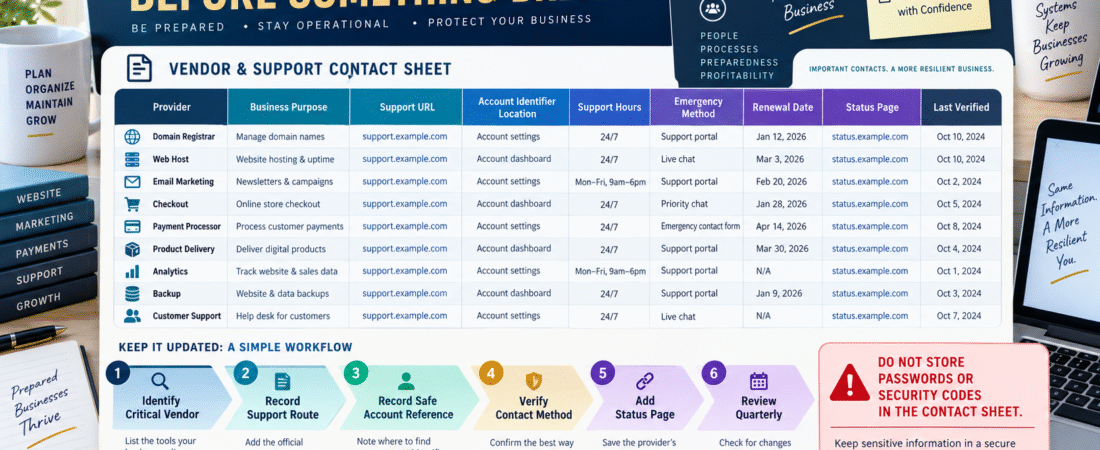
Identify Critical Provider → Record Business Purpose → Record Official Support Route → Add Safe Account Reference → Verify → Review Periodically
The goal is not to create another giant spreadsheet.
It is to answer:
Who controls this system, and how do I reach them?
Start With Critical Providers
List the services the business depends on.
Examples:
- Domain registrar.
- Hosting company.
- Email platform.
- Checkout.
- Payment processor.
- Product-delivery platform.
- Backup service.
- Analytics.
- Website security.
Your verified Digital Business Asset Inventory can provide the starting list.
Record the Business Purpose
Do not write only:
Hostinger
Write:
Hostinger — Hosting for Main Website
or:
GetResponse — Subscriber List and Email Automation
The purpose matters when one business uses many providers.
Record Official Support Routes
Examples:
Support Center
Account Chat
Support Ticket
Billing Support
Status Page
Avoid relying on a search-engine result during an emergency.
Record the official route while the account is working normally.
Record Where the Account Identifier Is Found
Support may ask for:
- Account email.
- Customer ID.
- Domain name.
- Order number.
- Subscription ID.
Do not necessarily copy sensitive identifiers into a widely shared document.
You can record:
Customer ID located in Billing → Account
or:
Account reference stored in secure business records
That is often enough.
Do Not Store Passwords
The vendor list should not contain:
- Passwords.
- Two-factor codes.
- Recovery codes.
- API keys.
- Secret tokens.
Those belong in secure credential-management systems.
Your verified Online Business Emergency Access Plan provides a safer approach.
Add the Provider’s Status Page
Sometimes the problem is not your account.
The provider may be experiencing an outage.
A status page can quickly answer:
Is this service having a known problem?
That can prevent unnecessary changes to your website.
Example
Website becomes unavailable.
Before reinstalling WordPress:
- Check host status page.
- Check domain status.
- Confirm whether outage is widespread.
- Then troubleshoot locally.
That sequence is safer than immediately changing settings.
Add Support Hours
Some providers offer:
- 24/7 chat.
- Business-hours email.
- Priority support only on higher plans.
- Phone support only for certain accounts.
Document what you actually have.
Do not assume a phone number exists.
Record Your Current Plan
Support options can depend on plan.
Record:
Provider:
Plan:
Support Level:
Example:
Email Platform — Starter — Standard Support
This helps set expectations.
Add Renewal Information
Your vendor list can include:
Renewal Date
or reference your existing Software Subscription Renewal Calendar.
You do not need to duplicate every billing detail.
The vendor list can point to the renewal calendar.
Identify Criticality
Use:
CRITICAL
Failure immediately affects:
- Website.
- Payments.
- Product access.
- Business email.
IMPORTANT
Failure creates operational inconvenience.
OPTIONAL
Business can continue without it.
This helps you decide whom to contact first during a multi-system issue.
Record Escalation Routes
Sometimes normal support does not resolve the issue.
Record any legitimate escalation path available under your plan.
Examples:
- Standard support.
- Billing escalation.
- Dedicated account manager.
- Hosting emergency queue.
Do not invent escalation contacts.
Record only verified routes.
Include Service Ownership
One common mistake is contacting the wrong company.
Example:
Your domain is registered at one company.
Website hosting is at another.
Email DNS is managed through a third.
The vendor sheet should clarify:
Registrar controls domain registration.
Host controls website server.
Email provider controls campaign platform.
That prevents wasted support tickets.
Connect It to Your Integration Map
Your newly developed business integration map answers:
What connects to what?
The vendor list answers:
Who supports each part?
Together they create a useful troubleshooting map.
Example:
Website Form → Email Platform
If form submits but contact never appears:
You know which two systems are involved.
Then determine where the failure occurs before contacting support.
Record the Last Verification Date
Support systems change.
A bookmarked help page from three years ago may be obsolete.
Add:
Last Verified
Review important contacts quarterly or twice yearly.
Create a “First Check” Column
Examples:
Hosting
First Check: Status page.
Email Marketing
First Check: Sending status and account notifications.
Payment Processor
First Check: Dashboard alert / status page.
This saves additional time.
Add Vendor Notes Carefully
Useful:
“Checkout support handles payment-form configuration but not Stripe account disputes.”
Not useful:
“They are terrible.”
Keep the document operational.
Test One Support Route Before an Emergency
You do not need to open unnecessary tickets.
But verify that:
- Link works.
- Login works.
- Support section exists.
- Account details can be found.
That is enough.
A Simple Vendor Contact Template
Use:
Provider
Business Purpose
Website/System
Current Plan
Official Support Route
Status Page
Account Identifier Location
Support Hours
Criticality
Renewal Reference
Last Verified
Notes
Use It During a Problem
Example:
Problem: Checkout works, but buyer receives no product.
Check:
- Checkout provider.
- Product delivery provider.
- Integration between them.
- Support contact for the system where failure occurred.
You now have a controlled troubleshooting path.
Review After Software Changes
Whenever you:
- Add software.
- Cancel software.
- Move hosting.
- Change checkout.
- Change payment provider.
update the vendor list.
Otherwise, it slowly becomes inaccurate.
Conclusion
A vendor contact list is a small business-continuity tool.
It should tell you:
Who controls the system
What the system does
Where official support lives
Where safe account references are stored
Whether the provider has a status page
When the information was last checked
Do not store passwords or security secrets in the sheet.
The goal is:
Find the right provider quickly without exposing sensitive access information.
Your Next Action
Write down your eight most important providers:
Domain | Hosting | Email | Checkout | Payment Processor | Product Delivery | Backup | Analytics
For each, record:
Provider | Purpose | Support Route | Status Page | Last Verified
Then choose the three providers whose failure would most directly stop sales or customer access.
Verify those three support links today.
Finally, save the vendor contact list where your business documentation can be found during an emergency.
That gives you a simple answer to:
“Who do I contact?”
before you urgently need it.