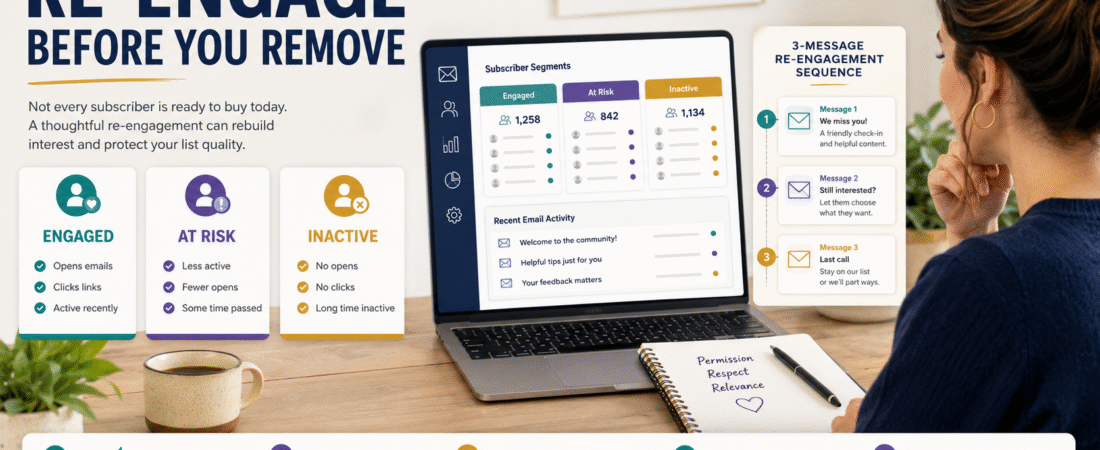
An email list can grow while becoming less useful.
Someone downloads a lead magnet, reads several emails, and then stops clicking.
Another subscriber changes interests.
Someone uses an email address they rarely check.
Another person simply no longer wants the information you send.
Keeping every address forever because “a bigger list is better” can create the wrong goal.
A healthier approach is to periodically identify people who appear inactive and send a short email re-engagement campaign that asks a simple question:
Do you still want to hear from me?
A practical workflow is:
Define inactivity → build a segment → send a short re-engagement sequence → measure meaningful response → keep engaged contacts → suppress or remove people according to your list policy.
Current GetResponse guidance similarly recommends segmenting inactive subscribers, attempting re-engagement, and maintaining list hygiene rather than indefinitely mailing an unresponsive list.
Start With a Good List-Building Foundation
Re-engagement works best when people originally joined voluntarily and understood what they were signing up for.
A healthy list begins with:
- Permission.
- Relevant lead magnets.
- Clear expectations.
- Useful welcome emails.
- Consistent content.
If you are still building that foundation, see my guide to building an email list with one lead magnet and a simple welcome series.
Re-engagement should not be used to repair a list built from people who never asked to receive your emails.
What Counts as Inactive?
There is no universal number that fits every business.
A daily newsletter and a monthly newsletter should not define inactivity in exactly the same way.
Consider:
- How often you normally email.
- How long your sales cycle is.
- Whether subscribers usually click.
- How frequently new content appears.
- Whether purchases are seasonal.
One business may consider 90 days inactive.
Another may reasonably use six months.
GetResponse’s current list-hygiene guidance mentions regularly addressing contacts that have not engaged for roughly three to six months, but your own sending frequency and audience should determine the practical threshold.
Be Careful With Open Rates
Email opens are not perfect evidence of engagement.
Privacy features and image-loading behavior can make open data less reliable than many beginners assume.
Where possible, consider stronger signals such as:
- Link clicks.
- Form submissions.
- Purchases.
- Replies.
- Website actions.
- Downloads.
- Confirmed preferences.
An open can be useful context.
A meaningful click often tells you more.
Step 1: Build the Inactive Segment
Define a rule.
For example:
Subscribed more than 120 days ago AND no meaningful click during the previous 90 days.
Do not automatically include:
- Brand-new subscribers.
- Customers receiving required transactional messages.
- People who recently joined.
- Contacts who requested a different frequency.
- Suppressed or unsubscribed addresses.
Make sure the segment represents people you genuinely want to evaluate.
Step 2: Decide What the Campaign Is Trying to Learn
A weak re-engagement campaign says:
Buy something before we remove you.
A better campaign first asks whether the relationship still matters.
Possible goals:
- Confirm interest.
- Let subscribers update preferences.
- Remind them what they originally subscribed for.
- Show your most useful recent resource.
- Give them a clear stay-on-the-list action.
- Give them an easy way to unsubscribe.
The primary question is not:
Can I squeeze one more sale from this contact?
It is:
Does this person still want this communication?
Step 3: Use a Short Sequence
A small online business does not need a 12-email rescue campaign.
Three emails may be enough for many situations.
Email 1 — The Check-In
Purpose:
Remind the subscriber who you are and why they originally joined.
Possible structure:
- Brief acknowledgment.
- What they receive from your list.
- One useful resource.
- Clear link to remain engaged.
Do not pretend you are personally heartbroken because they did not open a newsletter.
Keep the tone normal.
Email 2 — The Value Reminder
If there is still no meaningful response, send something useful.
You might share:
- A popular guide.
- Updated checklist.
- Helpful tutorial.
- Resource page.
- Relevant free download.
The message should demonstrate why remaining subscribed has value.
Email 3 — The Preference Decision
Now be clear.
Tell the subscriber that you are cleaning the list and want to send email only to people who still want it.
Offer:
Keep me subscribed
and an easy unsubscribe route.
Do not use fake urgency.
Affiliate Disclosure
This article contains affiliate links. If you purchase through one of these links, I may earn a commission at no additional cost to you. Affiliate compensation does not determine the conclusions or recommendations presented in this article.
If you want an email platform with segmentation and automation features that can support this kind of workflow, you can review GetResponse through my affiliate link. Its current platform includes segmentation, automation workflows, newsletters, and list-management tools; the exact capabilities depend on the plan.
Do Not Turn Re-Engagement Into Bribery
A discount can sometimes make sense.
But think carefully before teaching inactive subscribers:
Ignore my emails long enough and I will eventually send you the best deal.
Your incentive can simply be useful content.
If you do use a discount, make sure it fits the relationship rather than replacing it.
Give Subscribers a Preference Option
Inactivity does not always mean complete disinterest.
Someone may still want:
- Monthly updates instead of weekly.
- AI content but not affiliate marketing.
- Product updates but not promotions.
- Tutorials but not software reviews.
If your email platform and list strategy support preference-based segmentation, giving subscribers some control can preserve useful relationships.
Do not create 25 preference categories, though.
Complexity can make a small list harder to manage.
Decide What Counts as Re-Engagement
Before sending the campaign, define success.
Possible signals:
- Clicks the “keep me subscribed” link.
- Updates preferences.
- Replies.
- Downloads a relevant resource.
- Completes a form.
- Makes another meaningful action.
Do not change your success criteria after the campaign just because you dislike the result.
What Should Happen to Non-Responders?
This is the step many businesses avoid.
They run a re-engagement campaign and then continue emailing everybody anyway.
That defeats the purpose.
Your final rule might be:
Engaged: Return to the appropriate active segment.
Updated preference: Move to the selected communication segment.
Unsubscribed: Honor the unsubscribe.
No meaningful response: Suppress or remove according to your list policy and platform requirements.
GetResponse’s list-cleaning guidance explicitly includes re-engaging inactive subscribers and then removing unengaged contacts as part of list hygiene.
Do Not Confuse “Inactive Contacts” With “Unengaged Subscribers”
Email-platform terminology can be confusing.
For example, GetResponse’s specific “Inactive contacts” area refers to categories such as removed, unconfirmed, or bounced contacts. Its engagement scoring is a separate system that evaluates subscriber interaction and can categorize contacts from not engaged through highly engaged.
Always understand what a platform-specific label means before building your segment.
Keep the Campaign Permission-Based
Do not re-add:
- People who unsubscribed.
- Addresses that should remain suppressed.
- People who never gave appropriate permission.
A re-engagement campaign is for legitimately subscribed contacts whose engagement declined.
It is not permission to resurrect contacts who already opted out.
Measure More Than Opens
After the sequence, review:
- Clicks.
- Replies.
- Preference updates.
- Unsubscribes.
- Complaints.
- Bounces.
- Meaningful downstream actions.
A campaign that produces unsubscribes is not automatically a failure.
If those subscribers genuinely did not want future email, the campaign helped clarify your list.
Re-Engagement Can Also Improve Your Content Strategy
Suppose inactive subscribers respond strongly to one particular resource.
That may indicate:
- The topic still matters.
- Your recent emails drifted away from their interests.
- Your subject lines were unclear.
- Your sending frequency changed.
- Your content became too promotional.
Use the campaign to learn.
Do not evaluate only whether someone stayed.
Build Re-Engagement Into a Routine
You do not need to watch engagement every day.
A simple routine might be:
Monthly: Review overall engagement trends.
Quarterly: Review inactive segments.
When necessary: Run a short re-engagement sequence.
Afterward: Suppress or remove appropriate non-responders.
Then: Return attention to serving engaged subscribers.
This keeps email management manageable.
Avoid Common Re-Engagement Mistakes
Sending to Everyone
Target the correct inactive segment.
Using Only One Email
A short sequence gives subscribers a reasonable chance to respond.
Making Every Message Promotional
Lead with relevance.
Hiding the Unsubscribe Option
Make leaving easy.
Keeping Everyone Anyway
Then you have not completed the process.
Using Opens as the Only Signal
Consider stronger actions.
Waiting Years
Old lists can become increasingly difficult to evaluate.
A Simple Re-Engagement Checklist
Before launching:
- Define inactivity.
- Confirm permission.
- Build the segment.
- Exclude inappropriate contacts.
- Decide what action counts as re-engagement.
- Write two or three concise emails.
- Include one clear next action.
- Preserve unsubscribe options.
- Monitor complaints and bounces.
- Apply your keep-or-suppress rule.
- Document what you learned.
Conclusion
An email list does not become more valuable simply because the subscriber count gets larger.
A useful list contains people who actually want the information you send.
Create a simple re-engagement campaign by identifying a reasonable inactive segment, sending a short sequence, giving subscribers an easy way to confirm interest, and applying a clear decision rule afterward.
The goal is not to rescue every address.
It is to maintain a smaller, healthier, more useful relationship with the people who still want to hear from you.