A customer buys your digital product.
The payment works.
The delivery email arrives.
The files download correctly.
Technically, everything succeeded.
But the customer opens the folder and sees:
- Main-Guide.pdf
- Workbook.pdf
- Checklist.pdf
- Resources.pdf
- Templates.zip
- Bonus-1.pdf
- Bonus-2.pdf
Now a new question appears:
“What am I supposed to do first?”
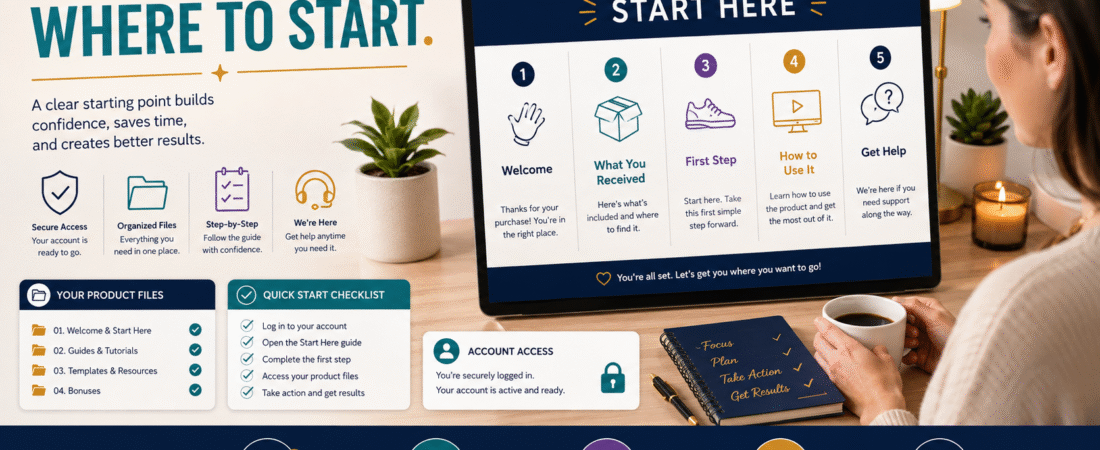
That is where a digital product Start Here guide can make a big difference.
A Start Here guide is not another large bonus.
It is a short orientation document that tells the customer:
What you purchased → what is included → where to begin → what order to follow → where to get help.
For many digital products, one or two pages may be enough.
The purpose is not to add more content.
It is to remove uncertainty.
Why Customers Need Orientation After the Purchase
As the product creator, you already understand the structure.
You know:
- Why each file exists.
- Which document matters most.
- Which bonus is optional.
- Which worksheet comes later.
- Which lesson should be completed first.
The customer does not.
That creates what I call an inside-the-product knowledge gap.
The creator sees an organized system.
The buyer may see a folder full of unfamiliar files.
A Start Here guide closes that gap.
A Delivery Email and Start Here Guide Have Different Jobs
These two documents should work together.
Delivery Email
Answers:
“How do I get what I bought?”
Start Here Guide
Answers:
“Now that I have it, what should I do?”
Do not force the delivery email to contain every product instruction.
Likewise, do not make customers open a 40-page manual just to discover which file comes first.
The broader digital-product customer journey from first click to first success is useful here because successful delivery is only one stage of the customer’s experience.
Step 1: Identify the Customer’s First Success
Before writing the guide, answer:
What is the first useful thing the customer should accomplish?
Not:
What should they read first because I spent the most time creating it?
Think from the customer’s perspective.
For an ebook:
Understand the core framework and choose the first action.
For a template pack:
Open the correct template and customize one copy.
For a course:
Log in and complete the orientation lesson.
For software:
Activate the account and complete one basic task.
For a checklist:
Work through the first section and identify the next action.
Your Start Here guide should lead toward that first success.
Step 2: Keep the Welcome Short
A useful opening may be only a few sentences.
For example:
Welcome to [Product Name]. This Start Here guide will show you what is included, which file to open first, and the simplest way to begin using the product. You do not need to complete everything at once.
That is enough.
Avoid a two-page motivational introduction before the customer reaches the instructions.
Step 3: List Exactly What the Customer Received
Create a simple inventory.
For example:
Your Product Includes
1. Main Guide
The primary training document.
2. Action Workbook
Use this while working through the main guide.
3. Quick-Start Checklist
Use this to track implementation.
4. Template Pack
Editable resources for the tasks described in the guide.
5. Bonus Resource
Optional supporting information.
Now the folder makes sense.
Step 4: Distinguish Required From Optional
This is especially important when a product includes bonuses.
Customers often assume:
More files = more required work.
That can create overwhelm.
Label resources clearly.
For example:
Start With These
- Start Here.
- Main Guide.
- Action Checklist.
Use When Needed
- Templates.
- Reference sheets.
Optional Bonuses
- Bonus training.
- Additional examples.
This tells the customer they do not need to consume everything before receiving value.
Step 5: Give One Clear First Action
A weak Start Here guide says:
“Explore the resources and begin whenever you are ready.”
A stronger guide says:
“Open the Main Guide and complete Sections 1 and 2. Then use the Planning Worksheet before moving to Section 3.”
Specific instructions reduce decision-making.
Step 6: Show the Recommended Order
For a multi-part product, include a simple sequence.
For example:
Recommended Path
- Read Start Here.
- Open Main Guide.
- Complete Worksheet 1.
- Use the checklist.
- Customize the templates.
- Return to the resource section when needed.
If customers can use the product in several ways, say so.
For example:
If you only need the templates, you can go directly to the Template Pack after reading this Start Here guide.
The goal is guidance, not rigid rules.
Step 7: Explain File Types
Beginners may not know what to do with every format.
Briefly explain:
PDF: Read with any standard PDF reader.
DOCX: Editable Microsoft Word document.
ZIP: Compressed folder that must be extracted before using the files inside.
XLSX: Spreadsheet file.
MP4: Video file.
Do not assume every buyer knows why a ZIP file will not behave like a normal folder until extracted.
Step 8: Include Access Information Without Including Passwords
If the product is hosted online, explain:
- Login page.
- Email address normally used.
- Password-reset procedure.
- Where the course or membership appears after login.
Do not place actual customer passwords in the Start Here file.
For example:
Login: Use the email address entered during purchase. If you do not remember your password, use the password-reset option on the login page.
If customers repeatedly lose access, the verified product-access recovery process provides a separate support workflow.
Step 9: Explain How Long the Product Should Take
Be careful with exact completion promises.
Do not say:
“You will master this in 30 minutes.”
unless that is genuinely supportable.
Instead, give structural guidance.
For example:
This guide contains five sections. You can work through them in one sitting or complete one section at a time.
That helps the customer plan without making unrealistic promises.
Step 10: Tell Customers What Not to Do
Sometimes preventing a mistake is helpful.
Examples:
- Do not edit the master template; make a copy first.
- Do not upload private license keys publicly.
- Do not share account credentials.
- Do not skip the setup checklist before using the advanced section.
- Do not use archived product files when an updated version is available.
Keep warnings limited to genuinely important issues.
Step 11: Include the Current Version
Add:
Product Version: 1.0
Last Updated: August 2026
This becomes useful later.
If support asks:
“Which version are you using?”
the customer can answer easily.
It also supports the broader process of maintaining a consistent digital-product update policy.
Step 12: Give Customers a Support Path
Do not merely write:
“Contact us if you need help.”
Tell them how.
For example:
If you have trouble accessing the product or believe a file is missing, use the support email listed on your purchase receipt. Include the product name and the email address used during purchase. Do not send passwords or full payment-card information.
One support path is usually easier to manage than several.
The existing digital-product customer-support system explains how FAQs, templates, troubleshooting, and escalation can support this process.
Step 13: Answer the Three Most Likely Questions
Add a tiny FAQ only if necessary.
For example:
Where should I start?
Open the Main Guide first.
Do I need to use every bonus?
No. Bonuses are optional unless a specific lesson tells you otherwise.
What if I cannot open a file?
Confirm that the file downloaded completely and that you have the appropriate software. Contact support if the problem continues.
Three useful answers are better than 30 questions nobody has asked.
Step 14: Keep the Design Simple
A Start Here guide should be easy to scan.
Use:
- Short headings.
- Numbered steps.
- Checkboxes.
- Bold labels.
- Plenty of white space.
- Clear filenames.
Avoid:
- Long paragraphs.
- Decorative clutter.
- Ten different font styles.
- Tiny text.
- Complex diagrams that require explanation.
This document is navigation.
Design it like navigation.
Step 15: Match the File Names
If the Start Here guide says:
Open Customer Planning Workbook
but the downloaded file is named:
FINALworksheet-v6-revised.docx
you have created new confusion.
Make the wording match the actual delivery files.
For example:
Start Here.pdf
Main Guide.pdf
Action Workbook.pdf
Quick-Start Checklist.pdf
Templates.zip
That makes the instructions self-verifying.
Step 16: Test It as a New Customer
Before publishing the product:
- Complete a test purchase.
- Open the delivery email.
- Download or access the product.
- Read only the Start Here guide.
- Follow its instructions literally.
- Confirm every filename matches.
- Check every link.
- Confirm support information.
- Verify the first action is obvious.
The existing end-to-end digital-product purchase and delivery testing process is a useful place to include this test.
A Simple Start Here Template
START HERE — [PRODUCT NAME]
Welcome
Thank you for purchasing [Product Name]. This page explains what is included and the easiest way to begin.
What You Received
- [Main Product]
- [Workbook]
- [Checklist]
- [Templates]
- [Optional Bonus]
Begin Here
Your first step is:
[Exact first action.]
Recommended Order
- [Step]
- [Step]
- [Step]
- [Step]
Optional Resources
[Explain what can be skipped until needed.]
Product Version
Version: [Number]
Updated: [Date]
Need Help?
[Approved support method.]
Never send passwords or full payment-card information through ordinary support messages.
Watch for Repeated Confusion
After the product is live, keep track of customer questions.
If several customers ask:
“Which file do I open first?”
improve the Start Here guide.
If several ask:
“Where is the template?”
make the file name or folder structure clearer.
If several ask:
“Do I have to complete all the bonuses?”
add that answer.
Customer questions can become usability evidence.
Do Not Turn Start Here Into Another Product
A common mistake is making the Start Here document too large.
It becomes:
- Welcome.
- 10-page explanation.
- Background theory.
- Full tutorial.
- FAQ.
- Upsell.
- Biography.
- Affiliate recommendations.
Now the customer needs a Start Here guide for the Start Here guide.
Keep it focused.
A Good Test
Ask:
Can a brand-new customer understand what to do within about one minute of opening this file?
If yes, the guide is probably doing its job.
Conclusion
A digital product does not become easier to use simply because all the files were delivered successfully.
Customers still need orientation.
Create a short Start Here guide that explains:
- What they received.
- What is required.
- What is optional.
- Which file comes first.
- What action to take.
- Where to get help.
Keep it short.
Match the real filenames.
Test it like a customer.
The goal is not to give buyers more information.
It is to make the information they already purchased easier to use.