A customer sends an email because a download link does not work.
You fix it.
A week later, another customer says the instructions on page 14 are confusing.
You explain them.
Then someone else cannot find the bonus file.
You send the location.
Each problem gets solved.
But there is a hidden weakness in this approach:
The problem disappears from your attention as soon as the customer is helped.
That means the same issue can come back again and again.
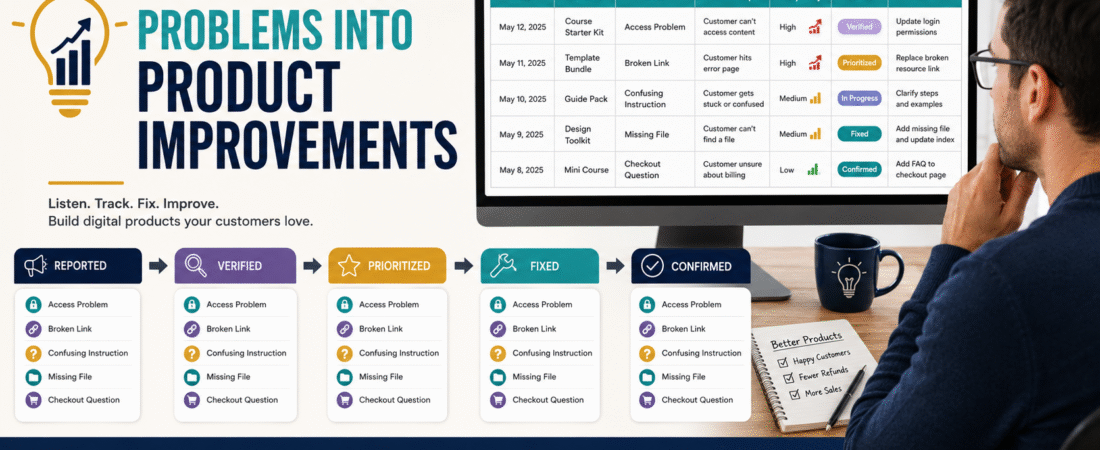
A digital product issue log gives you a simple place to record recurring problems so customer-support work can eventually improve the product itself.
The workflow is straightforward:
Record → Verify → Categorize → Prioritize → Fix → Confirm → Close
This is different from keeping a customer-feedback list.
Feedback tells you what people think, request, or suggest.
An issue log tracks something that is not working as intended, is creating confusion, or is causing preventable customer friction.
What Belongs in an Issue Log?
Useful examples include:
- Broken download link.
- Incorrect file.
- Missing bonus.
- Login problem.
- Instructions that repeatedly confuse customers.
- Outdated screenshot.
- Typographical error that changes meaning.
- Checkout problem.
- Delivery email problem.
- Product file that will not open.
- Incorrect resource URL.
- Mobile usability issue.
- Duplicate lesson.
- Wrong product version delivered.
The log should not become a dumping ground for every comment.
A customer saying:
“I wish this course had 25 additional lessons.”
is feedback.
A customer saying:
“Lesson 4 tells me to download a file that is not there.”
is an issue.
That distinction keeps the system useful.
Why Support Emails Alone Are Not Enough
You could leave every issue in your email inbox.
The problem is that email is organized around conversations, not product improvement.
Six customers may report the same problem using six different subject lines.
Unless someone notices the pattern, the creator keeps answering each message individually.
A dedicated issue log makes repeated problems visible.
This builds naturally on a structured digital-product customer-support system.
The support system handles the customer.
The issue log helps improve the system that caused the question.
Start With Seven Fields
You do not need complicated project-management software.
A spreadsheet can work.
Create these columns:
| Field | Purpose |
|---|---|
| Date | When the issue was reported |
| Product | Which product is affected |
| Issue | Short description |
| Category | Access, content, delivery, checkout, etc. |
| Impact | How serious is it? |
| Frequency | How often has it appeared? |
| Status | New, reviewing, fixed, closed |
You can add more later only if useful.
Write the Issue Clearly
Weak entry:
Customer had problem.
Better:
Customer downloaded Templates.zip, but the folder did not contain Template 3 referenced on page 18 of the guide.
The second entry is testable.
Someone can reproduce it.
That matters because the first question should be:
Is there actually a product problem?
Verify Before Changing the Product
Not every support request means something is broken.
A customer may have:
- Missed an instruction.
- Used an old link.
- Entered the wrong email.
- Opened the wrong file.
- Experienced a local browser problem.
Verify first.
For example:
- Open the product as a customer.
- Follow the relevant instruction.
- Test the link or file.
- Reproduce the reported problem.
- Record the result.
If the problem cannot be reproduced, do not immediately redesign the product.
Record:
Unable to reproduce — monitor for additional reports.
Categorize Issues
A simple set of categories might be:
Access
- Login.
- Password reset.
- Customer account.
- Membership permission.
Delivery
- Missing email.
- Broken download.
- Incorrect product.
Content
- Incorrect instruction.
- Missing section.
- Outdated information.
- Error.
Usability
- Confusing navigation.
- Difficult file structure.
- Unclear starting point.
Checkout
- Coupon issue.
- Payment flow.
- Wrong product name.
- Pricing-display problem.
Technical
- File will not open.
- Mobile problem.
- Browser issue.
Categories help reveal patterns.
Add an Impact Level
Not every issue deserves the same urgency.
Use something simple.
Critical
Customers cannot purchase or receive the product.
Examples:
- Checkout broken.
- Product completely inaccessible.
- Main file missing.
High
Customers can purchase but a major part of the experience is impaired.
Medium
Issue creates confusion but has a workaround.
Low
Minor formatting, wording, or cosmetic problem.
Now you can prioritize rather than fixing whichever issue happens to be newest.
Frequency Matters Too
An issue reported once may be isolated.
An issue reported ten times is evidence of repeated friction.
Track frequency.
For example:
| Issue | Impact | Reports |
|---|---|---|
| Broken checkout | Critical | 1 |
| Confusing login email | High | 9 |
| Typo on page 22 | Low | 2 |
The checkout issue gets immediate attention even though only one person reported it.
The login-email issue also deserves attention because it is repeated.
Frequency and severity should be considered together.
Connect the Issue Log to Customer Feedback
Your issue log and customer-feedback system should work together without becoming the same document.
The verified customer feedback loop for digital products helps separate repeated evidence from isolated suggestions.
A repeated statement such as:
“I do not understand where to begin.”
may start as feedback.
If enough customers experience the same confusion, it can become a usability issue worth fixing.
Record the Current Product Version
Include:
Affected Version: V1.2
This becomes important after updates.
Suppose Version 1.3 fixes the problem.
If someone later reports the same issue, first determine which version they have.
That is much easier when product files are already organized with clear version numbers.
The existing digital-product file organization system can support this process.
Separate Workaround From Permanent Fix
Suppose a download link fails.
Immediate Workaround
Email the customer the correct file.
Permanent Fix
Repair the delivery link so future customers receive the correct file automatically.
These are not the same thing.
The first solves one customer’s problem.
The second solves the business problem.
Record both.
Add a Root-Cause Field Only When Needed
For repeated or serious issues, ask:
Why did this happen?
Possible causes:
- File renamed after delivery setup.
- Outdated URL.
- Product updated but delivery package was not.
- Email template references old instructions.
- Plugin update caused conflict.
- Checkout configuration changed.
- Customer onboarding is unclear.
Do not perform a lengthy root-cause analysis for a spelling error.
Use more investigation for problems likely to recur.
Create a Status System
Use:
New
Issue has been recorded.
Verified
Problem has been reproduced or confirmed.
Planned
Fix has been chosen.
Fixed
Change has been made.
Testing
Fix is being checked.
Closed
Fix is confirmed.
This prevents a problem from being marked solved merely because someone changed something.
Always Retest
Suppose you fix a broken link.
Test it.
Suppose you rewrite instructions.
Follow them as though you were the customer.
Suppose you replace a ZIP file.
Download and extract it.
A fix that has not been tested is still an assumption.
Add the Fix to Your Product Change History
For meaningful changes, record:
Version 1.3 — September 2026
Corrected download link in Module 2 and replaced missing template.
This supports a clear digital-product update policy.
Not every small correction requires a customer announcement.
But you should know what changed.
Use the Log During Your Post-Launch Review
A launch produces a concentrated amount of customer evidence.
Afterward, review:
- Number of issues.
- Categories.
- Severity.
- Repeated problems.
- Time required to solve them.
- Permanent fixes completed.
The existing digital-product post-launch review process can use this issue log as evidence instead of relying on memory.
Do Not Add Every Suggested Feature
An issue log is not a feature-request list.
Example:
“The login link is broken.”
Issue.
“Please add a private social network.”
Feature request.
Both may be useful information.
They require different decisions.
Keep them separate.
Review the Log Monthly
Once a month:
- Filter for open issues.
- Look for repeated categories.
- Identify unresolved high-impact problems.
- Close fixes that were successfully tested.
- Move feature requests out of the issue list.
- Check whether old issues returned.
- Choose the next permanent improvement.
This can take very little time when the log is maintained consistently.
A Simple Issue-Log Template
Date:
[Date]
Product:
[Name]
Version:
[Version]
Issue:
[What happened]
Category:
[Access / Delivery / Content / Usability / Checkout / Technical]
Impact:
[Critical / High / Medium / Low]
Frequency:
[Count]
Verified:
[Yes / No]
Immediate Workaround:
[If applicable]
Permanent Fix:
[Action]
Status:
[New / Verified / Planned / Fixed / Testing / Closed]
Closed Date:
[Date]
The Most Important Question
When you close an issue, ask:
Did I solve the customer’s message—or did I solve the reason the message happened?
Sometimes the correct answer is only the first.
That is fine.
But repeated support problems should eventually produce better documentation, better delivery, or a better product.
Conclusion
Customer support should do more than make individual problems disappear.
A digital product issue log helps you capture what happened, verify it, measure its impact and frequency, prioritize the right fix, test the result, and record the change.
Keep the system simple.
You do not need complicated bug-tracking software.
A clear spreadsheet can be enough.
The real benefit is that the tenth customer should not have to report a problem that the first nine customers already taught you how to fix.