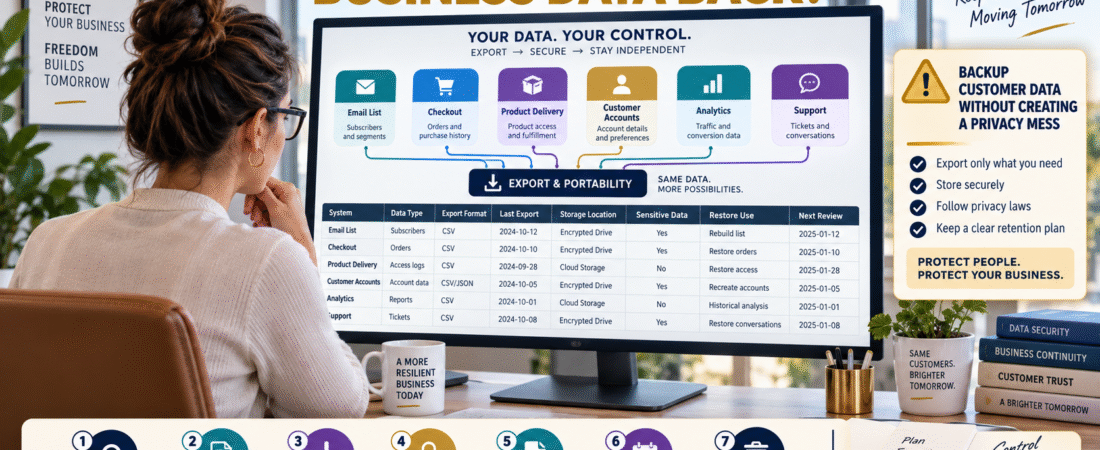
An online business can depend heavily on data stored inside other companies’ platforms.
That may include:
- Email subscribers.
- Customer names.
- Purchase records.
- Product-access records.
- Tags.
- Segments.
- Subscription status.
- Support history.
As long as the platform works, the data feels available.
But what happens if:
- You change platforms?
- An account becomes inaccessible?
- A service closes?
- An integration fails?
- You need to reconstruct customer access?
A sensible export process can improve business continuity.
But blindly downloading customer databases everywhere creates a different risk.
You do not want:
Better backup
to become:
More uncontrolled copies of sensitive information.
The goal is:
Identify Critical Data → Export Only What Matters → Store It Securely → Document It → Remove Obsolete Copies
Start With the Recovery Question
Do not begin with:
“What can I download?”
Ask:
“What information would I need to keep the business operating or restore customers if this platform became unavailable?”
That produces a much smaller and more useful dataset.
Email Subscriber Data
An email platform may contain:
- Email address.
- Name.
- Subscription date.
- Tags.
- Lists.
- Custom fields.
- Consent information.
- Automation status.
The most important recovery data may be:
- Subscriber identity.
- Permission or subscription status.
- Segmentation information.
Not every behavioral record needs to become a permanent offline file.
Customer Purchase Records
Your checkout or payment systems may contain:
- Customer.
- Product.
- Purchase date.
- Transaction.
- Subscription status.
This information can become important when someone says:
“I paid for this product but cannot access it.”
A current export may help reconstruct access when appropriate.
Product-Delivery Records
Your product platform may hold:
- Customer access.
- Membership status.
- Product ownership.
- Course enrollment.
Ask:
Could I identify who should have access if this platform disappeared?
If the answer is no, determine whether an appropriate export exists.
Do Not Create Unnecessary Copies
Every exported customer file becomes another file that must be protected.
Avoid storing the same customer database in:
- Downloads folder.
- Desktop.
- Email attachment.
- USB drive.
- Cloud drive.
- Old laptop.
Use a controlled location.
Record What the Export Contains
A filename such as:
customers.csv
is weak.
Use something like:
EmailSubscribers_2026-09-12.csv
Then document:
System: Email Platform
Data: Subscriber records
Export Date: September 12, 2026
Purpose: Migration/recovery
Storage: Secure business backup location
Now the file has context.
Track the Format
Exports may use:
- CSV.
- XLSX.
- JSON.
- ZIP.
- PDF.
CSV is common for subscriber and customer lists.
But ask:
Can I actually open and understand the file?
A backup in an unfamiliar proprietary format may provide limited practical recovery value.
Test Readability
You do not need to perform a full migration every time.
But open the exported file.
Confirm:
- Headers exist.
- Rows contain expected information.
- Important fields are present.
- File is not corrupted.
A file you never tested is only a presumed backup.
Protect Sensitive Exports
Customer exports can contain personal information.
Treat them accordingly.
That may include:
- Restricted access.
- Secure cloud storage.
- Device encryption.
- Controlled sharing.
- Appropriate retention.
Do not upload customer databases casually to unrelated tools or AI systems.
Avoid Passwords and Payment Credentials
Customer-data exports should not contain:
- Passwords.
- Full payment card numbers.
- Secret keys.
- Security codes.
Those belong in dedicated secure systems.
If an export unexpectedly contains highly sensitive information, understand what it contains before creating additional copies.
Decide How Often to Export
The correct frequency depends on how quickly the data changes.
HIGH-ACTIVITY BUSINESS
A weekly or monthly export may be appropriate.
SMALL SLOW-GROWING BUSINESS
Monthly or quarterly may be adequate.
STATIC ARCHIVE
Less frequent.
Ask:
How much recent customer information could I afford to reconstruct manually?
That helps set the frequency.
Use a Schedule Rather Than Memory
Add the export to a recurring business-maintenance checklist.
For example:
FIRST DAY OF EACH MONTH
- Export subscriber list.
- Export customer purchase records where appropriate.
- Confirm secure storage.
- Delete obsolete duplicate exports according to your retention policy.
- Record completion date.
Now it becomes a system.
Use Your Digital Asset Inventory
Your digital business asset inventory can identify which systems contain critical data.
Add a field:
Customer Data Export Available?: Yes / No
That immediately shows which platforms may require more recovery planning.
Connect the Export to Customer Access Recovery
Your product access recovery process becomes more resilient when purchase and ownership information can be verified.
An export should support a documented process.
It should not simply accumulate files.
Think About Platform Migration
A customer-data export also helps when switching software.
Before canceling a platform:
- Export critical records.
- Verify the file.
- Confirm migration format.
- Import or test the replacement.
- Keep the old platform until key data is validated when practical.
Never cancel first and ask about export options later.
Separate Operational Backups From Analytics Archives
Subscriber and purchase records help operate the business.
Analytics exports may serve a different purpose.
Do not combine every data source into one giant backup folder with no structure.
Use categories such as:
Customers
Subscribers
Products
Analytics
Financial Records
This makes recovery easier.
Create a Retention Rule
More backups are not automatically safer.
If you export the same list every month, you may eventually accumulate dozens of old customer datasets.
Define:
- What you keep.
- How long.
- Why.
- How obsolete files are securely removed.
This reduces unnecessary exposure.
Document the Last Successful Export
Use a simple register:
| System | Data | Last Export | Format | Secure Location | Tested |
|---|
Now you can immediately see which backup is stale.
Do Not Assume “Cloud” Means Exported
A SaaS provider may back up its own infrastructure.
That is not the same as you having a portable copy of your business data.
Provider backups help the provider restore the platform.
Your export may help you migrate or recover information outside that platform.
They serve different purposes.
A Simple Customer Data Export Checklist
For each important system record:
System:
Critical Data:
Can Export?:
Format:
Last Export:
Secure Storage:
File Tested?:
Contains Sensitive Data?:
Recovery Purpose:
Retention Rule:
Next Export:
That is enough for a small business.
Keep the Process Proportional
Do not create enterprise-level data-management complexity for a small list.
You need enough protection to support:
- Recovery.
- Migration.
- Customer support.
- Continuity.
Not endless administration.
Conclusion
Customer and subscriber data can become one of the most valuable operational assets in an online business.
A sensible export process should answer:
What data matters?
Can I retrieve it?
Can I read it?
Is it stored securely?
Do I know what it would be used to restore?
The goal is not to create as many backups as possible.
It is to maintain the minimum useful, secure, documented copies needed for continuity and migration.
Your Next Action
Write down the five systems most likely to contain customer or subscriber data.
For example:
Email Platform | Checkout | Product Delivery | Payment System | Customer Support
Beside each, record:
Can Export? | Last Export Date | File Format | Secure Storage Location
Choose the system with the oldest or missing export.
Create one current export today if doing so is appropriate for that system.
Open the file and confirm that it contains the fields you would actually need for recovery.
Then add a recurring calendar or monthly-maintenance task:
“Review critical customer-data exports.”
Do not download every possible dataset.
Start with the one export that would be hardest to reconstruct if the platform disappeared.