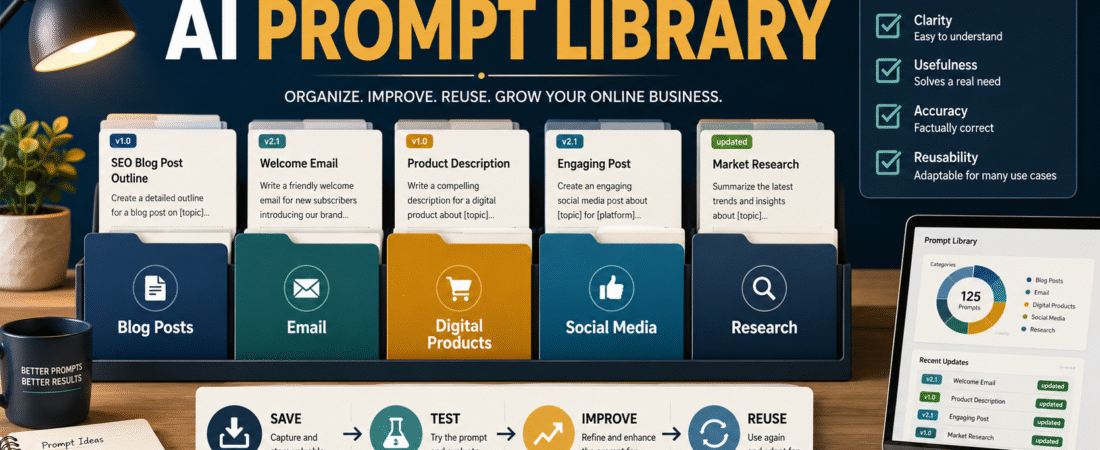
Many beginners use an AI tool successfully one day and then struggle to reproduce the result later. The problem is not always the tool. It is often the absence of a system for saving what worked.
An AI prompt library is a collection of reusable instructions organized by task. Instead of rewriting directions every time you need an article outline, email, checklist, or social-media post, you begin with a tested prompt and adjust only the details that change.
The most useful prompt library is not the largest one. It is the one you can understand, update, and use consistently.
Key Takeaways
- Save prompts that support tasks you expect to repeat.
- Organize prompts by business purpose rather than collecting them in one large document.
- Include placeholders for information that changes from one assignment to another.
- Test each prompt with several topics before treating it as reliable.
- Save notes about what the prompt does well and where human review is required.
Affiliate Disclosure: This article contains affiliate links. If you purchase through one of these links, I may earn a commission at no additional cost to you. Affiliate compensation does not determine the conclusions or recommendations presented in this article.
What Is an AI Prompt Library?
An AI prompt library is an organized collection of instructions that you can reuse for recurring work.
A library may contain prompts for:
- Developing blog-post ideas
- Creating article outlines
- Drafting email messages
- Planning ebooks
- Writing video scripts
- Developing lead magnets
- Reviewing content
- Comparing product options
- Turning one piece of content into several formats
- Creating quality-control checklists
A prompt library is different from a folder filled with AI-generated content. The generated article, email, or checklist is the completed asset. The prompt is the reusable set of instructions that helped produce it.
Saving both can be useful, but they serve different purposes.
Why Beginners Benefit From Saving Prompts
Starting every AI session with an empty message box creates unnecessary work.
You may remember the general topic but forget important instructions concerning:
- The intended audience
- The desired tone
- The required length
- The information that must be included
- The information that must be avoided
- The correct output order
- The review process
- The final formatting
A saved prompt gives you a repeatable starting point.
It also makes it easier to identify why one result is better than another. When you save the prompt, the output, and a few notes, you can see which instructions influenced the finished work.
This does not mean that every output will be identical. A reusable prompt should create consistency in the process while allowing the subject, examples, recommendations, and wording to change.
Start With Tasks You Already Repeat
Do not begin by collecting hundreds of prompts from the internet.
Start by listing the tasks you complete more than once.
For a small online business, those tasks might include:
- Selecting a blog topic
- Creating an article outline
- Writing a first draft
- Reviewing the draft
- Creating a featured-image prompt
- Writing an email announcement
- Turning the article into a short video
- Preparing social-media posts
- Evaluating a digital-product idea
- Creating a customer checklist
Choose three to five tasks that consume the most time or cause the most confusion. Build prompts for those tasks first.
This creates a practical library based on your actual work instead of a collection of prompts you may never use.
Create Simple Prompt Categories
A beginner-friendly library might include the following folders.
Content Planning
Use this folder for:
- Topic development
- Audience questions
- Search-intent planning
- Content calendars
- Article-angle selection
- Content-series planning
Blog and Article Creation
Use this folder for:
- Article outlines
- Introductions
- Step-by-step guides
- Comparison articles
- Editing
- Fact-checking reminders
- Final quality reviews
Email Marketing
Use this folder for:
- Welcome emails
- Educational newsletters
- Product announcements
- Follow-up messages
- Subject-line ideas
- Reengagement messages
Digital Products
Use this folder for:
- Ebook planning
- Checklist development
- Course outlines
- Worksheet ideas
- Product-positioning statements
- Customer-problem research
Social Media and Video
Use this folder for:
- Facebook posts
- LinkedIn posts
- Short-video scripts
- Captions
- Pinned comments
- Content-repurposing instructions
You can store these folders in a word-processing document, spreadsheet, note-taking application, cloud folder, or another system you already understand.
The best location is the one you will actually open and maintain.
The Six Parts of a Reusable Prompt
A reliable prompt usually needs more than a one-sentence request.
OpenAI’s current prompting guidance recommends giving clear, specific instructions, supplying enough context, and refining the prompt after reviewing the response.
Use the following six-part structure.
1. Role
Explain the perspective or expertise needed for the task.
Example:
Act as a beginner-friendly online-business educator and professional blog writer.
A role gives the AI a general frame of reference, but it should not replace specific instructions.
2. Task
State exactly what needs to be created.
Example:
Create a complete article explaining how a retiree can select a manageable digital-product idea.
Avoid vague directions such as:
Write something good about digital products.
3. Audience
Describe the intended reader.
Example:
Write for beginners and retirees who have useful knowledge but limited experience selling digital products.
The audience affects the vocabulary, examples, assumptions, and explanations.
4. Context
Provide background that the AI needs to understand the assignment.
You might include:
- The website
- The subject
- The reader’s main problem
- The purpose of the article
- Products that may be mentioned
- Information that must remain private
- Relevant source materials
5. Requirements
List the specific rules the output must follow.
Requirements may include:
- Required sections
- Approximate length
- Tone
- Formatting
- Affiliate disclosure
- Facts that require verification
- Prohibited claims
- Required examples
- Conclusion and next action
6. Output Format
State the order in which the information should appear.
For example:
- Article title
- Introduction
- Main sections
- Practical example
- Common mistakes
- Conclusion
A clear output order reduces the chance that important pieces will be omitted.
Use Placeholders for Information That Changes
A reusable prompt should not be tied permanently to one topic.
Use brackets to mark information that must be replaced.
For example:
Create a beginner-friendly article about [TOPIC] for [WEBSITE]. The primary reader is [AUDIENCE], and the article should help the reader accomplish [RESULT].
Other useful placeholders include:
- [DATE]
- [PRODUCT]
- [PRIMARY QUESTION]
- [ARTICLE TYPE]
- [AFFILIATE TOOL]
- [EXAMPLE]
- [WORD RANGE]
- [CALL TO ACTION]
- [SOURCE MATERIAL]
Before submitting the prompt, replace every placeholder with the correct information.
Leaving a placeholder unchanged may produce generic text or cause the AI to invent details.
Create a Prompt Record for Each Reusable Task
Every saved prompt should have a short information section.
Use this format:
Prompt Name:
Beginner Step-by-Step Blog Article
Purpose:
Creates a complete educational article for beginners.
Best Used For:
AI education, online business, email marketing, and digital-product topics.
Required Inputs:
Topic, audience problem, primary result, website, affiliate recommendation, and publication date.
Last Tested:
[Date]
Current Version:
Version 1.0
Known Strengths:
Produces organized explanations and actionable steps.
Review Carefully For:
Current facts, repeated language, unsupported product claims, and missing examples.
This information makes the prompt easier to use months later.
Test a Prompt Before Adding It to the Main Library
A prompt that works once may still be too dependent on the first topic.
Test it with at least three different assignments.
For example, test a step-by-step article prompt with:
- Building an email list
- Planning a first ebook
- Organizing an AI workflow
Then compare the results.
Ask:
- Did each article address the correct audience?
- Did the structure fit all three subjects?
- Did the prompt create unnecessary repetition?
- Were any required sections missing?
- Did it invent personal experience?
- Did the affiliate recommendation feel natural?
- Was the final action clear?
Revise the prompt when you notice a repeated problem.
Use Version Numbers
Do not overwrite a reliable prompt without keeping a record of the earlier version.
Use simple version labels:
- Version 1.0: Original prompt
- Version 1.1: Small wording or formatting adjustment
- Version 2.0: Significant change to structure or requirements
- Version 3.0: Major updated workflow
Add a brief note explaining what changed.
For example:
Version 1.1 removed hashtags and added a required WordPress category.
Version notes help you avoid returning to an older format accidentally.
Separate Master Prompts From Task Prompts
A master prompt controls a complete workflow. A task prompt performs one smaller part of that workflow.
For example, a blog-publishing master prompt may control:
- Topic selection
- Article structure
- Featured-image information
- Affiliate links
- Quality review
- Website order
A smaller task prompt might only:
- Review an article for repeated ideas
- Develop five title options
- Create a featured-image prompt
- Rewrite one confusing section
- Check whether an article answers its primary question
Keeping these separate makes the library easier to manage.
A Practical Beginner Example
Imagine a retired teacher who publishes articles about AI and online business.
At first, each article is created through a long conversation. The teacher explains the audience, length, tone, fields, disclosure, and formatting every time.
The results vary because some instructions are forgotten.
The teacher creates three reusable prompts:
- A complete blog-article prompt
- A final quality-control prompt
- A social-media repurposing prompt
Each prompt includes placeholders for the topic, date, audience problem, and affiliate recommendation.
After testing them on several subjects, the teacher saves the best versions in folders. A short note explains when each prompt should be used.
The next article still requires judgment and editing, but the setup process becomes more consistent.
When a Product-Creation Tool May Help
A prompt library can support the planning of ebooks, guides, checklists, and other digital products. It does not replace your responsibility to decide what the audience needs or to review the completed work.
People who want additional assistance developing digital-product ideas and content assets can review the current AI Product Engine offer.
The tool may be relevant when you already have a clear audience and product purpose. It may be unnecessary if you only need a simple document for storing prompts or if you are still deciding whom you want to help.
Common Prompt-Library Mistakes
Saving Every Prompt
A library becomes difficult to use when it contains dozens of untested variations of the same instruction.
Save the prompts that support repeated work. Archive experiments separately.
Using Unclear Names
Names such as “Good Prompt,” “New Prompt,” and “Prompt Final” provide little guidance.
Use descriptive names:
- Beginner Blog Article Prompt
- Email Welcome Sequence Prompt
- Digital Product Review Prompt
- Final Article Quality-Control Prompt
Forgetting the Intended Website
A prompt created for an educational AI website may not fit a tactical marketing website or a product-review website.
Include the website’s purpose and audience in the prompt.
Treating the First Output as Final
A strong prompt can improve consistency, but every output still requires review.
Check facts, links, instructions, examples, tone, and relevance before publishing.
Making the Prompt Too Complicated
A master prompt may need detailed rules, but not every small task requires several pages of instructions.
Use the shortest prompt that reliably controls the assignment.
A 30-Minute Prompt-Library Setup
First 10 Minutes
List five tasks you repeat regularly.
Next 10 Minutes
Create folders for those tasks and collect the prompts you already use.
Final 10 Minutes
Choose one prompt, add placeholders, name it clearly, and test it with a new topic.
You do not need to organize your entire business in one session. Begin with the prompt that would save you the most repeated effort.
Conclusion
An AI prompt library gives you a practical way to save, test, improve, and reuse the instructions behind your best workflows.
Begin with a few recurring tasks, organize prompts by business purpose, use clear placeholders, test each prompt across several assignments, and maintain simple version notes.
Select one task you complete repeatedly and turn its instructions into the first tested prompt in your library.