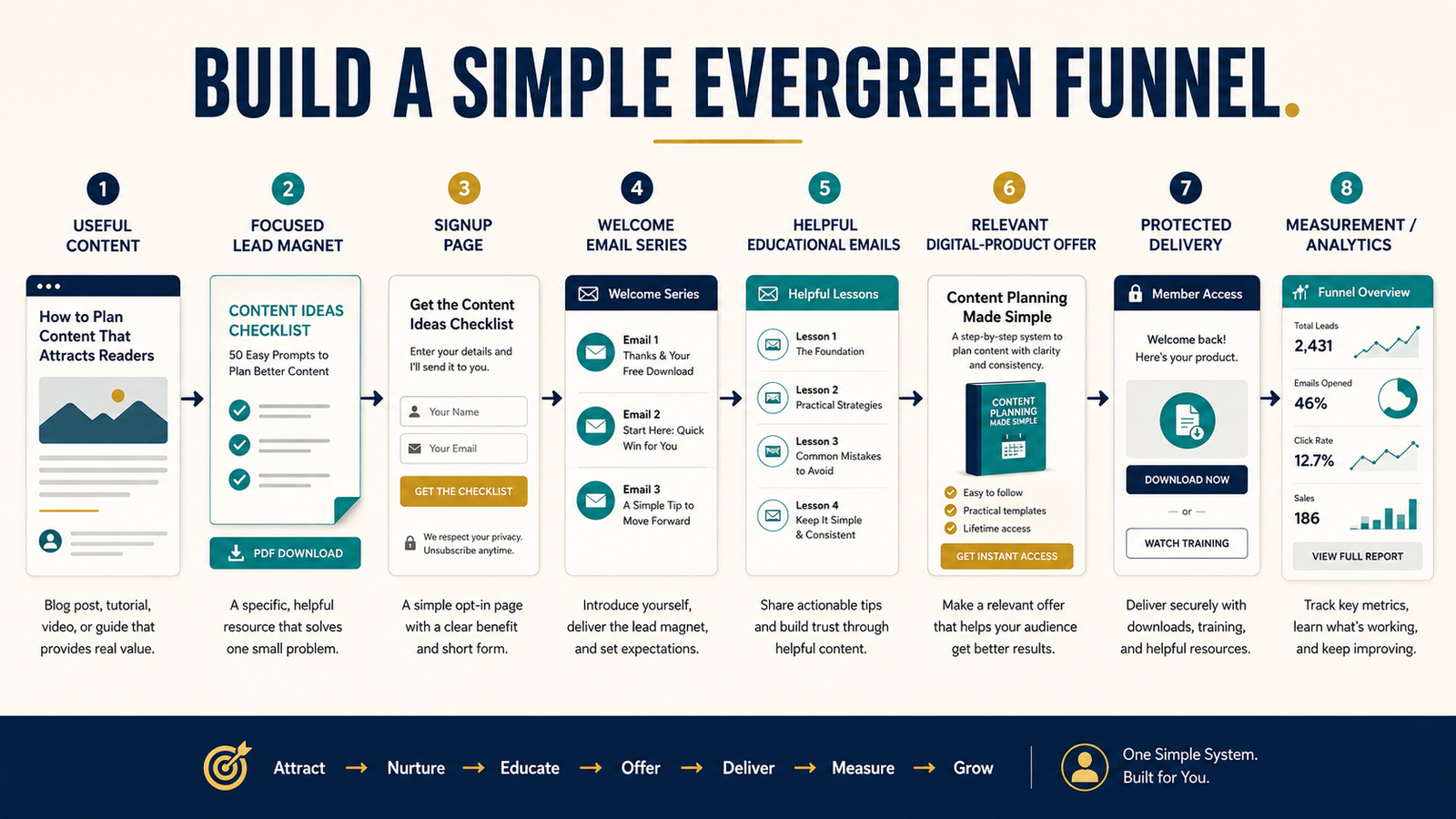
An evergreen sales funnel does not need fifteen pages, complicated automation branches, expensive advertising, and dozens of emails.
For a beginner or solo creator, a useful first funnel can be much simpler:
Helpful content → relevant lead magnet → signup page → welcome sequence → educational follow-up → relevant product offer → delivery and support.
The purpose is to create a repeatable path that helps the right person move from discovering your content to understanding a problem and deciding whether your product is an appropriate next step.
GetResponse currently describes opt-in, lead-magnet, sales, and webinar funnels that combine landing pages, signup forms, email follow-up, and related marketing tools. Its current pricing also shows that funnel and automation capabilities vary among plans.
The important lesson is not that you need a particular platform. It is that the pieces should work together around one clear audience need.
Key Takeaways
- Begin with one product and one intended buyer.
- Build the funnel backward from the product’s result.
- Use a closely related lead magnet.
- Keep the signup page focused.
- Start with a short welcome sequence.
- Educate before making repeated offers.
- Automate only a process you understand manually.
- Measure useful actions rather than building more pages.
Start With One Product
A common mistake is building a funnel before deciding what it should ultimately support.
Choose one product.
It might be:
- An ebook.
- A workbook.
- A template package.
- A mini course.
- A complete course.
- A digital toolkit.
- A membership.
- A software product.
Write down:
- Who it is for.
- What problem it solves.
- What result it helps deliver.
- What the buyer needs to know before purchasing.
- What objections or concerns may prevent the purchase.
- What information would help the buyer make an informed decision.
Suppose your product is an ebook that teaches retirees how to choose a manageable online-business model.
The funnel should not begin with a generic giveaway about “100 Ways to Make Money Online.”
A better lead magnet might be:
“The Retiree Online-Business Decision Checklist.”
The free resource and paid product address different stages of the same problem.
Work Backward From the Purchase Decision
Ask:
“What must someone understand before this product makes sense?”
For an ebook about building an email list, the potential buyer may need to understand:
- Why an email list matters.
- What a lead magnet does.
- What email software is required.
- How subscribers join.
- What happens after signup.
- Why the ebook provides a useful next level of guidance.
These questions can become:
- Blog posts.
- Videos.
- Lead magnets.
- Welcome emails.
- Educational emails.
The funnel becomes a teaching system.
Stage 1: Helpful Content
Your first stage helps people discover you.
Possible content includes:
- Search-focused blog articles.
- YouTube videos.
- Short videos.
- Social posts.
- Podcast appearances.
- Guest articles.
- Email referrals.
- Helpful answers in communities where promotion is permitted.
The content should solve a real problem even if the reader never enters the funnel.
Examples:
- How to choose an ebook topic.
- How to create a lead magnet.
- What email automation means.
- Ebook versus course for beginners.
- Common mistakes when selecting digital-product software.
At the end, offer the next resource only when it naturally fits.
Stage 2: One Focused Lead Magnet
The lead magnet should solve a problem immediately before the paid product.
If the product teaches complete ebook creation, possible lead magnets include:
- Ebook Topic Validation Checklist.
- Ten-Question Ebook Planning Worksheet.
- First Ebook Outline Template.
- Ebook Creation Tool Checklist.
The lead magnet should not be unrelated merely because it attracts many subscribers.
A person downloading “50 Inspirational Quotes” may have no interest in creating an ebook.
Stage 3: A Simple Signup Page
The landing page needs to answer:
- What is this?
- Who is it for?
- What will it help me do?
- What do I receive?
- What happens after I subscribe?
GetResponse’s current landing-page builder combines forms, page creation, performance reporting, and connections with email marketing and automation. Its current documentation also says free/trial and paid capabilities differ, so users should verify plan limits before building a permanent funnel.
A simple signup page might contain:
Headline: Choose Your First Ebook Topic With a 10-Question Worksheet
Explanation: Use this beginner-friendly worksheet to compare your ideas according to audience need, your knowledge, scope, and production time.
Benefits:
- Narrow several ideas to one.
- Identify an audience problem.
- Avoid choosing a topic that is too broad.
- Create the foundation for an outline.
Then show the form.
Avoid multiple menus, unrelated offers, and several competing buttons.
Stage 4: Deliver the Resource
The resource should arrive immediately.
A good first email can include:
- Welcome.
- Download link.
- Brief instructions.
- What the subscriber should expect next.
- One question that encourages a reply.
Do not use the first message mainly to sell.
The subscriber joined for the resource. Deliver it first.
Stage 5: Create a Short Welcome Sequence
A beginner can start with three to five emails.
Email 1: Deliver the resource
Purpose: fulfill the promise.
Email 2: Explain the next problem
Purpose: help the subscriber apply the lead magnet.
Email 3: Share an example
Purpose: make the process easier to understand.
Email 4: Address a common mistake
Purpose: prevent a predictable problem.
Email 5: Present the product
Purpose: explain how the paid product helps the subscriber continue.
This is enough to establish the basic system.
GetResponse’s Starter plan currently includes a welcome email series and one custom automation workflow, while higher plans add broader automation capabilities and sales-funnel features. Verify current pricing and limits before choosing a plan because these details can change.
Write Emails That Continue the Lesson
Each message should have one primary purpose.
If your lead magnet helps readers choose an ebook subject:
Email 2: How to determine whether the idea is too broad.
Email 3: A hypothetical example of narrowing an idea.
Email 4: The mistake of creating before validating.
Email 5: How your complete ebook-creation guide continues the process.
The product offer now feels connected to the education.
Present the Offer Clearly
A product email should explain:
- What the product is.
- Who it is for.
- The result it is designed to support.
- What is included.
- What effort is required.
- Important limitations.
- Price.
- How delivery works.
- Refund terms when applicable.
- Where to get help.
Avoid:
- Guaranteed income.
- Fake deadlines.
- Unsupported scarcity.
- Invented testimonials.
- Fake screenshots.
- “Anyone can succeed” claims.
A credible offer should help the subscriber make an informed choice.
Build the Product Page
A basic sales page may include:
- Clear product title.
- Intended buyer.
- Problem.
- Desired result.
- What is included.
- How the product works.
- Examples or screenshots.
- What it does not include.
- Price.
- Guarantee or refund information when applicable.
- Frequently asked questions.
- Purchase button.
The page does not need dozens of sections.
Answer the questions a reasonable buyer would ask.
Create Reliable Delivery
After purchase, the buyer should know:
- Payment was received.
- Where to access the product.
- How to log in.
- How to download files.
- Where to request support.
- Whether future updates are included.
Affiliate Disclosure: This article contains affiliate links. If you purchase through one of these links, I may earn a commission at no additional cost to you. Affiliate compensation does not determine the conclusions or recommendations presented in this article.
For ebooks, courses, memberships, downloads, and other digital products, you can review ProductDyno’s current delivery options.
Before using any delivery platform, test the entire purchase-to-access experience yourself.
Add Email Automation Only After the Sequence Makes Sense
Automation should reproduce a process you understand.
GetResponse currently describes automation workflows that can send messages to new subscribers and guide customers through a sequence based on configured conditions.
Begin with:
Trigger: Subscriber joins the lead-magnet list.
Action: Send delivery email.
Wait: One day.
Action: Send lesson.
Wait: Two days.
Action: Send example.
Wait: Two days.
Action: Send product education.
You can add tagging and branches later.
Do not build a complicated automation map simply because the software allows it.
Keep the Funnel Evergreen
Evergreen does not mean “never update.”
It means the funnel is not dependent on a specific launch date.
Review it periodically for:
- Broken links.
- Outdated product screenshots.
- Changed prices.
- Expired affiliate offers.
- New legal requirements.
- Old software instructions.
- Weak emails.
- Lead magnets that no longer match the audience.
- Product updates.
- Delivery problems.
An evergreen system still requires maintenance.
The goal is manageable maintenance, not zero maintenance.
Use One Main Email Platform
A beginner usually does not need separate services for every part of the first funnel.
GetResponse currently offers email marketing, forms, landing pages, welcome messages, and automation in the same ecosystem, with broader funnel features on higher plans.
You can explore GetResponse’s current email and automation options if you want to evaluate whether one platform can handle several pieces of the funnel.
Start with the lowest level that supports the actual workflow rather than buying advanced features for hypothetical future needs.
Measure the Funnel
Track each important transition.
Content
- Visits.
- Search clicks.
- Video views.
- Referral source.
Signup page
- Page visits.
- Completed signups.
- Signup rate.
- Mobile performance.
- Delivery.
- Link clicks.
- Replies.
- Unsubscribes.
- Complaints.
Offer
- Sales-page visits.
- Checkout starts.
- Purchases.
- Refunds.
- Customer questions.
Product
- Login problems.
- Download failures.
- Course completion where measurable.
- Support requests.
Do not automatically add more traffic when an important step is broken.
If 1,000 people visit the signup page but almost nobody subscribes, increasing traffic does not fix the offer.
Create a Simple Funnel Dashboard
You do not need a complicated spreadsheet.
Record monthly:
- Content visitors.
- Signup-page visitors.
- New subscribers.
- Welcome-series clicks.
- Product-page visits.
- Sales.
- Refunds.
- Support problems.
Add one column:
“What should I improve next?”
This keeps attention on the weakest stage.
A Practical Funnel Example
Imagine a retired teacher selling a $27 ebook:
Product: The Retired Teacher’s First Digital Product Guide.
Content: Articles about turning professional experience into an ebook.
Lead magnet: Digital Product Idea Worksheet.
Signup page: Offers the worksheet.
Welcome Email 1: Delivers it.
Email 2: Explains how to narrow an idea.
Email 3: Shows a retired-teacher example.
Email 4: Explains why beginners should start small.
Email 5: Introduces the ebook.
Product page: Describes the ebook.
Delivery: Protected download.
That is a funnel.
It does not require:
- Fifteen products.
- A complicated webinar.
- Daily advertising.
- Ten automation branches.
- Multiple websites.
- Expensive consulting.
The system can expand after it works.
A Seven-Step Evergreen Funnel Plan
Step 1: Choose one product
Define the buyer and result.
Step 2: Choose one lead magnet
Connect it closely to the product.
Step 3: Create one signup page
Make the promise clear.
Step 4: Write five emails
Deliver, educate, demonstrate, address a problem, and offer.
Step 5: Build the product page
Answer the buyer’s questions.
Step 6: Set up delivery
Test the customer-access process.
Step 7: Measure monthly
Improve the weakest stage.
Common Mistakes
Building too much before getting traffic
Start with the minimum working system.
Using an unrelated lead magnet
Subscriber quantity does not replace relevance.
Selling immediately after signup
Deliver the promised value first.
Adding automation before writing the sequence
The messages matter more than the automation diagram.
Sending every subscriber the same offers
As the list grows, use interests and tags responsibly.
Ignoring customer delivery
The funnel is not finished when payment occurs.
Treating evergreen as permanent
Review the system regularly.
Expecting passive income automatically
Automation reduces repeated tasks. It does not eliminate product creation, marketing, support, testing, or maintenance.
Conclusion
A simple evergreen sales funnel can be one of the most manageable systems for a solo online-business owner. Start with one product, connect it to one closely related lead magnet, collect permission through a clear signup page, deliver a short educational email sequence, and present the product as a logical next step.
Do not add technology until a real need requires it.
The strongest first funnel is not the most complicated funnel. It is the one you understand, can test, can maintain, and can explain from beginning to end.
Draw your first funnel on one sheet of paper using seven boxes: content, lead magnet, signup page, welcome email, educational emails, product offer, and delivery.