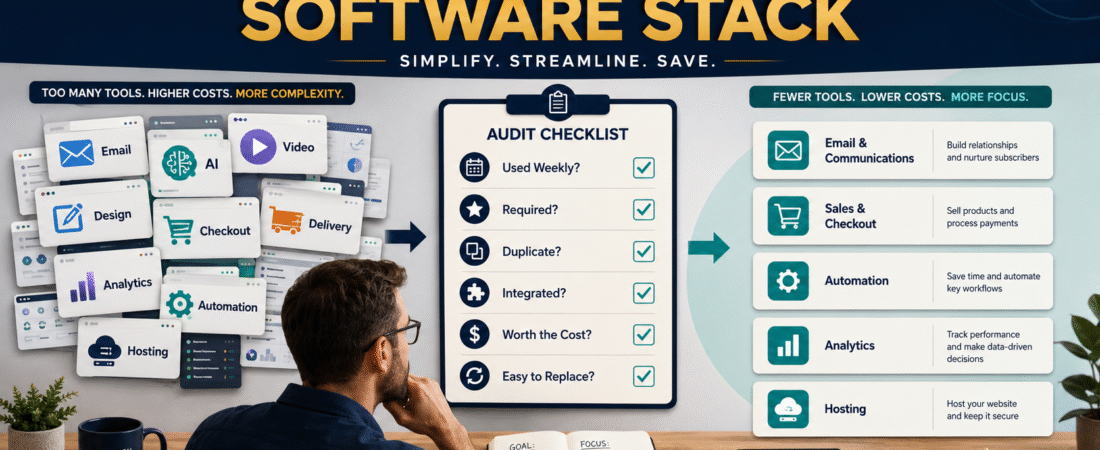
Online businesses have a software problem that rarely appears on a sales page.
Every individual tool can look inexpensive.
$15 per month for email.
$20 for AI.
$30 for graphics.
$49 for video.
$29 for automation.
$39 for another marketing system.
A few years later, the business owner may be paying for a collection of overlapping tools without remembering exactly why each subscription was purchased.
A software stack audit helps you answer a simple question:
Which tools are earning their place in the business?
The purpose is not to cancel software merely to reduce expenses.
The purpose is to create the smallest practical collection of tools that performs the work your business actually needs.
A useful audit process is:
- Inventory every paid tool.
- Identify its job.
- Record actual usage.
- Find overlapping functions.
- Calculate complete cost.
- Identify dependencies.
- Decide Keep, Downgrade, Replace, Pause, or Cancel.
- Document the final stack.
Step 1: Create a Complete Software Inventory
Do not rely on memory.
Review:
- Bank or card statements.
- PayPal subscriptions.
- Annual renewals.
- App marketplaces.
- Business email receipts.
- Software dashboards.
- Domain and hosting accounts.
Create a table with:
| Tool | Purpose | Monthly/Annual Cost | Renewal Date | Used How Often? | Owner |
|---|
Include annual subscriptions.
A $240 annual subscription can disappear mentally because it does not appear every month.
Convert annual costs into a monthly equivalent if that makes comparison easier.
Step 2: Give Every Tool One Primary Job
Ask:
Why does this software exist in my business?
Examples:
WordPress Hosting:
Operate websites.
Email Platform:
Manage subscribers and email automation.
Checkout:
Process digital-product purchases.
Delivery Platform:
Provide customer access.
AI Tool:
Assist with writing, research, planning, or analysis.
Design Tool:
Create images and visual assets.
If you cannot explain a tool’s purpose in one sentence, investigate it.
Vague answers such as:
I bought it because it seemed useful.
are a warning sign.
Step 3: Record Actual Usage
Use real behavior.
Classify each tool:
- Daily.
- Weekly.
- Monthly.
- Rarely.
- Not used.
Then ask why.
A rarely used tool is not automatically wasteful.
You may use tax software only periodically, for example.
But an email platform purchased for daily marketing that has not been opened for four months deserves attention.
Step 4: Find Duplicate Capabilities
This is where software stacks often become expensive.
Perhaps you have three products that can create landing pages.
Two can send email.
Four can generate AI text.
Three can create social graphics.
Two host courses.
Several have automation functions.
The question is not:
Which tool has the most features?
Ask:
Which tool is already performing the job reliably?
Suppose your email platform already creates landing pages that satisfy your needs.
You may not require another $39 landing-page tool.
Suppose your checkout platform includes course access, but you prefer a dedicated delivery system because it handles customers more effectively.
Then keeping both may be reasonable.
The audit should reflect real workflow, not feature-counting.
Step 5: Identify the Core Stack
Most small online businesses have a group of tools that form the operating foundation.
For example:
- Website.
- Email.
- Checkout/payment.
- Product delivery.
- AI assistant.
- Design.
- Analytics.
Your exact list will differ.
The goal is to identify the tools you would replace immediately if they disappeared tomorrow.
If you are still determining which categories belong in a basic system, How to Build a Simple Online-Business Starter Stack provides a beginner-friendly framework for distinguishing core tools from optional additions.
Step 6: Audit Your AI Subscriptions Separately
AI tools deserve special attention because capability overlap is expanding rapidly.
You might have:
- Chat assistant.
- Research tool.
- Writing tool.
- Image generator.
- Voice generator.
- Video generator.
- Course generator.
- Product generator.
Ask:
- Which tasks does each AI tool perform?
- Which results are meaningfully better?
- Which tool is integrated into a recurring workflow?
- Which subscription duplicates something you already own?
- Would cancellation actually increase work?
Avoid keeping five AI tools merely because each one occasionally produces something interesting.
A tool earns its place when it performs a useful recurring job.
Step 7: Check Dependencies Before Canceling
Do not cancel impulsively.
A tool may be connected to:
- Forms.
- Automations.
- Website pages.
- Checkout.
- Customer login.
- Email sequences.
- Affiliate tracking.
- Product delivery.
- API connections.
- DNS records.
Before canceling, ask:
What stops working if this account disappears?
Document dependencies.
A $15 tool that quietly powers an important automation may be more valuable than a $100 tool you open every day but do not actually need.
Step 8: Use Five Decision Categories
Keep
The software performs an important function and provides adequate value.
Downgrade
You need the tool but are paying for capacity or features you no longer use.
Examples:
- Larger subscriber tier than necessary.
- Team seats you do not need.
- Advanced plan for one basic feature.
Replace
Another tool can perform the job better or eliminate several subscriptions.
Do not replace merely because a competitor has a nicer sales page.
Pause
Useful for seasonal or temporary tools where pausing is supported.
Cancel
The software has no important job, duplicates another system, or costs more to maintain than the value it creates.
Step 9: Calculate the Real Cost of Switching
Saving $20 per month may not be worth a 15-hour migration.
Switching costs can include:
- Exporting data.
- Moving subscribers.
- Rebuilding forms.
- Recreating automations.
- Reconnecting domains.
- Moving courses.
- Updating links.
- Learning a new interface.
- Testing customer access.
Calculate both:
Subscription savings
and
transition cost.
The cheapest monthly product is not always the cheapest business decision.
Step 10: Watch for “Lifetime Deal Collection”
Lifetime software can be useful.
But it can also create a digital storage closet.
The thought process becomes:
It does not cost anything each month, so I should keep it.
Financially, perhaps.
Operationally, unused tools still create:
- Login clutter.
- Update notices.
- Security responsibilities.
- Data spread across systems.
- Confusion about which tool to use.
- Training burden for anyone helping you later.
Your software audit should include lifetime tools even when the recurring cost is zero.
Step 11: Remove Software That Creates Busywork
A software tool should reduce effort or create an important capability.
Sometimes software creates work.
You may find yourself:
- Updating dashboards nobody uses.
- Copying data between systems.
- Managing complicated automations.
- Watching training videos for tools you barely need.
- Troubleshooting integrations created only because several tools overlap.
That is a signal.
The guide How to Use AI to Separate Important Work From Online-Business Busywork can help evaluate whether recurring software activity contributes to a meaningful business result.
Step 12: Create a “No New Software Without a Job” Rule
Before buying another tool, complete this statement:
I need this tool because it will perform __________.
Then answer:
- What tool handles that task now?
- Why is the current approach inadequate?
- How often will I use the new tool?
- Which subscription might it replace?
- What is the complete first-year cost?
- How difficult is setup?
- What happens if I stop using it?
- Is there a free trial?
This simple gate can prevent impulse purchases.
Step 13: Document the Approved Stack
Create one page:
Website
Tool:
Purpose:
Tool:
Purpose:
Checkout
Tool:
Purpose:
Delivery
Tool:
Purpose:
AI
Tool:
Purpose:
Design
Tool:
Purpose:
Video
Tool:
Purpose:
Analytics
Tool:
Purpose:
Optional Tools
Tool:
Purpose:
Now you have a map of the business.
This becomes useful when:
- Troubleshooting.
- Training another person.
- Canceling software.
- Reviewing expenses.
- Planning a migration.
Step 14: Create SOPs for Important Tool-Dependent Tasks
Software becomes part of a business system only when the process around it is clear.
For example:
Tool: Email platform.
Process: Add a new lead magnet and connect the welcome sequence.
If that task happens repeatedly, document it.
Your verified guide on creating SOPs with AI for repeated business tasks explains how to turn actual workflows into procedures instead of depending on memory.
A Quarterly Software Audit
You do not need to obsess over subscriptions every week.
Once per quarter:
- Review all subscriptions.
- Check renewal dates.
- Identify unused tools.
- Look for duplicates.
- Review upcoming annual charges.
- Confirm integrations.
- Decide whether any plan should change.
- Update the approved stack document.
That creates control without turning cost-cutting into another project.
Conclusion
A software stack should make an online business easier to operate.
When the stack becomes so large that you cannot explain which tool performs which job, complexity has started winning.
Inventory every platform, assign each one a purpose, check real usage, identify duplicates, calculate migration costs, and make a deliberate decision: Keep, Downgrade, Replace, Pause, or Cancel.
Before buying your next tool, audit the ones you already have.
You may discover that the simplest improvement to your online business is not adding new software.
It is removing software that no longer deserves a job.