A backup feels reassuring.
A written emergency plan feels reassuring.
A spreadsheet showing where everything is stored feels reassuring.
But there is one question that matters more:
Could you actually recover the business if something failed?
You do not need to shut down your website or deliberately break your checkout to find out.
A recovery drill is a safe simulation that tests whether your backups, documentation, access instructions, and recovery procedures are usable.
The process is:
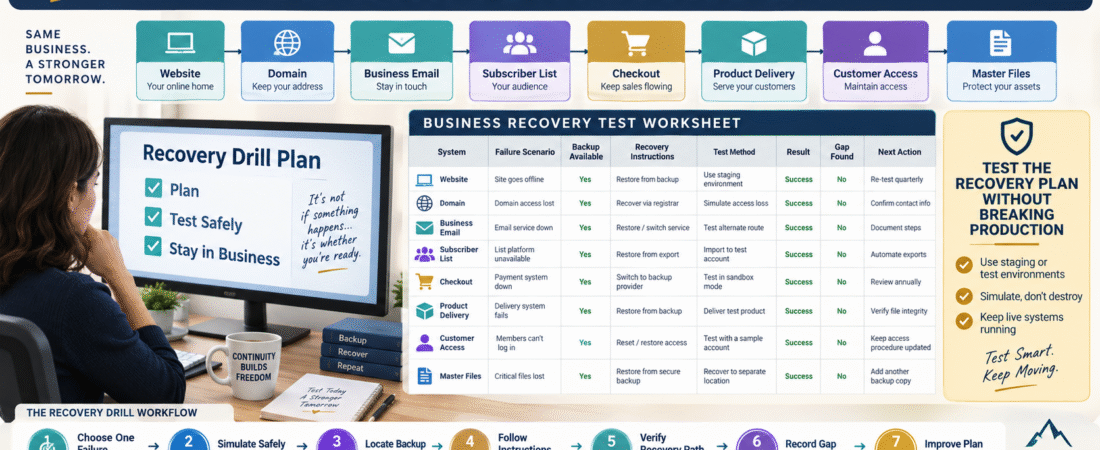
Choose Failure Scenario → Simulate Safely → Follow Recovery Instructions → Verify What You Can → Record Gaps → Improve Plan
A Backup Is Not the Same as a Tested Recovery
Imagine you have:
website-backup.zip
You have never opened it.
You do not know:
- When it was created.
- What it contains.
- Whether it is complete.
- How restoration works.
You have a backup file.
You do not yet have strong evidence that you have a working recovery process.
A recovery drill helps close that gap.
Do Not Test by Breaking Production
This is the most important rule.
A small-business recovery drill should usually be a safe simulation.
Do not:
- Delete the website.
- Cancel software.
- Remove DNS records.
- Wipe customer accounts.
- Disable payment processing.
Instead ask:
“If this failed, what would I need to recover?”
Then verify those pieces.
Scenario 1: Your Computer Fails
Imagine your main computer will not turn on.
Ask:
Can I access the files required to operate the business from another device?
Check:
- Master product files.
- Business documents.
- Current SOPs.
- Important images.
- Backup locations.
Do not actually damage your computer.
Simply use another device or verify the recovery path.
Scenario 2: You Lose a Product Master File
Pick one active digital product.
Pretend the current working copy has disappeared.
Can you find:
- Previous version.
- Current master.
- Editable source.
- Images.
- Delivery copy.
Your digital product file organization system can make this test much easier.
Scenario 3: A Customer Loses Access
Pretend a customer writes:
“I purchased Product A six months ago and cannot access it.”
Without changing a real customer account, walk through:
- Where would you verify purchase?
- Where would you verify entitlement?
- Where is the product?
- How would access be restored?
- Which email would be sent?
Your product access recovery process can provide the operating procedure.
Scenario 4: Your Main Website Is Unavailable
Do not take it offline.
Ask:
If the website disappeared, what would I do first?
Your answer might be:
- Confirm outage externally.
- Check hosting status.
- Check domain status.
- Review recent changes.
- Locate latest website backup.
- Contact hosting support.
- Test checkout and forms after restoration.
Now verify:
Can you actually locate the backup and support information?
Scenario 5: Email Platform Access Is Lost
Pretend you cannot enter your email-marketing account.
Ask:
- Where is the account information?
- Which email controls recovery?
- When was the subscriber list last exported?
- Which automations are documented?
- Could you identify the main list and signup forms?
The goal is not to build a replacement today.
It is to identify whether recovery information exists.
Scenario 6: Product Delivery Platform Is Unavailable
Ask:
Could I still determine who purchased what?
Check:
- Product files.
- Checkout records.
- Customer records.
- Access procedures.
- Delivery emails.
A temporary manual process may be enough for a short disruption.
Use Your Asset Inventory
Your digital business asset inventory should identify:
- System.
- Purpose.
- Owner.
- Location.
- Backup.
- Recovery method.
Use it as the recovery-drill map.
If a critical system is missing from the inventory:
That is already a finding.
Use Your Handoff Packet
A good recovery drill should test the instructions, not your memory.
Pretend you are a trusted helper who has never operated the system before.
Can you follow the documented steps?
If you have to say:
“I just know where that is.”
the documentation is incomplete.
Test One Scenario at a Time
Do not run a full disaster simulation.
Choose one area per month or quarter.
Example:
January
Master files.
April
Website recovery information.
July
Customer-access recovery.
October
Subscriber-data continuity.
Four short tests can provide more value than one overwhelming annual exercise.
Record Pass or Fail
For each drill, use:
PASS
Recovery resources were located and instructions made sense.
PARTIAL
Recovery appears possible, but something was unclear or outdated.
FAIL
Required backup, information, or procedure could not be found.
A failed drill is valuable.
It identifies a weakness before a real emergency does.
Test Backup Readability
For ordinary files, safely open the backup.
Confirm:
- File is readable.
- Version is identifiable.
- Expected content exists.
Do not assume the presence of a filename means the contents are correct.
Test Documentation
Follow the written procedure literally.
If the instruction says:
“Open backup folder.”
but does not say where the folder is:
Improve it.
If it says:
“Contact support.”
but no provider or support method is identified:
Improve it.
Test Alternate Access Carefully
If your continuity plan includes a secondary authorized administrator or emergency access procedure, verify that the process remains current without casually sharing credentials.
Your online business emergency access plan can help structure this securely.
Test Your Rollback Path
For a product update or website change, ask:
What is the last known working state?
Your rollback plan should identify what would be restored if the new change failed.
That is much stronger than simply saying:
“Use the backup.”
Look for Dependency Loops
Recovery systems can depend on the system that failed.
Example:
Backup instructions are stored only on the unavailable computer.
Or:
Password-manager recovery instructions are stored only inside the password manager.
Or:
Website backup is accessible only through the broken hosting account.
A drill can uncover these loops.
Record Every Gap
Use a small table:
Scenario: Website unavailable
Expected Recovery: Contact host and restore latest backup.
Gap: Hosting support account number not documented.
Action: Add safe account-identification information to handoff packet.
Status: Fixed.
Now the drill improves the system.
Connect Findings to the Business Change Log
If you improve a critical recovery procedure, record the change in your business change log.
That provides a history of continuity improvements.
Keep the Drill Short
A small-business recovery drill does not need to become an IT project.
Set a timer for:
30–60 minutes.
One scenario.
One test.
One improvement.
Stop when the objective is complete.
A Simple Recovery Drill Worksheet
Date:
Scenario:
Critical System:
What Failed in Simulation:
Expected Recovery Method:
Backup Located?:
Instructions Located?:
Instructions Usable?:
Recovery Path Verified?:
Result: Pass / Partial / Fail
Gap Found:
Next Action:
Retest Date:
This creates evidence that the plan has actually been examined.
Conclusion
Business continuity is stronger when it is tested rather than assumed.
A safe recovery drill does not require breaking your live website or disabling real systems.
Instead:
Choose One Failure → Simulate It → Locate Recovery Resources → Follow the Instructions → Identify Gaps → Improve the Plan
Test:
- Files.
- Documentation.
- Customer-access procedures.
- Subscriber recovery.
- Website recovery.
- Product delivery.
The goal is not to prove that nothing can fail.
It is to make sure a failure does not become the first time you discover that the recovery plan is incomplete.
Your Next Action
Choose one recovery scenario today:
Computer Fails
Website Unavailable
Customer Loses Product Access
Email Platform Unavailable
Master Product File Missing
Set a 30-minute timer.
Without damaging or disabling anything, attempt to locate every file, instruction, backup, support contact, and recovery step you would need.
Mark the result:
PASS | PARTIAL | FAIL
Then fix one gap before ending the exercise.
Schedule a different recovery scenario for your next quarterly maintenance review.
That turns your continuity plan from something you hope works into something you have actually tested.