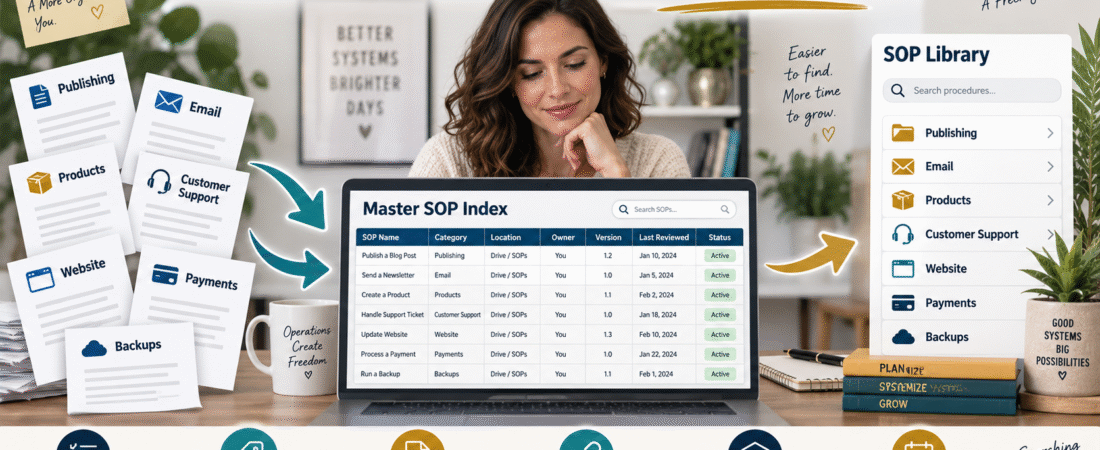
Writing a standard operating procedure can make a repeated business task easier.
But eventually another problem appears.
You may create procedures for:
- Publishing blog posts.
- Sending email campaigns.
- Updating digital products.
- Handling customer support.
- Processing refunds.
- Testing checkout.
- Backing up files.
- Managing affiliate links.
- Updating software.
- Reviewing analytics.
After several months, you have a collection of useful instructions—but no easy way to find the right one.
That is when an SOP system begins turning back into scattered documents.
The solution does not have to be another complicated software platform.
For a small online business, you can create one master SOP index that tells you:
What the procedure is → What category it belongs to → Where the current version is stored → When it was reviewed → Whether it is still active
Your SOPs can remain in their normal folders.
The index simply becomes the map.
Why Writing SOPs Is Only the First Step
Imagine you document this procedure:
How to Publish a New WordPress Blog Post
Six months later, you need it.
You search:
- Google Drive.
- Your computer.
- Old ChatGPT conversations.
- Downloads.
- A folder called Business.
- A folder called Procedures.
- A folder called New Procedures.
- A file called FINAL-SOP-UPDATED.docx.
Eventually you find three versions.
Now the procedure has not eliminated confusion.
It has created a different type of confusion.
A useful SOP system needs two things:
- Clear procedures.
- Clear navigation.
If you are still creating your procedures, my guide to creating an SOP with AI for the business tasks you repeat explains a simple way to document the task itself.
Once you have several SOPs, the next job is organizing them.
What an SOP Index Actually Does
An SOP index is not the procedure.
It is the directory that points to the procedure.
A simple index could contain:
| SOP | Category | Location | Version | Last Reviewed | Status |
|---|---|---|---|---|---|
| Publish Blog Post | Content | Link/File | 1.2 | Sept. 2026 | Active |
| Process Refund | Customer Support | Link/File | 1.0 | Aug. 2026 | Active |
| Back Up Website | Website | Link/File | 2.0 | Sept. 2026 | Active |
| Old Product Upload | Products | Link/File | 1.0 | May 2026 | Retired |
You do not need to put the full instructions inside the spreadsheet.
The index answers:
Where is the approved procedure?
Step 1: Inventory the Procedures You Already Have
Do not begin by creating twenty new SOPs.
First identify what already exists.
Search the places where you normally store business material.
Look for:
- Checklists.
- Word documents.
- Google Docs.
- PDFs.
- Notes.
- Spreadsheets.
- Saved AI prompts.
- Training instructions.
- Process guides.
Create a rough list.
Do not worry about perfect organization yet.
You are building an inventory.
Step 2: Give Every Procedure One Permanent Name
Naming matters.
Avoid:
- Blog SOP New.
- Blog SOP Final.
- Blog SOP Final 2.
- Updated Posting Instructions.
- New WordPress Directions.
Choose one permanent title:
Publish a WordPress Blog Post
The version can change.
The permanent procedure name should remain stable.
This makes searching much easier.
A consistent format might be:
Verb + Task
Examples:
- Publish a Blog Post.
- Send a Newsletter.
- Process a Refund.
- Add a Digital Product.
- Test a Checkout.
- Update an Affiliate Link.
- Back Up the Website.
- Review Monthly Analytics.
You can immediately understand what each document does.
Step 3: Create a Small Category System
Do not create thirty categories.
For a small online business, you may only need:
Content
Blog posts, videos, images, publishing.
Lead magnets, broadcasts, sequences, list maintenance.
Products
Creation, updates, delivery, access.
Customer Support
Questions, refunds, account recovery.
Website
WordPress, plugins, backups, maintenance.
Marketing
Affiliate links, promotion, campaigns.
Finance and Payments
Checkout, payments, subscriptions, records.
Business Operations
Reviews, planning, documentation, emergency procedures.
Your categories should reflect your real business.
Step 4: Record the Exact File Location
This is the core of the system.
The index should tell you where the procedure lives.
Examples:
Google Drive → Business Operations → SOPs → Website
or:
Local Business Folder → SOPs → Publishing
or a clickable document link.
Avoid writing:
“Google Drive.”
That still leaves too much searching.
Be specific enough that another person could find the file.
Step 5: Designate One Version as Current
One procedure should have one approved version.
Older versions can be archived.
For example:
Current
Publish-Blog-Post-SOP-V1.3.docx
Archive
Publish-Blog-Post-SOP-V1.2.docx
Publish-Blog-Post-SOP-V1.1.docx
Do not leave three versions in the active folder and hope you remember which one is correct.
The index should point only to the approved current version.
Step 6: Add a Status Column
Use a small status system:
Draft
Still being created or tested.
Active
Current approved procedure.
Review Needed
May be outdated.
Retired
No longer used.
Replaced
A newer procedure took its place.
This makes old documentation much easier to manage.
Step 7: Add a Last-Reviewed Date
Procedures can become outdated even when the task still exists.
A WordPress publishing SOP may change because:
- The theme changes.
- A plugin changes.
- Your metadata process changes.
- Your image requirements change.
A customer-support SOP may change because:
- Refund policy changes.
- Delivery software changes.
- Support address changes.
Record:
Last Reviewed: September 5, 2026
Then add an optional:
Next Review
You do not need to review everything monthly.
Review frequency should match how quickly the process can change.
Step 8: Link SOPs to the Larger Business System
An SOP explains one repeated task.
Your business operating plan explains how those tasks fit together.
For example:
Traffic → Email Signup → Follow-Up → Product Sale → Delivery → Support
Each part may eventually have its own SOP.
That is why a one-page online-business operating plan can be useful alongside the SOP library.
The operating plan is the map of the business.
The SOP index is the map of the instructions.
Step 9: Add a “When to Use” Description
Some procedure names may still be ambiguous.
Add one short sentence.
Example:
Procedure: Product Access Recovery
When to Use: Customer paid successfully but can no longer access the purchased product.
Another:
Procedure: Website Backup
When to Use: Monthly backup check and before major WordPress changes.
The description should help you choose the correct SOP quickly.
Step 10: Record Dependencies
Some procedures depend on software.
Add an optional column:
Systems Used
Example:
Publish Blog Post
Systems:
- WordPress.
- Canva.
- Internal Link Library.
This becomes valuable if a platform changes.
If you replace your email provider, you can filter the SOP index and immediately see every procedure that references the old system.
That prevents outdated instructions from hiding in forgotten documents.
Step 11: Separate SOPs From Passwords
Your SOP may say:
“Log in to the email platform.”
It should not contain the account password in ordinary text.
Document:
- What account is needed.
- Where access is managed.
- Who should have access.
Keep credentials in an appropriate secure password-management system.
My guide to organizing online-business logins without storing passwords in a spreadsheet explains that separation.
Step 12: Make the Index Useful During an Emergency
An SOP library becomes especially valuable when you cannot rely on memory.
Imagine you are unavailable and someone needs to:
- Find the website host.
- Locate the refund process.
- Restore product access.
- Identify the payment system.
- Find the backup procedure.
A good SOP index reduces the number of decisions that person must improvise.
That makes it a useful companion to your broader business-continuity documentation.
A Simple SOP Index Template
Use these columns:
SOP ID
Example: SOP-001.
SOP Name
Permanent procedure name.
Category
Content, Email, Products, Website, etc.
Purpose
One-sentence explanation.
File Location
Clickable link or precise folder.
Systems Used
Software required.
Version
Current version.
Last Reviewed
Date.
Next Review
Optional.
Status
Draft, Active, Review Needed, Retired.
Notes
Anything important.
That is enough.
Do Not Turn the Index Into Another Complicated Project
The purpose is findability.
You do not need:
- A custom database.
- Ten dashboards.
- Complex automation.
- A project-management platform solely for SOPs.
A spreadsheet can work perfectly well for a solo business.
Start simple.
Expand only if the number of procedures becomes difficult to manage.
Review the Index Quarterly
A short review can ask:
- Does every active SOP still exist?
- Does every link work?
- Is the current version correctly identified?
- Are retired procedures still marked active?
- Did new recurring tasks appear?
- Did a software change make instructions outdated?
The review may take much less time than rebuilding a lost procedure later.
Conclusion
Standard operating procedures are most valuable when you can find and trust the correct version quickly.
Create one master SOP index.
Give each procedure a permanent name.
Group procedures into a small number of categories.
Record the exact location.
Identify the current version.
Track review dates.
Retire obsolete procedures instead of leaving them mixed with active ones.
You do not need to reorganize your entire business in one day.
Start by finding your five most important existing procedures.
Add them to one index with:
Name → Category → Location → Version → Last Reviewed → Status
Once those five are easy to find, add the next five.
Over time, your business documentation becomes a usable operating system rather than a collection of forgotten files.