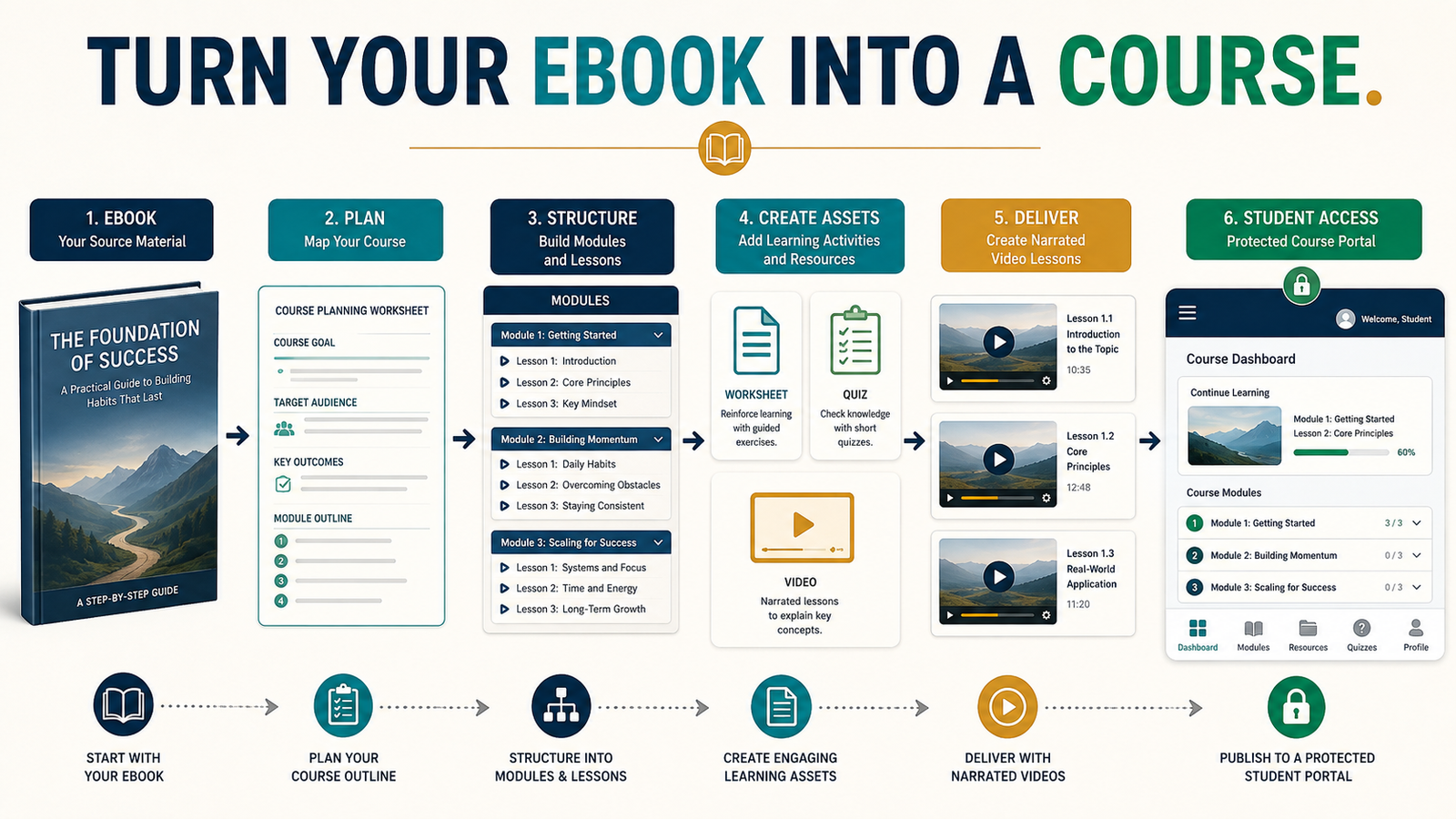
A completed ebook can give you much of the knowledge needed to create an online course, but an ebook and a course are not the same product. Readers move through written information independently. Students usually need a guided sequence, clear learning outcomes, demonstrations, activities, checkpoints, and opportunities to apply what they are learning.
The most practical way to turn an ebook into an online course is to use the book as your source material rather than treating every chapter as a finished lesson. First identify the result the student should achieve. Then reorganize the strongest parts of the book into modules, lessons, exercises, and supporting resources.
AI can assist with organizing source material, developing lesson objectives, identifying missing explanations, and drafting worksheets. It should not determine the entire educational experience without your review.
OpenAI currently describes ChatGPT Projects as workspaces where users can keep related chats, uploaded files, and project instructions together. This type of workspace may help a creator keep an ebook, course outline, lesson drafts, and supporting information organized during a long-form project.
Key Takeaways
- Use the ebook as a source, not as the finished course.
- Define the student’s final result before creating modules.
- Organize chapters according to the learning journey.
- Divide long explanations into shorter lessons.
- Add activities, examples, worksheets, and checkpoints.
- Use AI to assist with planning and drafting while preserving your judgment.
- Test the complete student experience before selling the course.
Begin With the Course Result
Before creating modules, complete this sentence:
“By the end of this course, the student should be able to…”
The result should be specific enough to guide your decisions.
A weak result would be:
“The student will understand online business.”
A stronger result would be:
“The student will be able to select one manageable digital-product idea, create a basic version, establish a simple delivery process, and plan the first promotional campaign.”
The second statement explains what the student should be capable of doing. It also helps you decide which ebook material belongs in the course.
Every lesson should support that result. Interesting information that does not help the student progress may remain in the ebook without appearing in the course.
Identify the Intended Student
The ebook reader and course student may be similar, but you should define the course audience separately.
Consider:
- What does the student already know?
- What does the student find confusing?
- How much technology can the student manage?
- What tools will be required?
- How much time can the student reasonably devote?
- What would cause the student to stop?
- What level of support will the student expect?
- What should the student complete during the course?
For example, a course for experienced marketers can move quickly through basic definitions. A course for retired beginners may need slower explanations, screenshots, examples, and instructions for navigating each tool.
The audience definition affects lesson length, terminology, assignments, and support materials.
Review the Ebook as Source Material
Create a course-conversion worksheet with five columns:
- Ebook chapter or section.
- Main lesson or idea.
- Student action.
- Supporting resource.
- Keep, revise, combine, or remove.
Review each chapter.
A section should normally remain in the course when it:
- Teaches a necessary skill.
- Explains an important decision.
- Prevents a common mistake.
- Supports the final result.
- Provides a useful example.
- Prepares the student for the next stage.
A section may need to be removed or moved to a bonus when it:
- Provides background that is not required.
- Repeats another lesson.
- Goes beyond the promised result.
- Requires advanced knowledge the beginner does not need.
- Exists mainly to increase the book’s length.
- Would distract the student from completing the primary process.
This review prevents you from producing a course that is simply a video reading of the ebook.
Organize the Learning Journey
A course should guide the student through an intentional progression.
A practical structure might be:
Module 1: Understand the goal
Explain the problem, intended result, and necessary preparation.
Module 2: Make the first decision
Help the student choose an audience, topic, product, or method.
Module 3: Build the foundation
Set up the tools, information, or materials required.
Module 4: Complete the main process
Guide the student through the central task.
Module 5: Review and improve
Provide testing, editing, and quality-control steps.
Module 6: Implement the result
Help the student publish, deliver, promote, or maintain what was created.
The number of modules should reflect the subject. Do not create ten modules merely because another course has ten.
Turn Chapters Into Shorter Lessons
An ebook chapter may contain several separate teaching points. Each point can become a lesson when it supports one clear objective.
A lesson should answer:
- What will the student learn?
- Why does it matter?
- What should the student do?
- What example will make it understandable?
- What resource will help?
- How will the student know the lesson is complete?
For example, an ebook chapter titled “Create Your First Digital Product” might become:
- Choose one audience problem.
- Match the product to your knowledge.
- Select the simplest product format.
- Define the minimum useful version.
- Set a realistic completion date.
- Review the product idea before building.
Each lesson addresses a manageable decision.
Write One Learning Objective for Every Lesson
A learning objective explains what the student should be able to do after completing the lesson.
Useful verbs include:
- Identify.
- Choose.
- Compare.
- Create.
- Organize.
- Demonstrate.
- Evaluate.
- Complete.
- Test.
- Revise.
Avoid objectives that use vague verbs such as “know” or “understand” without explaining how that understanding will be demonstrated.
Instead of:
“Understand lead magnets.”
Use:
“Choose a lead-magnet format that matches one specific subscriber problem.”
The second objective can be connected to an assignment.
Add a Student Action to Each Lesson
Information becomes more useful when the student applies it.
Student actions may include:
- Completing a worksheet.
- Choosing between two options.
- Writing a one-sentence result.
- Creating a checklist.
- Uploading a file.
- Testing a form.
- Recording a sample.
- Reviewing an example.
- Answering reflection questions.
- Completing a quality-control step.
A lesson about defining an audience should end with a written audience statement.
A lesson about creating a welcome email should end with a completed draft.
A course should help students produce something, not simply watch videos.
Use AI to Develop the Course Structure
Affiliate Disclosure: This article contains affiliate links. If you purchase through one of these links, I may earn a commission at no additional cost to you. Affiliate compensation does not determine the conclusions or recommendations presented in this article.
AI may help you:
- Analyze the ebook’s structure.
- Identify repeated sections.
- Suggest a logical lesson sequence.
- Draft learning objectives.
- Create discussion questions.
- Develop worksheets.
- Propose quiz questions.
- Simplify complicated explanations.
- Create alternative examples.
- Review lessons for missing steps.
You can review the current CourseMate AI offer when you want assistance developing course outlines, lesson plans, worksheets, quizzes, and educational materials.
Do not upload material you do not have the right to use. Review every AI-generated lesson and question for accuracy, usefulness, and alignment with the ebook.
Create a Course-Development Prompt
A useful prompt should provide:
- The ebook title.
- The intended student.
- The student’s experience level.
- The course result.
- The relevant source section.
- The lesson objective.
- The required action.
- The desired tone.
- The information that must be included.
- The information that should not be invented.
For example:
“Use the supplied ebook chapter as source material for a beginner lesson. The student is a retiree creating a first digital product. The lesson objective is to help the student choose one product format based on knowledge, time, cost, and delivery requirements. Create a teaching script, an example, a five-question decision worksheet, and a short completion checklist. Do not add statistics, product claims, or personal experiences that are not present in the source material.”
This gives the AI a defined educational assignment.
Decide Which Course Format to Use
Your course can combine several formats:
Text lessons
Useful for definitions, instructions, links, and material students may want to reference quickly.
Video lessons
Useful for demonstrations, explanations, and showing the instructor’s personality.
Audio lessons
Useful for students who prefer listening or want to review material away from a screen.
Worksheets
Useful for planning, decision-making, and implementation.
Checklists
Useful for repeatable processes and quality control.
Quizzes
Useful for checking understanding, but not every lesson requires one.
Templates
Useful when students need a structured starting point.
Choose formats based on the learning task rather than adding media merely to make the course appear larger.
Create Video Lessons From the Written Material
A video lesson should not sound like an ebook chapter being read word for word.
Adapt the text into a spoken script:
- Shorten long sentences.
- Explain one main idea at a time.
- Add verbal transitions.
- Describe what appears on screen.
- Include pauses for student actions.
- Remove references that only make sense on a printed page.
- Use examples that sound natural when spoken.
A written paragraph may become:
- A spoken explanation.
- A visual checklist.
- A downloadable worksheet.
- A brief demonstration.
This allows each format to perform a useful role.
Keep Lessons Manageable
Lesson length should reflect the subject and student.
A short lesson may be appropriate when:
- One decision is being explained.
- One tool is being demonstrated.
- One checklist is being completed.
- The student must pause and take action.
A longer lesson may be appropriate when:
- Several connected steps must be demonstrated together.
- Breaking the process apart would create confusion.
- A detailed case example is necessary.
Do not make every video the same length. Focus on completing the objective clearly.
Add Original Examples
Examples make abstract teaching easier to apply.
Suppose the course teaches students to create an ebook product.
A hypothetical example might follow:
“Robert is a retired school administrator who wants to help first-time substitute teachers. He could create a large course covering every classroom situation, but that would take months. Instead, he begins with a short substitute-teacher preparation guide and a printable classroom checklist.”
The example demonstrates audience choice, product scope, and a manageable starting point.
Do not attribute invented experiences to yourself. Clearly label hypothetical scenarios when necessary.
Create Worksheets From Important Decisions
A worksheet should help the student produce an answer.
For example, a product-selection worksheet might ask:
- What problem will the product solve?
- Who experiences this problem?
- What knowledge can you contribute?
- What is the smallest useful product?
- How long will it take to create?
- How will it be delivered?
- What must the buyer be able to do afterward?
- What evidence suggests people care about the problem?
Avoid worksheets that merely repeat lesson sentences with blanks.
Use Quizzes Selectively
A quiz can help confirm that a student recognizes:
- Important terminology.
- Required steps.
- Safety or compliance requirements.
- Differences between options.
- Common mistakes.
- The correct sequence.
Application-based questions are often more useful than memorization.
Instead of asking:
“What is a lead magnet?”
Ask:
“Which lead magnet would best match a blog post that teaches beginners how to select their first ebook topic?”
The second question requires practical judgment.
Choose a Delivery Platform
After the course is created, students need a reliable way to access it.
A course-delivery platform may provide:
- Modules and lessons.
- Video or file access.
- Student accounts.
- Public or private course access.
- Drip scheduling.
- Quizzes or certificates on qualifying plans.
- Product collections.
- Customer emails.
- Checkout or payment integrations.
ProductDyno currently presents options for paid and free courses, public or private access, interactive course content, downloads, memberships, collections, and additional learning-management capabilities. The exact features and limits depend on the current plan and offer.
You can examine ProductDyno’s current course-delivery options when you need a protected location for course lessons, downloads, and student access.
Confirm the current pricing, limits, integrations, support, and checkout terms before purchasing.
Test the Complete Student Experience
Do not evaluate the course only from the administrator’s dashboard.
Create a test-student account and check:
- Purchase or registration.
- Welcome email.
- Login instructions.
- Password creation.
- Mobile access.
- Lesson navigation.
- Video playback.
- File downloads.
- Worksheet readability.
- Quiz completion.
- Progress tracking.
- Password reset.
- Support contact information.
- Course completion.
- Access after a refund or cancellation when relevant.
Ask another person to complete the process without your assistance. Their questions may reveal instructions you assumed were obvious.
Avoid Creating Too Much Course Content
A larger course is not automatically more valuable.
Course bloat can cause students to:
- Delay starting.
- Skip lessons.
- Become confused.
- Forget the primary result.
- Stop before implementation.
- Feel that the course requires too much time.
Include what the student needs to achieve the promised result. Place advanced material in a bonus, follow-up product, or separate course when appropriate.
A Simple Ebook-to-Course Workflow
Step 1: Define the course result
Write one measurable completion statement.
Step 2: Describe the student
Identify experience, challenges, time, and technology needs.
Step 3: Review the ebook
Mark which sections to keep, revise, combine, remove, or move to bonuses.
Step 4: Build the module sequence
Organize the student journey.
Step 5: Define lesson objectives
Give every lesson one clear purpose.
Step 6: Add student actions
Connect each lesson with an exercise or decision.
Step 7: Create teaching materials
Develop scripts, worksheets, checklists, examples, and quizzes.
Step 8: Record or produce lessons
Create only the media needed to teach each objective.
Step 9: Upload the course
Organize modules, lessons, downloads, and access settings.
Step 10: Test the system
Complete the full process as a student.
Step 11: Invite a small test group
Collect questions and identify unclear lessons.
Step 12: Revise before a wider launch
Correct the course using actual feedback.
Common Mistakes
Uploading the ebook as the entire course
Students need guidance, actions, and learning progression.
Following the book’s chapter order automatically
The reading sequence may not be the best instructional sequence.
Creating videos before planning objectives
This often creates long lessons without a clear student action.
Adding quizzes to every module
Use assessments where they improve learning.
Buying software too early
Define the course and delivery requirements before choosing a platform.
Making unsupported promises
Do not guarantee that students will earn money, build a successful business, or achieve identical results.
Failing to test the student portal
A technically complete course can still create a confusing customer experience.
Conclusion
Turning an ebook into an online course allows you to reuse knowledge you have already developed, but the process requires more than placing chapters into a course portal. Begin with the student’s desired result, reorganize the book into a learning journey, create lesson objectives, and add practical activities that help the student apply the information.
Use AI to assist with organization and drafting, but maintain control over accuracy, teaching quality, examples, and final decisions. Keep the first course manageable and test every step before inviting paying students.
Choose one completed ebook chapter and convert it into a lesson objective, teaching script, and student worksheet as your first course-development exercise.