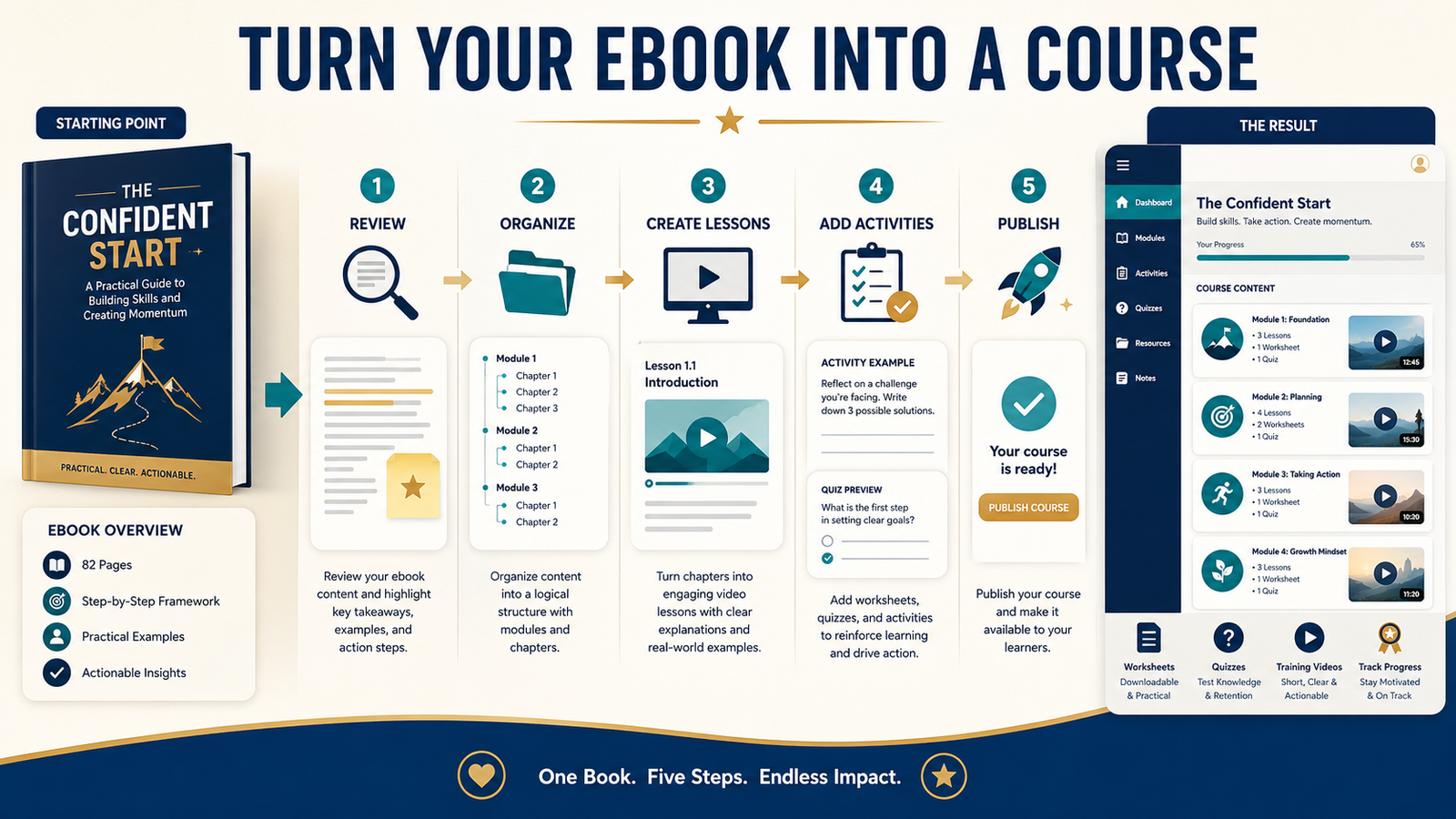
An ebook can give you much of the information needed for an online course, but it should not simply be divided into chapters and placed inside a course platform.
Readers and students learn differently.
An ebook is designed primarily for reading. A course should guide the learner through a sequence of explanations, examples, decisions, activities, and practical results.
AI can help you organize the material, suggest lesson structures, draft worksheets, develop quiz questions, and create supporting scripts. Human judgment is still needed to confirm that the lessons are accurate, useful, original, and suitable for the intended student.
The most reliable process is to treat your ebook as source material rather than as a finished course.
Key Takeaways
- Begin with the result the student should achieve.
- Select only the ebook material that supports that result.
- Organize the content into short, logical modules.
- Add activities and examples that require the student to apply the information.
- Review every AI-generated lesson, quiz, and worksheet before publication.
Affiliate Disclosure: This article contains affiliate links. If you purchase through one of these links, I may earn a commission at no additional cost to you. Affiliate compensation does not determine the conclusions or recommendations presented in this article.
Why an Ebook Is a Strong Starting Point
Creating an ebook usually requires you to identify an audience, explain a topic, organize information, and guide the reader toward a result.
Those same elements are valuable when developing a course.
An existing ebook may already contain:
- A defined audience
- A central problem
- A logical sequence
- Explanations
- Examples
- Warnings
- Checklists
- Recommendations
- A conclusion
- A next action
This can reduce the amount of research and planning required for a course.
However, the ebook may also contain long paragraphs, repeated explanations, or information that is useful for reference but unsuitable for a lesson.
The goal is not to use every page. The goal is to choose the information that helps the student progress.
Step 1: Define the Course Result
Before creating modules, write one sentence describing what the student should be able to do after completing the course.
Use this structure:
This course helps [AUDIENCE] go from [STARTING PROBLEM] to [PRACTICAL RESULT].
For example:
This course helps first-time ebook creators go from a collection of disconnected ideas to a complete chapter-by-chapter writing plan.
That is a clearer result than:
This course teaches everything about ebooks.
A narrow result makes the course easier to create and easier for the student to understand.
Step 2: Review the Ebook Against the Course Goal
Read the ebook’s table of contents and major sections.
Mark each section as:
- Essential to the course result
- Useful as supporting information
- Better as a bonus resource
- Unnecessary for this course
Do not automatically turn every chapter into a module.
A chapter containing background information might become a short introductory lesson. A detailed checklist might become a downloadable worksheet. Several overlapping chapters may become one focused module.
Keep the strongest material and remove anything that distracts from the learning result.
Step 3: Organize the Course Into Modules
A module is a major stage in the learning process.
A beginner course commonly works well with four to eight modules, although the correct number depends on the subject.
For example, an ebook-planning course might use:
- Choose the intended reader.
- Identify the reader’s main problem.
- Define the ebook’s promise.
- Organize the major ideas.
- Create the chapter sequence.
- Review and improve the outline.
- Prepare a writing schedule.
Each module should represent one meaningful stage.
Avoid creating a large number of tiny modules simply to make the course appear bigger.
Step 4: Turn Modules Into Lessons
Each module may contain two to five lessons.
A useful lesson should answer one primary question or teach one manageable skill.
For example, the module “Choose the Intended Reader” might include:
- Why a specific reader matters
- How to describe the reader
- How to identify the reader’s current problem
- How to test whether the audience is too broad
- A reader-profile worksheet
A lesson should not try to explain the entire subject.
Shorter lessons are easier to complete, review, and update.
Step 5: Use AI to Develop the First Course Structure
Once you define the audience, result, modules, and source material, AI can help develop a working outline.
Provide the AI with:
- The intended student
- The course result
- The ebook’s table of contents
- The sections approved for reuse
- The desired number of modules
- The type of activities required
- The course format
- The information that must not be copied or revealed
A useful instruction might be:
Review this ebook outline as source material. Create a seven-module beginner course that helps first-time nonfiction writers create a complete ebook outline. Do not reproduce the original chapters. Reorganize the concepts around student actions and include one practical activity for each module.
AI suggestions should be treated as a draft.
Check whether:
- The sequence is logical.
- The lessons match the student’s experience level.
- Important steps are missing.
- The modules overlap.
- The result can realistically be achieved.
- The proposed activities are useful.
Step 6: Add Learning Activities
A course should ask the student to do more than watch or read.
Useful learning activities include:
- Checklists
- Worksheets
- Planning pages
- Short quizzes
- Decision charts
- Reflection questions
- Templates
- Practice assignments
- Examples to evaluate
- Small implementation tasks
For a course about building an email list, an activity might ask the student to write one audience statement and one lead-magnet promise.
For an ebook course, an activity might ask the student to group ten reader questions into three possible chapters.
Each activity should connect directly to the lesson.
Step 7: Create Lesson Scripts
A lesson script is not the same as an ebook chapter.
Spoken instruction should use:
- Shorter sentences
- Clear transitions
- Practical examples
- Direct explanations
- Occasional summaries
- A specific activity or next action
A lesson script might follow this structure:
- State the lesson objective.
- Explain the concept.
- Demonstrate it with an example.
- Identify a common mistake.
- Give the student an activity.
- Explain what comes next.
Do not read long ebook paragraphs word for word.
Adapt the information for listening and learning.
Step 8: Review AI-Generated Quizzes Carefully
AI can suggest quiz questions, but each question must be checked.
Confirm that:
- The correct answer is actually correct.
- The wording is clear.
- Only one answer is clearly best when using multiple choice.
- The question tests the lesson objective.
- The quiz does not depend on information that was never taught.
- Explanations are included when useful.
- Trick questions are avoided.
The purpose of a quiz is to reinforce learning, not to confuse the student.
Step 9: Choose a Course-Creation Tool Carefully
A course-creation tool may help develop content, videos, ebooks, learning sites, or supporting assets.
The current CourseMateAI 2.0 sales page describes tools for building online academies and creating AI-assisted ebooks, training-video courses, PDFs, children’s ebooks, and whiteboard-style videos. The page also lists specific output limits and purchase terms that may change, so buyers should verify the current offer before purchasing.
You can review the current CourseMate AI offer.
This type of tool may be useful when you want assistance creating several kinds of course assets. It may be unnecessary when you already have completed lessons and only need a place to host or deliver them.
Do not choose a tool until you know:
- What the course contains
- How students will access it
- Whether videos are required
- Whether quizzes are required
- Whether downloads are required
- Whether commercial-use rights are necessary
- How much ongoing management you want
Step 10: Set Up Course Delivery
Course creation and course delivery are separate tasks.
Creation produces:
- Lessons
- Videos
- Worksheets
- Quizzes
- Audio
- Supporting resources
Delivery controls:
- Customer access
- Login information
- Content organization
- Downloads
- Progress
- Payments
- Membership areas
- Support
ProductDyno’s official site describes support for online courses, memberships, digital downloads, landing pages, payments, and secure content delivery. It also provides training videos and a knowledge base, although the current plan and licensing terms should be reviewed before using it.
You can see how ProductDyno handles digital-product delivery.
A simple downloadable course may not require the same platform as a large membership containing many lessons and students.
A Practical Course Example
Imagine a retired teacher who has written an ebook about helping beginners organize an online-business idea.
The ebook contains 12 chapters.
Instead of creating 12 course modules, the teacher identifies five student actions:
- Select a manageable business model.
- Define the intended customer.
- Choose one problem to solve.
- Select a simple offer.
- Create a 30-day starting plan.
The course contains five modules, each with:
- One short lesson
- One practical example
- One worksheet
- One review question
- One action step
The ebook remains a detailed reference resource. The course becomes a guided implementation experience.
This creates two related products without simply duplicating the same content.
Common Ebook-to-Course Mistakes
Copying the Ebook Directly
Students do not need a collection of pages placed into separate lessons.
They need instruction, examples, activities, and progress.
Including Too Much Content
A focused course is usually easier to complete than an oversized course covering every related topic.
Creating Videos Before Planning the Course
Record lessons only after the structure, objectives, and activities are clear.
Otherwise, you may have to recreate the videos.
Letting AI Define the Expertise
AI can suggest material, but it should not invent your experience, claims, student results, or teaching methods.
Skipping the Student Experience Test
Complete the course as a student.
Open every lesson, download every file, complete every activity, and test every link.
A Simple Course Quality-Control Checklist
Course Purpose
- Is the intended student clear?
- Is the course result specific?
- Does every module support the result?
Lesson Quality
- Does each lesson teach one main idea?
- Are examples included?
- Are unfamiliar terms explained?
- Is the action step clear?
Activities
- Does every activity support the lesson?
- Are instructions complete?
- Can a beginner finish without hidden information?
Accuracy
- Are facts verified?
- Are product details current?
- Are AI-generated materials reviewed?
- Are personal experiences truthful?
Delivery
- Do login and access instructions work?
- Are downloads clearly labeled?
- Does the course display correctly?
- Is support information available?
Conclusion
An ebook can provide a strong foundation for an online course, but the material must be reorganized around learning and action.
Define the student result, select the most useful source material, create logical modules, add activities, review AI-generated content, and test the delivery experience.
Choose one ebook you already own and identify the five most important actions a student should complete before developing the first module.