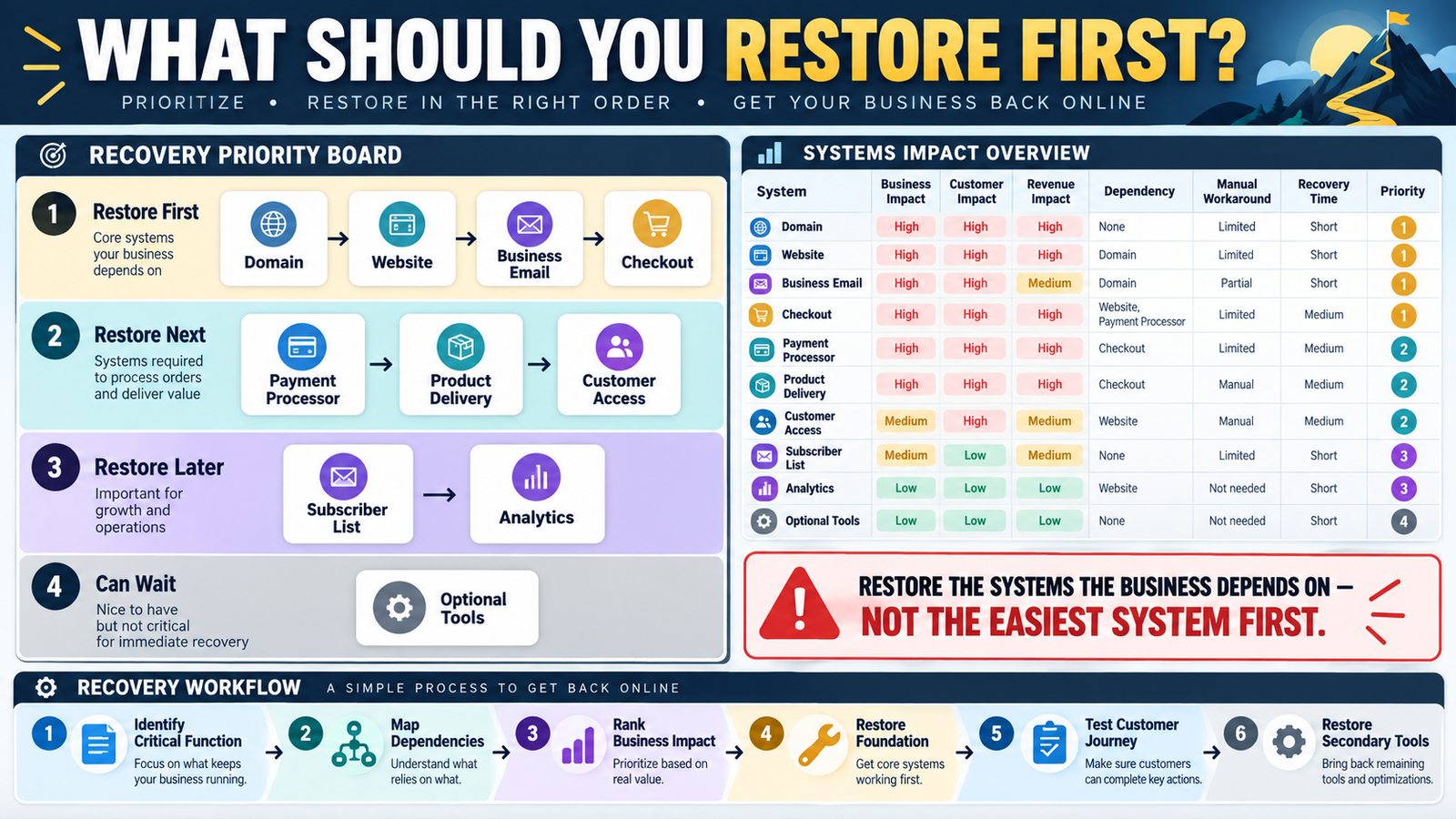
Imagine several business systems fail at the same time.
Your website is unavailable.
Email is inaccessible.
A marketing tool is offline.
Analytics is not reporting.
Which one do you fix first?
The easiest system to repair may not be the most important system to restore.
A simple online business recovery priority list gives you an order before an emergency begins.
The process is:
Critical Business Function → Dependency → Customer Impact → Revenue Impact → Workaround → Recovery Priority
Recovery Priority Is Different From Software Importance
You may love a particular design tool.
But if it is unavailable for six hours:
Customers may never notice.
Compare that with:
Payment processor unavailable.
Customers cannot buy.
Or:
Product delivery unavailable.
Customers pay but receive nothing.
Recovery priority should be based on business impact rather than personal preference.
Start With Business Functions
Do not begin with software names.
Begin with functions:
- Domain resolution.
- Website access.
- Payment collection.
- Product delivery.
- Customer communication.
- Customer access.
- Lead capture.
- Email marketing.
- Analytics.
- Content production.
Then identify which systems support each function.
Priority 1: Protect Revenue and Existing Customers
High-priority systems commonly include:
- Payment processor.
- Checkout.
- Product delivery.
- Customer access.
- Critical website pages.
If customers are paying but cannot receive what they bought:
That deserves immediate attention.
Priority 2: Preserve Communication
Business email may be critical because it supports:
- Customer support.
- Password recovery.
- Vendor communication.
- Account alerts.
An email-marketing broadcast platform may be less urgent than your primary business inbox during an outage.
Different types of email deserve different priorities.
Priority 3: Restore Lead Generation
Once current customers and payments are protected:
Restore:
- Signup forms.
- Landing pages.
- Lead magnets.
- Welcome automation.
These systems create future business but may have a short-term workaround.
Priority 4: Restore Reporting and Convenience Tools
Analytics is important.
But if:
- Website works.
- Customers can pay.
- Products are delivered.
a few hours without GA4 may be less damaging than broken checkout.
Do not let reporting tools distract you from customer-facing failures.
Map Dependencies Before Ranking
Your verified Online Business Integration Map is especially useful here.
Suppose:
Checkout → Payment Processor → Product Delivery → Email
You cannot fully restore product delivery if the checkout or payment connection is still broken.
Recovery order should follow dependencies.
Example Dependency Chain
Domain
↓
Website
↓
Checkout
↓
Payment Processor
↓
Product Delivery
↓
Customer Email
If the domain itself fails:
Fixing a landing-page button may be pointless.
Restore foundational systems first.
Add Customer Impact
Use:
CRITICAL
Customers cannot:
- Pay.
- Access purchases.
- Contact you.
- Use purchased service.
HIGH
Lead generation or important communications stop.
MODERATE
Business can continue using a workaround.
LOW
Little short-term impact.
This helps determine order.
Add Revenue Impact
Ask:
Does this failure stop new revenue?
Examples:
Payment Processor
Yes.
Checkout
Yes.
Analytics
Usually no immediate direct effect.
Design Software
Usually no immediate effect.
That does not mean analytics is unimportant.
It means its recovery priority may be lower during an emergency.
Add a Manual Workaround
A system may be important but temporarily replaceable.
Example:
Automated delivery fails.
Could you manually deliver products for several hours?
If yes:
Priority may remain high, but you have breathing room.
Record:
Manual workaround available? Yes / No
Add Maximum Tolerable Downtime
Use practical categories:
Less Than 1 Hour
Same Day
Within 24 Hours
Within Several Days
This does not need to become formal corporate disaster-recovery terminology.
It simply forces you to think about timing.
Domain and DNS Often Sit Near the Foundation
If the domain stops resolving:
- Website may fail.
- Email authentication may be affected.
- Landing pages may fail.
- Customer links may fail.
That can make domain-related problems unusually broad.
Document where the domain is registered and who controls DNS.
Hosting May Be Another Foundation
If hosting fails:
Your WordPress site can disappear.
But externally hosted systems might remain operational.
For example:
- Payment processor.
- Email platform.
- Product delivery.
A backup sales or support link could therefore be useful.
Use Your Digital Asset Inventory
Your verified Digital Business Asset Inventory can provide the list of critical systems.
Add:
Recovery Priority
to each important asset.
Use Your Emergency Access Plan
A system cannot be restored quickly if nobody can access it.
Your verified Online Business Emergency Access Plan should support the recovery list.
The priority list tells you:
What to restore.
The access plan tells an authorized person:
How to reach what is needed securely.
Do Not Restore Optional Tools Too Early
Suppose during a serious outage you spend an hour fixing:
- Thumbnail software.
- Social scheduler.
- Keyword tool.
Meanwhile:
Checkout remains broken.
That is backwards.
During recovery:
Customer Access → Revenue → Communication → Lead Generation → Reporting → Convenience
is a useful default sequence.
Your exact business may differ.
Test the Priority List
Your recovery drill can test:
Would I actually know what to restore first?
Choose one scenario.
Example:
Website and product delivery both fail.
Which system takes priority?
Why?
What depends on what?
If the answer is unclear:
Improve the list.
Build Recovery Tiers
TIER 1 — RESTORE FIRST
Systems whose failure immediately affects:
- Customer access.
- Payments.
- Business availability.
TIER 2 — RESTORE NEXT
Systems supporting:
- Customer communication.
- Lead generation.
- Important automation.
TIER 3 — RESTORE LATER
Reporting and operational tools.
TIER 4 — CAN WAIT
Convenience tools with little immediate customer impact.
Keep the structure simple.
A Sample Priority List
Domain / DNS
Customer Impact: Critical
Revenue Impact: Critical
Dependencies: Website, links
Priority: Tier 1
Checkout
Customer Impact: High
Revenue Impact: Critical
Dependencies: Payment, delivery
Priority: Tier 1
Product Delivery
Customer Impact: Critical
Revenue Impact: High
Workaround: Manual delivery possible
Priority: Tier 1
Email Marketing
Customer Impact: Moderate
Revenue Impact: Moderate
Workaround: Pause campaigns
Priority: Tier 2
Analytics
Customer Impact: Low
Revenue Impact: Low immediate
Priority: Tier 3
Avoid False Precision
You do not need:
Priority Score = 87.4
Use clear categories.
The objective is to make decisions faster during pressure.
Review After Major Business Changes
Update the priority list when you:
- Change checkout.
- Add a membership.
- Move hosting.
- Replace email platform.
- Launch a major product.
- Change product delivery.
Your recovery priorities may change with the business.
Conclusion
A recovery plan is more useful when it answers:
What gets restored first?
Rank systems according to:
Customer Impact → Revenue Impact → Dependencies → Workarounds → Maximum Tolerable Downtime
Do not automatically fix:
- The easiest tool.
- The most familiar tool.
- The tool you use most often.
Restore the systems the business depends on first.
Your Next Action
Write down these systems:
Domain | Hosting | Website | Business Email | Checkout | Payment Processor | Product Delivery | Email Marketing | Analytics
Assign each:
TIER 1 | TIER 2 | TIER 3 | TIER 4
Then answer for every Tier 1 system:
What depends on it?
What is the first recovery step?
Who provides support?
Is there a temporary workaround?
Finally, place the list inside your business-continuity documentation.
The next time several things go wrong at once, you will already know which problem deserves attention first.