Writing a good AI prompt once is useful.
Having to reconstruct that prompt every time you perform the same task is inefficient.
An AI prompt library solves that problem by turning your strongest recurring instructions into organized, reusable business assets.
The purpose is not to collect hundreds of clever prompts from the internet. It is to preserve the instructions that match your own recurring work—the way you want articles researched, emails structured, products reviewed, digital assets checked, or ideas evaluated.
A practical prompt library can be very simple:
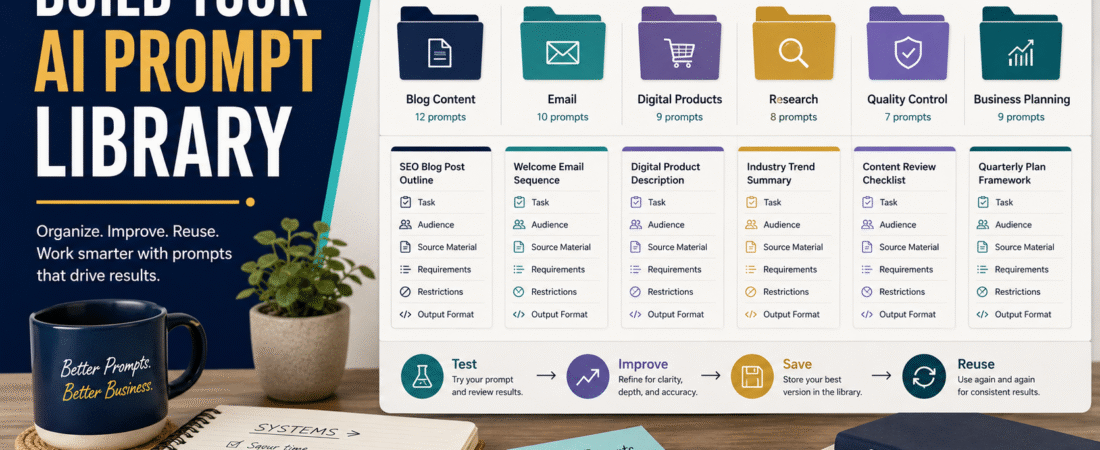
Choose your repeated tasks → save the successful instructions → replace topic-specific information with placeholders → organize the prompts by function → test them → version them → update them when your workflow changes.
For a solo creator, this can turn AI from a collection of one-time conversations into a repeatable operating system.
Key Takeaways
- Save prompts for tasks you genuinely repeat.
- Build templates from prompts that already produced useful results.
- Replace one-time details with clear placeholders.
- Store important restrictions as well as creation instructions.
- Keep examples of the desired output when they materially improve consistency.
- Give prompts version numbers and dates.
- Retire old prompts when your workflow changes.
- Keep the library small enough that you can actually find what you need.
What Is an AI Prompt Library?
An AI prompt library is an organized collection of reusable instructions for repeated AI tasks.
Examples might include:
- Blog article creation.
- Product-review research.
- Email drafting.
- Lead-magnet creation.
- Ebook planning.
- Course outlining.
- Content quality control.
- Social-media repurposing.
- Product comparison.
- Fact-checking.
Each saved prompt becomes a starting system.
Instead of explaining your requirements from scratch, you fill in the variables.
Do Not Begin by Collecting Random Prompts
Search online and you can find enormous collections labeled:
- 1,000 ChatGPT prompts.
- 500 marketing prompts.
- 10,000 business prompts.
The problem is that most of them were not built around your business.
A generic prompt might say:
“Act as an expert marketer and create engaging content.”
Your actual workflow may require:
- Specific audience.
- Exact article structure.
- Defined source hierarchy.
- No unsupported claims.
- Current fact-checking.
- Affiliate disclosure.
- WordPress publishing fields.
- Human-quality review.
The second type of prompt is far more valuable because it captures an operating process.
Start With Repeated Tasks
Write down what you use AI for repeatedly.
For example:
Content
- Create blog articles.
- Improve titles.
- Generate image prompts.
- Review drafts.
- Repurpose articles.
- Draft newsletter.
- Create welcome sequence.
- Rewrite subject lines.
- Proofread messages.
Digital Products
- Develop ebook outline.
- Create worksheets.
- Build checklists.
- Review product completeness.
Research
- Compare products.
- Identify changing facts.
- Extract customer questions.
Quality Control
- Check repetition.
- Verify required sections.
- Find unsupported claims.
- Review final formatting.
Start with perhaps five to ten recurring tasks.
Do not build fifty templates before you use the first five.
Save the Prompts That Already Worked
Your best prompt templates often come from completed work.
Suppose you created an article and thought:
“This is exactly how I want these articles structured.”
Do not save only the article.
Save the instructions that produced it.
Remove the one-time topic information and convert it into reusable placeholders.
For example:
Original instruction:
“Write an article explaining how retirees can build an email list with GetResponse.”
Reusable template:
“Write a detailed beginner article explaining [TOPIC] for [AUDIENCE]. The reader is trying to [GOAL] but is struggling with [PROBLEM]. Use [APPROVED SOURCES]. Include [REQUIRED ELEMENTS]. Avoid [RESTRICTIONS].”
The second version becomes reusable.
Use Clear Placeholders
A placeholder tells you what must change next time.
Useful placeholders include:
- [TOPIC]
- [AUDIENCE]
- [PRIMARY PROBLEM]
- [DESIRED RESULT]
- [SOURCE MATERIAL]
- [PRODUCT]
- [WEBSITE]
- [WORD COUNT]
- [DATE]
- [AFFILIATE LINK]
- [RESTRICTIONS]
- [OUTPUT FORMAT]
Make placeholders visually obvious.
Do not bury them inside long paragraphs.
Preserve the Prompt’s Important Strengths
When converting a successful prompt into a template, ask:
What made this output good?
Maybe it:
- Defined the audience clearly.
- Required practical examples.
- Forced a direct answer early.
- Prevented exaggerated claims.
- Specified the exact format.
- Required current sources.
- Included a final quality-control step.
Those instructions should remain.
Do not reduce a strong 1,000-word operating prompt to:
“Write another article like this.”
That loses the system.
Separate Permanent Instructions From Variables
A reusable prompt usually has two kinds of information.
Permanent
These stay the same.
Examples:
- Tone.
- Quality standards.
- Fact-checking rules.
- Required structure.
- Prohibited claims.
- Output order.
Variable
These change.
Examples:
- Topic.
- Date.
- Product.
- Audience question.
- Affiliate link.
- Source article.
When possible, place variables near the top.
This makes the prompt easier to use.
Build a Prompt Record
For each reusable prompt, save:
Prompt Name:
Purpose:
Version:
Last Updated:
Use When:
Required Inputs:
Prompt:
Quality Check:
Example Output: optional
Notes:
This may sound formal, but it prevents confusion later.
Give Every Prompt a Clear Name
Weak file name:
Prompt New Final 2
Better:
Blog Article Creation – Beginner How-To – Version 1.2
Weak:
email prompt
Better:
5-Email Welcome Sequence – Digital Product – Version 1.0
A good name tells you what the prompt does before you open it.
Organize by Business Function
One practical folder system is:
01 – Blog Content
02 – Email Marketing
03 – YouTube and Video
04 – Digital Products
05 – Product Reviews
06 – Research
07 – Quality Control
08 – Business Planning
Numbering keeps the folders in a consistent order.
You do not need sophisticated prompt-management software to begin.
A document folder can work.
Keep Creation Prompts and Review Prompts Separate
One of the most useful improvements is separating:
Create
from:
Check
For example:
Creation Prompt
Creates the blog article.
Accuracy Prompt
Identifies claims requiring verification.
Repetition Prompt
Checks repeated wording and ideas.
Publishing Prompt
Checks required fields and final format.
This is often safer than expecting one giant prompt to create, research, verify, edit, and publish flawlessly in one pass.
Save Quality-Control Prompts
These may become some of your most valuable templates.
Example:
“Review this completed article against the following requirements. Identify anything missing, inaccurate, repetitive, unclear, unsupported, or incorrectly formatted. Do not rewrite the article yet. Produce only the quality-control findings.”
Another:
“Identify every claim involving prices, product features, dates, statistics, policies, legal requirements, or current platform information that should be verified before publication.”
These prompts protect the final output.
Create a Versioning System
Suppose Prompt 1.0 works reasonably well.
You discover that articles sometimes omit practical examples.
Add:
“Include at least one original practical example.”
Now save:
Version 1.1
Do not overwrite every older version immediately.
Version history helps you understand what changed.
A simple naming convention:
- Version 1.0 – Original.
- Version 1.1 – Added example requirement.
- Version 1.2 – Added fact-checking stage.
- Version 2.0 – Major restructuring.
Date Important Prompt Changes
Add:
Updated: August 12, 2026
This becomes useful when you are comparing older output with newer output.
You can ask:
“Which prompt version produced this article?”
Without dates and versions, that can become difficult to answer.
Create a Prompt Testing Process
Do not declare a prompt “final” because it worked once.
Test it with:
- Different topic.
- Different audience.
- Easy subject.
- Difficult subject.
- Product review.
- How-to guide.
Then ask:
- Does it preserve the structure?
- Does it overproduce?
- Does it ignore restrictions?
- Does it repeat language?
- Does it require missing information?
- Does it remain easy to edit?
A reusable prompt should survive more than one topic.
Keep a Test Folder
Use three stages.
Testing
Prompts still being adjusted.
Approved
Prompts that consistently work.
Retired
Old versions kept only for reference.
This prevents you from accidentally using an outdated prompt.
Create a Prompt Change Log
When you improve a major business prompt, record:
Version: 1.3
Date: August 12, 2026
Change: Removed unnecessary SEO fields.
Reason: They were no longer part of the publishing workflow.
This is particularly useful for long master prompts.
Otherwise, six months later, you may not remember why a rule exists.
Use a Prompt Input Checklist
Before running a template, fill in:
- Topic.
- Audience.
- Goal.
- Approved source.
- Product links.
- Date.
- Output requirement.
- Restrictions.
If information is missing, resolve it before execution.
This prevents accidental generic output.
Create a Prompt for Prompt Updates
You can even standardize how prompts are revised.
For example:
“Review this prompt and modify only the rules necessary to accomplish [CHANGE]. Preserve all unrelated approved structure, field order, requirements, restrictions, and formatting. Return the complete updated prompt and provide a short change log.”
This reduces unintended redesign.
Store the Finished Asset With the Prompt
For important recurring business assets, keep:
- The finished output.
- The reusable prompt that created it.
Why?
The finished asset proves what “good” looks like.
The prompt preserves how to create the next one.
Together they form a reusable production system.
A Practical Example
Suppose a creator publishes:
How to Validate a Digital Product Idea Before Spending Weeks Creating It
The completed article is strong.
The creator saves:
Digital Product Validation Article – August 2026
Then saves:
Digital Product Decision Article Prompt – Version 1.0
The prompt contains placeholders for:
- Product type.
- Audience.
- Problem.
- Validation method.
- Example.
- Affiliate tools.
- Featured-image concept.
When the next topic is:
How to Price a Digital Product
the creator does not copy the old article.
The creator reuses the production framework.
That preserves quality without duplicating content.
Do Not Make Every Prompt Enormous
A complex six-article publishing system may justify a long master prompt.
A proofreading task may need six lines.
Match prompt size to task complexity.
A good library contains:
- Short utility prompts.
- Medium task templates.
- Detailed master prompts.
Do not force everything into one monster prompt.
Protect Sensitive Information
Do not save reusable prompts containing:
- Passwords.
- API keys.
- Customer personal information.
- Private financial records.
- Confidential documents.
Use placeholders.
For example:
[API KEY]
rather than storing the actual credential.
Create a Backup
Prompt libraries become business assets.
Keep a backup in:
- Local folder.
- Cloud storage.
- External drive.
Use readable formats such as:
- DOCX.
- TXT.
- Markdown.
- PDF for reference copies.
Do not depend on one conversation thread being your only copy.
Monthly Prompt Maintenance
Once a month:
- Review the prompts you used.
- Retire unused duplicates.
- Update prompts with recurring problems.
- Check software or platform instructions.
- Confirm affiliate links.
- Update version numbers.
- Back up the library.
This can take less time than repeatedly fixing weak outputs.
Common Prompt-Library Mistakes
Saving every prompt
Keep proven prompts, not conversational clutter.
Saving only the finished asset
Preserve the creation system too.
No version numbers
You will eventually use the wrong copy.
Vague names
Make files searchable.
Too many categories
Keep organization simple.
Mixing old and approved versions
Use Testing, Approved, and Retired folders.
Never updating prompts
Your business processes change.
Conclusion
An AI prompt library turns successful AI instructions into reusable business assets.
Start with the tasks you repeat. Save the prompts that already produced useful results. Replace one-time details with placeholders. Organize them by business function. Add version numbers, dates, and quality-control instructions.
You do not need hundreds of prompts.
You need a small collection of dependable systems that help you repeat work without rebuilding the instructions every time.
Choose the three AI tasks you perform most often and create one approved reusable prompt template for each.