AI can be extremely useful when the task is clear.
The problem often begins when the task changes while the AI is working.
You ask:
“Compare these two software platforms.”
The AI compares them.
Then it decides:
“Platform B is better, so you should cancel Platform A immediately.”
That second step may sound logical.
But it was not the task.
Or you ask:
“Rewrite this customer-support email.”
The AI begins changing:
- Refund policy.
- Product promise.
- Pricing language.
- Guarantee.
Again, the model moved from:
Completing the task
to:
Changing the business decision behind the task.
A simple set of AI task boundary rules prevents that kind of scope creep.
The workflow becomes:
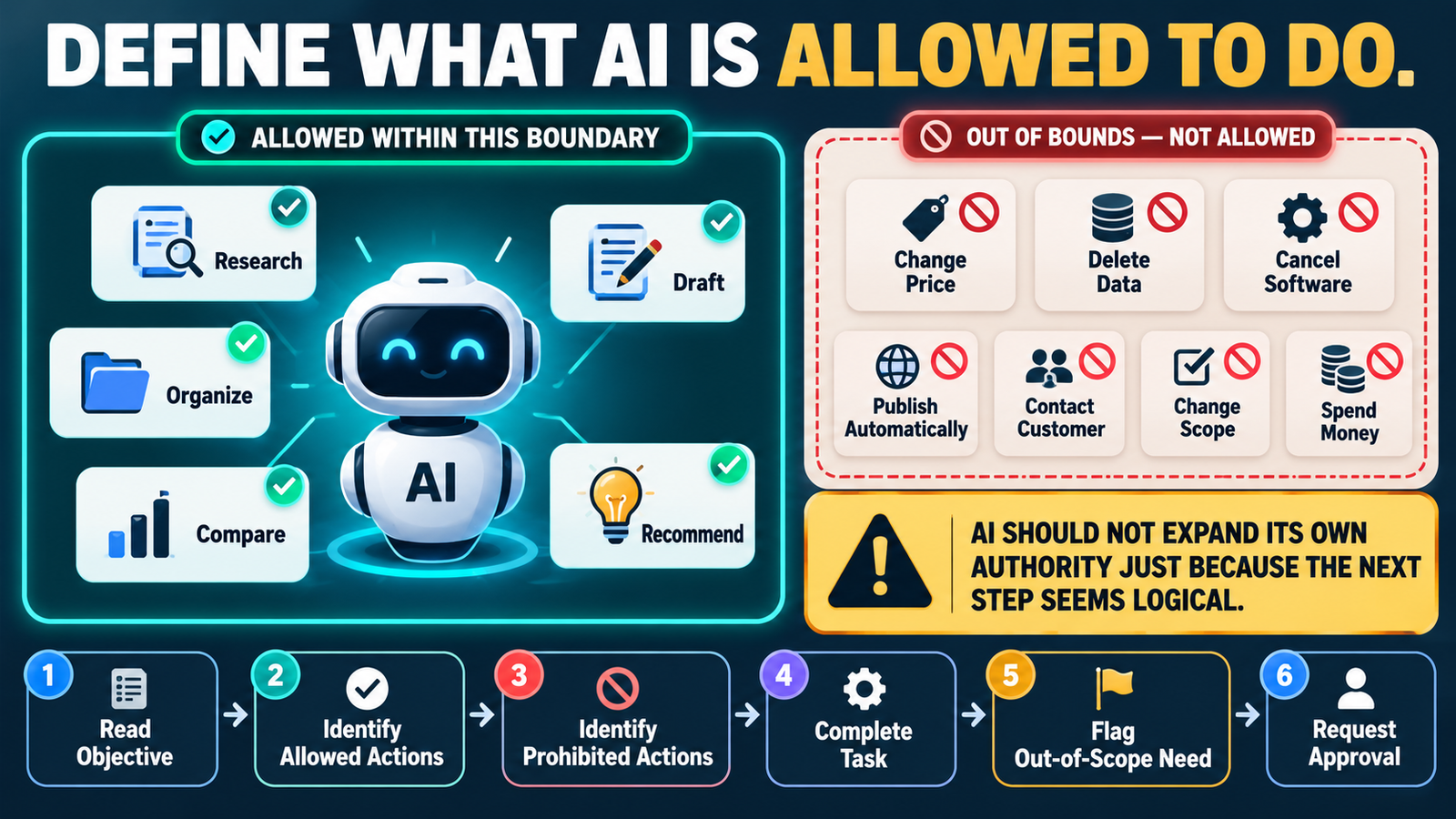
Objective → Allowed Actions → Prohibited Actions → Completion Criteria → Escalation
What Is an AI Task Boundary?
A task boundary defines:
What the AI is authorized to do inside this assignment.
It also defines:
What the AI must not decide or change without approval.
For example:
Allowed
- Research current prices.
- Compare documented features.
- Identify differences.
- Present tradeoffs.
Not Allowed
- Purchase software.
- Cancel existing software.
- Change account settings.
- Move customer data.
That creates a clear line between:
Analysis
and:
Authority.
Why AI Scope Creep Happens
AI is often optimized to be helpful.
If it sees a logical next step, it may try to complete it.
That can be useful in low-risk work.
Example:
You ask for an outline.
AI notices the headings are out of order.
Reordering them may be harmless.
But the same behavior becomes dangerous when the next logical step involves:
- Money.
- Customers.
- Data.
- Publishing.
- Irreversible changes.
The AI needs to know where helpfulness stops.
Boundary Rule 1: Define the Exact Objective
Start with one sentence.
Example:
“Compare AWeber and Mailjet for a small online business.”
That is clearer than:
“Help me with email software.”
A vague objective gives the model room to invent the assignment.
A precise objective narrows the work.
Boundary Rule 2: Define What AI May Change
For editing tasks, specify:
You may change:
- Grammar.
- Clarity.
- Structure.
- Redundancy.
Do not change:
- Price.
- Guarantee.
- Refund policy.
- Product promise.
Now the AI can improve the writing without rewriting the business.
Boundary Rule 3: Separate Recommendation From Execution
This is one of the most important rules.
AI can often:
Recommend
without being allowed to:
Execute.
Example:
AI may say:
“Based on these requirements, Platform B appears to fit better.”
That does not authorize it to:
- Cancel Platform A.
- Migrate data.
- Buy Platform B.
Your verified AI Approval Matrix helps define which actions require stronger human control.
Boundary Rule 4: Do Not Change Approved Decisions
Suppose a project already established:
Use three approval levels.
A later AI session should not redesign the framework into seven levels simply because it has another idea.
Add:
“Do not redesign approved structures unless new evidence creates a specific problem with the approved version.”
This protects continuity.
Boundary Rule 5: Stop When the Task Is Complete
AI workflows can become inefficient when the model keeps expanding.
Example:
Requested:
Create five headlines.
AI then adds:
- Thumbnail concepts.
- Email campaign.
- Social posts.
- Sales funnel.
Those may be useful someday.
But they are not part of the current task.
A boundary rule can say:
“When the requested deliverable is complete, stop unless an additional step is necessary to correct an error or satisfy the original objective.”
That keeps projects focused.
Boundary Rule 6: Flag Out-of-Scope Needs Instead of Acting
Sometimes AI discovers a genuine problem outside the scope.
Example:
While reviewing an email, it notices that the refund policy appears inconsistent.
The correct response is not necessarily to rewrite the policy.
Instead:
“Potential issue: refund-policy wording appears inconsistent. This is outside the current editing scope and should be reviewed separately.”
That is useful without exceeding authority.
Boundary Rule 7: Use Escalation for Higher-Risk Actions
Your verified AI Escalation Rules provide the next layer.
If completing the task would require:
- Spending money.
- Moving customer data.
- Publishing sensitive content.
- Deleting information.
- Making an irreversible change.
the AI should escalate.
The task boundary says:
You cannot do this automatically.
The escalation rule says:
Here is what happens instead.
Boundary Rule 8: Do Not Fill Missing Authority With Assumptions
Suppose the AI knows:
- Your product.
- Your current price.
But it does not know:
Whether it has permission to change the price.
It should not infer permission from context.
Use:
“If authority to perform a consequential action is not explicitly established, treat the action as requiring approval.”
That is much safer.
Boundary Rule 9: Distinguish Content Editing From Business Editing
This matters in marketing.
Content Editing
- Improve headline.
- Shorten paragraph.
- Fix grammar.
- Reorder section.
Business Editing
- Change offer.
- Change price.
- Change guarantee.
- Change refund policy.
- Change product scope.
The first may be routine.
The second should require explicit approval.
Boundary Rule 10: Protect Source-of-Truth Materials
If a project includes an approved master file:
Tell the AI:
“Do not overwrite or reinterpret the source of truth. Use it as the controlling version.”
This is especially important in:
- Product documentation.
- Prompt systems.
- Media inventories.
- Content libraries.
- Operating procedures.
Your verified AI Handoff Record can identify which source currently controls the project.
Boundary Rule 11: Make New Ideas Optional
AI can still be creative.
Use:
“If you notice a potentially useful improvement outside the approved scope, mention it separately as an optional future idea. Do not implement it automatically.”
This preserves creativity without derailing the project.
Boundary Rule 12: Use a Clear Completion Test
Ask:
How do we know this task is finished?
Example:
Task:
Review six product claims.
Completion:
- Six claims checked.
- Source recorded.
- Conflicts flagged.
- No unresolved high-risk claim presented as fact.
Once those conditions are met:
Stop.
Example Boundary Block for a Prompt
You could add:
TASK BOUNDARIES
You may:
- Research.
- Organize.
- Draft.
- Compare.
- Recommend.
You may not without explicit approval:
- Spend money.
- Cancel services.
- Delete information.
- Change pricing.
- Contact customers.
- Publish content.
- Move customer data.
- Change approved project structure.
If completing the task appears to require an action outside these boundaries:
Flag the issue and stop at that point.
That block can work across many business workflows.
Boundaries Reduce Rework
Clear boundaries also save time.
Without them:
AI may spend time developing work you never wanted.
Then you must:
- Review it.
- Reject it.
- Restore the approved approach.
With boundaries:
The model stays closer to the assignment.
Boundaries and Exceptions Work Together
Your verified AI Exception Queue gives out-of-bound situations somewhere to go.
Example:
Exception: Completing migration requires access to customer data.
Status: Waiting for owner approval.
Now the workflow remains controlled without losing the issue.
Review Boundaries After Mistakes
If AI repeatedly oversteps in the same area:
Add a specific boundary.
Example:
Problem:
AI repeatedly adds new sections to approved documents.
New rule:
“Do not add new sections unless the user specifically requests them.”
This is how a workflow becomes more reliable over time.
A Simple Boundary Checklist
Before starting an important AI task, answer:
Objective: What must be completed?
Allowed Actions: What may AI do?
Prohibited Actions: What may AI not do?
Source of Truth: What controls the answer?
Approval Point: What requires human decision?
Completion Condition: When should AI stop?
That is often enough.
Conclusion
AI task boundaries keep helpfulness from turning into unauthorized scope expansion.
A good boundary system defines:
Objective → Allowed Actions → Prohibited Actions → Approval Points → Completion Condition
The most important principle is:
The next logical step is not automatically an authorized step.
AI may identify a need.
It may analyze the need.
It may recommend an action.
But consequential business decisions should remain inside the authority structure you define.
Your Next Action
Choose one recurring AI task you use frequently.
Add this section to its prompt:
AI MAY:
List 3–5 actions.
AI MAY NOT WITHOUT APPROVAL:
List 3–5 actions.
STOP CONDITION:
Describe when the requested deliverable is complete.
Then run the task once.
At the end, ask:
Did AI stay inside the assignment, or did it add work I did not authorize?
If it crossed the line, turn that specific behavior into a new boundary rule.
That gives you a practical way to make AI more useful without giving it more authority than you intended.