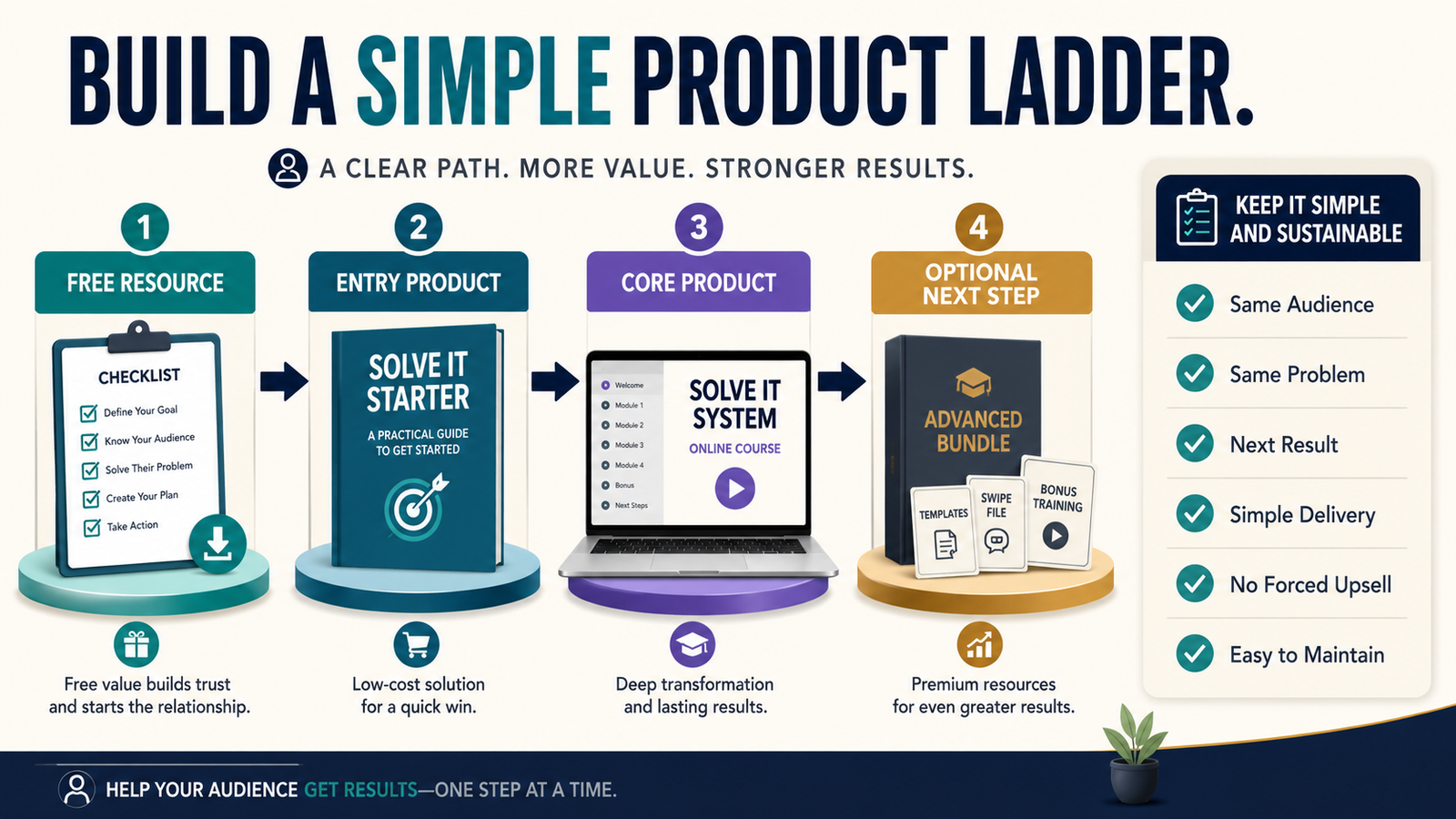
A digital-product ladder does not need ten offers.
For many solo creators, a useful ladder can be built with only three or four steps:
Free Resource → Entry Product → Core Product → Optional Advanced Offer
The purpose is to give the same person a logical next solution as their problem develops.
It is not to create more things to sell simply because marketing diagrams show a long staircase of products.
A strong beginner product ladder usually begins with one audience and one broad problem.
For example:
Audience: Retirees who want to create a small online business.
Free Resource: Digital Product Idea Checklist.
Entry Product: First Digital Product Planning Workbook.
Core Product: Complete Digital Product Creation Course.
Optional Advanced Product: Product Launch and Evergreen Marketing Toolkit.
Each step continues the same customer journey.
Key Takeaways
- Use one audience across the ladder.
- Start with one core problem.
- Give each level a different job.
- Do not force customers through every step.
- Build the first two or three products before adding more.
- Reuse your existing intellectual property when appropriate.
- Keep delivery and email follow-up simple.
- Measure whether buyers actually want the next step.
What Is a Product Ladder?
A product ladder is a set of offers arranged according to increasing:
- Depth.
- Implementation.
- Access.
- Support.
- Scope.
A customer may begin with a free resource and later decide that a more substantial paid solution is useful.
The ladder gives them somewhere logical to go.
A Ladder Is Not a Mandatory Sequence
Customers do not always need to buy:
Product 1 before Product 2.
Some people may enter directly at the core product.
For example:
A beginner might download your free checklist.
An experienced marketer may see your complete course and buy it immediately.
That is fine.
The ladder organizes your offers.
It should not create artificial barriers.
Start With One Audience
Weak ladder:
- Free AI prompts.
- Gardening ebook.
- Affiliate-marketing course.
- Resume service.
Those products serve different people.
Stronger:
Audience
Beginner digital-product creator.
Free
Product-Idea Checklist.
Entry
Digital-Product Planning Workbook.
Core
Create and Launch Your First Digital Product Course.
Advanced
Evergreen Digital Product Marketing System.
Every offer remains relevant.
Identify the Problem Progression
Ask:
What does the customer need first?
Then:
What becomes the next problem after that is solved?
Example:
Problem 1
“I don’t know what product to create.”
Free checklist.
Problem 2
“I chose an idea, but I need to plan it.”
Workbook.
Problem 3
“I have a plan, but I need the complete creation process.”
Course.
Problem 4
“I created it, but now I need a repeatable marketing system.”
Advanced toolkit.
The product ladder follows the customer’s progress.
Level 1: Free Resource
The free resource should solve one small problem completely.
Examples:
- Checklist.
- Worksheet.
- Short guide.
- Template.
- Quick-start plan.
Its job may be to:
- Help the visitor.
- Demonstrate your teaching style.
- Build the email list.
- Identify interest in the topic.
Do not make the free product intentionally useless.
Level 2: Entry Product
The entry product asks for a small financial commitment.
Possible formats:
- Ebook.
- Workbook.
- Checklist pack.
- Template bundle.
- Mini course.
The product should provide meaningfully more value than the free resource.
Example:
Free
10 Questions to Choose a Digital Product Idea.
Entry
40-page Digital Product Planning Workbook with evaluation scorecard, validation steps, examples, and a 30-day creation plan.
The relationship is clear.
Level 3: Core Product
The core product provides the complete solution you most want to be known for.
It might be:
- Detailed course.
- Comprehensive ebook system.
- Toolkit.
- Membership.
- Training program.
Do not automatically make the core offer huge.
It needs enough depth to produce the promised result.
Level 4: Optional Advanced Offer
Many small businesses do not need this immediately.
An advanced offer might provide:
- More implementation.
- More templates.
- Advanced strategy.
- Community.
- Consulting.
- Larger license.
- Complete bundle.
Build it only after the earlier products reveal genuine demand.
Do Not Build From the Bottom Up Forever
A common beginner mistake is creating:
- Freebie.
- $7 product.
- $17 product.
- $27 product.
- $37 product.
- $47 product.
before creating the main solution.
You can spend months making inexpensive offers without ever building the product that matters.
Instead:
- Define the core product.
- Create the smallest useful entry product.
- Create a free resource connected to it.
- Add an advanced offer later if needed.
Build Backward From the Core Offer
Suppose your core offer is:
The Beginner Ebook Creation Course
Ask:
“What smaller problem exists immediately before someone needs this?”
Answer:
“They do not know whether their ebook idea is worth creating.”
Entry product:
Ebook Idea Validation Workbook
Then ask:
“What small problem happens before that?”
Answer:
“They need topic ideas.”
Free resource:
20-Question Ebook Topic Finder
Now the ladder is connected.
Make Every Step Useful on Its Own
A customer who buys only the entry product should still receive what was promised.
Do not create:
“Workbook Part 1”
that deliberately stops halfway and says:
“Buy the $197 course to learn the answer.”
Instead, the workbook solves its defined problem.
The course solves a bigger one.
Use Existing Content
You may already have:
- Blog articles.
- Ebook.
- Checklists.
- Video lessons.
- Templates.
Review them.
A product ladder can sometimes be created by reorganizing existing assets rather than producing everything from zero.
For example:
Blog content → free checklist.
Existing ebook → entry product.
Ebook expanded into guided lessons → core course.
Templates and implementation resources → advanced bundle.
Separate Information From Implementation
This is a useful way to distinguish levels.
Free
Awareness.
“What should I consider?”
Entry
Decision.
“Help me choose and plan.”
Core
Implementation.
“Walk me through completing it.”
Advanced
Optimization.
“Help me improve or expand.”
The exact structure varies, but this prevents product overlap.
Avoid Selling the Same Material Four Times
Suppose your free guide and $27 ebook contain almost identical information.
Then your $97 course consists mostly of videos reading the ebook.
The customer has little reason to move upward.
Each level should provide a meaningful difference.
Examples:
- More depth.
- Better tools.
- Demonstration.
- Guided practice.
- Templates.
- Convenience.
- Support.
Create the Simplest Possible Ladder First
A perfectly valid product ladder can contain only:
Free
Checklist.
Paid
Complete ebook.
That is a two-level ladder.
Later:
Core
Course.
Do not add complexity because the phrase “product ladder” makes it sound necessary.
Connect the Ladder With Email
Affiliate Disclosure: This article contains affiliate links. If you purchase through one of these links, I may earn a commission at no additional cost to you. Affiliate compensation does not determine the conclusions or recommendations presented in this article.
Email can introduce the next logical product after a subscriber receives the free resource.
For example:
Email 1
Deliver checklist.
Email 2
Teach one important concept.
Email 3
Show a practical example.
Email 4
Explain the deeper planning problem.
Email 5
Introduce the paid workbook.
GetResponse currently supports email marketing, signup forms, landing pages, autoresponders, and automation, with features varying by plan.
You can review GetResponse’s current email-marketing options if you need an email platform to connect a lead magnet with follow-up messages.
The email sequence should teach and guide rather than pressure.
Connect Products With Delivery
If you eventually offer:
- Ebook.
- Course.
- Download pack.
- Membership.
a delivery platform can reduce customer confusion.
ProductDyno currently supports digital downloads, online courses, memberships, collections, customer access, and related selling tools.
You can review ProductDyno’s current delivery options if you need one location to organize several levels of a digital-product ladder.
Do not add a delivery platform until the products justify it.
Create Clear Transitions
At the end of the free resource:
“If you have selected your product idea and now need a complete planning process, the Digital Product Planning Workbook walks you through audience, scope, validation, structure, and a 30-day creation plan.”
That transition makes sense.
Bad transition:
“You liked this AI checklist, so buy my unrelated social-media course.”
Product fit matters.
Price Each Level for Its Role
The entry product is usually easier to purchase than the core product.
But do not rely on a universal rule such as:
- $7 freebie upsell.
- $27 ebook.
- $97 course.
Your actual price should reflect:
- Problem.
- Product depth.
- Audience.
- Alternatives.
- Support.
- Costs.
- Market.
The ladder describes relationship, not mandatory pricing.
Let Customers Skip Levels
Your product page can say:
New to the topic? Start with the workbook.
Already have a plan and want the complete creation process? Go directly to the course.
This respects different experience levels.
Do Not Add Coaching Automatically
Coaching can increase:
- Scheduling.
- Email.
- Support.
- Preparation.
- Customer expectations.
For someone building a low-maintenance business, the advanced level may be:
- Template library.
- Advanced course.
- Resource bundle.
rather than personal coaching.
A Hypothetical Simple Ladder
Imagine a retired teacher helping other educators create educational digital products.
Free
Teacher Knowledge-to-Product Checklist.
$27 Entry Product
First Educational Product Planning Workbook.
Core Course
Turn Your Teaching Knowledge Into a Digital Product.
Optional Advanced Bundle
Templates, launch checklist, email sequence, and publishing resources.
The creator can sell the first three without building a complicated membership community.
Measure Progression
Track:
- Free-resource downloads.
- Entry-product buyers.
- Core-product buyers.
- Which entry products lead to core purchases.
- Refunds.
- Customer questions.
If almost nobody who buys Product A wants Product B, the ladder may not be as connected as you assumed.
Listen to Customer Questions
Suppose workbook customers repeatedly ask:
“Can you show me how to build the product in WordPress?”
That may reveal a future course opportunity.
Let customer needs influence the next level.
Do not create the advanced offer entirely from imagination.
A Product-Ladder Planning Worksheet
Write:
Audience:
Main Problem:
Free Result:
Free Product:
Next Problem:
Entry Product:
Core Result:
Core Product:
Possible Advanced Need:
Advanced Product:
Delivery System:
Email Follow-Up:
If the transitions are difficult to explain, simplify the ladder.
Common Product-Ladder Mistakes
Creating too many products
Start small.
Serving different audiences
Keep the customer journey connected.
Making the free resource incomplete
Give real value.
Duplicating content
Each level needs a different job.
Forcing an advanced offer
Build it when demand exists.
Adding high-maintenance services
Consider whether they fit your business goals.
Assuming every customer starts at the bottom
Allow direct entry.
Conclusion
A digital-product ladder does not need to become a complicated funnel.
Start with one audience and one central problem.
Create a useful free resource. Add a focused entry product. Build one complete core solution. Then add an advanced offer only when customers demonstrate a reason for it.
The ladder should make the next decision easier for the customer and the business easier for you to manage.
Draw your product ladder on one page and remove every offer that does not clearly help the same audience solve the next logical problem.