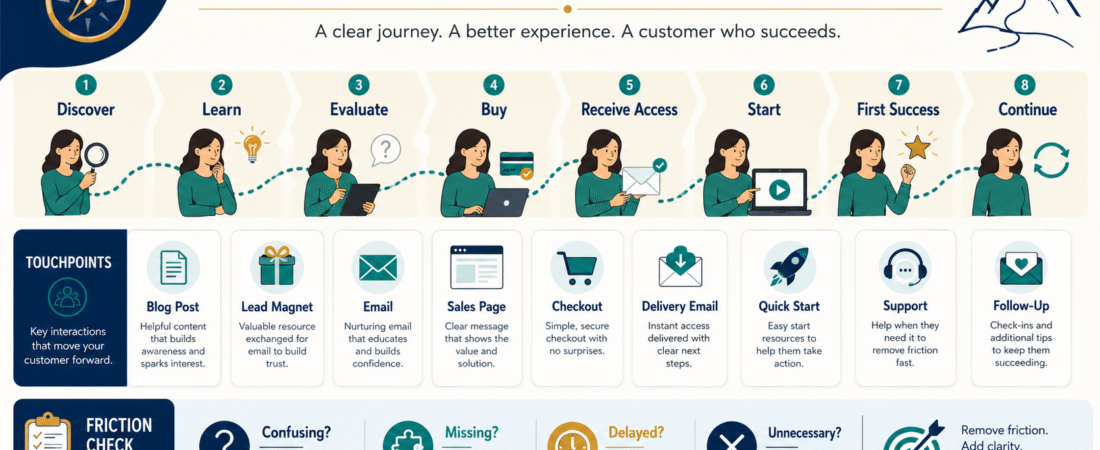
When creating a digital-product business, it is easy to think mainly about the pieces you build.
You create:
- Blog posts.
- Lead magnets.
- Emails.
- Sales pages.
- Checkout pages.
- Courses.
- Workbooks.
- Download areas.
But customers do not experience those pieces as separate projects.
They experience a journey.
Someone may first discover one article through Google, download a checklist, read three emails, visit a product page, purchase, receive a delivery email, sign in, and complete the first lesson.
If one of those steps is confusing, the entire business can feel confusing.
A simple customer journey map helps you see the business from the customer’s point of view.
Current 2026 customer-journey guidance describes the digital journey as the sequence of interactions a customer has with a business across digital channels and commonly organizes it around awareness, consideration, decision, retention, and advocacy.
For a small digital-product business, I would simplify that further:
Discover → Understand → Decide → Buy → Receive → Start → Succeed
That is enough to identify many of the problems that cause lost leads, support requests, refunds, and unused products.
Shopify’s current guide to mapping a digital customer journey
Start With One Customer and One Product
Do not begin by mapping your entire business.
Choose one product.
For example:
Beginner AI Prompt Workbook
Then imagine one typical person who needs it.
You are not trying to invent an elaborate fictional persona.
You need enough context to understand:
- What problem brought the person to you?
- What information do they need before purchasing?
- What happens immediately after purchase?
- What does successful product use look like?
Your existing guide to creating a customer avatar can help you avoid inventing needs customers have never demonstrated.
How to Create a Customer Avatar With AI Without Inventing Customer Problems
Stage 1: Discover
The first question is:
How does this person first encounter the business?
Possible entry points:
- Google Search.
- YouTube video.
- Social media.
- Referral.
- Email forwarded by a friend.
- Review.
- Lead magnet.
- Affiliate recommendation.
You do not need to control every possible entry point.
You need to understand the main ones.
Write:
Customer Goal: Find help solving a specific problem.
Business Touchpoint: Helpful article or video.
Question: Does the visitor immediately understand what this content will help them do?
Stage 2: Understand
The visitor now knows you exist.
They still need to determine:
Is this information relevant to me?
Your job at this stage is usually not to make an immediate sale.
It is to reduce uncertainty.
Touchpoints may include:
- Blog article.
- Free checklist.
- Beginner guide.
- FAQ.
- Recommended resources.
- Email signup.
Current digital-touchpoint guidance includes websites, email, social content, support interactions, post-purchase messages, and customer account environments among the interactions that shape a customer experience.
Stage 3: Join the Audience
If a lead magnet is part of the journey, map every step.
For example:
Article → Signup Page → Form → Thank-You Page → Delivery Email → Free Resource
Now inspect each transition.
Article to Signup Page
Is the free resource relevant to what the visitor was reading?
Signup Form
Does the visitor understand what they will receive?
Thank-You Page
Does it confirm success?
Delivery Email
Does it actually arrive and clearly provide access?
Your newly published guide on the confirmation step is useful here:
How to Create a Lead Magnet Thank-You Page That Actually Helps New Subscribers
Stage 4: Consider the Product
The subscriber may now begin evaluating a paid product.
Questions may include:
- What exactly is included?
- Is this appropriate for a beginner?
- What problem does it solve?
- What format is it?
- How much time will it take?
- Are special tools required?
- How is it delivered?
- What support is provided?
- What is the refund policy?
Your sales page should answer the questions that genuinely affect the buying decision.
It does not need to manufacture urgency.
Stage 5: Purchase
Map:
Sales Page → Buy Button → Checkout → Payment Confirmation
Then test it as a customer.
Ask:
Is the product name consistent?
If the sales page says:
AI Starter Workbook
but checkout says:
SKU-AI-294
that introduces doubt.
Is the price clear?
The customer should know what is being charged.
Is it recurring?
If so, make that clear.
Does checkout work on mobile?
Test it.
What happens after payment?
There should be an intentional destination.
Stage 6: Receive the Product
This is where many digital-product businesses create unnecessary anxiety.
The customer has paid.
Now they want access.
The journey might be:
Payment → Confirmation Page → Delivery Email → Login → Product
Every step should confirm what happens next.
Your newly verified delivery-email guide addresses this exact transition:
How to Write a Digital Product Delivery Email That Prevents Customer Confusion
Stage 7: Start
Product access is not the same as product use.
Suppose someone logs into a course and sees:
- 12 modules.
- 74 videos.
- 19 downloads.
- 8 bonuses.
The customer may think:
Where do I begin?
Create a clear first step.
Examples:
Start with the five-minute Quick Start lesson.
Download the one-page setup checklist first.
Complete Worksheet 1 before opening the templates.
The goal is not to show the customer how much content they bought.
It is to help them begin.
Stage 8: First Success
This is the stage many businesses fail to map.
Ask:
What is the smallest meaningful result the customer can achieve?
For a prompt workbook:
Write one usable prompt.
For an email course:
Send the first campaign.
For a design template:
Create the first finished graphic.
For a business checklist:
Complete the first setup section.
Design the onboarding path around reaching that first success.
First Success Is Better Than “Finished the Product”
A 200-page ebook may take weeks to finish.
A course may take months.
Do not require completion before the customer receives value.
If the product can create a useful result in the first 15 minutes, make that path obvious.
Add the Customer’s Question at Every Stage
Create a table:
| Stage | Customer Question |
|---|---|
| Discover | Can this help me? |
| Learn | Do I trust this information? |
| Evaluate | Is the product right for me? |
| Purchase | What exactly am I buying? |
| Delivery | Where is my product? |
| Start | What do I do first? |
| Success | Did this help me accomplish something? |
Now review the business from that perspective.
Add the Business Touchpoint
Next column:
| Stage | Touchpoint |
|---|---|
| Discover | Blog article |
| Learn | Lead magnet |
| Evaluate | Email + sales page |
| Purchase | Checkout |
| Delivery | Delivery email |
| Start | Quick Start |
| Success | First completed action |
You now have a basic journey map.
Add Friction
This may be the most useful column.
Ask:
What might stop or confuse the person here?
Examples:
Discover
Article title promises something the page does not answer.
Lead Magnet
Signup form does not explain delivery.
Message lands in Spam.
Sales Page
Product format is unclear.
Checkout
Customer sees a different product name.
Delivery
Access email has no obvious button.
Course
No Quick Start.
Support
Customer does not know where to ask for help.
These are operational problems you can fix.
Use Real Evidence Whenever Possible
Do not create a journey map entirely from imagination.
Use:
- Customer questions.
- Support messages.
- Refund reasons.
- Email replies.
- Analytics.
- Search queries.
- Product feedback.
- Test purchases.
If three people ask the same question, that is journey evidence.
Perform a Secret-Customer Test
One of the simplest audits is completing your own system as though you had never seen it before.
Use a different email address.
Start from:
Google or article → lead magnet → email → product page → test purchase → delivery → login → first lesson
Record every moment when you think:
This could be clearer.
Do not fix anything during the test.
Record it first.
Then review the complete list.
Do Not Add More Steps Unless They Help
Sometimes marketers accidentally make the customer journey longer because the funnel diagram looks more sophisticated.
You may not need:
Article → Quiz → Lead Magnet → Webinar → Five-Day Challenge → Strategy Call → Product
when:
Article → Useful Free Resource → Product
works.
Complexity should earn its place.
Map the Post-Purchase Experience Too
Current customer-journey frameworks explicitly continue beyond the initial transaction into retention and advocacy rather than treating checkout as the finish line.
For digital products, post-purchase touchpoints may include:
- Delivery.
- Onboarding.
- Product use.
- Support.
- Update notices.
- Feedback requests.
- Testimonials.
- Follow-up offers.
The business journey does not end when money changes hands.
Connect the Journey to Customer Support
A good onboarding system should answer common questions before a support request is necessary.
Your existing customer-onboarding guide provides a deeper process for that part of the journey:
How to Create a Customer Onboarding System for a Digital Product
Create a One-Page Journey Map
Your final document can be extremely simple.
DISCOVER
Touchpoint: Blog article
Customer goal: Solve problem
Friction: Article does not answer query
JOIN
Touchpoint: Lead magnet
Customer goal: Get useful free resource
Friction: Delivery unclear
CONSIDER
Touchpoint: Email + sales page
Customer goal: Evaluate product
Friction: Product contents unclear
BUY
Touchpoint: Checkout
Customer goal: Complete purchase
Friction: Confusing checkout
RECEIVE
Touchpoint: Delivery email
Customer goal: Get access
Friction: Missing login instructions
START
Touchpoint: Quick Start
Customer goal: Know first action
Friction: Too many choices
SUCCEED
Touchpoint: Product
Customer goal: Accomplish first result
Friction: No clear milestone
That fits on one page.
Review One Friction Point at a Time
Do not redesign your entire business because the journey map identified 17 improvements.
Prioritize:
Broken
Customer cannot complete the step.
Confusing
Customer can complete it but may struggle.
Unnecessary
The step adds no useful value.
Optional Improvement
Could be better later.
Fix broken first.
Conclusion
A digital-product customer journey map does not need to become a complicated marketing diagram.
Start with one customer and one product.
Map:
Discover → Understand → Decide → Buy → Receive → Start → Succeed
Then identify the real touchpoints between those stages.
Test the journey yourself.
Use actual customer questions to find friction.
And remember that the customer does not experience your website, email system, checkout, and course platform as separate pieces.
They experience one business.
Your job is to make that journey feel clear from the first click to the first useful result.