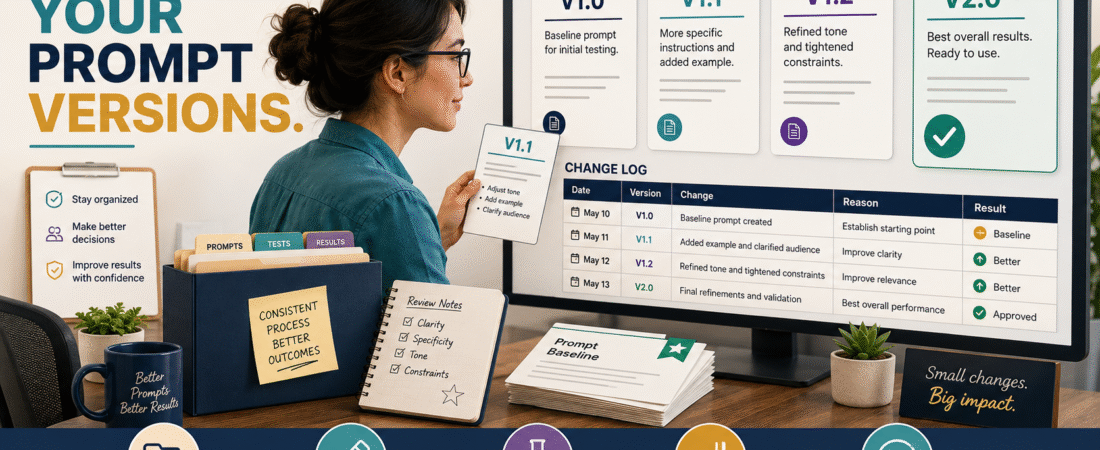
A reusable AI prompt can improve over time.
You add a better instruction.
You change the output format.
You tighten the word count.
You add a fact-checking rule.
You remove something that caused weak results.
Eventually you have files named:
- Prompt Final
- Prompt Final 2
- Prompt New
- Prompt Updated
- Prompt Updated Final
- Prompt Really Final
Now you have a problem.
You no longer know:
- Which version produced the best result.
- What changed.
- Why it changed.
- Whether the latest version is actually better.
- Which version you should restore if something goes wrong.
That is why even a beginner can benefit from a simple AI prompt version-control system.
You do not need GitHub, programming, or developer software.
You need five things:
Version number → saved prompt → change log → test result → approved status.
Formal AI engineering guidance uses the same underlying principle. AWS recommends version-controlling prompts because versioning supports rollback, testing, reproducibility, and a record of how prompt behavior changes.
A small online business can apply that discipline with a folder and spreadsheet.
Why Prompt Version Control Matters
Suppose Prompt 1.4 produces excellent 1,800-word articles.
You change three instructions:
- More conversational tone.
- New SEO rules.
- New conclusion format.
Prompt 1.5 suddenly produces shorter articles and skips part of the metadata.
What caused the problem?
You do not know because three things changed simultaneously.
Version control gives you a record.
Now you can compare 1.4 with 1.5 and decide whether to:
- Keep the new version.
- Modify it.
- Restore 1.4.
That ability to roll back is one of the reasons formal prompt-management frameworks treat prompts as controlled operational assets.
Start With One Approved Baseline
Choose the prompt you currently trust.
Do not begin by organizing every experimental draft from the last year.
Save the current working prompt as:
Prompt Name — Version 1.0
Examples:
Blog Article Prompt — V1.0
YouTube Short Prompt — V1.0
Product Review Prompt — V1.0
Customer Support Prompt — V1.0
This becomes the baseline.
Use a Simple Version-Number System
You do not need complicated software-development terminology.
A beginner-friendly system can be:
V1.0
First approved version.
V1.1
Small change.
V1.2
Another small change.
V2.0
Major structural revision.
For example:
V1.0 — Original approved article prompt.
V1.1 — Added internal-link requirements.
V1.2 — Added fact-checking section.
V2.0 — Rebuilt entire article structure.
The version number tells you immediately whether the change was small or substantial.
Never Overwrite the Approved Version
Suppose V1.2 works.
You want to test a change.
Do not open V1.2, edit it, and save over the same file.
Instead:
- Duplicate V1.2.
- Rename the copy V1.3.
- Edit V1.3.
- Test it.
- Preserve V1.2.
Now rollback remains possible.
AWS guidance on prompt lifecycle management specifically highlights rollback and traceability as benefits of maintaining version history rather than treating the latest text as the only copy.
Create a Prompt Change Log
Use a simple spreadsheet or document.
| Version | Date | Change | Reason | Result | Status |
|---|---|---|---|---|---|
| V1.0 | Aug. 1 | Baseline | Initial approved prompt | Good | Approved |
| V1.1 | Aug. 8 | Added word-count rule | Outputs too short | Better | Approved |
| V1.2 | Aug. 15 | Added 3 new rules | Improve SEO | Mixed | Testing |
| V1.3 | Aug. 18 | Removed one rule | Caused repetition | Better | Approved |
The key column is:
Reason
Without it, six months later you may wonder why an instruction exists.
Record What Changed
Do not write:
“Updated prompt.”
That tells you almost nothing.
Write:
Added requirement that all current product pricing must be verified through official sources.
Or:
Changed video script target from 700 to 580 characters.
Or:
Removed instruction to repeat the primary search phrase in every section because it made the article unnatural.
Specific change notes make the history useful.
Change One Important Thing at a Time
Whenever practical, test one meaningful change.
Suppose you want to improve:
- Tone.
- Length.
- Structure.
- Links.
- Fact-checking.
If you modify all five simultaneously and output quality changes, diagnosis becomes difficult.
Instead:
V1.1: Length.
V1.2: Fact checking.
V1.3: Link handling.
This creates cleaner evidence.
Keep the Prompt and Its Variables Separate
A reusable prompt normally contains fixed instructions plus changing information.
For example:
Fixed:
“Create a beginner-friendly product comparison using verified official sources.”
Variable:
Product A: [PRODUCT A]
Product B: [PRODUCT B]
Date: [DATE]
Using placeholders helps keep the reusable prompt stable.
AWS also recommends prompt templates and parameterization as a way to reduce duplicated instructions and improve maintainability.
Save the Exact Approved Prompt
Do not save only a summary.
Save the full prompt.
If V1.4 is approved, you should be able to open V1.4 six months later and run the same instruction again.
That is what makes version history practical.
Track the AI Environment When It Matters
Prompt output can change even when the prompt does not.
Models and products evolve.
If a prompt is business-critical, record useful context such as:
- AI platform.
- Model if visible and relevant.
- Date tested.
- Important settings.
- Input material used.
Formal AI lifecycle guidance notes that model changes can affect behavior, which is another reason prompt and model information may be useful for reproducibility.
You do not need to document every tiny setting for casual prompts.
Use more detail for prompts that create important publishing or business assets.
Use a Standard Test
When comparing versions, test them with comparable input.
For example:
Article Prompt Test
Use the same sample topic.
Product Review Prompt Test
Use the same pair of products.
Short-Form Script Prompt Test
Use the same source article.
Otherwise, you may compare:
Prompt difference
when the actual difference came from:
Input difference.
Create an Approval Standard
Before promoting a new prompt version to Approved, check:
- Did it follow every required field?
- Did it maintain required length?
- Did it preserve tone?
- Did it follow link rules?
- Did it avoid unsupported claims?
- Did it reduce the problem the revision was meant to fix?
- Did it introduce a new problem?
Then assign:
Approved
or:
Testing
or:
Archived
AWS describes a similar controlled lifecycle using stages such as Draft, Review, Active, and Archived for operational prompts.
You can use simpler language, but the principle is the same.
Keep One Clearly Marked Active Version
Your folder might contain:
- Blog Prompt V1.0 — Archived
- Blog Prompt V1.1 — Archived
- Blog Prompt V1.2 — Archived
- Blog Prompt V1.3 — ACTIVE
- Blog Prompt V1.4 — Testing
Now there is no ambiguity.
Do not rely on remembering:
“I think V1.3 was the good one.”
Organize the Files
A simple folder structure:
AI Prompt Library/
- Blog Prompts
- Video Prompts
- Product Prompts
- Email Prompts
- Business Operations
Within Blog Prompts:
- Blog Master Prompt V1.0
- Blog Master Prompt V1.1
- Blog Master Prompt V1.2
- Blog Master Prompt V2.0
- Blog Prompt Change Log
This builds naturally on a broader reusable AI prompt library.
Keep the Change Log With the Prompt
Do not put the prompt in one location and the change history somewhere completely different.
A future user should be able to open the folder and understand:
- Current version.
- Previous versions.
- Changes.
- Status.
- Test results.
That makes future handoff much easier.
Example: A Prompt Revision Gone Wrong
Imagine V2.2 creates excellent articles.
You add:
“Make every article highly persuasive and urgent.”
V2.3 produces:
- Exaggerated claims.
- Unnecessary urgency.
- Aggressive calls to action.
- Less educational tone.
Instead of trying to repair V2.3 through five more edits:
- Mark V2.3 Rejected.
- Restore V2.2.
- Create V2.4 from V2.2.
- Add a narrower instruction.
- Test again.
That is rollback.
Without version control, you may have lost the good prompt.
Do Not Confuse Newest With Best
This is a critical rule.
V4.0 is not automatically better than V3.2.
Version numbers describe sequence.
They do not guarantee quality.
If V3.2 consistently produces better output, it can remain the approved version.
Protect Working Prompts From Unnecessary Redesign
Once a prompt reliably produces the required output, make changes for a reason.
Good reasons:
- A required field is missing.
- A platform changed.
- Output is consistently weak.
- New legal or publishing requirements exist.
- A repeated problem has been identified.
Weak reason:
“Maybe I should make it more sophisticated.”
Complex prompts can become fragile.
Version the Final Publication Asset Separately
Do not confuse:
Prompt version
with:
Article version.
For example:
Prompt: Blog Master V2.2
Article: AI Workflow Article V1.0
The prompt generated the asset, but they are different records.
Saving both can make future reproduction and updating easier.
Connect Version Control to Targeted Revision
If a prompt change improves 95% of your output but one paragraph still needs work, do not automatically rebuild the master prompt.
Sometimes the article itself needs a targeted edit.
The existing guide to revising AI-generated content without rewriting everything explains how to isolate a revision while protecting approved sections.
Version the master prompt only when the same issue repeats enough to justify a system-level change.
A Simple Prompt Version-Control Template
PROMPT NAME:
[Name]
ACTIVE VERSION:
[V#]
DATE APPROVED:
[Date]
PURPOSE:
[Task]
CURRENT PROMPT:
[Full prompt]
CHANGE LOG
Version:
[V#]
Date:
[Date]
Change:
[What changed]
Reason:
[Why]
Test Input:
[What was used]
Result:
[What happened]
Status:
Testing / Approved / Archived / Rejected
Monthly Prompt Maintenance
You do not need to inspect every prompt constantly.
Once per month—or after a noticeable problem—review:
- Which prompts were used.
- Which repeatedly failed.
- Which were changed.
- Whether Testing versions should be approved or rejected.
- Whether old versions can be archived.
Do not modify stable prompts just to create activity.
Conclusion
AI prompts can become valuable business assets when you use them repeatedly.
Treat them accordingly.
Give each approved prompt a version number.
Never overwrite the last working version.
Record what changed and why.
Test revisions with comparable inputs.
Keep one clearly marked active version.
Archive rejected or outdated versions.
Most importantly, remember:
The newest prompt is not automatically the best prompt.
Version control gives you the ability to improve deliberately—and to restore the version that worked when an experiment makes the output worse.