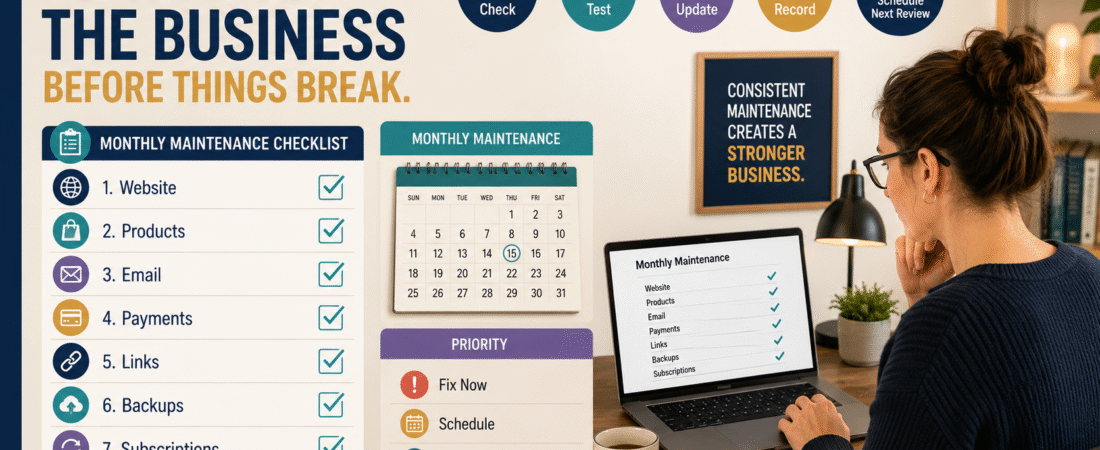
Many online-business problems do not appear suddenly.
They grow quietly.
A link that worked last month stops working.
A credit card expires.
A product file is updated in one folder but not in the customer-delivery system.
An email form stops adding subscribers.
A software subscription renews at a price you no longer expected.
A website backup has not been tested.
None of these problems require daily attention.
But ignoring them indefinitely can create unnecessary customer problems, lost sales, or wasted money.
A simple online business monthly maintenance checklist gives you one scheduled time to inspect the parts of the business that are easy to forget.
The goal is not to spend an entire day performing maintenance.
The goal is:
Check → identify exceptions → fix important problems → document the result → move on.
Monthly Maintenance Is Different From Daily Work
Your everyday work might include:
- Writing.
- Publishing.
- Customer support.
- Product creation.
- Email.
- Marketing.
Monthly maintenance asks a different question:
Is the underlying business system still functioning correctly?
You are inspecting infrastructure.
That means you should resist adding normal production tasks to the checklist.
Do not include:
- Write four articles.
- Create five videos.
- Build a new product.
Those are production goals.
Maintenance is about keeping the existing operation reliable.
Area 1: Website
Begin with the public website.
Check:
- Homepage loads.
- Main menu works.
- Important pages open.
- Contact page works.
- Lead-magnet pages work.
- Product pages work.
- Mobile layout looks reasonable.
- SSL certificate is active.
- Obvious plugin or theme errors are absent.
You do not need to inspect every page manually each month.
Prioritize high-value pages.
Area 2: Important Links
Test links connected with money or customer access.
Examples:
- Product checkout.
- Affiliate recommendations.
- Lead magnets.
- Email signup.
- Product login.
- Download instructions.
- Support page.
A broken decorative link is inconvenient.
A broken checkout link can stop revenue.
Prioritize accordingly.
Area 3: Product Delivery
Choose your active products.
Test:
Purchase or approved test path → confirmation → delivery → access → file
You may not need to perform a real transaction every month if your systems provide appropriate test modes, but the delivery path should be checked regularly.
The existing digital-product purchase and delivery testing workflow provides a fuller version of this process.
Monthly maintenance can use a shorter spot check.
Area 4: Product Files
Check whether:
- Current delivery file matches current approved version.
- Old drafts are not being delivered.
- Links inside PDFs still work.
- Bonuses are present.
- File names match instructions.
- Recently updated products are backed up.
This becomes much easier when files are organized consistently.
Area 5: Email Signup
Test one important signup form.
Use a test address when appropriate.
Confirm:
- Form submits.
- Subscriber reaches correct list.
- Confirmation works if used.
- Delivery email arrives.
- Links inside the email work.
- Appropriate automation begins.
Do not assume an embedded form still works because it worked six months ago.
Area 6: Customer Support
Review the previous month’s support activity.
Ask:
- What question appeared repeatedly?
- Was there an access problem?
- Did customers misunderstand something?
- Is an FAQ missing?
- Did one product create disproportionate support?
You do not have to solve every suggestion.
You are looking for recurring friction.
Area 7: Refunds
Review refund reasons.
Do not merely record the total.
Look for patterns.
Examples:
- Wrong product expectation.
- Access problem.
- Duplicate purchase.
- Technical issue.
- Product-content mismatch.
If three customers describe the same problem, investigate.
Area 8: Payment Systems
Check the high-level health of:
- Checkout.
- Payment processor.
- Payout account.
- Failed-payment notifications.
- Subscription payments.
Do not expose or copy sensitive financial credentials into your maintenance sheet.
Record only the operating status you need.
Area 9: Affiliate Links
Affiliate programs change.
A merchant may:
- Change a landing page.
- Close an offer.
- Replace tracking.
- Change terms.
- Discontinue a product.
Spot-check the links currently used most often.
A structured affiliate-link organization system makes this much easier.
Area 10: Software Subscriptions
Review upcoming renewals.
Ask:
- Do I still use this?
- Is the price changing?
- Is annual renewal coming?
- Is a cancellation deadline approaching?
- Could a lower plan do the job?
Your software subscription renewal calendar can supply the information.
Monthly maintenance is the time to act on it.
Area 11: Backups
Confirm that your critical backup process is still functioning.
Review:
- Website backup.
- Product-file backup.
- Important business records.
- Cloud copy.
- Offline or separately protected copy where appropriate.
A backup existing somewhere is not enough.
Occasionally test whether an important file can actually be restored.
The existing simple online-business backup process provides the broader framework.
Area 12: Domains and Hosting
Check:
- Domain expiration.
- Auto-renew.
- Payment method.
- Hosting renewal.
- Main administrative email.
- Any important notices.
Domains deserve high priority.
Losing access to an optional tool is inconvenient.
Losing the domain underlying your entire website can create a much larger problem.
Area 13: Account Security
Review only what is necessary.
For critical accounts:
- Is multi-factor authentication still active?
- Has an authorized user changed?
- Are recovery methods current?
- Is the main business email secure?
Do not use monthly maintenance as an excuse to constantly reset passwords without cause.
The objective is controlled access.
Area 14: Emergency Information
Ask:
If I were unavailable tomorrow, is the continuity information still correct?
The verified online-business emergency access plan provides a structure for documenting critical systems without placing passwords in an ordinary spreadsheet.
Update the plan when:
- Hosting changes.
- Domains move.
- Software changes.
- Support contact changes.
- Products move.
Area 15: Analytics
Maintenance is not the same as performance analysis.
You do not need a three-hour analytics session.
Confirm:
- Website analytics still collects data.
- Search Console has no obvious critical warning.
- Key events are still firing where relevant.
- Major traffic changes have a recorded explanation or follow-up.
If everything is normal, move on.
Use Three Outcomes
Every checklist item should end with one of three results.
FIX NOW
Important and actionable.
Examples:
- Checkout broken.
- Product inaccessible.
- Domain problem.
SCHEDULE
Needs work, but not an emergency.
Examples:
- Old FAQ.
- Outdated screenshot.
- Minor page formatting.
NO ACTION
Checked and functioning.
This keeps the maintenance session from becoming a full workweek.
Set a Time Limit
Try to complete the core inspection within a defined period.
The first month may take longer because you are building the process.
Later months should become faster.
If the checklist takes four hours every month, ask:
Which checks are actually useful?
Remove low-value work.
Use Your Weekly Scorecard for Performance
Monthly maintenance should not replace performance management.
The existing one-page weekly business scorecard can track ongoing business numbers.
Think of the difference as:
Weekly Scorecard: How is the business performing?
Monthly Maintenance: Are the systems still functioning?
Both are useful.
They serve different purposes.
A Simple Monthly Checklist
Website
- Homepage works
- Main navigation works
- Important forms work
- Mobile check completed
Products
- Delivery tested
- Current files confirmed
- Important links checked
- Signup tested
- Delivery email tested
- Core automation checked
Payments
- Checkout operational
- Processor status normal
- Failed payments reviewed
Support
- Repeated issues reviewed
- Refund patterns reviewed
Business Operations
- Software renewals checked
- Domains checked
- Hosting checked
Protection
- Backups confirmed
- Recovery information reviewed
- Critical security settings checked
Measurement
- Analytics collecting
- Critical alerts reviewed
Record Only Exceptions
You do not need to write:
Homepage works — no issue
every month.
You can simply check the box.
Record details only when:
- Something changed.
- A problem was found.
- An action was scheduled.
This keeps records readable.
Do Not Constantly Improve Things That Are Working
Maintenance creates a temptation:
“While I’m here, maybe I should redesign this page.”
That is not maintenance.
If something works and does not create meaningful problems, leave it alone unless you have a separate reason to improve it.
Stable systems are valuable.
Conclusion
A small online business does not need constant maintenance.
It does need periodic attention.
Once each month, review the website, important links, product delivery, email signup, payments, customer support, affiliate links, subscriptions, domains, backups, security, emergency information, and analytics.
Fix critical problems immediately.
Schedule nonurgent work.
Leave functioning systems alone.
The purpose is not to create another complicated routine.
It is to catch small operational problems while they are still small.