Imagine opening your computer tomorrow and discovering that the main folder containing your digital products is gone.
Not one file.
The entire folder.
Or imagine:
- Laptop failure.
- Accidental deletion.
- Ransomware.
- Cloud-account problem.
- WordPress mistake.
- Corrupted external drive.
- Lost password.
- Product file overwritten with the wrong version.
Would your online business still be recoverable?
A small online-business backup plan does not need enterprise-level infrastructure.
It does need one important principle:
Do not let the only copy of something important exist in one place.
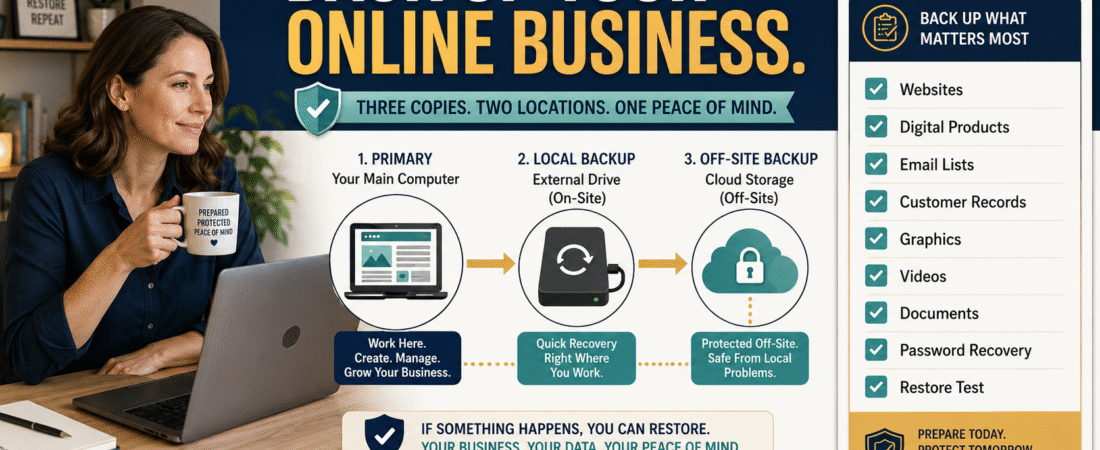
The U.S. Cybersecurity and Infrastructure Security Agency recommends that small businesses identify critical business data, back it up, and test that backups can actually be restored. CISA also promotes the widely used 3-2-1 approach: three copies of important data, on two types of storage, with one copy kept off-site or otherwise separate.
CISA’s small-business backup guidance is a useful reference for building a practical recovery plan.
Start by Asking What You Cannot Easily Recreate
Do not begin with storage technology.
Begin with business assets.
Ask:
If this disappeared tonight, what would be painful, expensive, or impossible to rebuild?
Examples:
- Digital-product source files.
- Customer delivery files.
- Website backups.
- Email subscriber exports.
- Sales records.
- Graphics.
- Videos.
- Audio.
- Course scripts.
- Product documentation.
- Legal/business records.
- Affiliate-link inventory.
- Prompt library.
- SOPs.
- Analytics exports.
- Brand files.
This becomes your critical-data inventory.
Not Every File Needs the Same Priority
Create three levels.
Critical
Loss would seriously interrupt the business.
Examples:
- Current product masters.
- Customer records.
- Important business documents.
- Website databases.
- Current email list.
Important
Rebuilding would consume significant time.
Examples:
- Blog drafts.
- Marketing graphics.
- Videos.
- Templates.
- Research.
Replaceable
Files you can easily download or recreate.
Examples:
- Software installers.
- Public PDFs.
- Temporary exports.
Backup effort should follow business importance.
Understand the 3-2-1 Idea
CISA describes the 3-2-1 backup approach as maintaining multiple copies across separate storage locations or media so one incident is less likely to destroy everything.
For a simple online business, that might look like:
Copy 1 — Working Copy
Your computer.
Copy 2 — Local Backup
External drive or another local backup device.
Copy 3 — Off-Site or Cloud Backup
A separate cloud or remote backup service.
The exact technology can vary.
The principle is separation.
Why One Cloud Folder Is Not Automatically a Complete Backup Strategy
Suppose everything is stored in one synchronized cloud folder.
You accidentally delete a folder.
If deletion synchronizes across devices, your mistake may propagate.
Cloud providers often have recovery tools, version history, or recycle bins, but your entire recovery plan should not depend on one account behaving exactly as expected.
A backup should protect you from more than device failure.
It should also help with:
- Mistakes.
- Corruption.
- Account problems.
- Malicious changes.
Back Up Digital Product Source Files
For each active product, preserve:
- Editable source document.
- Approved final version.
- Customer delivery files.
- Graphics.
- Worksheets.
- Bonus files.
- Product inventory.
- Update notes.
Your product-management system should make these files easy to identify.
That is why a low-maintenance digital product update plan and a clear backup process work well together.
Back Up Your Email List
Your email platform may be dependable.
But the subscriber list is a major business asset.
Periodically export data according to the features and policies of your provider.
Potential fields include:
- Email.
- Name.
- Subscription status.
- Tags.
- Signup date.
Handle customer and subscriber data carefully.
Store it only where appropriate and protect access.
A backup copy does not eliminate your privacy obligations.
Back Up Your Website
A WordPress business may need backups of:
- Database.
- Media.
- Themes.
- Plugins where relevant.
- Configuration.
- Custom code.
- Important page content.
Your hosting provider may already offer backups.
That is useful.
But understand:
- Frequency.
- Retention.
- Restoration process.
- What is included.
- Whether you can download a backup.
- What happens if the hosting account itself becomes inaccessible.
A backup feature you have never tested is still an assumption.
CISA Specifically Recommends Testing Restores
Creating backup files is only half of the job.
CISA’s current small-business cybersecurity guidance emphasizes testing partial and full restores, not simply assuming a backup is usable.
That means periodically proving:
I can actually recover this.
A Simple Restore Test
Choose one non-sensitive sample folder.
- Back it up.
- Delete the test copy from a separate test location.
- Restore it from backup.
- Open several files.
- Confirm contents are correct.
For a website backup, restoration can be more complicated.
Use your host’s documented procedures and, when appropriate, test in a staging environment rather than risking the live site.
Back Up Your SOPs
If you have documented processes for:
- Publishing.
- Customer support.
- Product delivery.
- Email.
- Affiliate links.
- Content production.
those documents may be just as important as the software.
Your guide to creating an SOP with AI for business tasks you repeat helps convert procedures from memory into documented assets.
Those documents should also be backed up.
Back Up Your Prompt Library
Reusable AI prompts can become intellectual property inside your workflow.
If you rely on them every day, do not leave the only copy:
- Inside one AI conversation.
- In one browser.
- On one computer.
Maintain an organized master.
Your existing guide to creating an AI prompt library for tasks you repeat every week provides the organization layer.
The backup plan protects it.
Create a Backup Schedule Based on Change Frequency
A file updated daily may need frequent backup.
An old archived ebook may not.
Example:
Daily or Automatic
- Active working documents.
- Current business files.
Weekly
- Product masters.
- Marketing assets.
- SOPs.
- Website export where appropriate.
Monthly
- Subscriber export.
- Affiliate-link library.
- Analytics archive.
- Business records snapshot.
After Major Changes
- Product launch.
- Website redesign.
- Plugin changes.
- Major course update.
- Migration.
Your schedule should reflect your real business.
Keep One Backup Separate From the Main Computer
If ransomware or another destructive event reaches:
- Computer.
- Permanently connected backup drive.
- Synchronized folders.
multiple copies may be affected.
CISA’s guidance recommends keeping critical backups offline or otherwise protected from the systems they are intended to recover.
That is why separation matters.
Protect Backups
A backup containing customer information is still customer information.
Protect it.
Consider:
- Strong account passwords.
- Multi-factor authentication.
- Encryption where appropriate.
- Restricted access.
- Secure storage.
- Removal of unnecessary old personal data.
Do not create an insecure pile of duplicate sensitive information in the name of safety.
Keep a Recovery Information Sheet
Your backup system should explain:
What is backed up?
Where is it stored?
How often?
Who can access it?
How do I restore it?
When was restoration last tested?
You do not need to store passwords directly in this sheet.
Use a secure password-management process.
The document should tell you where recovery resources exist.
What About Software Accounts?
You cannot “back up” every cloud service in the same way as a folder.
But you can preserve:
- Login-recovery information.
- Account ownership details.
- Exported data.
- Billing records.
- Configuration notes.
- Important settings.
- Integration map.
This is particularly useful when auditing your business tool stack.
If one tool becomes unavailable, you need to know what depended on it.
Create a Backup Inventory
Use a spreadsheet:
| Asset | Importance | Primary Location | Backup Location | Frequency | Last Restore Test |
|---|---|---|---|---|---|
| Product Masters | Critical | Computer | Drive + Cloud | Weekly | Aug. 2026 |
| Email List | Critical | Email Platform | Encrypted Export | Monthly | Aug. 2026 |
| Website | Critical | Host | Host + Download | Daily/Weekly | Aug. 2026 |
| Graphics | Important | Computer | Cloud | Automatic | Jul. 2026 |
This turns “I think it’s backed up” into something verifiable.
Do Not Make the System So Complex That You Stop Using It
A backup plan can become ridiculous.
You do not need 17 storage services.
For many solo businesses:
Working copy + automatic backup + separate additional copy + periodic restore test
is far better than an elaborate system nobody maintains.
A Monthly Backup Review
Once per month:
- Check that backups are running.
- Verify important folders are included.
- Export critical cloud data when appropriate.
- Review storage warnings.
- Confirm recent product versions are backed up.
- Test recovery of one sample.
- Update Last Restore Test.
That may take only a short period once the system is established.
Backups Are Part of Business Continuity
The purpose of backup is not storage.
The purpose is recovery.
Ask:
How quickly could I resume operating?
If your computer disappeared, could you recover:
- Product files?
- Website?
- Email list?
- Customer access?
- Publishing workflow?
A strong backup system supports the entire starter stack rather than one folder. For a broader view of the core business components involved, see How to Build a Simple Online-Business Starter Stack.
Conclusion
Backing up an online business does not require an enterprise IT department.
Identify the assets that matter most.
Keep multiple copies.
Separate at least one copy from the main working environment.
Back up the information you would struggle to recreate.
And periodically prove that recovery works.
A backup you have never tested is a hope.
A tested backup is a business system.