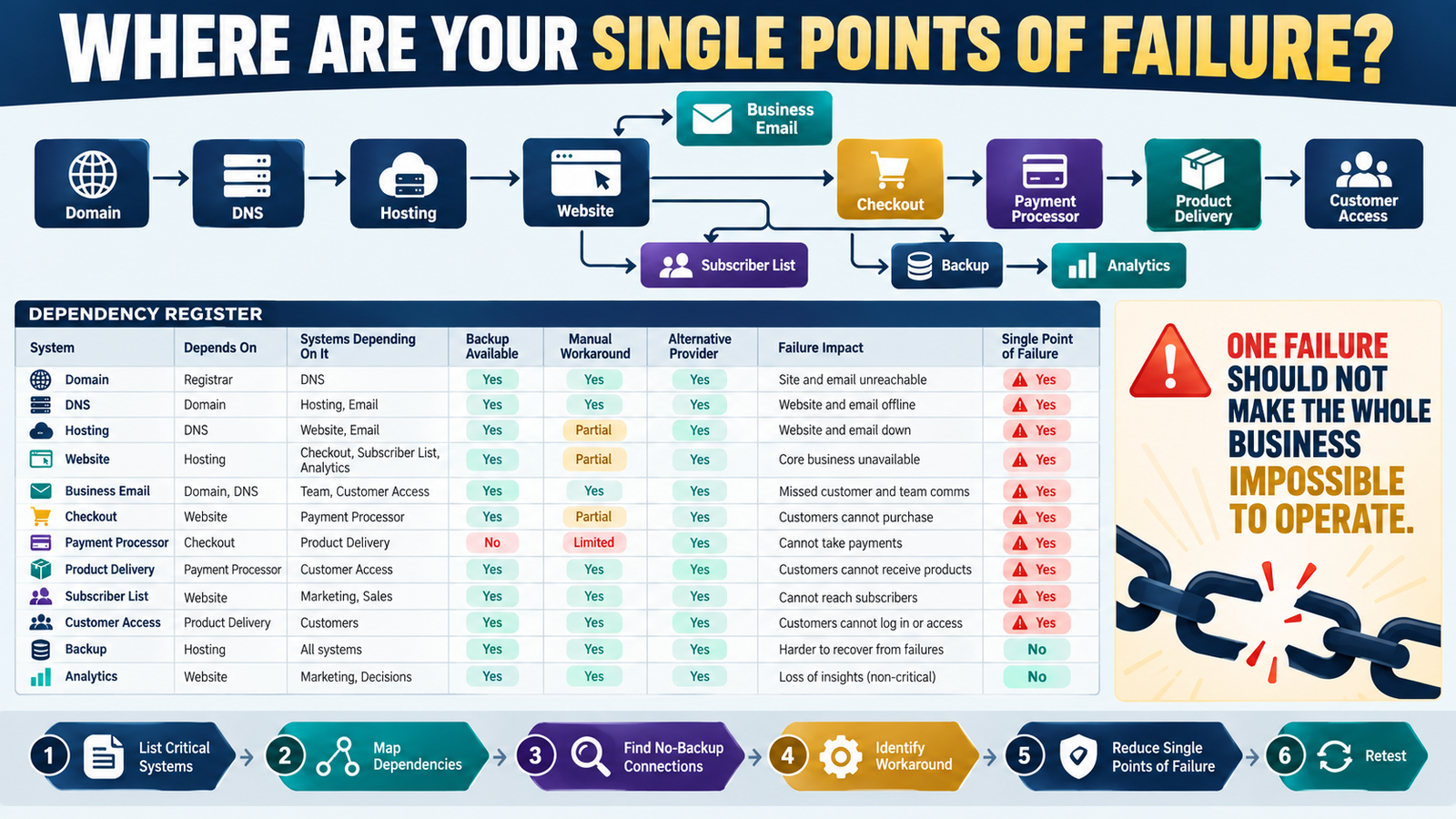
An online business can look simple from the outside.
One website.
One checkout.
One email platform.
One product-delivery system.
But those systems depend on other systems.
Your website may depend on:
- Domain registration.
- DNS.
- Hosting.
- WordPress.
- Plugins.
Your product sale may depend on:
- Checkout.
- Payment processor.
- Product delivery.
- Email.
- Customer account.
One failure can therefore affect several parts of the business.
A business dependency register helps you identify those relationships before something breaks.
The process is:
List Critical Systems → Identify Dependencies → Identify Downstream Impact → Find Workarounds → Identify Single Points of Failure → Reduce Risk
What Is a Business Dependency?
A dependency is something another system or business function requires in order to work.
Example:
Website depends on hosting.
If hosting fails:
The website fails.
Another:
Product delivery depends on checkout sending purchase information.
Checkout can collect money successfully.
But if the integration fails:
The customer may not receive access.
Dependencies Are Different From Integrations
Your verified Online Business Integration Map documents:
How systems communicate.
A dependency register asks:
What becomes impossible if this system disappears?
Example:
Email platform may integrate with your website.
But your business may also depend on that platform to:
- Store subscriber records.
- Send lead magnets.
- Run onboarding.
Dependency analysis looks at operational consequence.
What Is a Single Point of Failure?
A single point of failure is a component whose failure can stop an important business function because no practical alternative exists.
Example:
Only copy of your finished product exists on one laptop.
Laptop fails.
No backup.
That laptop was a single point of failure.
Another:
Every customer must receive access through one delivery platform.
No manual delivery process exists.
Platform outage means:
No customer can receive products.
That may be another single point of failure.
Start With Business Functions
List:
- Website.
- Payments.
- Checkout.
- Product delivery.
- Customer access.
- Email communication.
- Subscriber management.
- File storage.
- Backups.
- Analytics.
Then identify the systems supporting each function.
Example: Website
Function: Public website
Depends On:
- Domain registrar.
- DNS.
- Hosting.
- WordPress.
Now ask:
What happens if each dependency fails?
Domain Failure
Visitors may not reach website.
Hosting Failure
Website becomes unavailable.
WordPress Problem
Content may be inaccessible even though the domain and hosting work.
Different dependencies require different recovery actions.
Example: Digital Product Sale
Function: Sell Product A
Potential dependencies:
Sales Page → Checkout → Payment Processor → Product Delivery → Email Confirmation
A failure in any critical step can damage the customer journey.
Map the chain.
Add “Systems Depending on This”
Dependencies work in both directions.
Example:
Payment Processor
Systems depending on it:
- Checkout.
- Subscriptions.
- Refunds.
- Product-access triggers.
This tells you why payment processing deserves high recovery priority.
Add Failure Impact
Use:
Critical
High
Moderate
Low
Ask:
If this failed for 24 hours, what would happen?
Critical
Customers cannot buy or access purchases.
High
Important communication or lead generation stops.
Moderate
Manual workaround possible.
Low
Little immediate customer impact.
Add a Backup Field
Ask:
Is there a backup?
Examples:
- Website backup.
- Subscriber export.
- Product master copy.
- Secondary administrator.
- Alternate contact method.
A backup reduces some risks.
But only if it can actually be used.
Add a Manual Workaround
This is different from a backup.
Example:
Product automation fails.
Backup:
Customer data export.
Workaround:
Manually email the buyer the product.
A workaround helps the business operate temporarily while the main system is repaired.
Add Alternative Provider Carefully
You do not necessarily need two paid providers for everything.
But for highly critical services, it may help to know:
What is the replacement path?
Example:
If your web host fails permanently:
Which host could receive the backup?
You do not need to maintain the replacement account today.
You need to know whether recovery is realistic.
Use Your Asset Inventory
Your verified Digital Business Asset Inventory answers:
What does the business own or depend on?
Take each critical asset and add:
Depends On
and:
What Depends on It
Now the inventory becomes more operational.
Example Dependency Register
System: ProductDyno
Purpose: Customer product access
Depends On: Checkout integration, customer email, product files
Systems Depending On It: Customer delivery
Backup: Product files backed up
Manual Workaround: Manual customer delivery possible
Failure Impact: High
Single Point of Failure?: Partially
That is enough information to make a continuity decision.
Look for Dependencies With No Backup and No Workaround
These deserve attention first.
Use this rule:
High Impact + No Backup + No Workaround = Priority Risk
You do not need a complicated scoring formula.
The combination is obvious.
Example: Domain
Impact: Critical
Backup: Domain registration itself cannot simply be restored from a file.
Workaround: Limited.
Therefore:
Protect:
- Renewal.
- Account access.
- DNS documentation.
- Registrar contact.
Different risks require different controls.
Example: Product File
Impact: High
Backup: Yes.
Workaround: Restore copy.
Risk is much more controlled.
Add Ownership
Record:
Who controls this account?
If the owner is unavailable:
Can an authorized person determine what to do?
Your Emergency Access Plan can provide secure continuity without placing passwords in the dependency register.
Use the Register Before Software Cancellation
Suppose you plan to cancel a software tool.
Before canceling:
Search the dependency register.
Ask:
What business functions depend on it?
That can reveal hidden consequences before the account disappears.
Use the Register Before Major Changes
Before:
- Moving hosting.
- Replacing checkout.
- Switching email platforms.
- Changing product delivery.
review:
Upstream dependencies
and:
Downstream dependencies.
This reduces unexpected breakage.
Use the Business Change Log After Fixing a Dependency
Suppose you discover:
Only one copy of the customer-delivery file exists.
You create:
- Secure backup.
- Recovery instructions.
Record that improvement in your verified Business Change Log.
Now your continuity improvements have history.
Do Not Try to Eliminate Every Dependency
Dependencies are normal.
Your payment system will depend on a payment processor.
Your website will depend on hosting.
The goal is not:
No dependencies.
It is:
Known dependencies with appropriate recovery options.
A Simple Dependency Register
Use:
System
Business Purpose
Depends On
Systems Depending On It
Failure Impact
Backup
Manual Workaround
Alternative Path
Owner
Single Point of Failure?
Next Action
That is enough for most small online businesses.
Conclusion
A business dependency register shows where one failure can affect several other systems.
It helps you identify:
What depends on what
and:
Where no practical backup or workaround exists.
Pay particular attention to:
High Impact + No Backup + No Workaround
Those are the areas most likely to become dangerous single points of failure.
The goal is not to duplicate every tool.
It is to understand the dependencies well enough that one failure does not leave you wondering what broke next.
Your Next Action
List these systems:
Domain | DNS | Hosting | Website | Business Email | Checkout | Payment Processor | Product Delivery | Subscriber List | Backup
For each one, answer:
What does this depend on?
What depends on this?
Is there a backup?
Is there a temporary workaround?
Then circle every row where:
Failure Impact = High or Critical
and:
Backup = No
and:
Workaround = No
Choose one of those single points of failure and reduce the risk this week.
That gives your continuity work a clear priority instead of trying to protect everything equally.