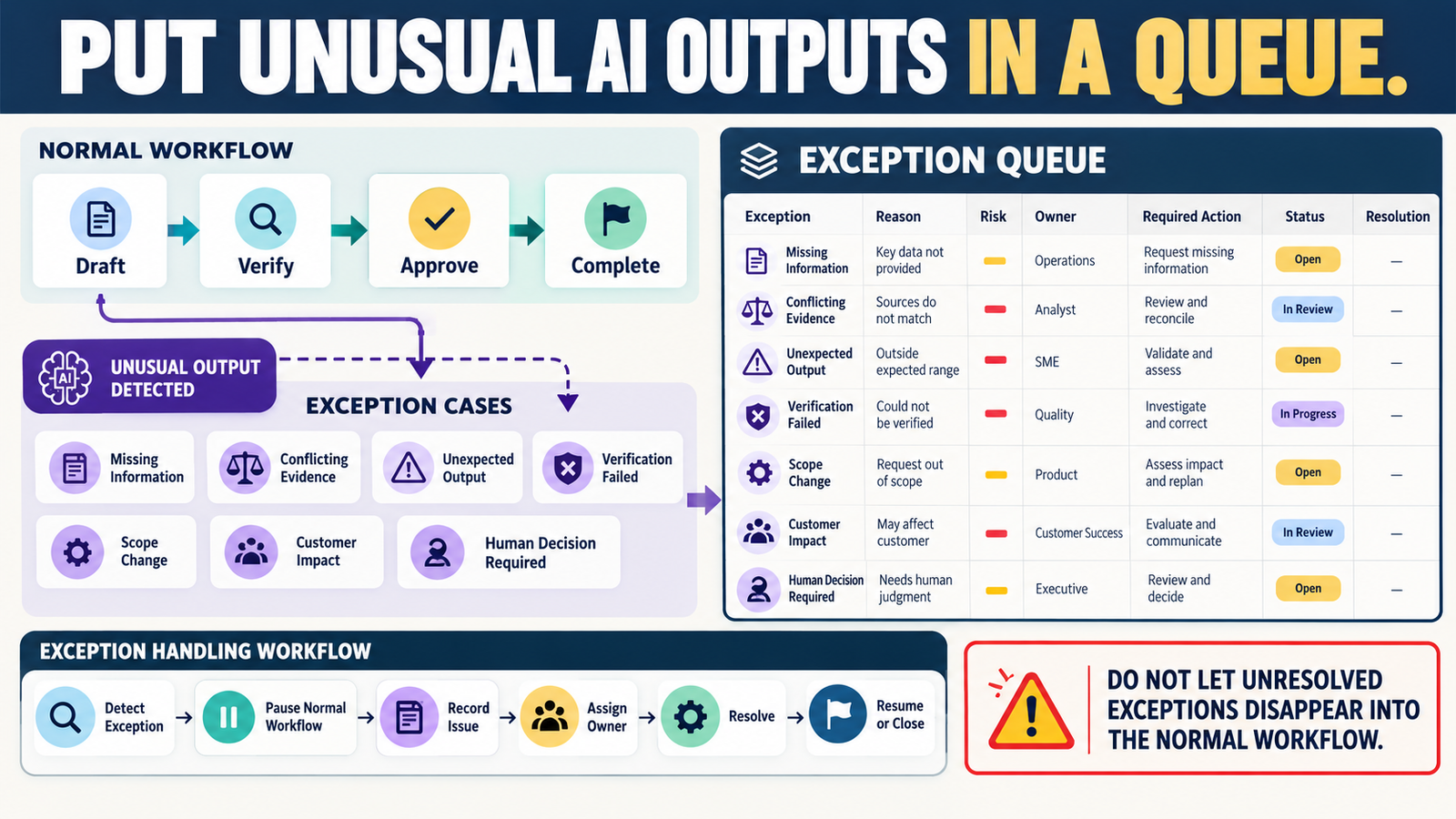
A repeatable AI workflow should handle normal situations efficiently.
For example:
Input → AI Draft → Verification → Human Review → Final Output
Most tasks may move through that process without difficulty.
Then something unusual happens.
The AI finds two credible sources that disagree.
A required fact cannot be verified.
A recommendation would affect a customer.
The requested task suddenly expands beyond its approved scope.
The AI generates an output that technically follows the instructions but clearly does not make sense.
Those cases should not be forced through the normal workflow.
They belong in an AI exception queue.
The process is:
Detect Exception → Pause Normal Workflow → Record Issue → Assign Resolution → Resolve → Resume or Close
What Is an AI Exception?
An exception is a situation that does not fit the assumptions of the normal workflow.
Examples include:
- Missing information.
- Conflicting evidence.
- Verification failure.
- Unexpected output.
- High-risk recommendation.
- Customer-impact decision.
- Financial commitment.
- Scope change.
- Human judgment required.
The key idea is:
The normal process no longer has enough information or authority to continue safely.
Why a Queue Is Better Than Simply Stopping
Your AI escalation rules tell the system when to stop.
Your verified AI Escalation Rules workflow provides exactly that type of boundary.
But stopping creates another question:
What happens to the unresolved issue next?
If the answer is:
“I will remember to come back to it,”
the problem can disappear.
The exception queue gives stopped work a destination.
Exception 1: Missing Critical Information
Suppose AI is preparing a software recommendation.
It knows:
- Your budget.
- Your current tool.
But it does not know:
- Number of subscribers.
- Required integrations.
- Whether you need ecommerce.
The workflow should not simply guess.
Create an exception:
Reason: Missing decision criteria.
Required Action: Obtain missing requirements.
Status: Waiting for information.
Once the information exists, the task can reenter the normal workflow.
Exception 2: Conflicting Evidence
Source A says:
Feature included on Starter.
Source B says:
Feature available on Pro only.
The correct response is not:
Choose the answer AI likes better.
Create:
Exception Type: Evidence conflict.
Action: Compare dates, plans, definitions, and source authority.
Your contradiction log can become the evidence-resolution tool for this type of exception.
Exception 3: Verification Failed
Suppose your workflow requires:
Current official source for software pricing.
No reliable current source can be found.
That should create an exception:
Verification Failed — Current Price Not Confirmed
Possible resolutions:
- Contact support.
- Remove exact price.
- State that price could not be independently confirmed.
- Delay publication.
The key is that:
Unverified
does not silently turn into:
Verified enough.
Exception 4: AI Leaves the Approved Scope
Task:
Correct grammar in this customer email.
AI begins changing:
- Refund policy.
- Price.
- Product promise.
That is a scope exception.
The correct response may be:
Flag proposed changes rather than applying them automatically.
Your workflow stays under control.
Exception 5: Unexpected Output
AI may occasionally produce something that passes basic format checks but is clearly strange.
Examples:
- Repeats an entire section.
- Contradicts an earlier paragraph.
- Invents a new product name.
- Mixes two companies in a comparison.
- Gives an irrelevant recommendation.
Create:
Exception Type: Unexpected output.
Do not manually repair it and forget what happened.
If the same pattern appears repeatedly, it may reveal a prompt problem.
Exception 6: High-Risk Decision
AI may reach a point where the next action involves:
- Spending money.
- Canceling software.
- Changing live pricing.
- Moving customer data.
- Publishing a sensitive statement.
Your verified AI Approval Matrix can identify the approval level.
The exception queue can then hold the task until the authorized human decides.
Keep Normal Work and Exception Work Separate
Imagine a batch containing 20 AI tasks.
Eighteen complete successfully.
Two have problems.
Do not stop the entire workflow if those two are independent.
Instead:
18 → Complete
2 → Exception Queue
This preserves efficiency without hiding unresolved problems.
Give Every Exception an Owner
An unresolved issue should belong to someone.
For a small one-person business:
The owner may always be you.
Still record:
Owner: Michael
That creates accountability.
In a larger team:
Possible owners could include:
- Content editor.
- Technical administrator.
- Customer support.
- Business owner.
Record the Reason
Do not write:
Problem
Write:
Official pricing page and support documentation show different plan limits.
Specific exceptions are much easier to resolve.
Record the Risk
Use:
LOW
Output can wait.
MEDIUM
Should be resolved before publication.
HIGH
Could affect customer, money, security, or irreversible action.
You do not need numerical scores.
Simple labels are easier to maintain.
Give Every Exception a Status
Useful statuses include:
NEW
INVESTIGATING
WAITING FOR INFORMATION
WAITING FOR APPROVAL
RESOLVED
CLOSED WITHOUT ACTION
The important rule is:
Every exception eventually leaves the queue.
Record the Resolution
Example:
Problem: Two official prices differed.
Resolution: One page was an annual promotion and one was standard monthly pricing.
Final Action: Article now describes both.
This creates useful business knowledge.
Feed Repeated Exceptions Back Into the Workflow
Suppose the same exception appears every week:
AI uses outdated software pricing.
That is no longer a one-time exception.
It is a workflow-design problem.
Add a permanent rule:
Current pricing must be reverified from a first-party source before drafting.
Your verified AI Error Log can help identify recurring patterns.
Use Confidence Labels Inside the Queue
Your verified AI Confidence Labeling System can help prioritize research exceptions.
For example:
Verified
No exception.
Well Supported
Normal review.
Needs Verification
Queue if the claim is important.
Unknown
Queue or remove from the output.
This prevents uncertainty from being overlooked.
Use Human Review Where It Creates Value
Not every exception requires hours of research.
Your verified Human Review Checkpoints workflow can help determine what actually deserves human attention.
The goal is:
Review the unusual cases more carefully instead of manually rechecking every routine result.
A Simple Exception Queue
Use these columns:
Exception ID
Task
Exception Type
What Happened
Risk
Owner
Required Action
Status
Resolution
Date Closed
Example:
EX-014
Task: Software comparison
Exception: Conflicting pricing
Risk: Medium
Owner: Michael
Required Action: Verify annual vs monthly billing
Status: Investigating
That is enough.
Set a Queue Review Schedule
For active workflows:
Review the exception queue:
- At the end of the batch.
- Before publication.
- During weekly maintenance.
Do not allow unresolved items to accumulate indefinitely.
Create a Maximum Age
You might use:
High Risk: Resolve before workflow continues.
Medium Risk: Resolve before publication.
Low Risk: Review within seven days.
This keeps the queue from becoming storage for forgotten problems.
Conclusion
A reliable AI workflow needs a place for situations that do not fit the normal process.
An exception queue gives you that place.
Use it for:
- Missing information.
- Conflicting evidence.
- Verification failures.
- Unexpected outputs.
- Scope changes.
- Customer-impact decisions.
- Financial or irreversible actions.
The basic process is:
Detect → Pause → Record → Assign → Resolve → Resume
The purpose is not to create more administration.
It is to make sure unusual AI problems remain visible until someone actually resolves them.
Your Next Action
Create a simple table with these columns:
Exception | Reason | Risk | Required Action | Status | Resolution
Then review the last five AI tasks you completed.
Ask:
Was there anything I noticed, questioned, skipped, or manually fixed without documenting it?
Add each unresolved item to the queue.
Next, add this rule to one recurring AI workflow:
“If an output cannot safely continue under the normal rules, stop that item, identify the exception, and place it in the exception queue rather than guessing.”
That gives unusual AI outputs a controlled path instead of allowing them to disappear inside routine work.