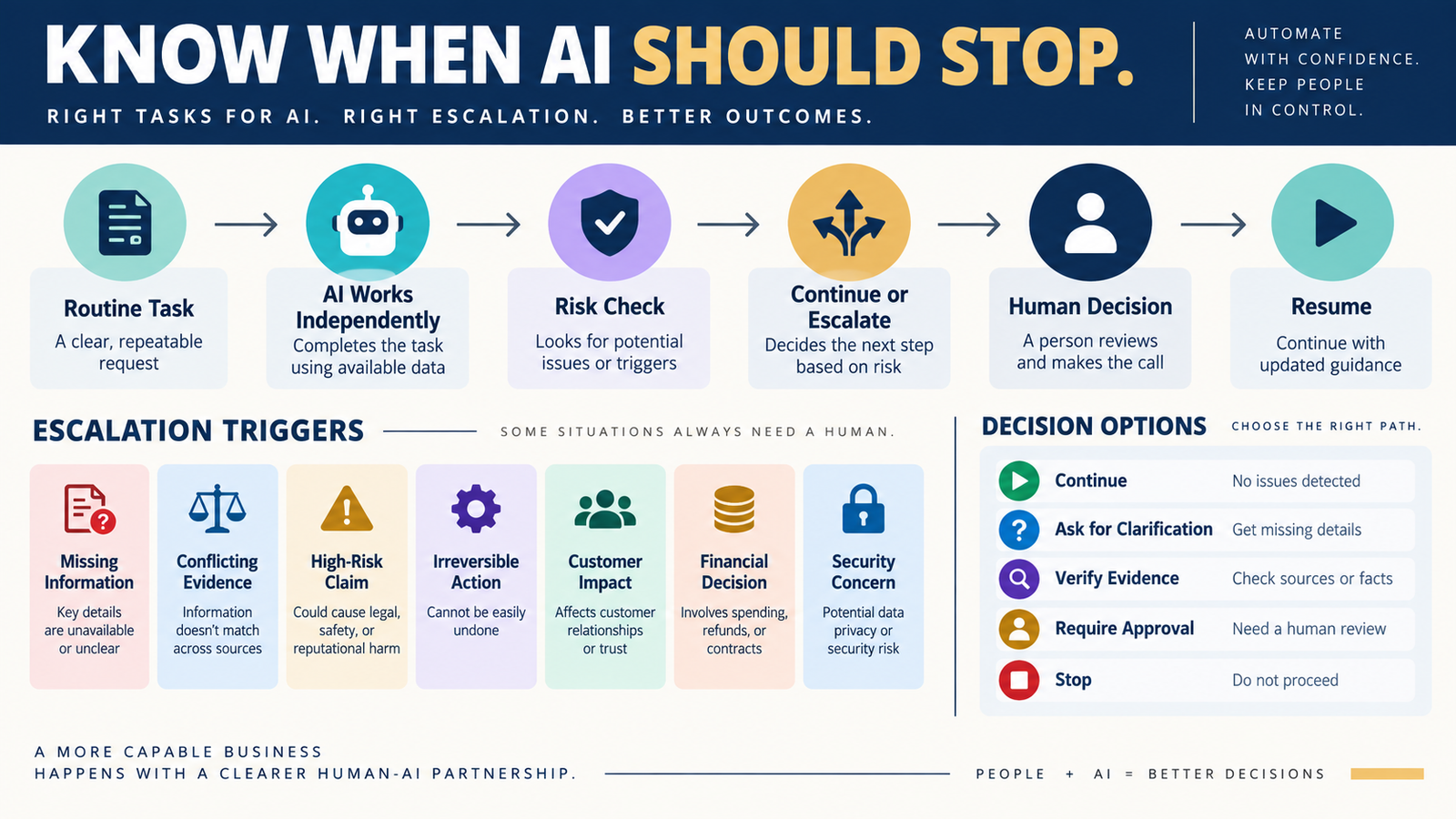
AI can perform many useful business tasks without creating much risk.
You might ask it to:
- Organize notes.
- Rewrite a paragraph.
- Brainstorm headlines.
- Format a checklist.
- Summarize approved information.
- Create several draft options.
Those tasks are generally easy to review and easy to reverse.
Other tasks are different.
Imagine asking AI to:
- Change a product price.
- Cancel business software.
- Respond to an angry customer.
- Publish an unverified factual claim.
- Delete information.
- Recommend a major purchase.
- Move customer data.
- Change a payment system.
Those decisions should not be treated like headline brainstorming.
A simple AI approval matrix gives each type of task an appropriate level of human control.
The workflow becomes:
Task → Risk → Approval Level → AI Work → Human Review or Approval → Action
Why an Approval Matrix Helps
Without clear approval rules, people often make one of two mistakes.
Everything Requires Approval
The human checks every tiny action.
AI saves less time because the workflow stops constantly.
Almost Nothing Requires Approval
AI is allowed to continue through important decisions because no boundary was defined.
That creates unnecessary risk.
A better system separates tasks according to consequence.
Use Three Approval Levels
You can build a useful matrix with only three categories.
LEVEL 1 — AI CAN PROCEED
Use for low-risk, reversible work.
Examples:
- Brainstorming.
- Formatting.
- Categorizing.
- Draft outlines.
- Creating alternate headlines.
- Converting notes into a table.
The human can still review the final result.
But AI does not need permission after every step.
LEVEL 2 — HUMAN REVIEW REQUIRED
Use when the work matters but AI can prepare most of it.
Examples:
- Blog article.
- Product comparison.
- Email campaign draft.
- Customer FAQ.
- Research summary.
- Business recommendation.
AI completes the work.
A human checks the important parts before publication or use.
LEVEL 3 — EXPLICIT HUMAN APPROVAL REQUIRED
Use before actions with meaningful consequences.
Examples:
- Change price.
- Cancel software.
- Change payment processing.
- Delete customer records.
- Send sensitive customer communication.
- Make an irreversible website change.
- Spend significant money.
AI may analyze and recommend.
The human owns the final decision.
Start With Consequence, Not Complexity
A task can be technically complicated but low risk.
Another can be extremely simple but high risk.
Example:
AI reorganizes 100 spreadsheet rows.
Technically substantial.
But easily reversible.
Compare that with:
AI changes a live checkout price.
One simple edit.
But it directly affects customers and revenue.
Approval should be based primarily on:
What happens if the AI is wrong?
Build the Matrix From Real Tasks
Do not create abstract categories first.
List what you actually use AI for.
Example:
- Write blog draft.
- Research software.
- Rewrite email.
- Create product outline.
- Compare tools.
- Suggest business change.
- Generate customer reply.
- Organize product files.
Then assign each one an approval level.
Example Approval Matrix
Brainstorm Blog Topics
Approval Level: AI Can Proceed
Reason:
Low risk and easily reversible.
Draft Blog Article
Approval Level: Human Review Required
Reason:
Public-facing content requires quality and accuracy review.
Publish Article
Approval Level: Explicit Human Approval
Reason:
Publication places the content publicly under the business’s name.
Research Software Pricing
Approval Level: Human Review Required
Reason:
AI can collect information, but current pricing must be verified.
Purchase Software
Approval Level: Explicit Human Approval
Reason:
Money and recurring commitments are involved.
The same workflow can therefore contain multiple approval levels.
Separate Preparation From Execution
This is one of the most useful distinctions.
AI may be allowed to:
Prepare
without being allowed to:
Execute
For example:
AI can prepare a recommendation to change software.
That does not mean it should cancel the existing account.
AI can prepare a refund response.
That does not mean it should automatically issue money.
AI can identify duplicate files.
That does not mean it should delete them.
This creates a powerful rule:
AI can often prepare a decision that only a human should execute.
Connect Approval Levels to Your Escalation Rules
Your verified AI escalation-rules workflow defines conditions where AI should stop.
The approval matrix defines who has authority to continue.
Together:
Escalation Rule: Something unusual happened.
Approval Matrix: Who decides what happens next?
That creates a much clearer operating system.
Use Stronger Approval for Irreversible Actions
Ask:
Can this be undone easily?
If yes:
Lower approval may be acceptable.
If no:
Require explicit approval.
Examples:
Easily Reversible
- Rewrite a paragraph.
- Reorder sections.
- Change internal draft title.
Harder to Reverse
- Send email to entire list.
- Delete customer data.
- Cancel account.
- Change domain settings.
- Publish pricing.
Irreversibility increases approval requirements.
Customer-Facing Work Deserves Review
Anything customers see can affect:
- Trust.
- Expectations.
- Refunds.
- Purchases.
- Support experience.
Examples:
- Sales page.
- Refund email.
- Product instructions.
- Checkout message.
- Support response.
AI can draft.
Human review should remain part of the process.
Financial Decisions Need Explicit Approval
Examples:
- Buying software.
- Changing price.
- Approving refund.
- Increasing advertising budget.
- Changing subscription.
AI can help answer:
- What does it cost?
- What alternatives exist?
- What assumptions matter?
- What are the tradeoffs?
But the business owner should approve the action.
Evidence Quality Can Raise the Approval Level
A routine research task might normally require only review.
But suppose:
Two authoritative sources disagree.
Now the task should escalate.
Your verified AI confidence-labeling system can help distinguish:
- Verified.
- Well supported.
- Needs verification.
- Unknown.
If the recommendation depends on an unresolved claim:
Do not approve the action yet.
Add Approval Rules to Recurring Prompts
Example:
APPROVAL RULES
AI may independently:
- Organize.
- Draft.
- Compare approved information.
- Suggest options.
Human review required before:
- Publication.
- Customer communication.
- Final factual comparison.
Explicit human approval required before:
- Spending money.
- Canceling software.
- Deleting data.
- Changing live pricing.
- Altering customer access.
- Making irreversible changes.
Now the boundaries travel with the workflow.
Do Not Make the Matrix Too Large
You do not need fifty approval categories.
Three levels are usually enough:
Proceed
Review
Approve
Keep it understandable.
Review the Matrix When AI Makes a Mistake
Suppose AI performs an action you wish it had stopped before taking.
Ask:
Was the approval level wrong?
If yes:
Update the matrix.
Your AI Error Log can preserve the lesson.
A Simple AI Approval Matrix Template
Use these columns:
Task
Risk if Wrong
Reversible?
Customer Impact?
Financial Impact?
Approval Level
Human Reviewer
Execution Authority
Example:
Blog Draft | Medium | Yes | Public | Low | Human Review | Owner | Owner
Change Price | High | Yes but consequential | Yes | Yes | Explicit Approval | Owner | Owner
Brainstorm Titles | Low | Yes | No | No | AI Can Proceed | None | AI
Conclusion
An AI approval matrix prevents two extremes:
Human approval for everything
and:
AI approval for everything.
Use three simple levels:
AI Can Proceed
for low-risk reversible work.
Human Review Required
for important drafts, research, and public-facing work.
Explicit Human Approval Required
for financial, customer-data, irreversible, or consequential business actions.
The most important distinction is:
AI can prepare a decision without owning the decision.
Your Next Action
Write down 10 tasks you currently use AI for.
Create three columns:
AI CAN PROCEED | HUMAN REVIEW | EXPLICIT APPROVAL
Place every task into one column.
Then look for anything involving:
- Money.
- Customer data.
- Public publication.
- Software cancellation.
- Live pricing.
- Irreversible actions.
Move those to the appropriate stronger approval level.
Finally, add the three approval levels to the reusable prompt for one workflow you use regularly.
That gives AI a clear boundary between:
Work it can perform
and:
Decisions that remain yours.