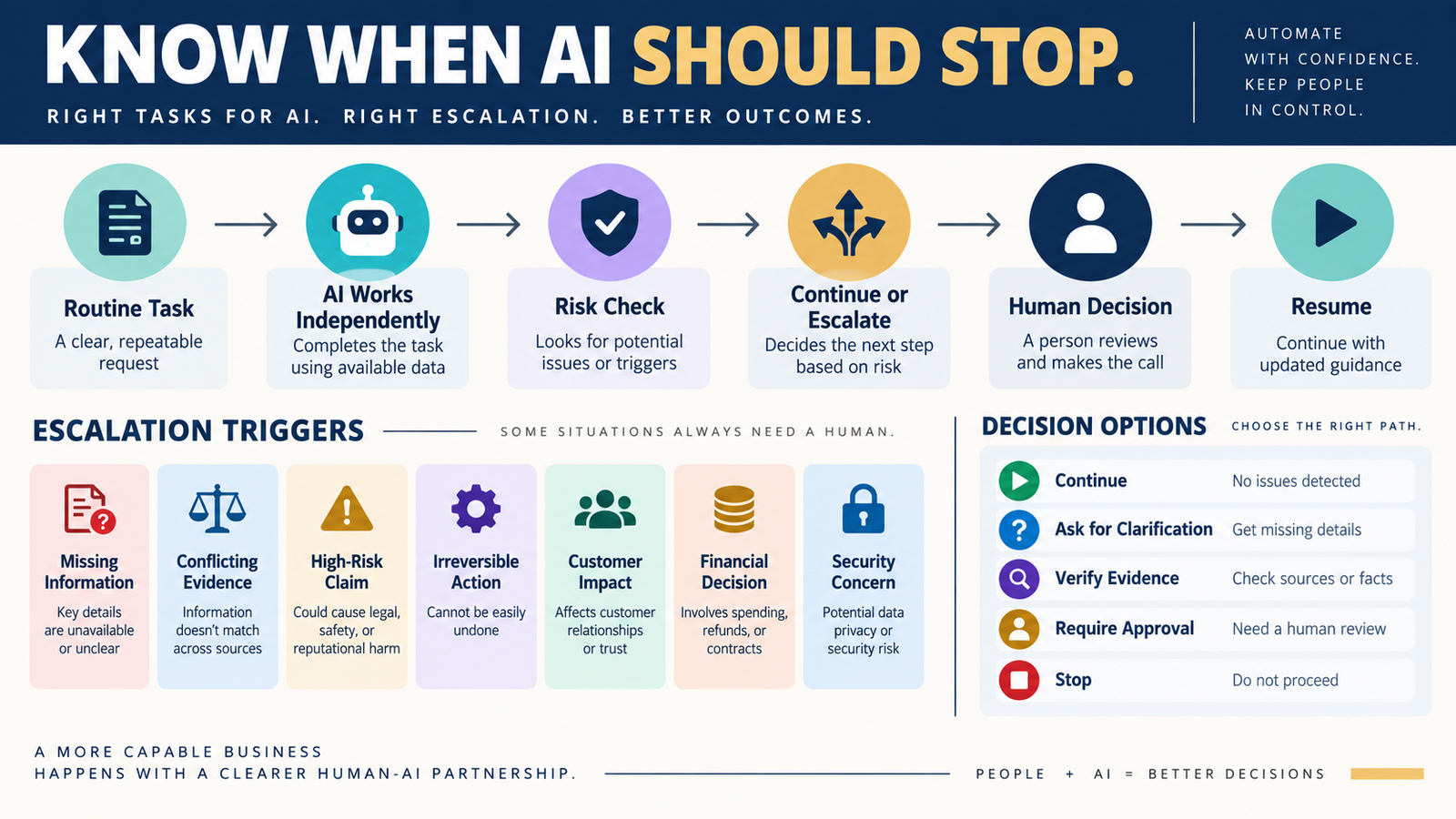
One of the easiest ways to misuse AI is to treat every task as though the model should keep going until it produces a final answer.
Sometimes that is appropriate.
If you ask AI to:
- Reformat approved notes.
- Brainstorm headlines.
- Organize a checklist.
- Sort ideas into categories.
there may be little reason to interrupt the workflow.
Other situations are different.
Suppose AI discovers:
- Two official sources that disagree.
- A missing customer requirement.
- A recommendation involving substantial money.
- An irreversible software change.
- A security concern.
- An important claim it cannot verify.
Continuing confidently can make the result worse.
A better AI workflow contains escalation rules.
The process becomes:
AI Performs Task → Checks Escalation Conditions → Continues, Verifies, or Stops for Human Judgment
What Is an AI Escalation Rule?
An escalation rule tells the AI:
“If this specific condition occurs, do not make the final decision yourself.”
Instead, the AI may be instructed to:
- Ask for missing information.
- Flag uncertainty.
- Gather stronger evidence.
- Present options.
- Require human approval.
- Stop the workflow.
The point is not to make AI less useful.
The point is to prevent AI from improvising precisely when improvisation carries the most risk.
Escalation Is Different From Ordinary Human Review
A human-review checkpoint may happen at a predictable point.
For example:
AI Draft → Human Review → Publish
An escalation rule is conditional.
For example:
If two current official sources conflict → Escalate
If there is no conflict, the workflow can continue normally.
That makes escalation especially useful in repeatable automated systems.
Rule 1: Escalate When Required Information Is Missing
AI often tries to be helpful when context is incomplete.
Suppose you ask:
“Which email platform should I choose?”
But you did not provide:
- Subscriber count.
- Sending frequency.
- Budget.
- Automation requirements.
- Ecommerce needs.
AI could still produce an answer.
But the answer may depend heavily on assumptions.
A better rule is:
If essential decision information is missing, identify the missing information before making the recommendation.
This prevents guesswork from becoming strategy.
Rule 2: Escalate When Strong Sources Conflict
Suppose:
Official Pricing Page A: $49/month.
Official Pricing Page B: $99/month.
AI should not silently choose one.
Use:
If credible current sources materially conflict, report the conflict and do not present one version as definitively correct until the conflict is resolved or qualified.
This is especially important for:
- Pricing.
- Policies.
- Product features.
- Legal requirements.
- Technical instructions.
Rule 3: Escalate High-Risk Claims
Some claims deserve stronger controls.
Examples:
- Legal advice.
- Financial recommendations.
- Health information.
- Security instructions.
- Current software pricing.
- Customer-data procedures.
A useful rule is:
If being wrong could create meaningful harm, require stronger evidence or human review before finalizing the claim.
This fits naturally with the Five-Level AI Output Verification Process.
Rule 4: Escalate Irreversible Actions
AI may recommend:
- Delete.
- Cancel.
- Remove.
- Overwrite.
- Publish.
- Send to entire list.
- Migrate.
- Change DNS.
- Modify payment configuration.
These actions are very different from drafting text.
Use:
If the action is difficult or impossible to reverse, stop before execution and require explicit human approval.
Even when the recommendation is probably correct, the decision deserves a deliberate checkpoint.
Rule 5: Escalate Actions Involving Customer Data
Customer data deserves special treatment.
Examples:
- Exporting customer lists.
- Deleting records.
- Uploading information to another service.
- Changing access.
- Combining databases.
An escalation rule might say:
If a task requires moving, exposing, deleting, or materially changing customer data, require human confirmation and identify the privacy or security implications first.
Rule 6: Escalate Significant Financial Commitments
AI can compare:
- Software plans.
- Marketing options.
- Vendors.
- Subscriptions.
But a recommendation becomes more consequential when it leads directly to a purchase.
Use a threshold appropriate to your business.
For example:
Any recommendation involving a new recurring paid service must present cost, cancellation terms, alternatives, and expected business purpose before approval.
You do not need the exact same threshold for every business.
The important part is having a rule.
Rule 7: Escalate When AI Is Relying on an Assumption
Some assumptions are harmless.
Others determine the entire recommendation.
Suppose AI recommends abandoning a software platform because it assumes migration is easy.
That assumption deserves verification.
Your AI Assumption Checklist provides a useful process for identifying those hidden dependencies.
An escalation rule can say:
If a recommendation depends on an unverified high-risk assumption, pause the recommendation until the assumption is tested or explicitly accepted.
Rule 8: Escalate When the Task Leaves Its Approved Scope
Suppose the task is:
Correct grammar in this email.
AI begins rewriting:
- Offer.
- Price.
- Guarantee.
- Positioning.
That is scope drift.
Use:
If completing the task requires changing something outside the user’s approved scope, flag the proposed change instead of making it automatically.
This is particularly useful in revision workflows.
Rule 9: Escalate When Verification Fails
AI should be allowed to say:
“I could not verify this.”
Your workflow should not reward the model for always producing a complete answer.
Use:
If an important current claim cannot be verified from an appropriate source, label it unverified and stop treating it as fact.
That is far better than filling the gap.
Rule 10: Escalate Unexpected Results During Testing
Suppose AI helps you test:
- Checkout.
- Signup form.
- Automation.
- Customer access.
The expected result does not occur.
Do not allow the workflow to begin changing several unrelated settings automatically.
Use:
If a test produces an unexpected result, stop, record the result, and identify likely causes before making additional changes.
This prevents one error from becoming several.
Create Three Escalation Levels
You can simplify the system further.
LEVEL 1 — FLAG
AI continues but clearly identifies the issue.
Examples:
- Minor uncertainty.
- Optional improvement.
- Low-risk missing detail.
LEVEL 2 — VERIFY
AI pauses the conclusion and gathers stronger evidence.
Examples:
- Current pricing.
- Conflicting feature information.
- Important factual claim.
LEVEL 3 — HUMAN APPROVAL REQUIRED
AI does not continue with the consequential action.
Examples:
- Delete account.
- Cancel software.
- Change payment system.
- Move customer data.
- Publish legal or high-risk content.
This creates predictable behavior.
Add Escalation Rules to Master Prompts
Instead of remembering them every time, write them into reusable prompts.
Example:
ESCALATE AND STOP FOR HUMAN REVIEW IF:
- Required information is missing.
- Current authoritative sources materially conflict.
- A recommendation depends on an unverified high-risk assumption.
- An action is irreversible.
- Customer data could be exposed, moved, or deleted.
- A significant financial commitment is proposed.
- Verification of an important claim fails.
Now the workflow includes boundaries before the problem appears.
Use Your AI Error Log to Improve the Rules
Escalation rules should evolve from real experience.
If AI repeatedly makes the same kind of decision without enough evidence, record it in your AI Error Log.
Then ask:
Should this become a future escalation condition?
That turns errors into workflow improvements.
Avoid Too Many Escalations
If AI stops every thirty seconds, the system becomes frustrating.
Do not escalate:
- Minor formatting choices.
- Low-risk brainstorming.
- Easily reversible wording decisions.
Use escalation when human judgment materially improves safety, accuracy, or business control.
A Simple AI Escalation Table
Create:
Condition
Risk Level
AI Response
Human Approval Needed?
What Happens Next
Example:
Official sources conflict
Risk: Medium/High
Response: Present conflict
Approval: Yes before final factual claim
Next: Verify or qualify
Another:
Headline choice
Risk: Low
Response: Choose best option
Approval: No
Next: Continue
The difference becomes obvious.
Conclusion
A reliable AI workflow should not assume that AI must always finish the task independently.
Escalation rules create boundaries around situations where:
- Information is missing.
- Evidence conflicts.
- Risk is high.
- Actions are irreversible.
- Customer data is involved.
- Money is involved.
- Verification fails.
- The task leaves its approved scope.
The objective is not:
“AI stops often.”
It is:
“AI stops at the right moments.”
That preserves automation where it helps while keeping important decisions under human control.
Your Next Action
Take one AI workflow you use repeatedly.
Write these seven escalation conditions underneath it:
Missing Critical Information
Conflicting Evidence
High-Risk Claim
Irreversible Action
Customer-Data Impact
Financial Commitment
Verification Failure
For each condition, choose one response:
CONTINUE | FLAG | VERIFY | REQUIRE HUMAN APPROVAL
Then add those rules directly to the reusable prompt for that workflow.
On your next three uses, note whether the rules:
- Prevented an actual mistake.
- Stopped unnecessarily.
- Need adjustment.
Keep the rules that protect meaningful decisions and remove any that only create friction.