A digital product may be automated, but the customer experience is not completely automatic.
Someone may buy your ebook and lose the download email.
A course customer may forget a password.
A buyer may not understand where to begin.
A payment may appear successful while product access does not arrive.
Someone may ask whether a bonus is included, whether a file works on a particular device, or which lesson should be completed first.
A simple customer support system for digital products gives you a repeatable way to handle those situations without turning your small online business into a full-time customer-service department.
The system does not need to be complicated.
For many small digital-product businesses, the essential workflow is:
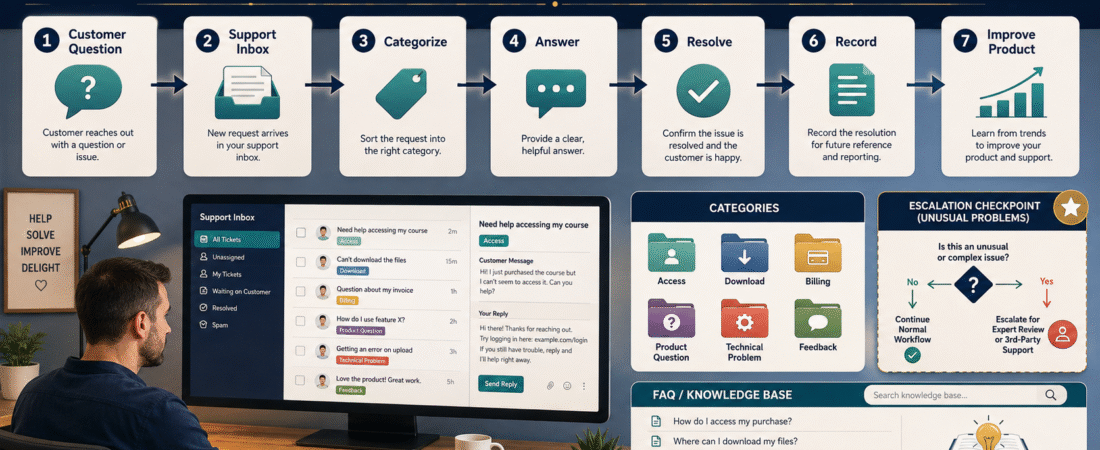
One support inbox → classify the question → solve the problem → record repeated issues → improve instructions → close the request.
That is enough to create consistency while keeping the business manageable.
Why Digital Products Still Need Customer Support
One attraction of digital products is that delivery can often be automated.
A customer can:
- Visit a sales page.
- Pay online.
- Receive access.
- Download or open the product.
- Begin using it.
But automation does not eliminate every problem.
Customers can still experience:
- Missing confirmation emails.
- Login problems.
- Expired or confusing links.
- Download difficulties.
- Questions about file formats.
- Unclear instructions.
- Billing questions.
- Product-use questions.
- Requests for clarification.
- Technical incompatibilities.
A customer should not need to understand your entire technology stack to get help.
Your support system should translate a problem into a clear next action.
Start With One Support Destination
The simplest improvement is often to stop sending customers to multiple places.
Avoid a situation where customers might contact you through:
- Personal email.
- Website form.
- Facebook message.
- YouTube comment.
- Payment-platform message.
- Course discussion area.
- A second support address.
You can still receive questions from several places, but establish one official support destination whenever possible.
For example:
Then place that contact point in:
- Purchase confirmation.
- Product-access page.
- Welcome email.
- Course dashboard.
- FAQ page.
- Product documentation.
The goal is not to prevent customers from contacting you elsewhere.
The goal is to create one dependable route for problems that require actual support.
Define What Counts as Support
One reason customer service becomes overwhelming is that everything gets treated as the same type of request.
Create a few categories.
Access Problem
Examples:
- I cannot log in.
- My download is missing.
- I did not receive the access email.
- My password reset did not arrive.
These should usually receive high priority because the customer may be completely blocked.
Billing or Purchase Question
Examples:
- Was my payment received?
- Where is my receipt?
- I purchased the wrong version.
- I have a question about the transaction.
These may require checking the payment or checkout platform.
Product-Use Question
Examples:
- Which worksheet should I complete first?
- Where is the template mentioned in Lesson 3?
- Does the course include downloadable transcripts?
Often these questions can eventually become FAQ material.
Technical Problem
Examples:
- A video will not play.
- A file will not open.
- A resource link is broken.
- A lesson is unavailable.
Feedback or Suggestion
Examples:
- Could you add another example?
- I would like a different format.
- This instruction was difficult to understand.
Feedback is useful, but it is not automatically an emergency.
Create a Support Priority Rule
Not every message requires the same response speed.
A simple priority model might be:
Priority 1 — Customer Cannot Access What Was Purchased
Investigate promptly.
Examples:
- Login failure.
- Missing product.
- Broken download.
- Payment completed but no access.
Priority 2 — Product Cannot Be Used Correctly
Examples:
- Required file is damaged.
- Important instruction is incorrect.
- Required lesson is missing.
Priority 3 — Customer Needs Clarification
Examples:
- Where should I begin?
- Which option applies to my situation?
- Where can I find a bonus?
Priority 4 — Suggestion or Optional Request
Examples:
- Please add another worksheet.
- Could this also be available in audio?
- I would prefer another design.
This prevents one optional suggestion from pushing a genuine access problem to the bottom of the list.
Fix Onboarding Problems Before Creating More Support
A surprising amount of support work can be prevented before the customer asks a question.
If customers repeatedly ask:
Where do I begin?
the problem may not be the course.
It may be the welcome experience.
A strong onboarding process should explain:
- What the customer purchased.
- How to access it.
- Where to begin.
- What to do first.
- Where to find downloads.
- How to get help.
My guide to creating a customer onboarding system for a digital product provides a useful companion process for reducing preventable confusion.
Support and onboarding should work together.
Build a Small FAQ From Real Questions
Do not begin by creating 75 imagined questions.
Start with real support requests.
Keep a simple record:
Question:
Where do I download the workbook?
Answer:
Open Module 1, select “Downloads,” and choose the workbook file.
Frequency:
Asked four times.
Action:
Add the answer to the FAQ and improve Module 1 navigation.
Repeated support questions are valuable because they reveal where customers need more clarity.
You can use AI to help organize those questions, but the answers should remain grounded in your actual product. The existing guide on building an AI FAQ system for a small online business explains how to structure recurring questions rather than asking AI to invent customer problems.
Create Approved Response Templates
Some questions repeat.
Instead of rewriting the same response from memory, create approved templates.
For example:
Missing Access Email
Subject: Your Product Access
Thank you for contacting us. I can help you locate your purchase.
Please first check the email address used during checkout, including your spam or promotions folders.
If you still cannot locate the access message, reply with the name of the product and the email address used for the purchase. Please do not send credit-card information.
Password Problem
Provide only the verified reset process.
Download Problem
Explain:
- Where the download is located.
- Supported file type.
- Whether the link expires.
- What to do if it still fails.
Templates reduce inconsistency.
They should not eliminate human judgment.
Do Not Put Sensitive Information Into AI Unnecessarily
AI can help organize support material, summarize recurring questions, or turn approved answers into a cleaner FAQ.
But customer-support data may contain personal or confidential information.
Do not casually paste:
- Passwords.
- Payment-card information.
- Private account credentials.
- Sensitive personal details.
- Complete transaction records.
into an AI tool merely to save a few minutes.
Use the minimum necessary information and follow the privacy and security requirements of the systems you use.
Create a Support Log
A simple spreadsheet can contain:
| Date | Product | Category | Problem | Resolution | Repeated? | Product Change Needed? |
|---|---|---|---|---|---|---|
| Aug. 17 | Ebook | Access | Missing download | Resent access | Yes | Improve email |
| Aug. 17 | Course | Question | Where to start | Sent Quick Start link | Yes | Improve onboarding |
| Aug. 18 | Course | Technical | Broken worksheet link | Replaced link | No | Completed |
The purpose is not bureaucracy.
The purpose is pattern recognition.
Without a record, you may answer the same question 20 times and never realize the underlying product needs a small correction.
Turn Repeated Problems Into Product Improvements
Suppose customers repeatedly cannot locate a template.
You have several possible solutions:
- Keep answering the question forever.
- Improve the navigation.
- Add the template link to the welcome page.
- Add it to the FAQ.
- Rename the resource more clearly.
Options 2 through 5 reduce future work.
This is where support becomes a product-improvement system.
It also connects naturally with a low-maintenance digital product update plan.
Not every request deserves a product change, but repeated high-friction problems deserve attention.
Define What Support Does Not Include
Boundaries make a support system manageable.
Suppose you sell a $27 workbook about planning a digital product.
Customer support might include:
- Access assistance.
- Broken-file correction.
- Clarification of instructions.
- Technical questions about provided resources.
It may not include:
- Unlimited private coaching.
- Full website setup.
- Individual business consulting.
- Custom product creation.
- Personalized legal or financial advice.
If you do not define the difference, a small digital purchase can slowly become an unlimited service obligation.
Create an Escalation Rule
Most requests can follow a standard process.
Some should be escalated to you personally.
Examples might include:
- Refund dispute.
- Security concern.
- Payment discrepancy.
- Repeated technical failure.
- Complaint involving a serious product error.
- Request outside your documented support policy.
Your support process can say:
If the request matches an approved FAQ or access procedure, follow the procedure. If it involves money, security, account ownership, policy exceptions, or an unresolved technical failure, escalate it.
This is especially important if another person eventually helps manage the business.
Write the Support Process as an SOP
Once the support process works, document it.
A support SOP might contain:
Trigger
A customer support message arrives.
Required Information
- Customer name.
- Product.
- Email used for purchase.
- Category of problem.
Procedure
- Read the request.
- Identify the category.
- Check approved records.
- Use an approved response when applicable.
- Escalate exceptions.
- Record the resolution.
- Identify repeated issues.
- Close the request.
Quality-Control Check
- Was the customer’s actual question answered?
- Was sensitive information handled appropriately?
- Were access instructions verified?
- Was the issue recorded?
- Does documentation need updating?
If you need help documenting the workflow, How to Create an SOP With AI for the Business Tasks You Repeat shows how to convert a real recurring task into a testable procedure.
Measure Support Without Building a Call Center Dashboard
A solo creator does not need 30 customer-service metrics.
Track a few practical questions:
- How many support requests arrived?
- Which category appeared most often?
- How many were access problems?
- Which question repeated?
- What took the most time?
- Which issue could be prevented?
- Which product documentation needs improvement?
The goal is to reduce avoidable support while maintaining dependable help.
A Simple Weekly Support Review
Once per week, ask:
What did customers struggle with?
Which answer was repeated?
Did any link or file fail?
Was an onboarding instruction unclear?
Does the FAQ need one new answer?
Does the product need one small improvement?
Then make only the necessary changes.
Do not rebuild the entire product every week.
Conclusion
A good customer support system for digital products does not require a large help desk.
Start with one support destination, classify requests, prioritize access problems, create approved responses, record recurring questions, and improve onboarding or documentation when patterns appear.
The strongest support system gradually produces fewer preventable questions because the business becomes clearer.
Your first action is to create six support categories today:
Access, Billing, Product Question, Technical Problem, Feedback, and Escalation.
Then route every future support request into one of them.