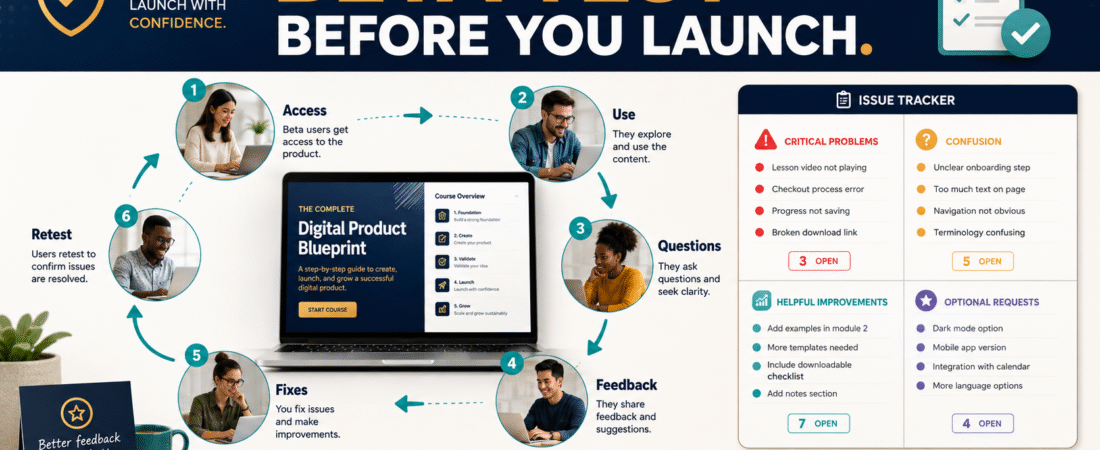
Creating a digital product and finishing a digital product are not always the same thing.
You may believe your ebook is easy to follow, your course lessons are arranged correctly, your worksheets make sense, and your customer-access instructions are obvious.
Then a real person uses the product for the first time.
That is when you discover that a download link is difficult to find, an instruction assumes knowledge the buyer does not have, a worksheet needs an example, or a lesson refers to something that was never explained.
A digital product beta test gives you a controlled way to find these problems before sending the product to a wider audience.
The goal is not to keep improving the product forever. It is to answer a much simpler question:
Can an appropriate customer receive this product, understand what to do, use it successfully, and move toward the result the product promises without unnecessary confusion?
A practical beta-testing process looks like this:
- Decide what you need to learn.
- Choose appropriate testers.
- Give them a realistic version of the product.
- Tell them what you want them to test.
- Observe questions and problems.
- Separate serious problems from preferences.
- Make the most useful corrections.
- Retest important changes.
- Decide whether the product is ready for a wider launch.
Beta Testing Is Different From Product-Idea Validation
Beta testing should not be your first attempt to discover whether anyone cares about the underlying problem.
Before spending substantial time building a product, it makes sense to investigate demand, competing solutions, customer questions, and whether the intended result matters to the audience. The U.S. Small Business Administration recommends market research as a way to understand demand, market size, saturation, pricing, and other factors that reduce business uncertainty. The SBA’s business-planning and market-research resources provide a useful starting point.
That is the validation stage.
If you have not completed it yet, review my guide to validating a digital product idea before spending weeks creating it.
Beta testing happens later.
You are no longer asking only:
Is this a problem worth solving?
You are asking:
Does the product I created actually solve it well enough to release?
Step 1: Decide What the Beta Test Must Prove
Do not give someone your product and ask:
What do you think?
That question can produce pleasant but vague responses.
Instead, decide what you need to learn.
For an ebook, you might want to know:
- Is the sequence logical?
- Are important terms explained?
- Which sections are confusing?
- Are examples sufficient?
- Can the reader identify the next action?
- Are links and resources working?
For an online course:
- Can the user log in?
- Can lessons be located?
- Does the lesson order make sense?
- Do downloads work?
- Are assignments understandable?
- Are any important steps missing?
- Does the user know what to do after completing a module?
For a checklist pack:
- Can another person follow the checklist without asking the creator what an item means?
- Are the checkpoints observable?
- Are steps missing?
- Are instructions duplicated?
- Does the checklist actually prevent the mistakes it claims to address?
Your testing questions should come directly from the product’s purpose.
Step 2: Choose Testers Who Resemble the Intended User
Your closest friend can be helpful, but a person who already understands your thinking may overlook problems a real customer would notice.
A useful beta tester should be reasonably close to the intended reader or buyer.
For example, if the product is designed for beginners, testing it only with experienced marketers creates a problem.
Experts automatically fill in missing information.
A beginner cannot.
You do not need an enormous testing group. A manageable group that can provide thoughtful feedback is more useful than a large group that never opens the product.
Look for people who:
- Match the intended experience level.
- Have the type of problem the product addresses.
- Are willing to actually use the material.
- Will point out confusion rather than trying to be polite.
- Understand that the product is still being tested.
Step 3: Test a Realistic Version
A beta product does not need beautiful final packaging.
It does need enough of the real experience to make the test meaningful.
If customers will eventually receive:
Checkout → confirmation → login → course → downloads → next steps
then testing only the course PDF may miss half the problems.
Include the most important parts of the customer journey:
- Access instructions.
- Login process.
- Product navigation.
- Core content.
- Worksheets or downloads.
- Important links.
- Completion instructions.
- Support contact.
You want to discover what happens when somebody encounters the product without you sitting beside them explaining it.
Step 4: Give Testers a Specific Mission
Instead of saying:
Please review my course.
say:
Begin with the welcome instructions as though you just purchased the course. Complete Modules 1 and 2 without asking me for help unless you become stuck. Record anything you cannot understand, anything you expected but could not find, any broken links, and every point where you were unsure what to do next.
That instruction produces more useful evidence.
You can also ask testers to classify feedback:
Blocked: I could not continue.
Confused: I continued, but the instruction was unclear.
Missing: I needed information that was not provided.
Improvement: The product works, but this would make it easier.
Preference: I personally would prefer something different.
Those categories prevent every suggestion from looking equally urgent.
Step 5: Do Not Defend the Product During Testing
Creators naturally want to explain.
A tester says:
I did not know where to find the workbook.
The creator replies:
It’s right there under the second video.
That explanation may solve the immediate conversation, but it hides the product problem.
A real customer may never ask.
Record the issue first.
Ask:
What did you expect to see?
or:
Where did you look first?
That information can show whether the problem is the product, navigation, onboarding, or terminology.
Step 6: Track Problems in One Place
Create a simple testing sheet.
Include:
Tester
Product Section
Problem
Category
Severity
How Often It Appeared
Proposed Fix
Decision
Retest Needed?
This prevents feedback from disappearing into emails and messages.
It also lets you identify patterns.
If one person says a paragraph is confusing, investigate it.
If several independent testers become confused at exactly the same point, the evidence becomes much stronger.
Step 7: Separate Defects From Feature Requests
This is critical.
Suppose your product is a $27 beginner workbook.
A beta tester says:
You should add 30 video tutorials, monthly live coaching, a private community, and software.
That does not mean the workbook is defective.
It means one tester described a different product.
Ask whether the request is necessary for the promise you actually made.
Fix Before Launch
Examples:
- Broken links.
- Missing files.
- Incorrect instructions.
- Login failure.
- Contradictory information.
- Required step missing.
- Serious confusion about where to start.
Consider Improving
Examples:
- More examples.
- Better navigation.
- Shorter explanation.
- Quick-start checklist.
- Additional clarification.
Consider Later
Examples:
- New bonus.
- Additional format.
- Advanced lesson.
- Expanded template collection.
Probably Decline
Examples:
- Feature outside the product’s purpose.
- Request that dramatically increases ongoing maintenance.
- Personal preference unsupported by other evidence.
A beta test should improve the product—not turn one simple offer into ten products.
That same principle is useful when building a product line. My guide to creating a simple digital product ladder without building ten products explains why controlled expansion can be more manageable than constantly adding offers.
Step 8: Test the Customer’s First 15 Minutes
Many product problems happen immediately after purchase.
Test:
- What confirmation does the buyer receive?
- Is the login obvious?
- Is the first product page understandable?
- Is there a clear “Start Here” instruction?
- Does the buyer know which resource comes first?
- Are downloads labeled clearly?
- Is support information visible?
A strong product can feel weak if the buyer spends ten minutes trying to find it.
Step 9: Test the Promised Result
Do not evaluate only whether the files open.
Ask whether the product helps the intended user make progress.
If you sell a checklist designed to prevent publishing mistakes, testers should be able to use it to find publishing mistakes.
If you sell an ebook-planning workbook, a tester should finish with a more organized ebook plan.
If you sell an introductory course, the learner should be able to perform the introductory task.
Your product promise determines the test.
Step 10: Retest Important Fixes
A correction can create another problem.
Suppose you reorganize the course because several testers could not locate a worksheet.
Check the new version.
Did the change solve the problem?
Did the updated navigation break another link?
Did you update the lesson but forget the Quick Start guide?
Retesting is especially useful after changes involving:
- Access.
- Navigation.
- Downloads.
- Payment integrations.
- Automated emails.
- File replacements.
- Course sequencing.
Create a Launch-Readiness Checklist
Before ending the beta, ask:
- Can users access the product?
- Do all important links work?
- Are required files present?
- Does the customer know where to begin?
- Are instructions understandable to the intended experience level?
- Have serious factual errors been corrected?
- Have repeated confusion points been addressed?
- Does the product deliver what the sales message promises?
- Is support information available?
- Have important fixes been retested?
- Are remaining issues acceptable rather than launch-blocking?
You do not need zero suggestions.
You need a product that is ready to perform its intended job.
Do Not Let Beta Testing Become Permanent Delay
There will always be another improvement you could make.
At some point, beta testing can become perfectionism.
Set a clear launch threshold.
For example:
We launch when all critical access problems, factual errors, broken resources, and repeated high-severity confusion points are resolved.
Optional enhancements can go onto an update list.
When the product is ready, move into a controlled launch instead of endlessly rebuilding it. My guide to launching a digital product for beginners without building a complicated launch funnel provides the next stage of that process.
Conclusion
A digital-product beta test is quality control with real users.
Define what you need to learn, choose appropriate testers, give them a realistic customer experience, collect specific feedback, prioritize serious problems, and retest important changes.
Do not ask beta testers to design your entire business.
Ask them to help reveal whether the product you already created is understandable, usable, accurate, and capable of delivering its intended result.
Your next action is simple: create a one-page beta test sheet with four headings—What Must Work, What Testers Should Do, What They Should Report, and What Would Block Launch.