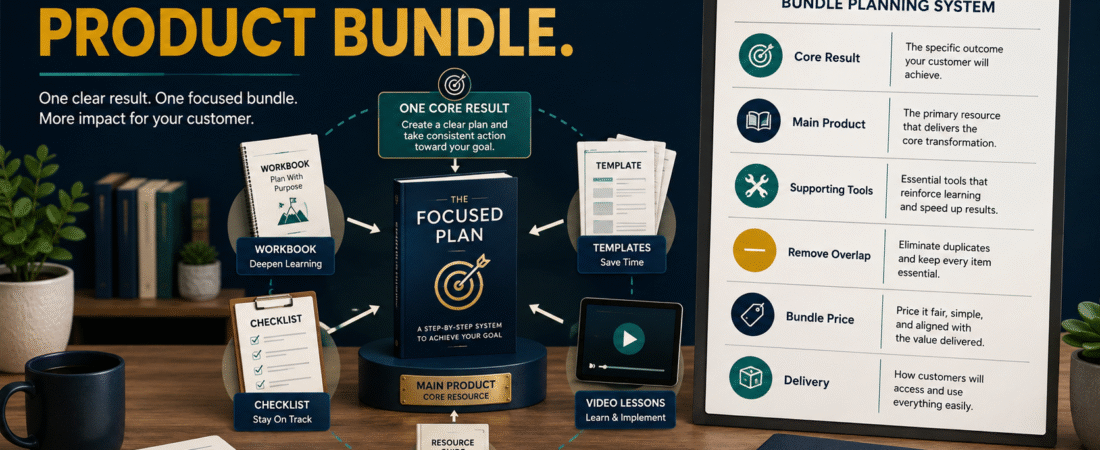
A digital-product bundle should make a customer’s job easier.
It should not be a pile of unrelated ebooks, old bonuses, templates, and videos placed together so the sales page can claim an enormous “total value.”
The strongest bundle starts with one result and combines products that help the buyer reach that result more completely.
For example:
Main Product: Ebook explaining how to choose and create a first digital product.
Supporting Workbook: Helps the buyer make the decisions.
Checklist: Prevents missing important steps.
Templates: Reduce blank-page work.
Short Video Lessons: Demonstrate the few steps that are easier to show than explain.
That is a coherent bundle.
Key Takeaways
- Begin with one customer outcome.
- Choose one clear main product.
- Add supporting products only when they improve implementation.
- Remove overlap and duplicated material.
- Do not inflate the bundle with irrelevant bonuses.
- Price the bundle according to usefulness, positioning, and alternatives.
- Make delivery simple.
- Test every file and access point before selling.
Start With the Result
Complete:
“This bundle helps [AUDIENCE] accomplish [RESULT].”
Example:
“This bundle helps a beginner choose, outline, and create a first practical ebook.”
Every item should contribute to that outcome.
If an item does not help, remove it.
Choose the Core Product
A bundle usually works better when the buyer can identify the main product.
Possible core products include:
- Ebook.
- Course.
- Workbook.
- Template package.
- Software.
- Membership.
The remaining products support it.
For example:
Core
Beginner Ebook Creation Guide.
Support
Topic-selection worksheet.
Support
Chapter-outline template.
Support
Editing checklist.
Support
Five short video demonstrations.
The structure makes sense immediately.
Do Not Start With Bonuses
A common mistake is asking:
“What can I add to make this look more valuable?”
Ask instead:
“Where might the buyer struggle?”
Suppose your ebook teaches product creation.
Potential struggles:
- Choosing the idea.
- Organizing the outline.
- Writing prompts.
- Editing.
- Publishing.
Each struggle can justify a supporting resource.
Build a Bundle Map
Write the main result in the center.
Then add the stages.
Example:
Stage 1: Decide
Product Idea Scorecard.
Stage 2: Plan
Ebook Outline Template.
Stage 3: Create
Main Ebook Creation Guide.
Stage 4: Review
Quality-Control Checklist.
Stage 5: Publish
Publication Checklist.
This creates a connected product journey.
Turn Information Into Tools
A bundle becomes more useful when some parts help the customer act.
Instead of adding another 30-page report, create:
- Worksheet.
- Checklist.
- Template.
- Decision tree.
- Planning calendar.
- Spreadsheet.
- Prompt framework.
The buyer already receives explanations in the main product.
Supporting resources should reduce implementation effort.
Add Video Only Where Video Helps
Video can be useful for:
- Software demonstrations.
- Screen walkthroughs.
- Visual processes.
- Complex setup.
Do not record a 15-minute video simply reading a PDF.
If the written material works better as a reference, leave it written.
Avoid Repeating the Same Information
Suppose the ebook contains:
Ten Questions to Validate a Product Idea.
Then the workbook contains the same ten questions.
That may be appropriate if the workbook gives space to complete them.
But if the bundle also includes:
- Validation Checklist.
- Validation Report.
- Validation Cheat Sheet.
and all contain the same ten questions, the bundle is becoming repetitive.
Different assets should serve different functions.
Create a Simple Product Architecture
A beginner bundle might contain:
Product 1: Main Guide
Explains the complete system.
Product 2: Workbook
Helps apply the system.
Product 3: Checklist
Helps verify completion.
Product 4: Templates
Reduce repeated setup.
Product 5: Quick-Start Video
Shows the first action.
Five useful products can feel more complete than twenty weak bonuses.
Decide Whether Every Product Should Be Sold Separately
You may offer:
- Main product individually.
- Complete bundle.
- Premium bundle.
Example:
Ebook: $27.
Ebook + Workbook + Templates: $47.
Complete Bundle + Video Training: $67.
These are only hypothetical examples.
Your actual pricing should reflect the audience, product, costs, support, and market.
Do not assume a three-tier structure is necessary.
Price the Bundle Based on Utility
Avoid:
“Workbook value $197.”
“Checklist value $297.”
“Five prompts value $997.”
unless those numbers are defensible.
A better explanation is:
“The bundle combines the main guide with the planning workbook, templates, and quality-control checklist so you can move from learning the process to implementing it.”
The buyer understands the value without artificial arithmetic.
Consider Existing Customers
Suppose a customer already bought the ebook.
Later, you launch a bundle containing the same ebook.
Decide whether existing customers can:
- Upgrade.
- Pay only the difference.
- Receive a loyalty discount.
- Buy the supporting pack separately.
Avoid making loyal buyers repurchase the identical core product unnecessarily.
Create a Bundle From Existing Products
You do not always need to make new products.
Review your existing catalog.
Possible collection:
- Ebook.
- Checklist.
- Planner.
- Mini course.
Ask:
- Do they serve the same audience?
- Do they solve related parts of one problem?
- Is anything duplicated?
- Does the combination create a clearer result?
If yes, you may already have the foundation.
Use PLR Carefully
Licensed PLR can help create supporting materials when the license permits.
For example:
You have an original ebook.
You license a relevant worksheet.
Do not simply insert the unchanged PLR.
Instead:
- Verify the license.
- Edit it.
- Match your audience.
- Update information.
- Add your branding.
- Ensure it fits the bundle.
The customer should experience one coherent product.
Use AI to Create Supporting Materials
AI can help turn your original content into:
- Checklist.
- Workbook.
- FAQ.
- Template.
- Quiz.
- Action plan.
Give AI the main product as source material and say:
“Create a supporting worksheet that helps the reader implement Chapter 3. Do not repeat the chapter. Turn its decisions into questions and writable action fields.”
The supporting resource now has a defined job.
Organize Product Delivery
Affiliate Disclosure: This article contains affiliate links. If you purchase through one of these links, I may earn a commission at no additional cost to you. Affiliate compensation does not determine the conclusions or recommendations presented in this article.
A bundle may contain several separate files.
ProductDyno currently describes product collections that can combine individual products and bonuses into one collection, including themed training or downloadable bundles.
You can review ProductDyno’s current product-collection and delivery options if you need a way to organize several digital products under one customer-access system.
Verify the current plan and feature requirements before purchasing.
Create a Clean Customer Portal
The buyer should see:
Start Here
Then:
- Main Guide.
- Workbook.
- Templates.
- Checklist.
- Videos.
- Resources.
Do not present 30 randomly named ZIP files.
Explain what each item does.
Create a “Start Here” Page
Include:
- What the buyer purchased.
- Which product to begin with.
- Recommended order.
- Download links.
- Video access.
- Support.
- Updates.
This reduces support questions.
Test the Files
Check:
- PDF opens.
- ZIP files extract.
- Word documents open.
- Links work.
- Videos play.
- Worksheets print.
- Templates are editable.
- Mobile display is usable.
A bundle with one broken file feels unfinished.
Check Commercial Licenses
If the bundle includes:
- PLR.
- Stock graphics.
- Templates.
- AI-generated assets.
- Software.
- Fonts.
verify that your intended distribution is permitted.
Do not assume that because you can use an asset inside your own ebook, you can transfer the original editable asset to customers.
Create One Visual Identity
A bundle feels more professional when:
- Covers coordinate.
- Fonts match.
- Colors match.
- Product names follow the same style.
- File names are understandable.
You do not need identical covers.
You need a recognizable family.
Do Not Make the Bundle Too Large
More content creates more:
- Customer decisions.
- Downloading.
- Support.
- Maintenance.
- Updating.
A customer may value:
One guide + one workbook + one checklist
more than:
73 bonuses.
The purpose is completion.
A Hypothetical Bundle Example
Imagine a retired educator creating:
The First Digital Product Starter Bundle
Main Ebook
How to turn professional knowledge into a manageable digital product.
Product Idea Worksheet
Select one audience and problem.
Product Validation Checklist
Evaluate the idea before creation.
30-Day Creation Planner
Schedule manageable work sessions.
AI Prompt Templates
Organize product drafting.
Final Quality-Control Checklist
Review the product before sale.
Every resource supports the same result.
That is a bundle.
A Simple Bundle-Creation Workflow
Step 1: Define the customer result
One sentence.
Step 2: Choose the core product
Identify the main solution.
Step 3: Identify implementation gaps
Where might the buyer struggle?
Step 4: Add supporting resources
One resource per meaningful need.
Step 5: Remove duplication
Make every item earn its place.
Step 6: Create a product order
Tell the customer what comes first.
Step 7: Set the price
Consider usefulness, alternatives, and costs.
Step 8: Create delivery
Keep access simple.
Step 9: Test everything
Use a customer account.
Step 10: Review after launch
Watch questions and support requests.
Common Bundle Mistakes
Adding unrelated bonuses
Quantity does not equal value.
Inflating imaginary prices
Explain practical usefulness instead.
Repeating the main product
Supporting resources should implement, not merely duplicate.
Creating confusing delivery
Make the first action obvious.
Ignoring licensing
Verify distribution rights.
Building too much
A focused bundle is easier to maintain.
Forgetting existing customers
Create a fair upgrade path when appropriate.
Conclusion
A digital-product bundle should feel like one solution delivered through several useful formats.
Begin with one customer result. Choose one main product. Add only the worksheets, templates, checklists, videos, or resources that make implementation easier.
Remove overlap. Keep delivery simple. Make the pricing believable.
Do not ask how many bonuses you can add.
Ask what the buyer needs to complete the result.
Take one existing digital product and identify the three places where a customer may need extra help. Those three gaps are your best starting points for a useful bundle.