AI can make creating a lead magnet faster, but speed is not the most important goal.
A lead magnet succeeds when it solves a small, specific problem for the type of person you want on your email list. AI can help you research questions, organize ideas, create a first draft, develop checklists, rewrite unclear sections, and generate alternative titles. It cannot decide automatically what your audience genuinely needs or guarantee that people will subscribe.
The strongest approach is to begin with the reader’s problem, give AI detailed instructions, add your own knowledge, and review the finished resource carefully before publishing it.
If you simply ask an AI tool to “create a lead magnet about online business,” you may receive a polished document that sounds like hundreds of other free guides. If you instead define one person, one problem, and one useful result, the output has a much better foundation.
Key Takeaways
- Start with a subscriber problem, not a content format.
- Make the promised result narrow and useful.
- Give AI your own source material and instructions.
- Choose a format that helps the reader complete one action.
- Edit generic AI wording and verify factual claims.
- Add examples, worksheets, or checklists that increase usefulness.
- Build the signup and delivery process only after the resource is worth downloading.
What Should a Lead Magnet Actually Do?
A lead magnet is a free resource offered in exchange for permission to communicate with someone, usually through email.
It might be:
- A checklist.
- A worksheet.
- A short ebook.
- A quick-start guide.
- A template.
- A decision chart.
- A prompt pack.
- A resource list.
- A mini course.
- A planning workbook.
The format is secondary.
The first question is:
What small problem can I help this person solve now?
Suppose your broader business teaches beginners how to create ebooks.
A lead magnet called:
“The Complete Guide to Online Business”
is broad and difficult to evaluate.
A more focused offer could be:
“The First Ebook Topic Decision Worksheet: 10 Questions to Help You Choose a Useful Ebook Idea.”
The second option promises a clear action. Someone downloading it knows what the resource is supposed to help accomplish.
Start With One Intended Subscriber
Do not ask AI for fifty lead-magnet ideas before defining the audience.
Write a short audience description.
For example:
“My intended subscriber is a beginner over age 50 who wants to create a small digital product from existing knowledge. This person has limited technical experience and does not want to build a complicated online business.”
Now list the questions that person might ask:
- What could I create?
- What knowledge do I already have?
- Should I start with an ebook or course?
- How large should my first product be?
- What tools do I need?
- How do I know whether the idea is useful?
- How much time will it take?
- How do I avoid wasting money?
Those questions provide much stronger lead-magnet ideas than an open-ended AI brainstorming request.
Choose a Small Result
A good lead magnet should not try to replace your entire paid product.
It should help the reader move from one point to another.
Examples:
Before: “I have several product ideas and cannot choose one.”
After: “I have selected one idea to research further.”
Or:
Before: “I do not know what my welcome email should contain.”
After: “I have a complete outline for my first three welcome emails.”
Or:
Before: “I do not know whether my blog article is ready to publish.”
After: “I have reviewed the article using a twenty-point quality-control checklist.”
That is enough.
A free resource can be short and still valuable when it helps someone make a useful decision.
Ask AI to Identify the Reader’s Decision Points
Once you know the problem, ask AI to help break it down.
For example:
“Act as an instructional content assistant. I am creating a lead magnet for beginners who want to choose their first ebook topic. Identify the ten decisions they need to make before committing to a topic. Focus on audience need, personal knowledge, scope, usefulness, research requirements, production time, and realistic implementation. Do not include income promises.”
Review the response.
Ask:
- Is every question necessary?
- Does it sound like something a beginner would understand?
- Are two questions asking the same thing?
- Is an important issue missing?
- Does anything require factual verification?
- Can I add an example from my own knowledge?
The AI output is a starting point, not the finished resource.
Use Your Own Knowledge as Source Material
AI becomes more useful when it has something meaningful to work with.
Provide:
- Notes.
- Existing articles.
- Your own checklists.
- Frequently asked questions.
- Ebook sections you created.
- Course notes.
- Product-development processes.
- Customer questions you are permitted to use.
- Lessons you have learned.
- Definitions.
- Examples.
- Warnings.
Do not upload copyrighted material you do not have permission to reuse.
If you are creating a lead magnet from your own article, tell AI:
“Use only the supplied article as the foundational source. Turn the product-selection section into a one-page decision worksheet. Preserve the article’s practical beginner approach, but do not copy long paragraphs. Each question should help the reader make a decision.”
This produces a more controlled resource.
Select the Right Format
Match the format to the reader’s problem.
Use a checklist when:
- The reader needs to verify steps.
- The process is repeatable.
- Missing one item can cause a problem.
- The reader already understands the basics.
Use a worksheet when:
- The reader must make decisions.
- Personal answers are required.
- Planning matters more than reading.
- You want the subscriber to create something.
Use a short guide when:
- The subject requires explanation.
- Several connected steps must be taught.
- A checklist alone would lack context.
Use a template when:
- The reader needs a starting structure.
- A blank page is the main obstacle.
- The format can be reused.
Use a prompt pack when:
- The audience already uses AI.
- The prompts solve a defined problem.
- Each prompt includes enough context to produce useful output.
Do not create a 40-page ebook when a two-page worksheet would solve the problem more efficiently.
Create a Clear Outline
For a short guide, a useful outline might be:
- What this resource helps you do.
- The problem to solve.
- The five-step process.
- One worked example.
- The action checklist.
- The next step.
For a worksheet:
- Instructions.
- Decision Question 1.
- Decision Question 2.
- Decision Question 3.
- Scoring or review section.
- Final decision.
- Next action.
For a checklist:
- Preparation.
- Creation.
- Review.
- Publishing.
- Final quality check.
The outline should match the result promised on the signup page.
Draft One Section at a Time
Instead of requesting the complete resource immediately, develop important sections individually.
A useful sequence is:
- Create the outline.
- Approve it.
- Draft the introduction.
- Draft the main steps.
- Add an example.
- Create the worksheet or checklist.
- Write the conclusion.
- Review the complete resource.
This allows you to catch a weak direction early.
For each section, tell AI:
- Who is reading it.
- What they need to learn.
- What action they should take.
- What information must be included.
- What claims should be avoided.
- What tone to use.
Make the Lead Magnet Sound Like You
Generic AI language can reduce trust.
Remove phrases such as:
- Unlock your potential.
- Revolutionize your journey.
- Game-changing strategy.
- Endless opportunities.
- Skyrocket your results.
- Transform your life overnight.
Replace them with specific guidance.
Instead of:
“Unlock the power of AI to revolutionize your digital-product journey.”
Write:
“Use AI to organize your product ideas, but make the final decision based on the audience problem you can solve well.”
The second statement communicates something useful.
Add a Practical Example
Examples can make a small resource feel substantially more useful.
Imagine a retired teacher who wants to create a digital product.
The teacher lists three possible topics:
- Classroom management.
- Substitute-teacher preparation.
- General educational technology.
The lead-magnet worksheet might ask the teacher to score each idea according to:
- Knowledge level.
- Audience clarity.
- Problem urgency.
- Ease of explanation.
- Production time.
- Required research.
- Ability to create a useful first version.
The exercise teaches the decision process instead of simply telling the reader to “pick a niche.”
Use AI to Create a Checklist
AI is particularly helpful when converting a process into a checklist.
Provide the process and ask:
“Convert this process into a concise quality-control checklist. Every item must describe one action the reader can verify. Avoid vague statements such as ‘make it valuable.’”
Weak checklist item:
- Make your lead magnet valuable.
Better item:
- Confirm that the resource helps the reader complete the same result promised in the signup headline.
The second item can actually be checked.
Create a Worksheet That Produces an Answer
A worksheet should not simply ask readers to copy information from the guide.
It should help them make a decision.
For example:
Audience: Who specifically needs this resource?
Problem: What are they trying to accomplish?
Obstacle: What prevents them from doing it?
Small Result: What can the lead magnet help them complete in 10–30 minutes?
Format: Which format would make the action easiest?
Evidence: What questions, searches, comments, or conversations suggest that people care about the problem?
Next Step: What should the reader logically do after completing the resource?
At the end, the creator should have a lead-magnet concept.
Fact-Check the Finished Resource
AI can create statements that sound reasonable but are inaccurate.
Review:
- Product features.
- Prices.
- Laws.
- Email regulations.
- Platform requirements.
- Research statistics.
- Quotes.
- Dates.
- Software instructions.
- Technical claims.
- Links.
If the resource concerns email marketing, verify current legal and platform requirements before presenting them as definitive advice.
Do not add statistics merely to make the resource look authoritative.
Add Human Quality Control
Use a final checklist:
- Does the resource solve one clear problem?
- Does it match the intended subscriber?
- Does it deliver what the title promises?
- Is the main action obvious?
- Are the examples understandable?
- Are factual claims verified?
- Is repeated AI wording removed?
- Are instructions specific?
- Is the resource easy to skim?
- Does the next step make sense?
- Does it work on a phone?
- Are links tested?
- Are spelling and grammar correct?
Do not skip this stage because the document looks polished.
Create the Resource More Efficiently
Affiliate Disclosure: This article contains affiliate links. If you purchase through one of these links, I may earn a commission at no additional cost to you. Affiliate compensation does not determine the conclusions or recommendations presented in this article.
A specialized lead-magnet tool may help organize guides, worksheets, checklists, and subscriber resources more efficiently.
You can review the current LeadMagnet IQ Commercial offer if you want assistance creating lead-magnet materials for list building.
The tool should support your planning process rather than replace the need to understand the audience and review the finished resource.
Design for Readability
Good design does not require complicated graphics.
Use:
- Large headings.
- Short sections.
- Clear spacing.
- Consistent fonts.
- Readable contrast.
- Simple icons.
- Checkboxes.
- Writing space.
- Page numbers when appropriate.
- A visible website or brand name.
Avoid:
- Tiny fonts.
- Several decorative typefaces.
- Busy backgrounds.
- Excessive stock imagery.
- Long paragraphs squeezed onto one page.
- Large promotional banners inside an educational resource.
You can examine ClickDesigns for creating lead-magnet covers, worksheets, and promotional graphics when you need a structured design tool.
Create the Signup Page After the Lead Magnet
The signup page should accurately describe the resource.
Include:
- A clear headline.
- One-sentence explanation.
- Three to five specific benefits.
- An image of the resource.
- The signup form.
- Clear expectations about future email.
- Appropriate privacy information.
Do not promise results the resource cannot guarantee.
A headline such as:
“Choose Your First Ebook Topic With This 10-Question Planning Worksheet”
is more believable than:
“Download the Secret Ebook Formula That Guarantees Sales.”
Deliver It Immediately
After signup:
- Confirm the subscription when required.
- Display a thank-you page.
- Send the resource.
- Explain how to use it.
- Provide one appropriate next step.
Test the process yourself.
Open the file on:
- Desktop.
- Tablet.
- Phone.
Test every link.
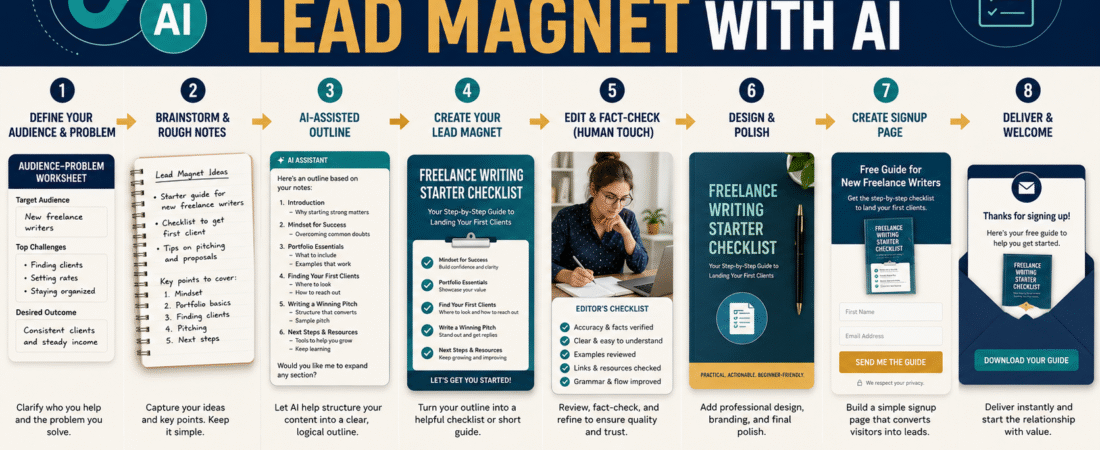
A Simple AI Lead-Magnet Workflow
Step 1: Define the subscriber
Write one paragraph describing the intended person.
Step 2: Define one problem
Choose a problem small enough to address clearly.
Step 3: Define the result
State what the reader should complete.
Step 4: Gather source material
Use your own notes, experience, and existing content.
Step 5: Ask AI for structure
Create an outline based on the source material.
Step 6: Develop the resource
Write one section at a time.
Step 7: Add practical tools
Include a checklist, worksheet, template, or example.
Step 8: Verify information
Check every changing or factual claim.
Step 9: Edit for human quality
Remove repetition and generic wording.
Step 10: Design the resource
Make it clear and easy to use.
Step 11: Build the signup page
Match the promise to the finished product.
Step 12: Test delivery
Subscribe yourself and verify the complete experience.
Common Mistakes
Starting with a broad topic
Narrow problems usually produce clearer lead magnets.
Letting AI invent the audience
Define the person before generating content.
Creating too much information
A lead magnet needs a useful result, not maximum page count.
Publishing the first AI draft
Review every section.
Using generic examples
Create scenarios that match your intended audience.
Failing to verify claims
Polished writing can still be inaccurate.
Designing before solving the problem
A beautiful PDF cannot repair weak content.
Forgetting the next step
The reader should understand what to do after completing the resource.
Conclusion
AI can make lead-magnet creation faster, but the strongest lead magnets still begin with human judgment. Define one subscriber, identify one problem, promise one manageable result, and provide AI with enough source material to help you build something specific.
Then improve the draft with original examples, practical tools, fact-checking, editing, and professional formatting.
Do not judge the resource by its page count or how quickly AI created it. Judge it by whether the intended subscriber can use it to make progress.
Choose one audience problem today and write the single result your first AI-assisted lead magnet should help the reader achieve.