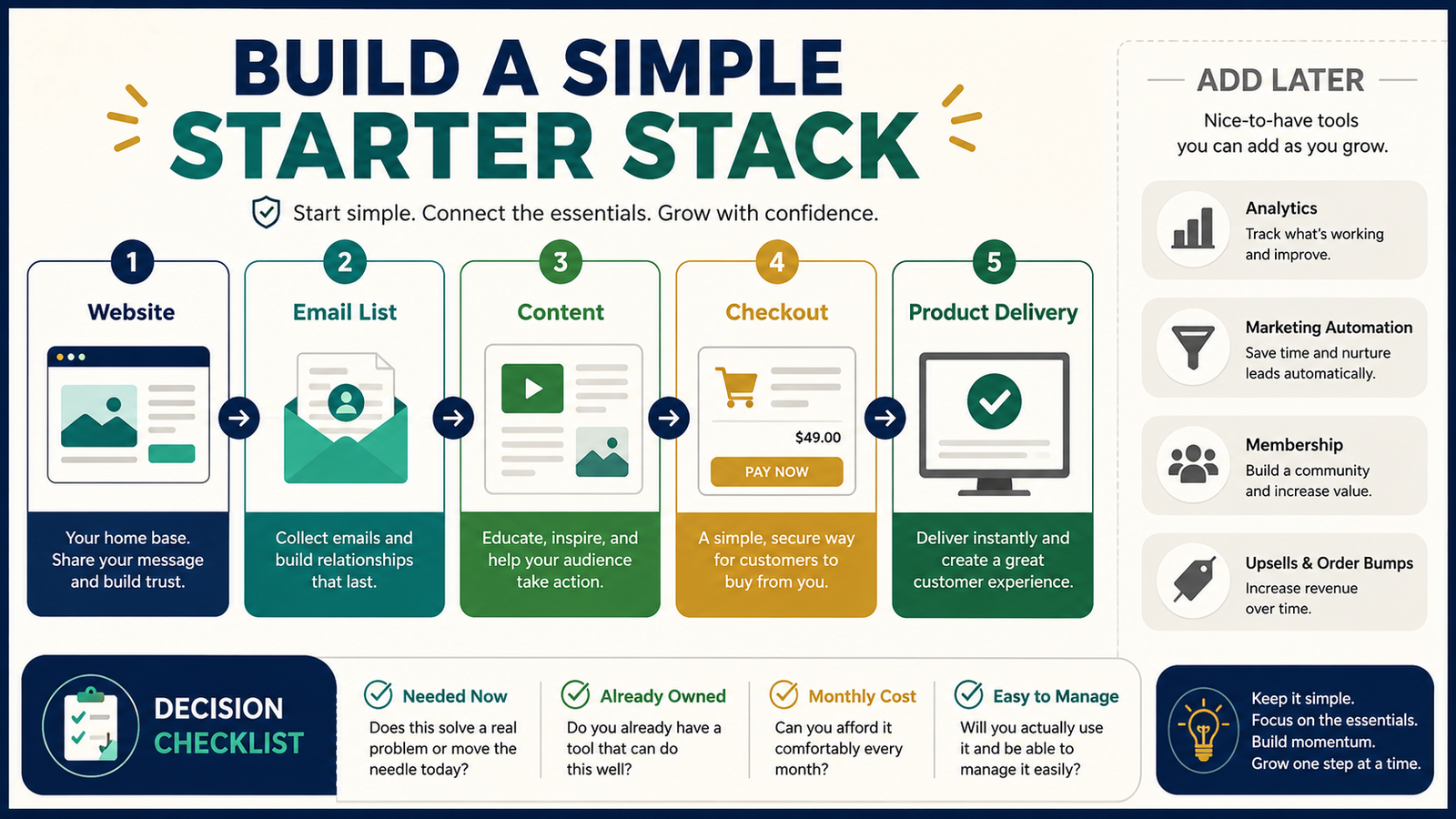
An online-business starter stack is the small group of tools used to attract visitors, communicate with subscribers, accept payments, and deliver a product.
A beginner does not need every marketing platform recommended online.
A simple digital-product business can often begin with five connected parts:
- A website or landing page
- An email-marketing service
- A repeatable content process
- A checkout system
- A delivery method
The goal is not to own the most software. The goal is to create one complete customer path that you can understand and manage.
Key Takeaways
- Choose tools based on the customer journey rather than long feature lists.
- Use software you already own when it meets the immediate need.
- Keep creation, payment, and delivery as simple as the product allows.
- Add automation only after the manual process works.
- Review the full monthly and annual cost before purchasing another tool.
Affiliate Disclosure: This article contains affiliate links. If you purchase through one of these links, I may earn a commission at no additional cost to you. Affiliate compensation does not determine the conclusions or recommendations presented in this article.
Begin With the Customer Journey
Before comparing tools, write down what the customer must do.
A basic digital-product journey may look like this:
- Discover an article or social-media post.
- Visit the website.
- Join the email list.
- Receive helpful information.
- Review a product offer.
- Complete payment.
- Receive access to the product.
- Contact support when necessary.
Every tool should support one or more of these steps.
When a tool does not help the current customer journey, it may belong on the “add later” list.
Part 1: Website or Landing Page
The website gives your business a central location.
It may contain:
- Homepage
- About page
- Contact page
- Blog
- Lead-magnet page
- Product page
- Affiliate disclosure
- Privacy information
- Support instructions
A beginner does not need a large website before publishing useful content.
Begin with enough pages to explain:
- Who the site helps
- What information it provides
- What free resource is available
- How to contact the business
- What product or service is offered
If you already have WordPress hosting, improve the existing site before purchasing another website platform.
Part 2: Email-Marketing Service
An email service allows you to:
- Collect subscribers
- Deliver a lead magnet
- Send welcome messages
- Publish newsletters
- Communicate about new content
- Introduce relevant products
- Process unsubscribe requests
The first system may contain only:
- One signup page
- One lead magnet
- Three welcome emails
- One weekly or occasional newsletter
GetResponse combines email marketing with landing pages, forms, and automation tools, making it one option for businesses that prefer several subscriber functions in one platform. Its current official materials describe email campaigns, landing pages, forms, and automation as connected parts of the service.
You can explore GetResponse’s email-marketing features.
Review the current plan limits and price before choosing it. A beginner may not need advanced funnels or automation during the first stage.
Part 3: Content-Creation Process
Content helps people discover the business and understand what you teach.
Your process may include:
- Topic selection
- Research
- Article writing
- Email creation
- Social-media posts
- Short videos
- Featured images
- Final review
The tool is less important than the repeatable process.
You may use:
- A word processor
- An AI assistant
- A spreadsheet
- A design platform
- A simple editorial checklist
Avoid buying several writing tools before developing one workflow that produces accurate and useful content.
Part 4: Checkout System
The checkout processes payment.
Important questions include:
- Does it support the payment type you need?
- Can it sell one-time products?
- Can it handle subscriptions when necessary?
- Does it integrate with the delivery platform?
- Can it add buyers to the email system?
- How are refunds managed?
- Are taxes handled?
- What transaction or platform fees apply?
- Can customers receive a receipt?
Do not select a checkout only because it has advanced sales-funnel features.
Your first requirement is reliable payment and a clear customer experience.
Part 5: Product Delivery
Delivery determines what happens after the purchase.
A customer may receive:
- A PDF download
- A course login
- A membership account
- Video access
- Audio files
- Software access
- A collection of resources
A basic PDF requires less infrastructure than a course containing 25 videos.
ProductDyno is one possible platform for delivering courses, memberships, and digital products. Its official pages describe protected content delivery and membership or course functions.
You can review ProductDyno’s digital-product delivery options.
Before purchasing a delivery platform, confirm that it works with your checkout and that its current pricing fits the expected product volume.
Match the Stack to the Product
The product determines the system.
Simple Ebook
Possible stack:
- WordPress product page
- Email service
- Checkout
- Automatic PDF delivery
Video Course
Possible stack:
- Website
- Email service
- Checkout
- Course platform
- Video hosting
- Customer login
- Support process
Membership
Possible stack:
- Website
- Email automation
- Recurring checkout
- Membership platform
- Regular content schedule
- Cancellation management
- Customer support
Do not create a membership stack when the first product is one short ebook.
Use the “Already Owned” Test
Before purchasing software, list what you already own.
Record:
- Tool name
- Primary purpose
- Current cost
- Features used
- Features unused
- Renewal date
- Whether it solves the new problem
A beginner may already own:
- WordPress hosting
- Email software
- A checkout
- Design software
- AI writing tools
- Video software
- Product-delivery software
The cheapest tool is often the one that is already paid for and capable of completing the task.
Use the “Needed Now” Test
For each proposed tool, ask:
- Which current business task does it complete?
- Can an existing tool perform that task?
- Is the need immediate or possible later?
- What is the full annual cost?
- How much setup time is required?
- What happens if I cancel?
- Can data or content be exported?
- Will customers be affected by a future change?
A feature you may use someday is not always a reason to pay today.
A Practical Beginner Example
Imagine a retired educator preparing a $27 digital guide.
The initial plan includes:
- WordPress website
- GetResponse email list
- ThriveCart checkout
- ProductDyno delivery
- ClickDesigns graphics
- AI writing platform
- Video-creation software
- Webinar software
- Community platform
The customer receives only a PDF and worksheet.
The educator simplifies the stack to:
- WordPress for the product page
- GetResponse for subscriber communication
- ThriveCart for payment
- An existing secure delivery option for the PDF
The other tools may become useful when the business adds a course or membership.
The simplified stack reduces setup and makes it easier to test the first offer.
Calculate the Real Cost
Do not evaluate a tool only by its monthly price.
Include:
- Monthly subscription
- Annual billing
- Transaction fees
- Upgrade costs
- Storage charges
- Additional user fees
- Domain costs
- Email-contact limits
- Video hosting
- Optional integrations
A $20 monthly tool costs $240 per year before upgrades or fees.
Record every recurring tool in one document.
Create a Tool Renewal Calendar
For each paid service, record:
- Tool
- Purpose
- Cost
- Billing frequency
- Renewal date
- Cancellation deadline
- Current use
- Decision date
Review the calendar before renewals.
Ask:
- Did I use the tool?
- Did it solve the intended problem?
- Can another tool replace it?
- Does the next business stage still require it?
- Is a lower plan sufficient?
Add Automation Later
Automation is valuable when it repeats a process that already works.
Do not automate confusion.
First confirm that:
- The signup form works.
- The lead magnet arrives.
- The checkout completes.
- The customer receives access.
- The welcome emails make sense.
- Support instructions are clear.
After the manual path works, automate repeated steps.
Common Starter-Stack Mistakes
Buying Tools Before Defining the Product
A course platform may be unnecessary when the product becomes a checklist.
Choosing Based on the Largest Feature List
Unused features create cost and complexity.
Ignoring Integration Requirements
The checkout, email service, and delivery system must exchange the right customer information.
Creating Duplicate Functions
Several tools may provide landing pages, email, automation, or design.
Decide which platform owns each responsibility.
Forgetting Exit Options
Know how to export contacts, files, and customer records.
A Simple Starter-Stack Worksheet
Product:
[Product]
Customer:
[Audience]
Discovery Method:
[Blog, email, social media, advertising]
Website Requirement:
[Pages needed]
Email Requirement:
[Signup and messages]
Checkout Requirement:
[Payment type]
Delivery Requirement:
[Download, login, course, membership]
Existing Tools:
[Tools]
Missing Tool:
[Only what is necessary]
Monthly Cost:
[Total]
Annual Cost:
[Total]
Next Review Date:
[Date]
Conclusion
A beginner online-business starter stack should provide a complete path from discovery to delivery without unnecessary software.
Begin with a website, email system, content process, checkout, and delivery method. Use tools you already own, match the system to the product, and delay advanced features until the basic customer experience works.
Map the complete journey for your first product before purchasing another platform.