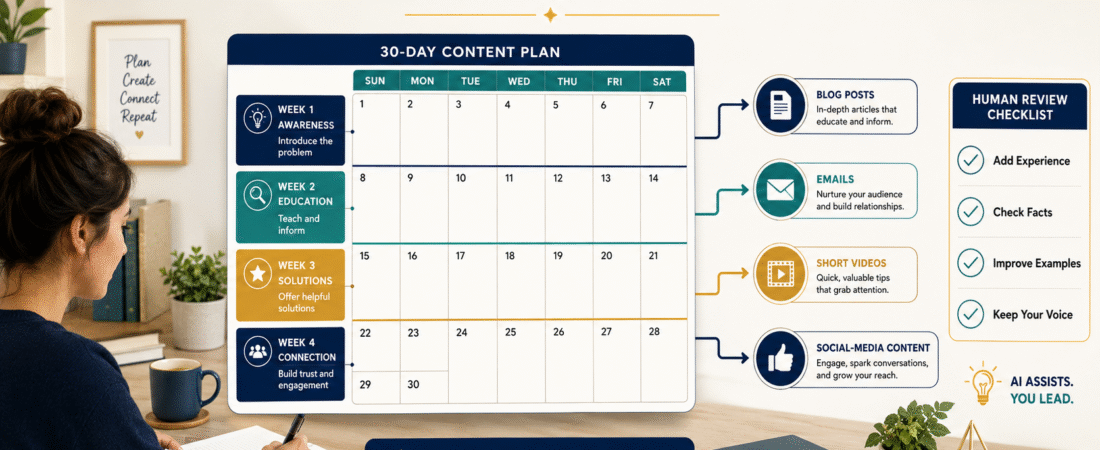
An AI content plan for beginners should make publishing easier without turning every article, email, and social-media post into generic material.
The most practical approach is to choose one audience problem for each week, create one detailed source article, and then adapt its main lessons into several smaller pieces of content.
AI can help you organize topics, develop outlines, suggest questions, and prepare first drafts. Your knowledge should still determine what is accurate, useful, and appropriate for your readers.
A strong 30-day plan gives you direction while leaving enough room to improve topics based on reader questions and new ideas.
Key Takeaways
- Organize the month around four focused weekly themes.
- Begin each week with one detailed source article.
- Give AI clear information about the audience, goal, tone, and required format.
- Add your judgment, examples, and explanations before publishing.
- Review the plan weekly rather than creating 30 finished posts in one sitting.
Affiliate Disclosure: This article contains affiliate links. If you purchase through one of these links, I may earn a commission at no additional cost to you. Affiliate compensation does not determine the conclusions or recommendations presented in this article.
Why a Monthly Content Plan Helps Beginners
Creating content without a plan often leads to three problems.
First, you spend too much time deciding what to create. Second, your topics may feel disconnected. Third, you may repeat the same advice because there is no record of what has already been published.
A monthly plan gives each piece of content a purpose.
It can help you decide:
- Which audience problem you are addressing
- Which article should be created first
- Which smaller assets can come from that article
- Which product or resource fits naturally
- Which questions require additional research
- Which content should be published later
The plan is not meant to prevent creativity. It provides an organized starting point so that new ideas have somewhere to fit.
Step 1: Select One Primary Audience
Do not create a content plan for everyone interested in online business.
Choose one group for the month.
Examples include:
- Retirees exploring online-business ideas
- Beginners learning how to use AI
- First-time ebook creators
- Small-business owners building an email list
- Affiliate marketers improving their content
- Course creators organizing existing knowledge
A specific audience helps you select useful examples and avoid overly general advice.
Write one sentence:
This month’s content will help [AUDIENCE] accomplish [RESULT].
For example:
This month’s content will help first-time ebook creators organize their ideas and complete a practical writing plan.
That statement becomes your monthly direction.
Step 2: Identify Four Weekly Problems
Choose one audience problem for each week.
A monthly plan for beginner ebook creators might use:
Week 1: Choosing the Ebook Topic
Help readers select a useful and manageable subject.
Week 2: Defining the Reader
Help readers identify who the ebook is for and what problem it addresses.
Week 3: Creating the Outline
Help readers arrange ideas into a logical chapter sequence.
Week 4: Reviewing the Manuscript
Help readers check clarity, accuracy, completeness, and usefulness.
Each week supports the same larger goal without repeating the same search question.
Step 3: Create One Source Article for Each Week
A source article is the most complete piece of content for the week.
It should contain:
- A clear question
- A direct answer
- Detailed explanations
- A practical example
- Action steps
- Common mistakes
- A conclusion
The article provides the foundation for smaller assets.
For example, an article about selecting an ebook topic could become:
- An email about avoiding overly broad topics
- A short video about choosing one reader problem
- A Facebook post asking readers what stops them from beginning
- A LinkedIn post about turning professional knowledge into educational content
- A one-page topic-selection worksheet
This reduces the need to research a separate subject for every platform.
Step 4: Use AI for Planning Before Drafting
AI is often most useful before the first draft.
Ask it to help you:
- List audience questions
- Group related questions
- Identify overlapping topics
- Suggest several article angles
- Organize a logical sequence
- Create a basic content calendar
- Find gaps in the plan
- Develop alternative examples
OpenAI’s current guidance recommends using clear, specific instructions, providing necessary context, and improving prompts through an iterative process after reviewing the results.
A practical planning prompt could say:
Help me create four weekly content themes for retirees who want to turn their knowledge into a small digital product. Each week must address a different problem and support one detailed blog article, one email, one short video, and two social posts. Avoid exaggerated income claims.
Review the suggestions rather than accepting the first list automatically.
Step 5: Protect Your Natural Voice
Your voice comes from how you explain ideas, what you emphasize, the examples you select, and the advice you believe matters.
AI may imitate a requested tone, but it does not automatically know:
- Which lessons you have learned
- Which beginner mistakes concern you
- Which recommendations you consider practical
- Which explanations match your teaching style
- Which business models you prefer
- Which promises you refuse to make
Add a short voice guide to your prompt.
For example:
Use a patient, teaching-oriented tone. Explain unfamiliar terms. Avoid hype, exaggerated income language, and unnecessary technical language. Provide realistic steps for ordinary beginners.
Then improve the draft by adding your own judgment.
Step 6: Use a Four-Part Weekly Content Structure
A simple weekly system could include the following.
Monday: Source Article
Publish the detailed article answering the week’s main question.
Tuesday: Educational Email
Teach one important lesson from the article and direct subscribers to the complete guide when appropriate.
Wednesday: Short Video
Explain one problem and one practical takeaway.
Thursday: Social-Media Post
Create a conversation around a common mistake or decision.
Friday: Practical Resource
Offer a checklist, worksheet, template, or summary.
You do not have to publish every day. The same structure can be spread across two weeks when you prefer a lighter schedule.
Step 7: Give Every Asset a Different Purpose
Repurposing does not mean copying the same introduction everywhere.
Each asset should have a specific job.
The blog article may explain the complete process.
The email may help the subscriber avoid one mistake.
The video may demonstrate one step.
The social post may ask readers about their experience.
The worksheet may help the reader apply the advice.
This creates consistency without unnecessary duplication.
Step 8: Create a Simple Planning Record
Use a document or spreadsheet with these fields:
- Publication date
- Website or platform
- Weekly theme
- Content title
- Audience question
- Main takeaway
- Required research
- Related product or resource
- Current status
- Review notes
Statuses may include:
- Idea
- Planned
- Drafted
- Reviewed
- Scheduled
- Published
- Needs updating
This record helps you see what has been completed and what still requires work.
A Practical Beginner Example
Imagine a retired teacher who wants to help other retirees understand AI.
The four weekly themes could be:
- Understanding what AI can and cannot do
- Writing clearer prompts
- Reviewing AI-generated information
- Creating a simple repeatable workflow
The first source article explains basic AI limitations.
The supporting email discusses why a confident AI answer may still require verification.
The short video explains one prompt mistake.
The social post asks readers which AI task feels most confusing.
The checklist helps readers review an AI response before using it.
All the content supports one audience and one monthly learning goal.
Step 9: Use AI to Assist With Digital-Product Ideas
A strong month of content may reveal a recurring audience problem that could support a paid product.
For example, repeated questions may suggest:
- A checklist pack
- A prompt collection
- A short guide
- An ebook
- A workbook
- A beginner course
People who want assistance developing ebooks, guides, checklists, and related digital-product assets can review the current AI Product Engine offer.
A product-creation tool may help organize ideas and produce working drafts. It cannot confirm that the audience needs the product or that the finished information is accurate and useful.
Step 10: Complete a Human Review
Google’s current guidance emphasizes content created primarily to benefit people and asks whether readers will leave feeling they learned enough to achieve their goal.
Before publishing, ask:
- Does this answer a real question?
- Is the useful answer provided early?
- Are the examples original and understandable?
- Have facts and links been checked?
- Does the content sound like my normal teaching voice?
- Have repeated phrases been removed?
- Is the recommended tool relevant?
- Does the reader know what to do next?
The review is what turns an organized AI draft into responsible content.
Common AI Content-Planning Mistakes
Creating the Entire Month in One Prompt
A single large request may produce repetitive topics and shallow drafts.
Plan the month first, then create each asset separately.
Choosing Topics Only Because They Appear Popular
A popular topic may not fit your audience or business.
Choose subjects that solve relevant reader problems.
Using the Same Introduction Repeatedly
Each article should begin with the specific problem addressed that day.
Publishing Without Verification
Check software details, prices, statistics, policies, and links before publication.
Removing All Flexibility
Leave space for current questions, reader feedback, and important updates.
A Simple 30-Day Planning Template
Week 1
Audience problem:
[Problem]
Source article:
[Title]
Supporting email:
[Lesson]
Short video:
[One takeaway]
Social post:
[Conversation question]
Practical resource:
[Checklist or worksheet]
Repeat the same fields for Weeks 2, 3, and 4.
Conclusion
An AI content plan for beginners should organize your work without replacing your knowledge or natural teaching style.
Choose one audience, identify four weekly problems, create one source article per week, and adapt each article into smaller assets with distinct purposes.
Start by writing one monthly audience statement and four weekly questions before asking AI to develop the calendar.