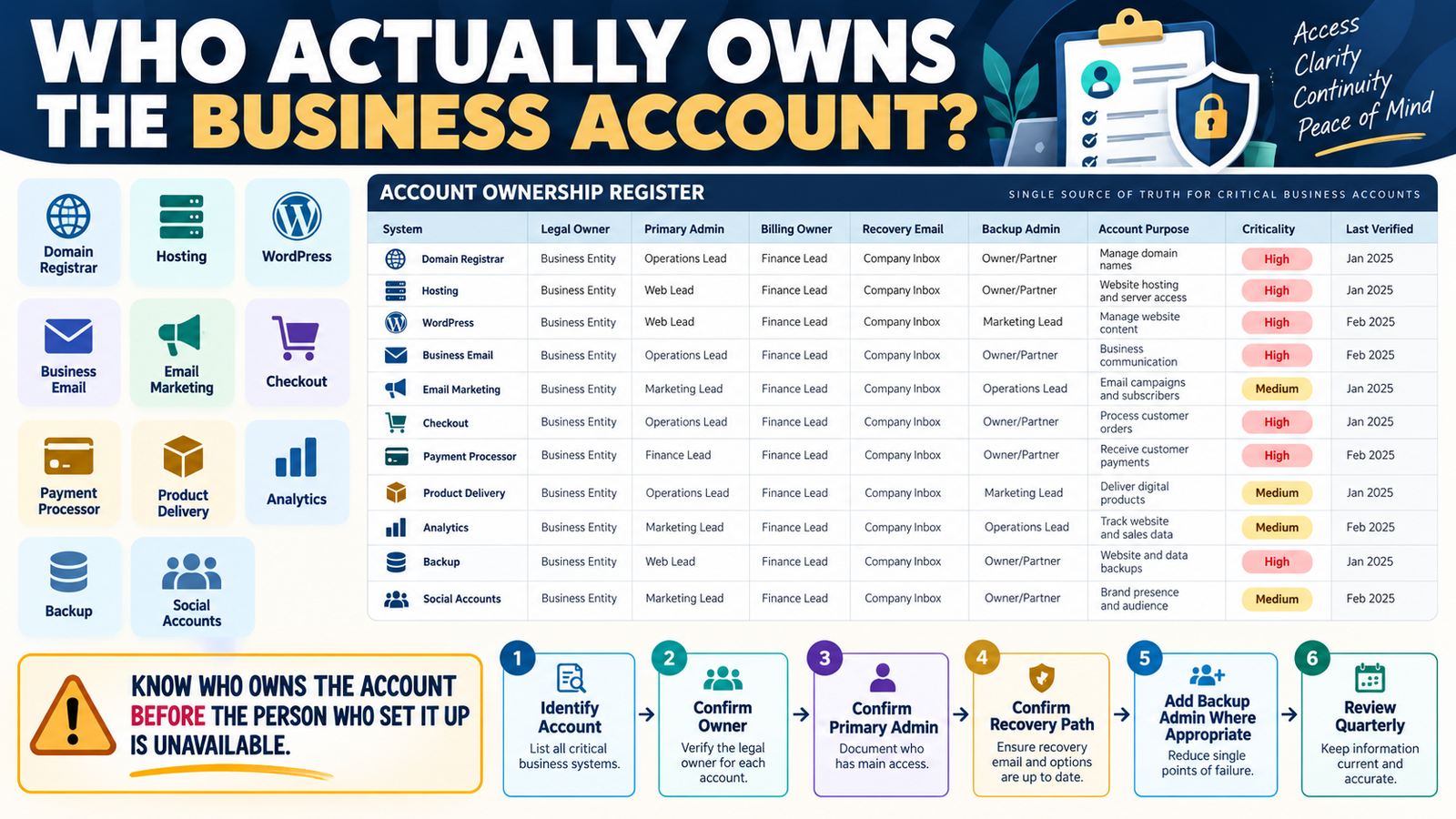
Online businesses accumulate accounts quickly.
You may have:
- Domain registrar.
- Web host.
- WordPress.
- Business email.
- Email marketing.
- Checkout.
- Payment processor.
- Product delivery.
- Analytics.
- Backup service.
- Social platforms.
You know you use them.
But another question is just as important:
Who actually owns each account?
That may sound obvious.
It often is not.
An account may have been created:
- Years ago.
- With a personal email address.
- By a contractor.
- By an employee.
- Under an old business name.
- Using a forgotten billing profile.
A simple online business account ownership register documents who legally and operationally controls each critical service.
The structure is:
Account → Owner → Administrator → Billing → Recovery → Backup Access → Verification
Ownership Is Different From Login Access
Someone can have login access without owning the account.
Example:
A web designer may be an administrator.
But:
The business should still own the hosting relationship.
Or:
An employee may manage email campaigns.
But:
The business owner should still control account recovery and billing.
Do not confuse:
Person who uses the account
with:
Person or business that controls the account.
Start With Critical Accounts
Use your verified Digital Business Asset Inventory as a starting point.
Prioritize:
- Domain.
- Hosting.
- Payment processor.
- Business email.
- Checkout.
- Product delivery.
- Subscriber platform.
- Backup.
Those are the systems most likely to create serious disruption if control becomes unclear.
Field 1: Legal or Business Owner
Record:
Who should ultimately own this account?
Examples:
- Lee One Enterprises LLC.
- Michael E. Lee.
The appropriate name depends on how the account is structured.
The key is consistency.
Field 2: Primary Administrator
Who currently manages the account?
Example:
Primary Admin: Michael
This is the person who can normally:
- Change settings.
- Add users.
- Configure integrations.
Field 3: Billing Owner
The person managing operations may not control billing.
Record:
Who receives invoices?
Who controls the payment method?
Who approves plan changes?
This becomes important during:
- Renewal.
- Cancellation.
- Dispute.
- Account recovery.
Field 4: Recovery Email
Do not necessarily write the entire recovery address into a document shared widely.
You can record:
Recovery controlled through business email account.
The objective is to know:
Where recovery goes.
Field 5: Recovery Phone
If a service uses a phone number for:
- Verification.
- Two-factor recovery.
- Security alerts.
confirm the number is current.
Old phone numbers can create serious account-access problems.
Field 6: Backup Administrator
For appropriate business systems, ask:
If the primary administrator is unavailable, can another authorized person regain control?
A backup administrator may be useful for:
- Hosting.
- WordPress.
- Business software.
Do not add unnecessary administrators merely for convenience.
Each additional account with elevated access increases security exposure.
Field 7: Account Purpose
Write:
GetResponse — Subscriber list and email automation
not only:
GetResponse
Now a future person knows what disappears if the account is inaccessible.
Field 8: Criticality
Use:
CRITICAL
Loss of access could stop:
- Website.
- Revenue.
- Customer delivery.
- Email.
- Domain control.
IMPORTANT
Business continues but work becomes difficult.
OPTIONAL
Little immediate operational impact.
This tells you where to focus first.
The Domain Registrar Deserves Special Attention
The domain controls:
- Website address.
- Often DNS.
- Sometimes email routing.
If domain ownership becomes unclear:
Many other systems can be affected.
Record:
Registrar
Business owner
Primary administrator
Renewal responsibility
Recovery method
Your Business Dependency Register helps show how much depends on that account.
Hosting Ownership Matters Too
Hosting may control:
- Website files.
- Databases.
- Backups.
- Email.
- DNS.
Confirm the account is not owned exclusively through:
A former developer’s personal account.
If it is:
Plan a proper ownership transfer rather than waiting for an emergency.
Payment Processor Ownership Is Critical
Payment accounts may involve:
- Legal business name.
- Tax information.
- Bank account.
- Identity verification.
Do not treat them like ordinary software logins.
The owner and recovery information should match the actual business arrangement.
Email Is a Recovery Dependency
Your business email may be used to recover:
- Hosting.
- WordPress.
- Software.
- Payments.
That makes email itself a critical dependency.
Ask:
If I lose access to my business email, what accounts become harder to recover?
This is why account ownership and dependency documentation work together.
Contractor-Created Accounts Are a Common Risk
Imagine a contractor created:
- Analytics.
- Hosting.
- Search Console.
- Social accounts.
using the contractor’s email.
The contractor leaves.
The business now has a continuity problem.
Where possible:
The business should hold primary ownership.
Contractors should receive appropriate delegated access.
Review Google and Analytics Ownership
For services such as:
- GA4.
- Search Console.
review:
- Administrators.
- Property owners.
- Former users.
Remove access that is no longer needed.
Do not leave former contractors with permanent administrative rights simply because nobody reviewed the list.
Connect This to Emergency Access
Your verified Online Business Emergency Access Plan answers:
How can an authorized person continue the business if the primary owner is unavailable?
The ownership register answers:
Which accounts need that continuity plan?
Do Not Put Passwords in the Register
The register should contain ownership information.
Not:
- Passwords.
- Recovery codes.
- API keys.
- Secret questions.
- Two-factor backup codes.
Use a secure credential system for those.
Add “Last Verified”
An account may be correct today.
Then:
- Administrator changes.
- Email changes.
- Billing contact changes.
Add:
Last Verified: October 5, 2026
Review critical accounts periodically.
Add “Ownership Problem?”
Use:
YES / NO
Examples:
NO
Account owned by business, recovery current, backup admin documented.
YES
Account still controlled through former contractor email.
Now you have an action list.
A Simple Account Ownership Register
Use:
System
Business Purpose
Legal/Business Owner
Primary Administrator
Billing Owner
Recovery Method
Backup Administrator
Criticality
Last Verified
Ownership Problem?
Next Action
That is enough.
Review Ownership Before Canceling or Migrating
Before moving a system:
Confirm you have authority to:
- Export data.
- Change DNS.
- Transfer domain.
- Change payment details.
- Close account.
Ownership should be confirmed before migration begins.
Use Your Vendor Contact List Too
Your vendor contact list tells you:
Who provides the service and how to contact support.
The ownership register tells you:
Who within your business controls the account.
Together they answer:
Who supports it?
and:
Who owns it?
Do Not Wait for an Emergency
The worst time to discover unclear account ownership is when:
- Website is down.
- Domain expired.
- Payment processor needs verification.
- Contractor disappeared.
Ownership review is easier while everything works.
Conclusion
An online business needs more than a list of software tools.
It needs a clear record of:
Who owns each critical account.
Document:
Owner → Administrator → Billing → Recovery → Backup Access → Criticality
Pay particular attention to:
- Domain.
- Hosting.
- Business email.
- Payment processor.
- Checkout.
- Product delivery.
The goal is simple:
The business should remain in control of the systems the business depends on.
Your Next Action
Create a table containing these eight accounts:
Domain | Hosting | Business Email | Email Marketing | Checkout | Payment Processor | Product Delivery | Analytics
For each, answer:
Who owns it?
Who is the primary administrator?
Where does recovery go?
Who controls billing?
Then highlight any row where:
You cannot confidently answer all four questions.
Choose the most critical unclear account and fix its ownership or documentation first.
Do not store passwords in the register.
Instead, make sure the business can identify who controls the account and how authorized recovery would occur.
That gives you a much stronger foundation for long-term business continuity.