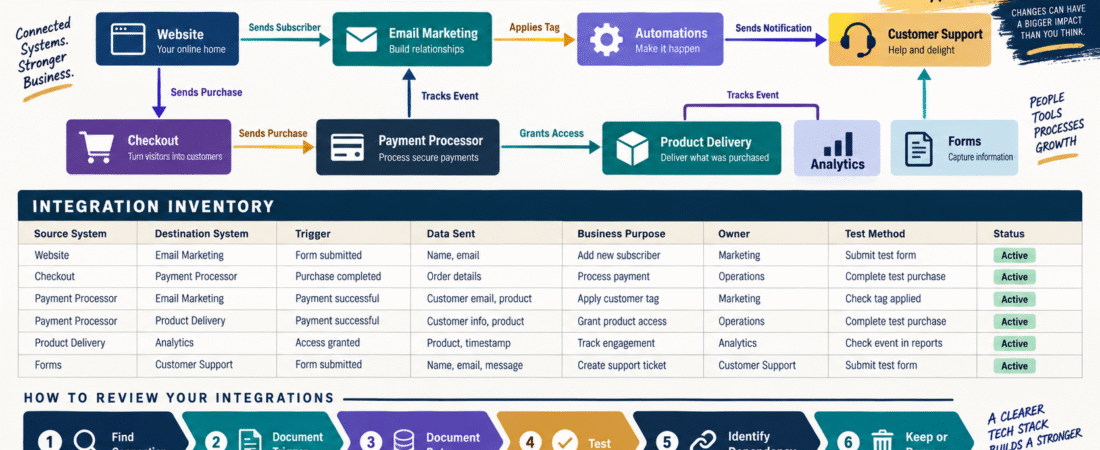
Online businesses often begin with separate tools.
You add:
- Website.
- Email platform.
- Checkout.
- Product-delivery system.
- Analytics.
- Payment processor.
Then you connect them.
A website form adds a subscriber to email.
Checkout applies a customer tag.
Payment triggers product access.
A purchase sends an email.
Analytics records an event.
After several months, the business no longer contains only separate tools.
It contains a network of connections.
That network can be difficult to remember.
An online business integration map documents:
System A → Connection → System B → Business Result
The goal is simple:
Know what will be affected before you change one tool.
What Is an Integration?
An integration allows two systems to exchange information or trigger an action.
Examples:
Website Form → GetResponse
New subscriber is added.
Checkout → ProductDyno
Buyer receives product access.
Checkout → Email Platform
Customer tag is applied.
Website → GA4
Website behavior is recorded.
Some integrations are direct.
Others may use:
- Plugin.
- Webhook.
- API.
- Automation platform.
Why Integrations Become Invisible
Once an integration works, you stop thinking about it.
That is exactly what makes it easy to forget.
Six months later you replace a form.
The subscriber automation quietly stops.
Or you cancel software.
A checkout still attempts to send data to it.
The integration was invisible until it failed.
Start With Critical Business Flows
Do not begin by documenting every plugin.
Start with:
Lead Generation
Visitor → Form → Email List → Welcome Email
Sale
Customer → Checkout → Payment → Product Delivery → Customer Email
Analytics
Visitor → Website → Tracking → GA4
Support
Customer → Support Request → Business Inbox → Response
Now identify the connections that make each flow work.
Record the Source System
This is where the information begins.
Example:
Source: WordPress form.
Record the Destination System
Where does the information go?
Example:
Destination: GetResponse.
Record the Trigger
What starts the connection?
Examples:
- Form submitted.
- Purchase completed.
- Subscription canceled.
- Tag applied.
- Product purchased.
- Customer added.
Without the trigger, you do not really understand the automation.
Record the Data Being Sent
Examples:
- Email address.
- Name.
- Product ID.
- Customer tag.
- Purchase status.
- Event name.
Do not copy passwords or sensitive credentials into the map.
Document the type of information being transferred.
Record the Business Purpose
This field is important.
Example:
Integration: Checkout → Email platform
Purpose: Add buyers to customer segment and start onboarding sequence.
Months later, you know why the integration exists.
Without purpose, an old automation can look unnecessary even though the business still depends on it.
Record the Connection Method
Use:
- Native integration.
- WordPress plugin.
- API.
- Webhook.
- Automation service.
- Manual process.
This tells you where troubleshooting should begin.
Example Integration Record
Source System: ThriveCart
Destination: Product Delivery Platform
Trigger: Successful purchase
Data Sent: Customer email + purchased product
Purpose: Grant buyer access
Connection Method: Native integration
Critical?: Yes
Test Method: Complete test purchase
Status: Working
That one row can save significant troubleshooting later.
Identify Critical Integrations
Not every integration deserves equal attention.
HIGH CRITICALITY
If it breaks:
- Buyer does not receive product.
- Payment cannot complete.
- Subscriber receives nothing.
- Customer loses access.
MEDIUM CRITICALITY
Business continues, but a manual process may be required.
LOW CRITICALITY
Convenience automation.
Prioritize testing based on consequence.
Connect the Map to Your Business Asset Inventory
Your verified Digital Business Asset Inventory answers:
What systems do I have?
The integration map answers:
How do those systems depend on one another?
Those are different questions.
Both matter.
Use the Map Before Canceling Software
Your software cancellation process should include:
Check integration map.
Before removing a platform:
Search every row where that platform appears as:
- Source.
- Destination.
- Connection method.
Now you can see what might break.
Use the Map Before Replacing a Form
A website form may appear simple.
But it could trigger:
Form → List → Tag → Automation → Lead Magnet Delivery
Replacing only the visual form without recreating the backend connection can break the entire lead funnel.
The integration map makes that dependency visible.
Use the Map Before Changing Checkout
Checkout can be one of the most connected systems.
It may communicate with:
- Payment processor.
- Product delivery.
- Email.
- Affiliate system.
- Analytics.
Do not treat checkout replacement as one isolated change.
Map the connections first.
Record Direction
Arrows matter.
Example:
Checkout → Email Platform
is different from:
Email Platform → Checkout
The first may send buyer information.
The second may send people to a sales page.
Use directional arrows in your visual map.
Create Both a Diagram and a Table
A diagram helps you see the business.
A table helps you maintain it.
Diagram
Website → Email
Checkout → Product Delivery
Checkout → Email
Website → Analytics
Table
Contains:
- Details.
- Trigger.
- Data.
- Test.
- Owner.
You do not need sophisticated diagramming software.
A simple box-and-arrow diagram works.
Test Critical Connections
Document:
How do I know this integration works?
Examples:
Email Signup
Submit test subscriber.
Product Delivery
Complete test order.
Analytics
Trigger test event.
Customer Tag
Confirm buyer receives correct tag.
The integration is not fully documented until you know how to test it.
Record Last Test Date
Add:
Last Tested
A critical integration tested two years ago may deserve attention.
A monthly test may be excessive for some stable systems.
Choose frequency based on consequence.
Look for Orphaned Integrations
You may discover:
- Old automation pointing to canceled software.
- Form sending to unused list.
- Webhook from retired checkout.
- Analytics integration nobody uses.
Those may be removed after careful verification.
Do not delete automatically.
Confirm that nothing depends on them first.
Look for Duplicate Integrations
Two systems may perform the same action.
Example:
Checkout directly adds customer to email.
Another automation also adds the same customer.
That can create:
- Duplicate tags.
- Duplicate emails.
- Confusing behavior.
An integration map can reveal duplication.
Connect It to Your Change Log
When you add or remove an integration:
Record the change.
Your verified Business Change Log can preserve:
What changed → Why → Test result → Rollback
If an automation fails later, you know what was modified.
Connect It to Your Handoff Packet
Someone helping with the business may know:
We use ProductDyno.
But they may not know:
The checkout grants ProductDyno access automatically.
The integration map provides that missing system-level understanding.
A Simple Integration Inventory Template
Use these columns:
Integration ID
Source System
Destination System
Trigger
Data Sent
Business Purpose
Connection Method
Criticality
Test Method
Last Tested
Status
Owner
For a small business, this may contain only 10–20 rows.
That is enough.
Conclusion
An online business is not merely a collection of software subscriptions.
It is a network of connected systems.
An integration map helps you understand:
What connects → What triggers the connection → What data moves → Why it matters → How to test it
That becomes especially valuable before:
- Canceling software.
- Replacing checkout.
- Changing forms.
- Moving email platforms.
- Troubleshooting broken automation.
You do not need a complicated technical architecture diagram.
You need a clear picture of:
What connects to what.
Your Next Action
Draw these six boxes on a page:
Website | Email | Checkout | Payment Processor | Product Delivery | Analytics
Now draw arrows showing every connection you currently use.
For each arrow, write:
Trigger → Data Sent → Business Purpose
Then circle the three connections that would most directly affect customers or revenue if they failed.
Test one of those three today.
Finally, create an integration inventory and record:
Source | Destination | Trigger | Purpose | Test | Status
That gives you the first working map of how your online business systems actually communicate.