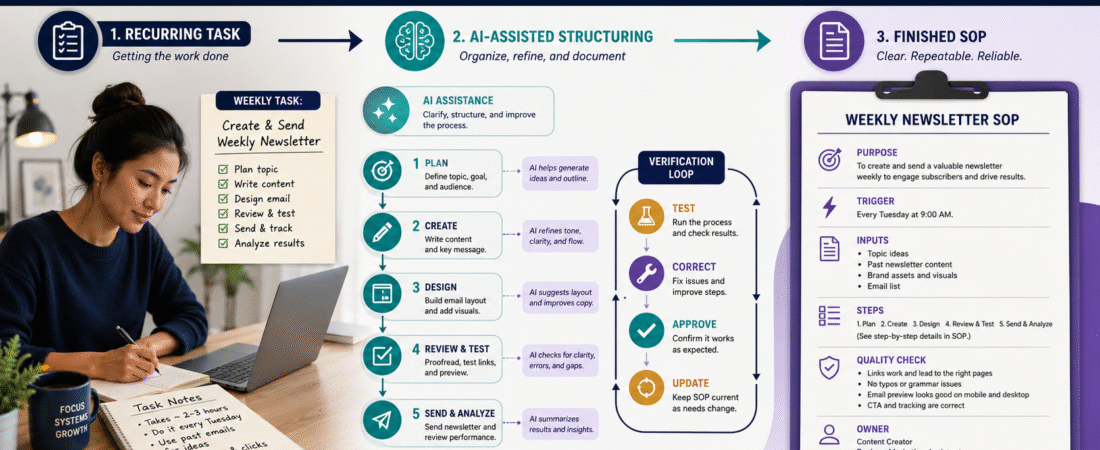
If you perform the same online-business task more than a few times, there is a good chance it should be documented.
A standard operating procedure, usually called an SOP, explains how to complete a recurring task correctly without depending on memory.
AI can make creating an SOP easier because it can help organize rough notes, identify missing steps, clarify instructions, create checklists, and turn an informal process into a more structured document.
The important limitation is this:
AI should help document the process. It should not invent a process you have never verified.
A practical workflow is:
Perform the real task → record what you actually do → give those notes to AI → organize the procedure → identify missing information → test the SOP → correct it → approve it → update it when the process changes.
That approach creates a business system another qualified person has a reasonable chance of following.
Key Takeaways
- Document tasks you repeat rather than relying on memory.
- Start with the real process you currently use.
- Give AI your source information instead of asking it to guess.
- Separate required actions from optional preferences.
- Include quality-control checkpoints.
- Test the SOP with the actual tools and files.
- Ask another person to follow the instructions when possible.
- Date and version every important SOP.
What Is an SOP?
A standard operating procedure is a documented method for completing a recurring task.
Examples in a small online business might include:
- Publishing a WordPress article.
- Creating a featured image.
- Uploading a YouTube video.
- Adding an affiliate link.
- Processing a refund request.
- Creating a new digital product.
- Updating an old software review.
- Sending a weekly newsletter.
- Backing up business files.
- Reviewing website analytics.
An SOP answers:
What needs to happen?
When does it happen?
What information or tools are required?
Who does it?
What order should the steps follow?
How do we know it was completed correctly?
Why AI Is Useful for SOP Creation
The difficult part of creating procedures is often not knowing how to perform the task.
It is slowing down long enough to explain everything clearly.
You may know instinctively that after uploading a WordPress featured image you should:
- Check the image dimensions.
- Add ALT text.
- Confirm the correct category.
- Preview mobile display.
- Test outbound links.
Someone else does not automatically know that.
AI can help turn your shorthand notes into explicit instructions.
Start With a Real Repeated Task
Do not begin with:
“Write an SOP for my business.”
That is too broad.
Choose one task.
For example:
Publish a completed blog article in WordPress.
Now define the beginning and end.
Beginning
The finished article, featured image, publishing information, and links are ready.
End
The article is published, visually checked, and its important links have been tested.
That creates a boundary.
Perform the Task Once Yourself
The fastest way to discover the real steps is to perform the task.
As you work, record:
- What you click.
- What information you enter.
- Which files you open.
- Which decisions you make.
- What you check.
- What can go wrong.
Do not worry about polished writing.
Raw notes might say:
“Open WordPress. New post. Paste title. Paste article. Check H2s. Add category. Upload featured image. ALT text. Add affiliate disclosure. Test links. Preview. Publish.”
That is enough source material to begin.
Capture Hidden Knowledge
The most dangerous SOP gaps are often things the original person considers obvious.
Suppose your note says:
“Add featured image.”
A new person may need to know:
- Where is the image stored?
- Which file is correct?
- What dimensions should it have?
- Should it contain text?
- How should ALT text be written?
- Where does the image appear?
- What should be checked after upload?
The procedure must contain the information required to complete the task without hidden assumptions.
Give AI the Source Material
A useful instruction might be:
“Turn the following notes into a standard operating procedure. Do not invent steps, passwords, software features, file locations, or policies that are not included. When information is missing, mark it as [INFORMATION NEEDED] rather than guessing.”
Then provide your notes.
This restriction is important.
You want AI to expose missing information instead of silently filling the gaps.
Use a Consistent SOP Structure
A practical SOP can include:
SOP Name
What process does this cover?
Purpose
Why does the process exist?
Trigger
When should it be performed?
Responsibility
Who performs it?
Required Inputs
What must exist before starting?
Required Tools
Which software or accounts are needed?
Procedure
Exact ordered steps.
Quality-Control Check
How do you confirm correct completion?
Exceptions
What happens when the normal process does not apply?
Completion
What counts as done?
Version Information
When was the procedure approved or updated?
Not every tiny procedure needs every field, but this structure works well for important recurring work.
Write Observable Steps
Weak SOP instruction:
“Make sure the article looks good.”
How?
Stronger:
“Preview the article on desktop and mobile. Confirm that the title is fully visible, headings are formatted correctly, the featured image displays without cropping important text, and no paragraph contains broken HTML.”
The second instruction can actually be checked.
Begin Steps With Actions
Use clear verbs:
- Open.
- Select.
- Enter.
- Upload.
- Verify.
- Compare.
- Save.
- Test.
- Publish.
- Record.
This makes procedures easier to follow.
Keep One Action Per Step When Practical
Weak:
“Upload the image, add the ALT text, set the category, check the links, preview everything, and publish.”
Better:
- Upload the approved featured image.
- Enter the approved ALT text.
- Select the approved WordPress category.
- Test every affiliate and external link.
- Preview the post.
- Correct any formatting problems.
- Publish the article.
The second version is easier to troubleshoot.
Include Decision Points
Some processes are not perfectly linear.
For example:
Does this article contain an affiliate link?
If yes:
Verify that the affiliate disclosure appears before the first affiliate recommendation.
If no:
No affiliate disclosure is required for that article under your publishing policy.
The SOP should document those branches.
Document Inputs
Suppose someone is publishing a review article.
Required inputs might include:
- Final article.
- Featured image.
- ALT text.
- Category.
- WordPress tags.
- Affiliate link.
- Official product link.
- Publication date.
If one of those inputs is missing, the person should know whether to:
- Stop.
- Request the missing information.
- Continue.
Do not force workers to invent missing content.
Add a Quality-Control Section
A procedure should explain how success is verified.
For a WordPress publishing SOP:
- Correct website selected.
- Correct title.
- Featured image displays.
- Category correct.
- Tags correct.
- Affiliate disclosure present when needed.
- Affiliate links work.
- External sources open.
- No broken formatting.
- Mobile preview acceptable.
- Article is publicly accessible.
Now completion is observable.
Ask AI to Find Ambiguity
After drafting the SOP, ask:
“Identify every instruction that requires the reader to guess. Look for vague verbs such as check, fix, improve, review, handle, or make sure. For each vague instruction, explain what additional information would make the step observable and repeatable.”
This can reveal instructions you assumed were obvious.
Ask AI to Find Missing Resources
Another useful review:
“List every external resource, account, file, template, password location, URL, checklist, naming convention, or approval that this SOP assumes exists.”
Do not provide passwords directly.
Instead write:
“Login credentials are stored in [APPROVED PASSWORD MANAGER].”
The SOP should explain where authorized users obtain necessary access without exposing credentials.
Add Screenshots Carefully
Screenshots can help when:
- The interface is confusing.
- Several similar buttons exist.
- A setting is difficult to locate.
But screenshots become outdated.
If you use them:
- Add a short caption.
- Explain the action in text too.
- Record the screenshot date.
- Replace it after major interface changes.
An SOP that only works because of a screenshot is fragile.
Test the SOP Yourself
Set your original notes aside.
Follow only the finished procedure.
Pretend you have forgotten the task.
Watch for:
- Missing steps.
- Wrong order.
- Undefined terminology.
- Missing files.
- Assumed permissions.
- Unclear quality standards.
Correct the document.
The Strongest Test: Give It to Someone Else
If possible, have another qualified person follow the SOP.
Do not coach them while they work unless safety or account security requires intervention.
When they ask:
“Where is this file?”
or:
“What does this instruction mean?”
you have discovered an SOP gap.
Record the question.
Fix the document.
A Hypothetical Example
Imagine a retired creator publishes six WordPress articles each day.
At first, the process exists only in memory.
The creator documents:
- Open the correct WordPress website.
- Create new post.
- Enter approved title.
- Paste final article.
- Confirm heading structure.
- Select category.
- Add WordPress tags.
- Upload featured image.
- Enter ALT text.
- Verify affiliate disclosure.
- Test affiliate links.
- Preview desktop.
- Preview mobile.
- Publish.
- Record publication.
After another person tests it, two missing steps appear:
- No instruction says which website receives which article.
- No instruction explains where approved featured images are stored.
Those are added.
The SOP is now stronger because it was tested.
Create SOPs for High-Value Repeated Tasks First
Do not document everything at once.
Start with tasks that are:
- Repeated frequently.
- Easy to forget.
- Financially important.
- Customer-facing.
- Likely to be delegated.
- Vulnerable to mistakes.
Examples:
- Product delivery.
- Article publishing.
- Affiliate-link review.
- Customer refund handling.
- Email campaign setup.
Five useful SOPs are more valuable than fifty half-finished ones.
Create a Master SOP Index
Your index might contain:
SOP 001: Publish WordPress Article
SOP 002: Upload YouTube Short
SOP 003: Update Affiliate Product Review
SOP 004: Add New Digital Product
SOP 005: Monthly Website Analytics Review
Include:
- Version.
- Owner.
- Last review date.
- Status.
Status options:
- Draft.
- Testing.
- Approved.
- Retired.
Add Version Numbers
Example:
WordPress Publishing SOP — Version 1.0
Later:
Version 1.1 — Added mobile-preview requirement.
Then:
Version 2.0 — Rebuilt after major WordPress workflow change.
Do not keep multiple files called:
Final SOP Updated New Final.docx
Version numbers remove confusion.
Schedule SOP Reviews
A procedure may become inaccurate when:
- Software changes.
- A tool is replaced.
- File locations change.
- Team responsibilities change.
- Product names change.
Set a reasonable review schedule.
Important technology-dependent SOPs may deserve review more frequently than stable administrative procedures.
Use AI to Update, Not Reinvent
When a process changes:
- Give AI the approved SOP.
- Describe the exact change.
- Ask it to modify only affected sections.
- Preserve all unrelated approved instructions.
- Test the revised SOP.
- Increase the version number.
This is safer than regenerating the entire document from scratch.
An SOP Quality-Control Checklist
Before approving a procedure, confirm:
- Purpose is clear.
- Trigger is clear.
- Owner is identified.
- Inputs are listed.
- Tools are listed.
- Steps are in the correct order.
- Each critical step is observable.
- Hidden information has been removed.
- Decision points are documented.
- Quality checks are explicit.
- Exceptions are addressed when necessary.
- Sensitive credentials are not exposed.
- Procedure has been tested.
- Version and date appear.
- Future review responsibility is assigned.
Common SOP Mistakes
Asking AI to invent the procedure
Document reality first.
Using vague instructions
Define what “check” means.
Leaving resources unstated
Tell the reader where approved materials are found.
Forgetting quality control
Explain what “done correctly” means.
Never testing the document
An untested SOP is only a draft.
Never updating it
Procedures age.
Making every SOP enormous
Use the amount of detail the task requires.
Conclusion
AI can make SOP creation much easier, especially for a solo creator who already knows how to perform the work but has never documented it.
The strongest approach is to begin with the real task, capture what you actually do, let AI organize the instructions, expose missing information, and then test the result.
A useful SOP removes guessing.
It gives another qualified person the instructions, resources, decision rules, and quality checks needed to produce a consistent result.
Choose one business task you completed at least three times this month and document it the next time you perform it.