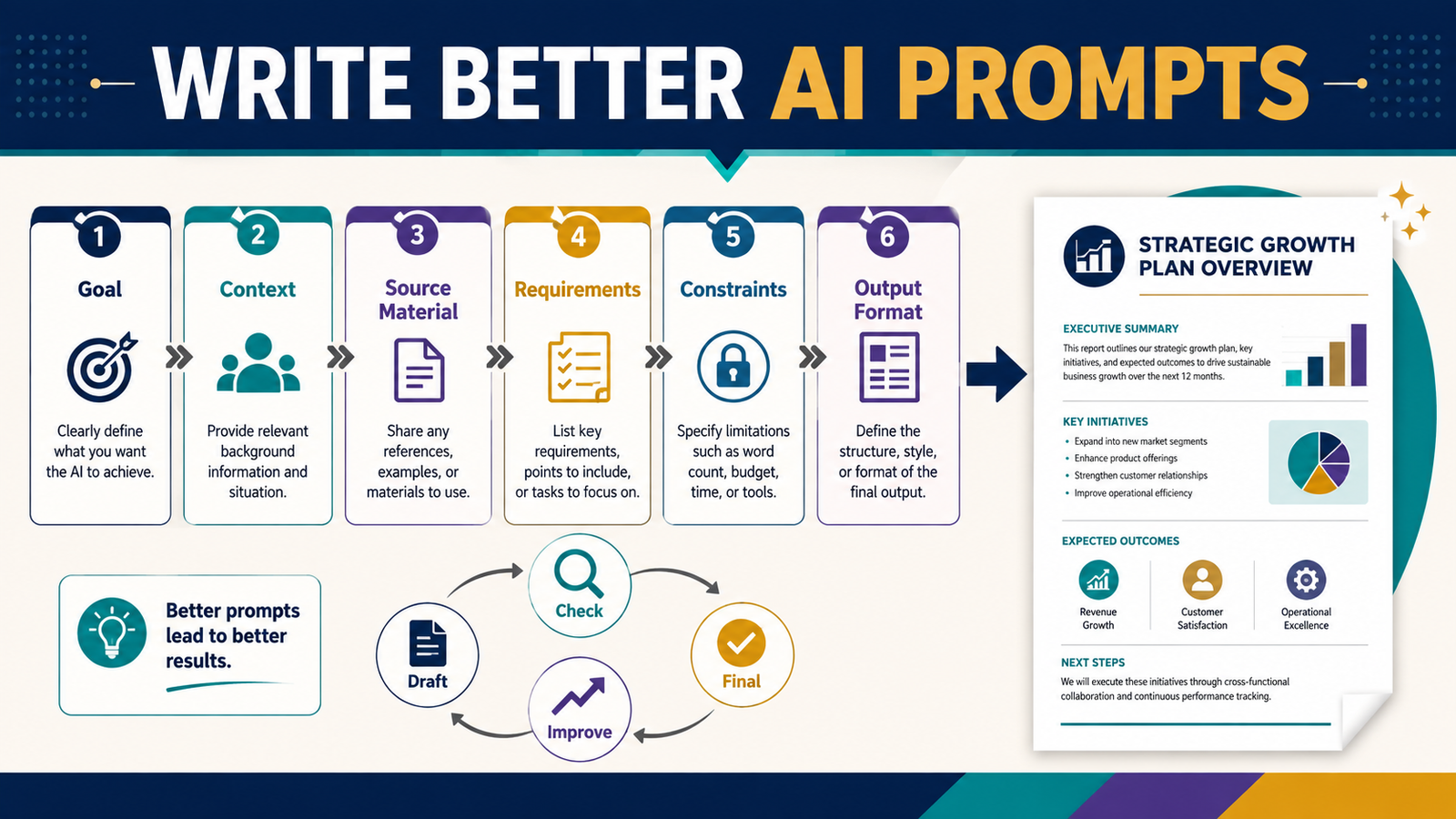
Getting better results from AI usually does not require learning a collection of secret commands.
It requires communicating the assignment clearly.
A useful AI prompt tells the system what you are trying to accomplish, provides the information needed to complete the task, explains important requirements and limitations, and describes what the finished output should look like.
OpenAI’s current prompting guidance recommends clear and specific instructions, supplying necessary context, breaking complicated tasks into manageable pieces, and improving results iteratively rather than assuming the first prompt must produce the final answer.
For a beginner, that is good news. You do not have to become a programmer to improve your prompts. You need to learn how to give instructions the way an effective teacher, manager, or project leader would.
Key Takeaways
- Begin with the result you want.
- Give AI enough context to understand the assignment.
- Provide source material when the task depends on specific information.
- Separate requirements from optional preferences.
- State important limits explicitly.
- Describe the format of the finished output.
- Break complicated projects into stages.
- Review and improve AI-generated work instead of publishing the first draft.
Why Vague Prompts Produce Vague Results
Consider this instruction:
“Write something about email marketing.”
What should the AI create?
It might be:
- A blog article.
- An email.
- A sales page.
- A social post.
- A tutorial.
- A comparison.
- A beginner explanation.
- An advanced automation strategy.
The system must make several assumptions.
Now compare it with:
“Write a beginner-friendly explanation of how a small online-business owner can create a three-email welcome sequence for new subscribers. The reader has never used email automation before. Explain the purpose of each email, give a short example, avoid technical jargon, and end with a five-point setup checklist.”
The second prompt provides a clearer assignment.
The difference is not a magical prompt formula. It is better communication.
Step 1: Define the Goal
Begin by answering:
What should exist when this task is finished?
Weak goals include:
- Help me with marketing.
- Give me business ideas.
- Improve this.
- Make this better.
- Write content.
Stronger goals include:
- Create a five-email welcome sequence.
- Compare two ebook ideas using five decision criteria.
- Turn my notes into a beginner checklist.
- Review this article for missing steps.
- Create a course outline from my completed ebook.
- Rewrite this explanation for someone with no technical experience.
The goal gives the AI a destination.
Step 2: Explain the Context
Context answers:
Why are we doing this, and who is it for?
Useful context may include:
- Audience.
- Experience level.
- Business type.
- Product.
- Website.
- Project stage.
- Reader problem.
- Available tools.
- Budget.
- Desired outcome.
For example:
“I am creating this for retirees who want to start a small online business but do not want a complicated full-time operation.”
That one sentence changes the type of advice that should be produced.
Advice suitable for a venture-funded software company may be completely inappropriate for a retired solo creator.
Step 3: Provide Source Material
When a task depends on specific information, provide it.
Source material may include:
- Your notes.
- An ebook chapter.
- A product description.
- Customer questions.
- An existing blog article.
- A transcript.
- A spreadsheet.
- A checklist.
- A policy.
- A research document.
Then explain how the AI should use it.
For example:
“Use the attached ebook chapter as the primary source. Do not introduce claims that are not supported by the chapter unless you clearly identify them as outside research.”
This is much safer than assuming the AI will know which information matters.
Step 4: State the Requirements
Requirements are the elements that must appear.
For a blog article, they might include:
- 1,800 words.
- Clear introduction.
- Direct answer early.
- Major headings.
- Beginner example.
- Common mistakes.
- Practical checklist.
- Conclusion.
For an email sequence:
- Five emails.
- One purpose per email.
- Subject line.
- Friendly tone.
- One primary action.
- No exaggerated claims.
For a product review:
- Intended buyer.
- Features.
- Limitations.
- Pricing considerations.
- Who may not need it.
- Balanced verdict.
The clearer the requirements, the less the AI has to guess.
Step 5: Add Constraints
Constraints explain what the AI must not do.
Examples:
- Do not invent statistics.
- Do not claim that I personally used the product.
- Do not guarantee income.
- Do not add products I did not supply.
- Do not use technical language without explaining it.
- Do not create more than five steps.
- Do not change the approved format.
- Do not repeat information already covered.
- Do not use fake testimonials.
Constraints are particularly important in business content because an otherwise polished draft can contain claims you never intended to make.
Step 6: Describe the Output Format
Tell AI what the finished response should look like.
You might request:
- A numbered process.
- A table.
- A checklist.
- A complete article.
- A script.
- A worksheet.
- A five-email sequence.
- A decision matrix.
- A WordPress-ready draft.
- A concise summary.
For example:
“Return the result as a seven-step checklist. Each checklist item should begin with an action verb and include one sentence explaining why the step matters.”
That is more specific than:
“Give me a checklist.”
The Six-Part Prompt Structure
A practical beginner structure is:
1. Goal
What needs to be created?
2. Context
Who is it for and why?
3. Source Material
What information should the AI rely upon?
4. Requirements
What must be included?
5. Constraints
What must be avoided?
6. Output Format
How should the finished result be organized?
You do not have to use these labels every time.
The purpose is to make sure important information is not missing.
Example: A Weak Business Prompt
“Give me ideas for an ebook.”
This may produce a large list of random subjects.
A Stronger Version
“I want to create a short practical ebook for retired educators who are interested in turning professional knowledge into a simple digital product. Generate ten ebook ideas that each solve one narrow problem. Avoid broad ‘make money online’ subjects and guaranteed-income claims. For each idea, provide the intended reader, problem, practical outcome, and why the subject could support a 40–70-page ebook. Present the ideas in a numbered list.”
Now the AI knows:
- Audience.
- Product type.
- Scope.
- Desired result.
- Restrictions.
- Output structure.
Example: Improving a Blog Prompt
Weak:
“Write a blog article about AI.”
Stronger:
“Write a 1,800-word beginner article explaining how a solo online-business owner can use AI to organize a weekly content workflow. The reader understands basic ChatGPT use but has no automation experience. Include a five-step workflow, one hypothetical example, common mistakes, privacy cautions, and a practical implementation checklist. Do not promise traffic, rankings, sales, or time savings that cannot be verified.”
That prompt provides editorial control.
Break Complicated Work Into Stages
OpenAI’s prompting guidance recommends dividing complex tasks into smaller, focused requests when useful.
Suppose you are creating an ebook.
Instead of:
“Write my entire ebook.”
Use stages.
Stage 1
Define the audience and outcome.
Stage 2
Create the knowledge inventory.
Stage 3
Develop the outline.
Stage 4
Create chapter briefs.
Stage 5
Draft one chapter.
Stage 6
Review the chapter.
Stage 7
Continue to the next chapter.
Stage 8
Review the entire manuscript for repetition and consistency.
This process gives you more control.
Use Follow-Up Prompts
The first response does not need to be final.
Useful follow-ups include:
- Make the explanation simpler.
- Add an example.
- Remove repeated ideas.
- Check this section for unsupported claims.
- Compare this with the original requirements.
- Explain what is missing.
- Create three alternatives.
- Shorten the introduction.
- Make the checklist items observable.
- Identify assumptions.
Treat AI as an interactive assistant rather than a vending machine that must produce perfection from one command.
Ask AI to Review Its Work Against the Requirements
A useful quality-control prompt is:
“Review the draft against the original requirements. Identify any requirement that is missing, partially completed, unclear, repetitive, or unsupported. Do not rewrite yet. Return a quality-control report.”
Then review the report yourself.
Afterward:
“Revise only the sections needed to correct the identified problems.”
This can be more effective than repeatedly asking, “Make it better.”
Separate Creation From Verification
AI can help draft content.
Verification is a separate task.
For example:
Creation prompt
“Draft a beginner explanation of email-list segmentation.”
Verification prompt
“Identify every factual claim in this draft that may require current verification.”
Research step
Check official documentation.
Final prompt
“Revise the draft using the verified information below.”
This helps prevent polished but outdated material from moving directly into publication.
Give AI Examples When Style Matters
If you want a particular style, provide an example you own.
Then say:
“Use this example only to understand the level of detail, organization, and teaching style. Do not copy its sentences, examples, or specific wording.”
Examples can communicate expectations more efficiently than a long list of adjectives.
Avoid Overloaded Prompts
More detail is useful only when the detail is relevant.
A 5,000-word prompt with conflicting instructions can be harder to follow than a focused 500-word prompt.
Review your prompt for:
- Duplicate instructions.
- Contradictions.
- Old requirements.
- Unnecessary background.
- Requirements that no longer apply.
- Several tasks that should be separated.
Long prompts are not automatically better prompts.
Clear prompts are better prompts.
Create Reusable Prompt Templates
If you perform the same task repeatedly, save the structure.
For example:
Task: [What should be created?]
Audience: [Who is it for?]
Problem: [What needs to be solved?]
Source Material: [What should be used?]
Required Elements: [What must be included?]
Constraints: [What must not happen?]
Output Format: [What should the finished result look like?]
Quality Check: [What should be verified before completion?]
You can then fill in the variables.
Use Specialized Tools When They Simplify Repetitive Creation
Affiliate Disclosure: This article contains affiliate links. If you purchase through one of these links, I may earn a commission at no additional cost to you. Affiliate compensation does not determine the conclusions or recommendations presented in this article.
General AI tools are flexible, but specialized software can sometimes reduce the amount of prompting needed for a repeated task.
For example, if your primary goal is creating ebooks, guides, checklists, and other digital-product materials, you can review the current AI Product Engine offer.
The important question is whether a specialized workflow actually makes your process simpler. Do not buy another tool merely because it includes AI.
Protect Sensitive Information
Before placing information into an AI prompt, ask:
- Does this contain customer information?
- Passwords?
- Private financial data?
- Confidential contracts?
- Proprietary material?
- Personal information?
- Information I do not have permission to upload?
Do not treat an AI prompt box as a storage location for information that should remain private.
Review the privacy and data-handling policies of the platform you use.
A Practical Prompt Quality Checklist
Before sending an important prompt, confirm:
- The goal is clear.
- The audience is identified.
- Necessary context is present.
- Source material is supplied.
- Requirements are explicit.
- Constraints are explicit.
- Output format is defined.
- Conflicting instructions have been removed.
- Current facts will be verified.
- The first draft will be reviewed.
A Simple Prompt You Can Adapt
“Help me create [DELIVERABLE].
It is for [AUDIENCE].
The reader/user is trying to [GOAL] but is struggling with [PROBLEM].
Use the following source material: [SOURCE].
The finished result must include:
[REQUIREMENTS].
Do not:
[CONSTRAINTS].
Use a [TONE] style and explain unfamiliar concepts in plain language.
Return the finished result as [OUTPUT FORMAT].
Before finishing, check that every required element is included and that no unsupported facts or personal experiences have been invented.”
This template is simple enough to reuse while still providing substantial direction.
Common Prompting Mistakes
Giving only a topic
A topic does not define the assignment.
Asking for too many unrelated tasks
Separate major workflows.
Failing to define the audience
Advice can become too broad.
Omitting source material
AI may fill gaps with assumptions.
Forgetting constraints
Unwanted claims can appear.
Asking for “better” without defining better
Specify what should improve.
Publishing the first response
AI output still requires human review.
Treating prompts as permanent
Update templates when your workflow changes.
Conclusion
Writing better AI prompts is primarily an exercise in giving better instructions.
Define the goal. Explain the context. Provide useful source material. State the requirements. Identify important constraints. Specify the output format. Then review what the AI creates and improve it through focused follow-up instructions.
You do not need the world’s longest prompt. You need enough information for the system to understand what successful completion looks like.
Take one AI task you perform regularly and rewrite its prompt using the six-part structure before you use it again.