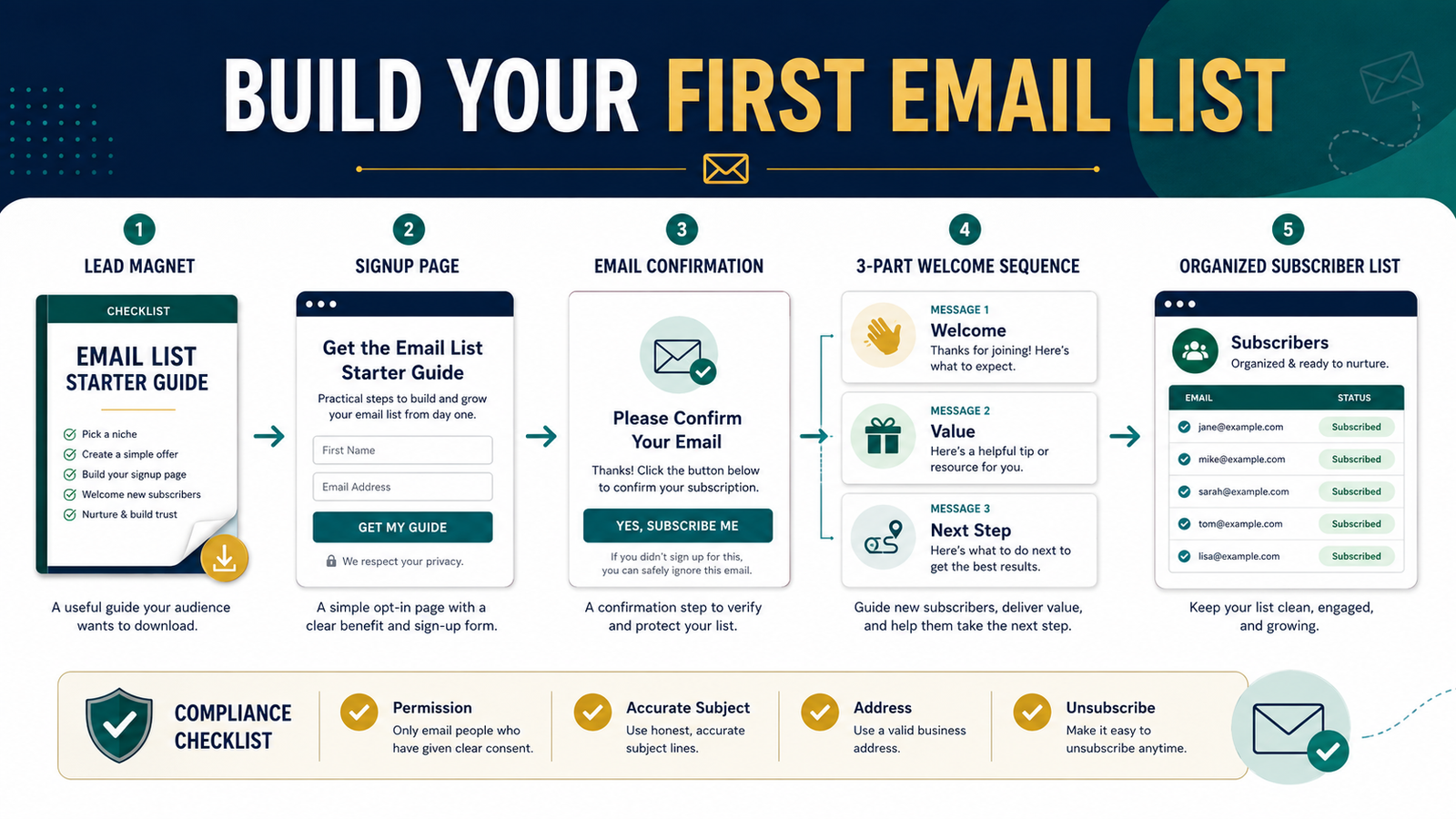
A beginner does not need dozens of forms, complicated automation maps, or a large advertising budget to start building an email list. The simplest workable system consists of one useful lead magnet, one signup page, one permission-based form, and a short welcome email series.
The central purpose of an email list is not to collect as many addresses as possible. It is to establish a direct, permission-based relationship with people who are interested in a specific subject.
Lead magnets such as ebooks, checklists, worksheets, templates, and other useful resources can give visitors a clear reason to subscribe. The offer should closely match the reader’s goal and deliver what the signup page promises.
Key Takeaways
- Choose one audience problem before creating a lead magnet.
- Make the signup promise specific and easy to understand.
- Ask only for information you genuinely need.
- Deliver the resource immediately.
- Use a short welcome series to introduce yourself and provide value.
- Follow permission, identification, address, and unsubscribe requirements.
- Measure subscriber quality rather than chasing a large number.
Decide Who You Want on Your Email List
An email list works better when it is built around a defined audience.
“People interested in business” is too broad. A more useful audience might be:
- Retirees exploring simple online-income projects.
- Beginners learning how to use AI responsibly.
- New ebook creators.
- Affiliate marketers who need content ideas.
- Small-business owners starting an email list.
- Online-course creators who need a launch checklist.
The narrower description helps you create a more relevant lead magnet and welcome sequence.
Suppose your website teaches beginners how to create digital products. A general newsletter offer may not be persuasive because visitors do not know what they will receive.
A lead magnet called “The First Digital Product Decision Checklist” gives the visitor a specific reason to subscribe. It addresses a real question: What product should I create first?
Choose One Problem for the Lead Magnet
A lead magnet should help the reader complete a small but meaningful action.
Good beginner lead magnets include:
- A one-page checklist.
- A short step-by-step guide.
- A planning worksheet.
- A comparison chart.
- A prompt pack.
- A simple template.
- A resource list.
- A short email course.
- A mini workbook.
- A troubleshooting guide.
The best choice depends on what the visitor needs at that moment.
For example, someone reading an article about writing an ebook may appreciate an ebook-planning worksheet. Someone reading a review of email software may want an email-platform comparison checklist.
Avoid offering a large resource merely because it appears more valuable. A focused five-page guide that solves one problem can be more useful than a seventy-page ebook filled with unrelated information.
Create a Clear Signup Promise
Your signup page should answer four questions quickly:
- What will I receive?
- What problem will it help me solve?
- Who is it for?
- What will happen after I subscribe?
A clear signup message might say:
“Download the First Digital Product Planning Worksheet and identify a practical product idea based on your knowledge, available time, and intended audience. You will also receive beginner-friendly online-business emails, and you may unsubscribe at any time.”
That is more informative than:
“Join my list for updates.”
The visitor should not have to guess what “updates” means.
Keep the Signup Form Simple
Many beginner lead magnets require only:
- First name.
- Email address.
- Consent language.
- A clear submit button.
Every additional field creates another decision for the visitor. Do not request a telephone number, business address, company size, annual income, or other information unless it is genuinely necessary.
The button should describe the action. Examples include:
- Send Me the Checklist.
- Get the Free Guide.
- Download the Worksheet.
- Start the Email Course.
Avoid buttons that create confusion or pressure.
Use Permission-Based List Building
Do not buy email lists or automatically add people who have not requested your messages.
Permission-based subscribers are more likely to recognize you, open your emails, and understand why they are receiving them. Current email-marketing guidance continues to recommend explicit opt-ins and organically built lists rather than purchased contacts.
Your signup language should accurately describe what the person will receive. Do not advertise one free resource and then immediately send unrelated daily promotions.
Depending on your audience, location, and email provider, you may also use a confirmation process in which the subscriber clicks a link to verify the address. This can reduce incorrect addresses and provide stronger evidence of consent, although it may also reduce the number of completed subscriptions.
Build the Lead Magnet Efficiently
Affiliate Disclosure: This article contains affiliate links. If you purchase through one of these links, I may earn a commission at no additional cost to you. Affiliate compensation does not determine the conclusions or recommendations presented in this article.
Begin with the result, not the design.
Write a short outline:
- The problem.
- The decision or process.
- The steps.
- The checklist or worksheet.
- The next action.
A specialized tool can assist with creating checklists, worksheets, guides, and subscriber incentives. You can review the current LeadMagnet IQ Commercial offer when you want help developing lead-magnet content and organizing the finished resource.
Regardless of the tool, review every page for accuracy, clarity, usefulness, and consistency with the signup promise.
Create One Focused Landing Page
A lead-magnet landing page should have one primary purpose: helping an interested visitor decide whether to subscribe.
Include:
- A benefit-focused headline.
- A short explanation.
- Three to five useful outcomes.
- A simple image of the resource.
- The signup form.
- A privacy statement or link.
- Clear expectations about future messages.
Remove navigation choices and unrelated offers when they distract from the main action.
Do not promise that the resource will guarantee sales, income, traffic, or business success. Explain what it can realistically help the reader understand or complete.
Deliver the Resource Immediately
After someone subscribes, the resource should be easy to access.
Possible delivery methods include:
- A link on a confirmation page.
- A link in the first welcome email.
- Both a confirmation-page link and an email link.
- Access through a protected download area.
Providing the link in the email gives the subscriber a message they can save. Showing it on the confirmation page provides immediate access.
Test the entire process yourself:
- Submit the form.
- Complete any confirmation step.
- Check the inbox and spam folder.
- Test the download link.
- Open the resource on a phone and computer.
- Confirm that the welcome emails arrive in the correct order.
- Test the unsubscribe link.
Create a Three-Email Welcome Series
A welcome series is a set of automated messages sent after a person joins the list. It introduces the sender, sets expectations, and begins the relationship.
A beginner can start with three messages.
Welcome Email 1: Deliver and orient
Send this message immediately.
Include:
- A welcome.
- The promised download link.
- One sentence explaining who you help.
- What type of emails the subscriber will receive.
- How often you generally plan to write.
- A request to reply with a relevant question.
Do not bury the download beneath a long personal story.
Welcome Email 2: Help with the next problem
Send this message one or two days later.
Provide a practical lesson that builds upon the lead magnet.
For example, if the lead magnet helps readers choose an ebook subject, the second email might explain how to define the intended reader.
This proves that subscribing provides continuing value.
Welcome Email 3: Recommend the next action
Send this message another one or two days later.
You may:
- Link to a helpful article.
- Recommend a relevant resource.
- Present a beginner checklist.
- Invite the subscriber to review a product.
- Explain a logical next step.
Any promotion should connect naturally to the reason the person subscribed.
Choose an Email Platform That Matches the Starting System
A beginner generally needs:
- Signup forms.
- Landing pages.
- Contact management.
- Automated welcome messages.
- Basic reporting.
- Unsubscribe management.
- Reasonable upgrade options.
GetResponse currently presents email campaigns, landing pages, forms, welcome emails, and automation features across its plans. The exact limits differ by plan and can change, so verify the current details before choosing.
You can explore GetResponse’s current email-marketing features when you want one platform for the signup page, subscriber list, and welcome sequence.
Do not automatically purchase a more advanced plan. Start with the features required for your first system and upgrade only when a missing capability supports a clear business need.
Follow Basic Commercial Email Requirements
In the United States, the CAN-SPAM Act establishes requirements for commercial email. The Federal Trade Commission advises businesses to use accurate header information, avoid deceptive subject lines, include a valid postal address, and provide recipients with a method of opting out.
Your email service provider may automate part of this process, but you remain responsible for your messages.
Basic practices include:
- Use a recognizable sender name.
- Use an accurate reply-to address.
- Write subject lines that reflect the message.
- Include your required business address.
- Include a functioning unsubscribe link.
- Process unsubscribe requests promptly.
- Do not conceal the commercial nature of a promotion.
- Keep records of how subscribers joined when possible.
Email laws vary by location and audience. Obtain appropriate legal guidance when your situation requires it.
Place the Offer Where Relevant Visitors Will See It
A lead magnet will not grow a list if it is hidden.
Practical placement options include:
- Within a closely related blog article.
- At the end of relevant posts.
- On a dedicated free-resources page.
- In the website header or sidebar.
- On an exit-intent form used carefully.
- On the homepage.
- In social-media profiles.
- In video descriptions when platform rules permit.
- Inside related digital products.
Match the lead magnet to the content.
A visitor reading about email-list setup should see an email-list checklist, not an unrelated graphic-design guide.
Measure the Quality of the System
Do not evaluate your list only by total subscriber count.
Review:
- Landing-page visits.
- Signup completions.
- Confirmation completion rate.
- Welcome-email delivery.
- Email opens as a directional signal.
- Link clicks.
- Replies.
- Unsubscribes.
- Spam complaints.
- Product interest.
- Which pages produce subscribers.
A smaller list of people who requested a relevant resource may be more useful than a large list built through a broad giveaway.
A Simple Beginner Implementation Plan
Day 1: Define the subscriber
Write one paragraph describing the person and the problem.
Day 2: Outline the lead magnet
Choose one result and create a short outline.
Day 3: Create the resource
Write and design the checklist, guide, or worksheet.
Day 4: Build the signup page
Add the promise, benefit points, form, and expectations.
Day 5: Write the welcome series
Prepare the three messages before opening the form publicly.
Day 6: Test the process
Subscribe with a test address and inspect every step.
Day 7: Add the offer to relevant content
Begin with your most closely related website pages.
This schedule is only an example. Complete the process at a pace that allows you to review each part properly.
Common Beginner Mistakes
Creating a lead magnet before defining the audience
The result is usually too broad.
Promising more than the resource delivers
The content must match the signup-page description.
Sending promotions immediately
Begin by delivering the resource and establishing trust.
Creating too many automations
One working welcome series is better than several unfinished workflows.
Collecting unnecessary personal information
Request only the information you need.
Failing to test the mobile experience
Many subscribers will open the form and emails on a phone.
Hiding the unsubscribe option
A clear unsubscribe process protects trust and supports responsible marketing.
Ignoring inactive or uninterested subscribers
List quality matters more than an impressive total.
Conclusion
Building an email list for beginners does not require an elaborate funnel. Begin with one audience problem, create one useful lead magnet, build one clear signup page, and follow it with a short welcome series.
Keep the promise accurate, obtain permission, deliver the resource immediately, and continue sending information that matches the subscriber’s original interest. As the list grows, improve the system using actual questions, replies, and performance data rather than adding complexity for its own sake.
Choose the one problem your first subscriber needs help solving and outline a small lead magnet around that problem.