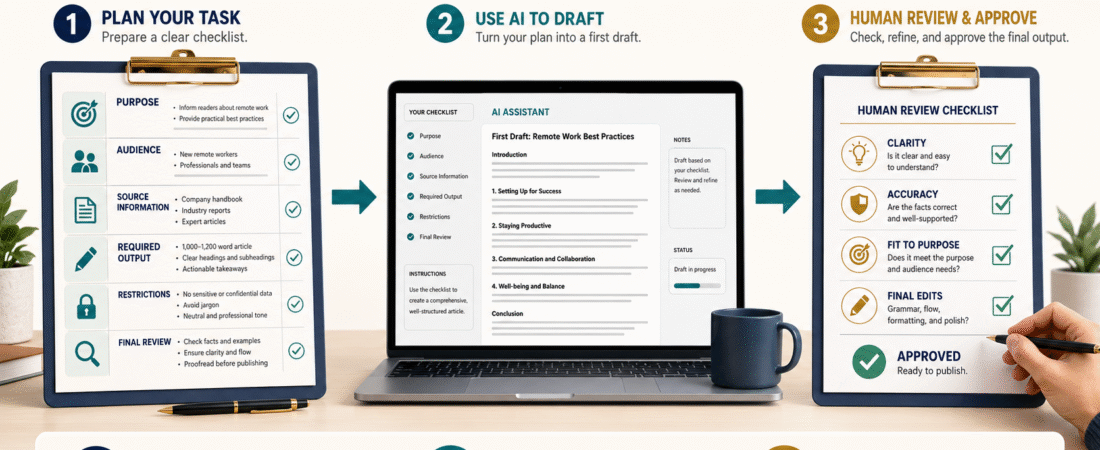
Many disappointing AI results begin before the prompt is written.
The user may know the general subject but has not decided exactly what the AI should create, who the finished work is for, which information it should use, or what must be checked afterward.
A short AI task checklist can solve much of this confusion.
Before asking AI to write, organize, compare, summarize, or recommend something, define:
- The task
- The intended audience
- The desired result
- The approved information
- The required output
- The restrictions
- The final review process
This does not require advanced technical knowledge. It requires a few minutes of planning.
Why a Short Request Often Produces a Weak Result
Consider this request:
Write an article about digital products.
The AI does not know:
- Which type of digital product
- Who will read the article
- What problem the article should solve
- Whether the reader is a beginner
- Whether products should be recommended
- Which examples are appropriate
- How long the article should be
- Which claims must be avoided
- What publishing fields are required
The system may produce a broad article containing general definitions and familiar advice.
A more useful assignment begins by deciding what the article is supposed to accomplish.
For example:
Create a beginner-friendly article for retirees explaining how to choose between a checklist, ebook, workbook, and short course. Focus on creation time, delivery requirements, customer support, and ease of management. Avoid income promises.
That request gives the AI a clearer job.
Checklist Item 1: What Is the Exact Task?
Describe the action you want completed.
Possible tasks include:
- Create
- Compare
- Review
- Explain
- Organize
- Summarize
- Evaluate
- Rewrite
- Fact-check
- Develop a plan
- Create a checklist
- Identify missing information
Do not combine several unrelated tasks unless the final output truly requires them.
A vague task:
Help me with my ebook.
A clearer task:
Review this ebook outline and identify missing steps, repeated ideas, and sections that may confuse a beginner.
The clearer version gives you a result that can be evaluated.
Checklist Item 2: Who Is the Audience?
The intended audience affects nearly every part of the response.
An article for experienced software developers should not sound like an article for retirees using AI for the first time.
Record:
- Experience level
- Main problem
- Desired result
- Available time
- Technical comfort
- Budget concerns
- Existing tools
- Common misunderstandings
Example:
The audience is beginners over age 50 who want to use AI for a small online business but prefer simple instructions and minimal technical language.
This helps the AI choose appropriate explanations and examples.
Checklist Item 3: What Result Should the Person Receive?
Do not define the assignment only by its subject.
Define what the finished work should help someone do.
For example:
Subject: Email marketing
Result: Help a beginner create the first three welcome emails.
Subject: Digital products
Result: Help a retiree select one manageable product format.
Subject: AI prompts
Result: Help a beginner create reusable instructions for repeated tasks.
A clear result prevents the response from becoming a collection of unrelated facts.
Checklist Item 4: What Information Should AI Use?
Provide the source material needed for the assignment.
This may include:
- Your notes
- Approved product information
- A document
- An article
- A product outline
- Official instructions
- Customer questions
- Personal experience
- A previous version
- Business requirements
Tell the AI whether the information should be:
- Followed closely
- Used as inspiration
- Summarized
- Reorganized
- Critiqued
- Expanded
- Compared
Do not provide a paid product and ask for a public article without explaining which information must remain private.
Checklist Item 5: What Information Must Not Be Invented?
This instruction is especially important for reviews, recommendations, and business content.
Tell AI not to invent:
- Personal product experience
- Prices
- Features
- Statistics
- Customer results
- Testimonials
- Ratings
- Income claims
- Licenses
- Refund policies
- Deadlines
- Product availability
You can write:
When information is missing, identify the gap instead of guessing.
This makes uncertainty visible.
Checklist Item 6: What Format Do You Need?
State exactly how the finished work should be organized.
Possible requirements include:
- Article
- Checklist
- Script
- Table
- Step-by-step guide
- Product description
- Review
- WordPress publishing package
- Microsoft Word document
Also state the section order.
For example:
- Title
- Direct introduction
- Key takeaways
- Step-by-step process
- Example
- Common mistakes
- Conclusion
Without an output format, the AI may return an outline when you need complete copy.
Checklist Item 7: What Tone Should Be Used?
Tone affects how the content feels.
Possible directions include:
- Beginner-friendly
- Professional
- Reassuring
- Tactical
- Balanced
- Educational
- Conversational
- Formal
- Cautious
- Persuasive without hype
Avoid asking only for “better writing.”
Explain what better means.
Example:
Use a patient, teaching-oriented style. Explain unfamiliar terms, use realistic examples, and avoid exaggerated marketing language.
Checklist Item 8: What Restrictions Apply?
Restrictions help protect the final result.
Possible restrictions include:
- Do not make income promises.
- Do not invent firsthand experience.
- Do not use technical language without explanation.
- Do not copy the source material.
- Do not reveal paid product content.
- Do not use hashtags.
- Do not include unrelated recommendations.
- Do not add a call to action unless requested.
- Do not repeat the same explanation.
- Do not use copied logos in image prompts.
A restriction should correct a real risk rather than make the prompt unnecessarily complicated.
Checklist Item 9: What Example Should Be Included?
Examples make instructions easier to understand.
Plan the example before asking for the draft.
For example:
Include a retired teacher who wants to create a short digital guide but does not want to build a large course or membership.
This creates a situation relevant to the intended audience.
Do not ask AI to invent a personal story and present it as your own experience.
Checklist Item 10: What Should Be Reviewed?
Every AI-assisted result needs a review standard.
Ask:
- Is the answer accurate?
- Does it address the right audience?
- Is the useful answer provided early?
- Are any important steps missing?
- Were facts invented?
- Are examples understandable?
- Is the wording repetitive?
- Does the output follow the requested format?
- Does the final action make sense?
- Are links and product details correct?
Do not judge the output only by whether it sounds polished.
A polished answer can still be incomplete.
A Reusable AI Task Checklist
Copy and complete this checklist before an important assignment.
Task:
[What should AI do?]
Audience:
[Who is the finished work for?]
Audience Problem:
[What is difficult or confusing?]
Desired Result:
[What should the person understand or complete?]
Source Information:
[What should AI use?]
Approved Personal Experience:
[What may be stated?]
Information That Must Not Be Invented:
[Facts, experience, claims, or details]
Required Output:
[Article, script, checklist, review, or another format]
Required Sections:
[Section order]
Tone:
[Style]
Example:
[Situation to include]
Restrictions:
[What must be avoided?]
Final Review:
[What should be checked?]
A Practical Beginner Example
Suppose you want AI to create an article about starting an email list.
The completed checklist might say:
Task:
Create a step-by-step article.
Audience:
Retirees beginning a small online business.
Problem:
They do not understand the minimum tools required.
Result:
Help them create one lead magnet, one signup page, and three welcome emails.
Source Information:
Approved email-service information and the website’s existing workflow.
Restrictions:
No guaranteed subscriber growth, income claims, invented statistics, or advanced automation.
Example:
A retired teacher creating a checklist for first-time ebook writers.
Final Review:
Check instructions, links, examples, disclosure, and clarity.
This task is much easier to complete well than “write about email marketing.”
When the Checklist Can Be Shorter
Not every assignment needs a detailed worksheet.
A simple task such as correcting grammar may need only:
- The text
- The desired tone
- A rule not to change the meaning
Use a longer checklist when the task involves:
- Publishing
- Product reviews
- Business decisions
- Personal experience
- Changing facts
- Legal or licensing information
- Several deliverables
- Paid customer content
The greater the risk, the more useful the planning becomes.
Common AI Task-Planning Mistakes
Asking for Everything at Once
A large assignment can become repetitive or incomplete.
Break it into clear stages when necessary.
Providing No Source Material
AI may fill gaps with general information.
Forgetting the Audience
A correct explanation may still be unsuitable for beginners.
Failing to Define the Result
The response may discuss the topic without helping anyone act.
Reviewing Only Grammar
Check accuracy, logic, completeness, and usefulness.
Making the Prompt Longer Than the Task
Use enough detail to control the result without adding rules that do not matter.
Conclusion
An AI task checklist helps you decide what you need before asking the system to create it.
Define the task, audience, desired result, source information, format, restrictions, example, and final review. These decisions make the prompt clearer and the response easier to evaluate.
Complete the checklist for one repeated business task and save it as the starting point for a reusable prompt.