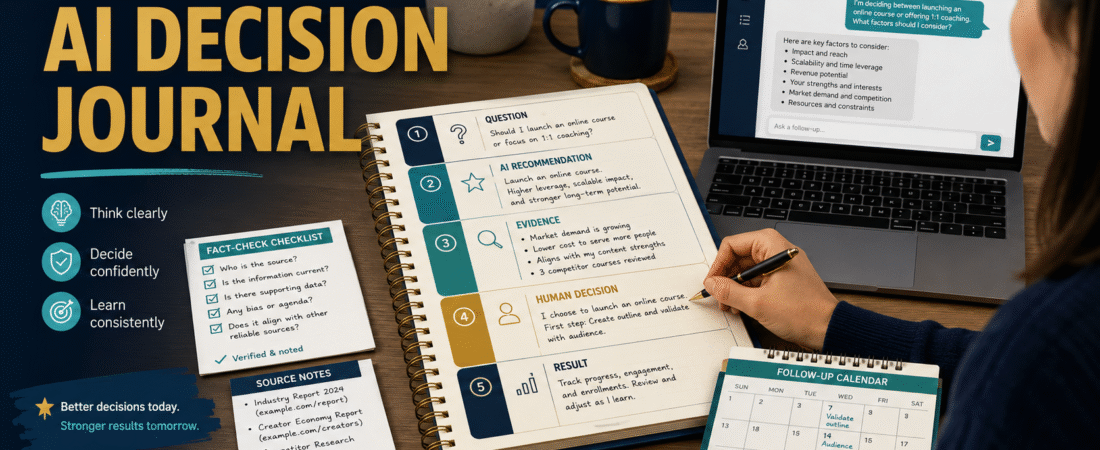
AI can help you compare tools, organize ideas, identify options, and think through business decisions. The problem is that many people accept a recommendation, take action, and later forget why the decision was made.
An AI decision journal gives you a written record of the question, the recommendation, the evidence you checked, the choice you made, and what happened afterward.
This simple habit can help you notice when AI advice was useful, when important information was missing, and when your own assumptions affected the result.
The purpose is not to document every conversation. Record decisions that involve meaningful time, money, customer trust, or business direction.
Key Takeaways
- Record the original business question before asking AI for advice.
- Separate the AI recommendation from verified evidence.
- Write down your final human decision and the reason for it.
- Schedule a date to review what happened.
- Use repeated lessons to improve future prompts and business systems.
What Is an AI Decision Journal?
An AI decision journal is a document used to track important choices involving AI assistance.
It may be stored in:
- A notebook
- A Microsoft Word document
- A spreadsheet
- A cloud document
- A note-taking application
- A project-management system
The format is less important than the information recorded.
A basic entry should include:
- The decision date
- The question
- The intended result
- The AI recommendation
- The assumptions behind the recommendation
- The evidence reviewed
- The alternatives considered
- The final decision
- The review date
- The eventual result
This turns a temporary AI conversation into a reusable business record.
Why AI Recommendations Can Be Difficult to Evaluate
AI responses often sound organized and confident.
That can make an incomplete recommendation appear more reliable than it is.
A response may overlook:
- Your available budget
- Your technical skill
- The time required
- Current product pricing
- Licensing restrictions
- Customer-support needs
- Existing tools you already own
- Long-term management
- Information that has recently changed
- Personal preferences that were never provided
The recommendation may still contain useful ideas. The journal helps you examine them instead of accepting the conclusion automatically.
Step 1: Write the Decision Question Clearly
Begin with one specific question.
A vague question would be:
What should I do with my online business?
A clearer question would be:
Should I use a course platform or sell my first training product as a downloadable guide?
The clearer question gives you a decision with identifiable alternatives.
Include the practical result you want.
For example:
I want the simplest delivery method that provides a professional customer experience without creating unnecessary monthly expenses.
This helps prevent the conversation from drifting toward features that do not support your goal.
Step 2: Record Your Starting Conditions
Before asking AI for advice, document the facts already known.
For example:
- Available budget: $50 per month
- Product format: PDF guide and worksheets
- Expected initial customers: fewer than 50
- Technical experience: beginner
- Required support: email only
- Existing tools: WordPress and ThriveCart
- Future plan: add a course later
- Management preference: low maintenance
An AI recommendation may change when these details are included.
Without them, the system may recommend a powerful platform that is unnecessarily expensive or complicated.
Step 3: Save the Exact Recommendation
Copy the important part of the AI response into the journal.
Do not record only your interpretation.
Include:
- The primary recommendation
- The stated reasons
- Important cautions
- Alternatives mentioned
- Facts that require verification
- Questions that remain unanswered
You do not need to save every sentence. Preserve enough information to understand the reasoning later.
Step 4: Identify the Assumptions
Ask:
- What did the AI assume about my budget?
- Did it assume I need advanced features?
- Did it assume the product information was current?
- Did it assume I want rapid growth?
- Did it assume I am comfortable with technical setup?
- Did it assume I have used the tool before?
- Did it assume the decision is reversible?
Write down any assumption that could change the recommendation.
For example:
The recommendation assumes I will create several courses during the next year.
That assumption matters when you currently plan to sell only one PDF guide.
Step 5: Separate Facts From Opinions
Create two sections.
Facts to Verify
Examples include:
- Product price
- Subscription terms
- Refund policy
- Commercial-use rights
- Feature availability
- Customer limits
- Integrations
- Export options
- Cancellation procedure
Judgment or Opinion
Examples include:
- This tool appears beginner-friendly.
- This workflow may be easier to manage.
- A lower-priced plan may be sufficient.
- The additional features may not justify the cost.
Facts can often be checked through official sources.
Judgments require you to decide whether the reasoning fits your situation.
Step 6: Research the Important Claims
Do not research every minor statement.
Focus on facts that could change the decision.
For a software purchase, review:
- Official pricing page
- Official feature list
- Help center
- License terms
- Refund information
- Current checkout page
- Available tutorials
- Integration documentation
Record the source and the date reviewed.
A simple note might say:
Official pricing page reviewed July 31, 2026. The plan requires a monthly subscription and includes features I do not currently need.
This makes it easier to identify outdated information later.
Step 7: Compare at Least Two Alternatives
A recommendation becomes more useful when compared against reasonable alternatives.
Your alternatives may include:
- Buy the recommended tool.
- Choose a simpler tool.
- Use software you already own.
- Complete the task manually.
- Delay the decision.
- Test a free plan.
- Create a smaller version of the project.
- Hire someone for one specific task.
Record the advantages, disadvantages, cost, setup time, and management requirements of each option.
Step 8: Make the Human Decision
Write the final choice in your own words.
Use this format:
Decision:
[What you chose]
Reason:
[Why it fits your situation]
Main risk:
[What could go wrong]
Protection:
[How you will reduce the risk]
Review date:
[When you will evaluate the result]
For example:
Decision:
Use the existing checkout system to deliver the first guide instead of purchasing a new course platform.
Reason:
The first product is a simple PDF, and the current system already supports basic delivery.
Main risk:
The customer-access experience may be less organized when more products are added.
Protection:
Review the process after the first 25 sales or before creating a video course.
A Practical Beginner Scenario
Imagine a retiree deciding whether to purchase a large collection of private-label-rights products.
AI recommends the membership because it offers a large library and could reduce product-creation time.
The decision journal reveals several assumptions:
- The buyer will use many products.
- The licenses permit the intended uses.
- The content quality is consistent.
- The topics fit the audience.
- The buyer has time to customize the material.
After reviewing these assumptions, the retiree decides to begin with a free account or smaller purchase.
The final decision is not that the membership is bad. It is that the larger plan does not yet fit the current business stage.
Step 9: Schedule a Review
A decision is not fully evaluated when the purchase or action occurs.
Set a review date based on the decision.
Examples:
- Seven days after trying a new workflow
- Thirty days after purchasing software
- After publishing ten articles
- After the first product launch
- After gaining 100 subscribers
- Before the next renewal date
At the review, record:
- What worked
- What failed
- What cost more than expected
- What took longer than expected
- Which assumptions were correct
- Which features were unused
- Whether the decision should continue
Step 10: Turn Lessons Into Better Prompts
The journal can improve future AI conversations.
Suppose several entries show that AI repeatedly recommends advanced systems.
Add this instruction to future prompts:
Prioritize the simplest solution that meets my current needs. Explain which advanced features I can delay and identify any ongoing management requirements.
Other useful prompt improvements may include:
- Respect a stated budget.
- Compare existing tools before recommending a purchase.
- Identify assumptions.
- Separate verified facts from judgment.
- Explain who may not need the recommendation.
- Include a lower-cost alternative.
- Identify information that may have changed.
A Reusable AI Decision Journal Template
Decision Title:
[Name]
Date:
[Date]
Question:
[Decision to make]
Desired Result:
[What success means]
Starting Conditions:
[Budget, tools, skills, time, audience, constraints]
AI Recommendation:
[Recommendation]
Reasons Provided:
[Reasons]
Assumptions Identified:
[Assumptions]
Facts Requiring Verification:
[Facts]
Sources Reviewed:
[Sources and dates]
Alternatives Considered:
[Options]
Final Decision:
[Choice]
Reason for Decision:
[Reason]
Main Risk:
[Risk]
Review Date:
[Date]
Result:
[Completed later]
Lesson for Future Decisions:
[Lesson]
Common AI Decision-Making Mistakes
Asking AI to Make the Final Choice
AI can help you analyze information, but you remain responsible for the decision.
Failing to Provide Constraints
Recommendations become less useful when budget, time, skills, and existing tools are missing.
Verifying Only the Information You Like
Check claims that support and challenge the recommendation.
Recording the Decision but Not the Result
The review teaches you whether the reasoning worked in practice.
Treating Every Decision as Permanent
Some decisions can be tested on a small scale before making a long commitment.
Which Decisions Belong in the Journal?
Record choices involving:
- Software purchases
- Product pricing
- Course platforms
- Affiliate products
- Email services
- Content strategies
- Outsourcing
- Advertising
- Major website changes
- Business-model changes
You probably do not need an entry for selecting a social-media caption or correcting a paragraph.
Use the journal where a poor choice could waste meaningful resources.
Conclusion
An AI decision journal helps you slow down important choices without making the process complicated.
Record the question, conditions, recommendation, assumptions, verified evidence, final decision, and eventual result. Over time, these entries reveal which AI suggestions help your business and which require stronger instructions or additional research.
Create your first journal entry before making the next software purchase or major online-business change.